API Gateway or the Code Way
"Listen to me, coppertop. We don't have time for twenty questions. Right now, there is only one rule. Our way… or the highway."
Ring a bell? That look on Neo's face, hoping Trinity would save the day… About to get out of the car like "fine, I'll walk," then Trinity steps in and he stays. Hard to believe it's been 25 years. Great movie—worth a rewatch.
What's the connection? With API Gateway, the situation is a bit similar: "API Gateway or the code way."
With two differences: 1—nobody's pulling a gun, and 2—we do have time for questions.
In this article I'll try to answer questions like "What is an API Gateway good for?", "Why should we use an API Gateway?", or "Should we use an API Gateway?" in a way that someone new to Web Service development can follow.
Quick note before we start: Let's not get stuck on the literal meaning of "API." The context here is Web Services, and we're talking about Web Services used as APIs. When people say "Web Service" they often think SOAP, WSDL, XML, and when they say "API" they think REST, Swagger, JSON—but in this article I'll use both terms, "Web Service" and "API," more or less interchangeably.
Get yourself a Web Service
Let's start by writing a sample Web Service. Since this article is about API Gateway, I'll leave the actual service development to this guide: Spring REST Service guide. Follow it and in about five minutes you'll have a working Web Service.
The language of the Web Service and whether it's SOAP or REST doesn't matter. An API Gateway can be used for all Web Services regardless of language or protocol.
So what's the problem?
"Okay, I wrote and ran the service in five minutes. How hard can it be to add a few more methods (endpoints)?" Sound familiar? I'm sure it does. I could dive into Cross-cutting Concerns, Containers, or Proxy Objects with code samples, but we might lose beginners early on. Experienced folks don't need that anyway. So let's keep it simple and verbal.
As you can see, developing a Web Service isn't that big a deal. You might say "Real-world services aren't this simple"—and often they're not that complex either. Much of the time we're just making things we already do in-house—database work, algorithms, existing app logic—callable over the network. That's the essence of a Web Service: making a method callable over HTTP.
The real difficulty with Web Services is handling the management problems that come when the number of services and clients grows quickly. Here are some examples:
-
Authentication: When you put Web Services on a server and expose them on the Internet, you usually don't want everyone to call them. You need some form of authentication so only defined users can access them.
-
Authorization: As the number of users and Web Services and/or methods (endpoints) grows, you get requests like "these people can call these methods but those people can't call these." You need authorization.
-
IP restriction: You may need to accept requests only from certain IPs, or reject requests from certain IPs. You could ask the network team to update firewall rules for your service, but when you need to add IPs, change servers, move the service, or add new servers, you'll run into friction with the network team soon enough.
-
Content filtering: Are all incoming requests benign? There may be attacks. How will you block them? Rely on the network team again? Will that be enough?
-
Encryption/decryption: You may be asked to encrypt traffic. "I exposed the service over HTTPS, what else do you need?" doesn't always fly. Some clients or organizations insist on encryption. You might even get "Requests must be signed; verify the signature and sign the response." The network team can't help there.
-
WsSecurity: Heard of it? There's a standard for all that encrypt, decrypt, sign, verify stuff, and some organizations use it on their SOAP services. Good luck to anyone writing a client for that.
-
Schema validation: If you expect a certain message structure—e.g. "Integer in this field, Date in that one"—don't you need to enforce that?
-
Sometimes organizations say: "My service should only run on these weekdays, these hours; the rest of the time it should be down." How would you handle that?
-
Message transformation: As the number of clients grows, you get more requests like "Can you change the message structure?", "Can you omit null fields?", "Send arrays like this." Sometimes you can't avoid it; you have to do it.
-
Redaction (client-specific responses): Your service returns a fixed structure, but later you're asked: "Return this extra field to this type of user but hide it from others." Then you either duplicate services or write code that returns different responses per client.
-
Logging: Logging is always required. Typical questions: "Who called?", "When?", "What did they send?", "What did we return?", "Who did we send this data to?" Keeping logs isn't enough; you need to be able to query them.
-
Monitoring: You've built a service that must be available 24/7. How do you check that it's up and responding correctly? If it stops, starts returning errors, or slows down and times out, how will you know? Will you wait for complaint calls or emails? Of course not. You need measures in place.
-
Error message handling: What error message or HTTP code will your Web Service return in each situation? How do you customize them? "Do we need that? Can't we just return 500 with 'an error occurred'?" No. You have many clients and messages must be meaningful. If the error doesn't tell the client they sent a missing parameter or that their IP is wrong, how will they fix it?
-
Maintenance: Ever tried to update a system while it's running? Imagine that for your Web Service.
-
Moving the service: You may need to change the service address. If you have many clients, what then? Either every client updates their code to the new URL, or you make the change transparent to clients. The second is much better—but how?
-
Load balancing and failover: As services become critical, pressure on you increases. Downtime or degraded performance becomes unacceptable, so you want to deploy the service on more servers and form a cluster. Then load is spread and if one server fails, another can answer. How do you do that?
-
As the number of services grows, even tracking what exists becomes a problem. Some organizations sign agreements with consumers before exposing Web Services. You need to manage which service was opened when, under which agreement, and until when it's valid. Sometimes this is expected to be automated. Good luck.
-
Documentation: How to use the services must be documented. Relying on standards like Swagger or OpenAPI helps. How many of you who have developed Web Services have prepared at least one Swagger or OpenAPI file? Do you know the format?
I could add more items, but these are enough for now. If you've read through them and paused to think "How would I do all this?", you've seen how much work there is beyond coding the business logic of a Web Service. Some of it can be done in code, but consider that you might have 100, 200, or 500 Web Services, how many people on your team can write that level of code, and that all of it will need to be maintained. And step away from the urge to solve everything with code!
I've summarized what we've covered so far in the diagram below. I kept the terms in English because that tends to be clearer.
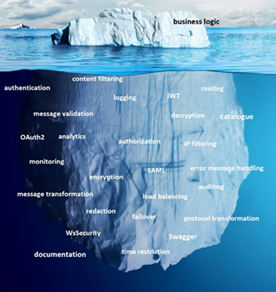
Coding the business logic and putting the Web Service in production is the tip of the iceberg. The real work is below the waterline, and neglecting it can be a fatal mistake.
What is an API Gateway good for?
An API Gateway is the common name for software that handles the tasks above—and many more—without touching your Web Service code, through configuration. It sits in front of your Web Services, and their message traffic passes through it. That makes it possible to control, transform, or customize those messages in any way you need.
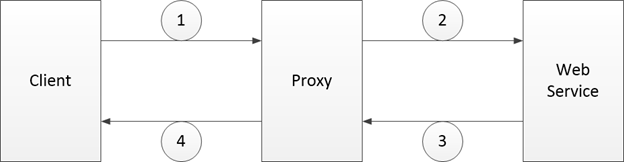
As in the diagram, the client's request (Step 1) is received by a Proxy on the API Gateway. The Proxy is the proxy entity created on the gateway for the target Web Service; the Client actually talks to the Proxy. The Proxy acts as a client to the Web Service (Step 2), receives the response (Step 3), and returns the response to the Client (Step 4). Configuration in the API Gateway customizes the Proxy's behavior, so security, traffic management, message transformation, service relocation, and similar needs can be managed from a single place.
Besides being low-latency, high-performance, and scalable, an API Gateway should offer easy-to-use interfaces, be deployable so it doesn't become a Single Point of Failure, and support many users in different roles. Depending on your needs, the ability to integrate with or provide various tools and software also matters.
The obvious benefits of doing all this through configuration can be summarized as:
-
Web service development is reduced to coding business logic. Everything else is configuration. So you can deliver more Web Services/APIs with fewer, less specialized people—efficiency goes up.
-
Time and cost drop significantly.
-
Security, logging, and other low-level, relatively hard topics are handled centrally, so risk goes down and quality goes up.
-
Service health can be monitored and issues detected and fixed quickly, so loss of reputation, customers, or revenue is greatly reduced.
A few benefits that are less obvious if you've never used an API Gateway:
-
You can answer: How many Web Services do I have? Who is calling them? When and why did we open each one? What requests came in and what did we return? Which services fail most? Which are used most? How are they performing? What security measures are in place?
-
Amount of code, and thus maintenance cost, drops a lot.
-
Services become registered. You don't end up with services running somewhere that nobody knows about.
-
A service catalog emerges, so you avoid implementing the same service over and over.
-
You can monitor performance and take steps to improve it.
-
Service traffic becomes observable and reportable.
Conclusion
If you only have a few Web Services and use them for data exchange between your own applications—i.e. you are both provider and consumer—you may not need an API Gateway. But if the number of Web Services grows, you start building them for other organizations to call, or many of your applications act as clients to other organizations' Web Services, it's worth considering an API Gateway.
If you want to try one quickly, we've been working on one for a while: Apinizer Demo