The Future Where APIs Talk to AI: Apinizer API Portal MCP Integration
The new way to make your enterprise systems AI-ready
Last week a developer friend of mine called: "Man, how many APIs are in this system, I don't even know which one to use!" Does this story sound familiar?
The Moment Every Developer Has Lived
You're starting a new project. In front of you are dev, test, and production environments. Dozens, maybe hundreds of API endpoints in each. What does each API do? What parameters do I need to send? How does authentication work?
Usually it goes like this: You ask your teammates on WhatsApp/Slack, you look at old projects, you spend hours researching in documentation. In the end you learn by trial and error. This process sometimes takes days.
Now imagine: What if an AI assistant could do this entire process for you? And not just you—what if your entire team could benefit from this advantage?
That's exactly where Apinizer APIPortal's game-changing MCP integration comes in.
Why Apinizer APIPortal? Because we didn't just add MCP support; we made the entire API ecosystem management AI-native. APIPortal is no longer a passive documentation platform—it works like an active AI companion.
Why Has MCP Become So Important?
Model Context Protocol (MCP) is actually a simple concept: it enables AIs to talk to real-time data. Developed by Anthropic (the maker of Claude), this protocol allows AI assistants to go beyond training data and interact with live systems.
Why is this critical? Because in the enterprise world, information is constantly changing. An API endpoint that exists today may be deprecated tomorrow. New versions are released, parameters change, new features are added. Static documentation can't keep up with this pace, but with real-time access, AIs can always stay current.
API Chaos in the Enterprise
There's a typical situation in large organizations:
Current State Table:
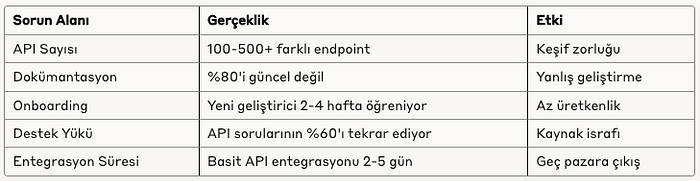
When we look at this table, it becomes clear how vital MCP is. Because AIs can solve all of these problems at once.
Apinizer APIPortal's MCP Difference:
Other API management platforms offer static documentation. Apinizer APIPortal, however:
- Real-time API Intelligence: As your APIs change, the AI learns instantly
- Contextual Discovery: Not just an API list—recommendations based on use cases
- Smart Integration Patterns: The AI automatically finds the best integration paths
- Predictive Troubleshooting: Solution suggestions before problems occur
This means Apinizer APIPortal + MCP = A 24/7 AI-powered API consultant for your developers!
A Story from the Real World
Three months ago we got a call from a customer. A fintech company using 6 different payment providers. A new developer had joined and needed to learn which API to use when.
Normally this process goes like this: A senior developer spends 2–3 hours explaining each payment API one by one. Rate limits, error codes, test environments… Both the senior's time is spent, and the new developer can't remember all the details.
We thought about how we could do this with our Apinizer API Portal MCP integration.
The new developer would ask Claude:
"What payment APIs are in this system and when should I use each one?"
Claude would connect to Apinizer APIPortal and:
- System Scan: Find all payment-related APIs (6 different providers, 23 endpoints)
- Smart Categorization: Group by transaction types (recurring, one-time, refund, etc.)
- Usage Pattern Analysis: Figure out which API is used in which scenarios
- Comparative Analysis: List each provider's pros and cons
- Code Examples: Generate sample code for each scenario
The whole process completes in a few minutes. Both the senior and junior developer thank us 😎
Live Demo
Even though we're still in preview, let's explain what we mean with a few screenshots. We used Claude Desktop in this example; we may share how to set it up or how we did the integration in another post. For now, here's the part that excites us most:
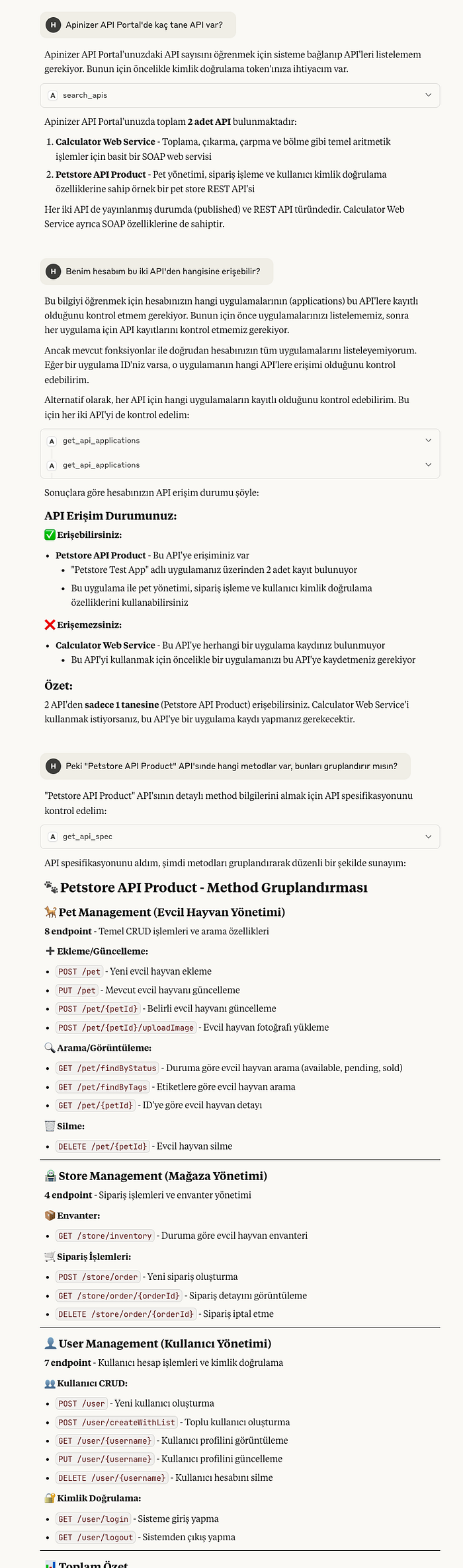
We don't think we need to go on at length—we've all got the main idea. So we won't ask Claude more questions here. Right now 18 different MCP tools are actively running on Apinizer APIPortal and we keep developing. These tools are organized in 4 main categories:
API Management Tools (6): search_apis, get_api_details, get_api_spec, test_api, get_api_access_url, get_api_plans — Core tools for AIs to discover APIs, get details, test them, and review plans.
Analytics & Monitoring Tools (4): get_api_stats, get_api_traffic, get_api_response_time, query_api_traffic — Advanced analytics tools for API performance metrics, traffic analysis, and detailed querying.
Application Lifecycle Tools (4): create_app, get_app_details, delete_app, get_app_apis — Comprehensive app management tools for creating and managing applications and API subscriptions.
Credential Management Tools (4): add_api_key, get_app_credentials, delete_credential, get_credential_details — Credential lifecycle tools for creating and managing API keys and security.
This tool ecosystem enables AI assistants to integrate fully with Apinizer APIPortal. Each tool was built with enterprise-grade security, audit logging, and error handling. On our roadmap we have expanding the functionality of these tools and adding new ones for additional use cases. Our goal is for AIs to manage the API ecosystem without human intervention. Let's continue with real-world usage examples.
Enterprise Scenarios: Real-World Examples
Scenario 1: New Team Member Onboarding
Previous State: Ahmet just joined. He needs to learn how to get customer data in our e-commerce system. Mehmet (senior dev) gave him a 1-hour presentation, then Ahmet continued learning on his own by experimenting. He became productive after 2 weeks.
With Apinizer APIPortal MCP: Ahmet asks the AI "How do I get customer data?" Apinizer's AI-powered discovery engine finds the CRM API, shows the authentication method, explains rate limiting rules. Ahmet becomes productive the same day.
Estimated ROI: 2 weeks → 1 day (1400% improvement)
Scenario 2: Cross-System Integration Challenge
Situation: Fatma needs to get customer orders from the CRM, check inventory status from the ERP, and use a third-party API for shipping calculation. She's researching how to connect these 3 systems.
Traditional Approach: Reading each system's documentation, figuring out the API call sequence, handling data format mismatches. Takes 1 week.
With Apinizer APIPortal MCP: She asks the AI "How do I sync CRM orders with ERP inventory?" Apinizer's cross-system integration intelligence analyzes all three system APIs, suggests the optimal integration pattern, writes the data transformation logic. Uses APIPortal's proven integration templates.
Estimated ROI: 1 week → 2 hours
Scenario 3: Troubleshooting and Debugging
Real Incident: API calls in production are showing a 15% failure rate. Hasan (DevOps) can't find which endpoint has the problem or why. He's lost in the logs.
MCP Solution: He asks the AI "There's a 15% failure on the Payment API, what could be the cause?" The AI:
- Analyzes all payment endpoints
- Identifies error patterns
- Checks rate limiting, timeout, and authentication issues
- Finds the specific problematic endpoint
- Suggests a fix
Estimated Debugging Time: 4 hours → 15 minutes
Enterprise MCP Integration Realities
Of course not everything is perfect. We need to be realistic:
Areas Where AI Is Truly Good Right Now
API Discovery and Mapping — In our tests, with SearchApisTool AIs can search and filter all APIs on the portal. They can fetch and parse OpenAPI specs with GetApiSpecTool. This works with 95%+ accuracy.
Analytics and Monitoring Integration — With GetApiStatsTool, GetApiTrafficTool, GetApiResponseTimeTool, AIs can analyze API performance in real time. How much each API is used, response times, error rates—all available automatically.
Complete Lifecycle Management — AIs don't just discover APIs; with CreateAppTool, AddApiKeyTool, TestApiTool they can perform full API lifecycle management. From application creation to credential management.
Intelligent Testing Capabilities — With TestApiTool, AIs can test API endpoints and analyze results. This provides real debugging and troubleshooting capability.
Areas Still Evolving
Complex Business Logic — If your API has very specific business rules, the AI may not fully understand them. Domain-specific constraints like "this field is for premium customers only" can sometimes be missed.
Performance Optimization — Not yet 100% reliable on optimizing API call flow or suggesting cache strategy. It gives functional solutions but they may not always be fully optimal.
Legacy System Integration — Limited support for SOAP services, proprietary protocols, and very old APIs. It's very strong with modern REST APIs but gets confused with legacy—who doesn't 😁
Still Challenging Areas
Enterprise Security Compliance — The AI can't fully address compliance requirements like GDPR, SOX, HIPAA. It finds the API and shows how to use it but can't give 100% reliable answers to questions like "Is this API GDPR-compliant?"
Real-time State Management — There's still risk with complex, stateful operations. Transaction management, rollback scenarios, distributed system consistency—these remain challenging for AI.
Enterprise MCP Strategy: Phased Approach
We often discuss a 3-phase implementation strategy with our customers. We'll be rolling out phase 1 at a customer soon.
Phase 1: Quick Wins (First 3–6 Months)
Goal: Immediately increase developer productivity
Focus Areas:
- API discovery acceleration
- Basic integration patterns
- Onboarding process optimization
- Simple troubleshooting automation
Expected Results:
- API discovery time: 2 hours → 10 minutes
- New developer onboarding: 2 weeks → 3 days
- Repetitive support tickets: 60% reduction
- Code quality: Fewer integration bugs
In this phase we're not tackling risky areas. We're starting with proven, reliable use cases.
Phase 2: Smart Integration (6–12 Months)
Goal: Get strategic integration decisions from AI
Focus Areas:
- Cross-system integration planning
- Performance optimization recommendations
- Advanced error handling patterns
- API governance automation
Expected Results:
- Integration planning time: 70% reduction
- System downtime: 40% reduction (better error handling)
- API consistency: Standardized patterns
- Architecture decision quality: Improved
In this phase we start taking AI's recommendations but still have humans approve critical decisions.
Phase 3: Autonomous Operations (12+ Months)
Goal: Self-healing, self-optimizing API ecosystem
Focus Areas:
- Predictive API management
- Automated compliance checking
- Self-healing integration patterns
- Business logic automation
It's still early for this phase but the direction is clear.
Technical Reality Check: How Mature Is It?
When we were meeting with a customer, their CTO asked us: "Is this AI stuff marketing hype, or can I really use it in production?"
Our honest answer was the same as always: "It depends."
Production-Ready Parts
API Discovery: 95%+ reliability. Even though we're in preview, in our tests we haven't found any major issues.
Basic Integration Guidance: Very solid. It almost always gives the right guidance for simple REST APIs.
Documentation Generation: Excellent. Much faster and more consistent than writing documentation manually.
Beta-Level Parts
Complex Workflow Orchestration: It works but can exhibit unexpected behavior in edge cases. Requires intensive and detailed testing.
Performance Optimization: It gives good suggestions but they need to be tested and approved in production.
Experimental Parts
Business Logic Understanding: It struggles to fully understand domain-specific rules, so human oversight is required.
Compliance Automation: Promising but needs legal team review.
So right now there are features you can use in production with confidence, features you need to use carefully, and experimental ones. "Setting realistic expectations" is very important.
The Big Picture: Where Are We Headed?
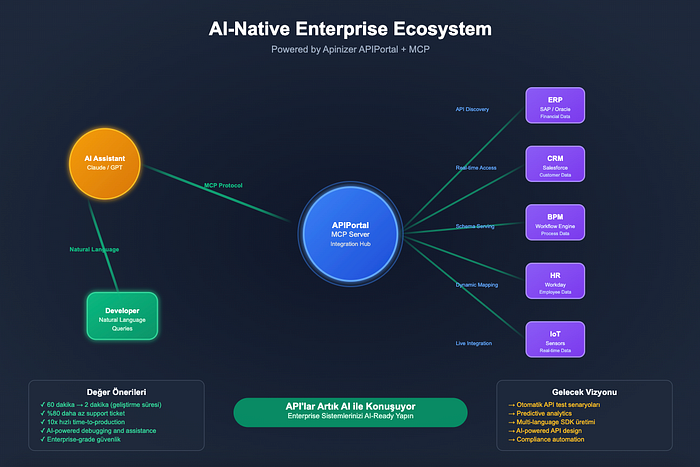
The trend we've observed over the last 6 months: APIs are becoming "AI-readable." That means APIs are being optimized not just for human developers but for AIs as well.
This transformation has huge implications. In the future, if your API can't be discovered by AI, it won't be "adopted." Because developers will increasingly use AIs for API discovery.
The first-mover advantage is very clear right now. While your competitors are still doing traditional API management, if your APIs are AI-native, you'll have a significant advantage in the market.
Practical Example: Why is Stripe's API so popular? It's not just functionality—documentation quality and developer experience are also excellent. Now imagine AIs can also automatically discover and use the Stripe API. That creates an unfair advantage!
Conclusion: The Future of APIs Is Being Shaped by AI
This transformation is not just a technology shift, it's a mindset shift. Instead of thinking of APIs only as a technical interface, we need to think of them as AI-compatible intelligent services.
Apinizer APIPortal's MCP integration is the first step in this transformation. We're making the entire developer experience AI-powered—from API discovery to intelligent integration, from troubleshooting to optimization.
The question isn't: "Will AIs change API management?" The question is: "Do you want to be in front of this change or behind it?"
Contact us for detailed information about Apinizer APIPortal MCP integration.
We've made this feature available as a preview with the 2025.07.1 interim version. We're also preparing documentation on how to use it. We normally wouldn't release a feature before the docs are ready, but this one got us too excited :) so sorry about that.