Access Control
Access Control lets you manage consumers' access permissions to API Proxies and API Proxy Groups — along with the associated expiration date, environment-based quota/throttling, and disallowed method/proxy settings — from a single screen. This page lists the Access Control related pages under Identity Management together.
View Modes
The Access Control screen has three modes that let you look at the same access relationship from three different perspectives:
- API Proxy mode: Select an API Proxy from the list on the left; on the right, manage the consumers granted access to that API Proxy and its method/endpoint-based access restrictions.
- Proxy Group mode: The same logic applies to an API Proxy Group and its member API Proxies.
- Consumer mode: Select a consumer from the list on the left; on the right, view and manage the list of all API Proxies and API Proxy Groups this consumer has access to (the reverse perspective).
For the selected consumer/API Proxy/Proxy Group relationship, you can configure the expiration date, environment-based quota and throttling settings, and disallowed method/proxy definitions. Changes are applied with Save and Deploy.
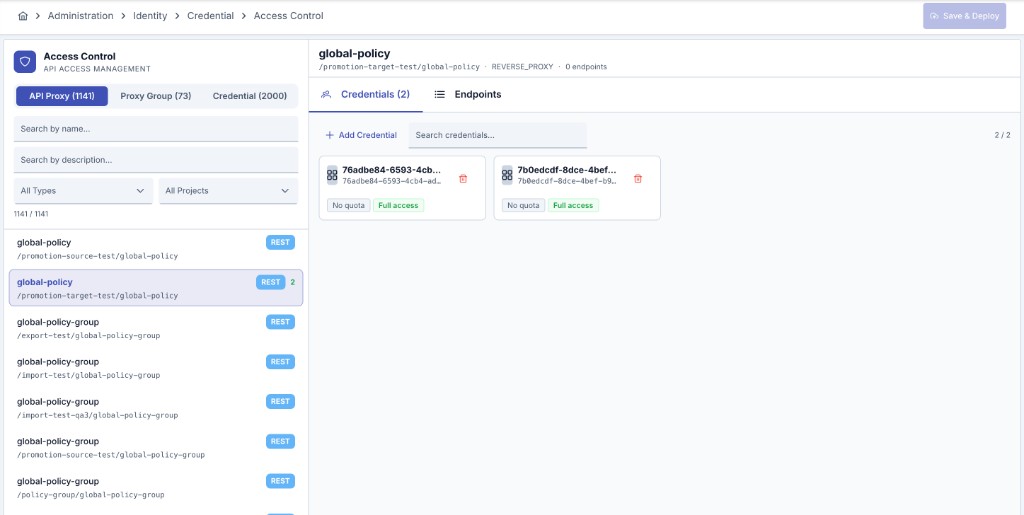
For detailed field-level configuration descriptions, see API Proxy ACL and API Proxy Group ACL.
Consumer access permission alone is not sufficient for API proxy access. For the settings in the consumer and access permission to be valid, one of the authentication policies must be added on the API Proxy and the Security Manager option must be selected as the authentication method in this policy.
Related Pages
API Proxy-based access permission and consumer configuration parameters.
API Proxy Group-based access permission and configuration parameters.
Access control list reports based on API Proxy or organization/credential.
IP group definitions used in Allowed/Blocked IP List policies.
Defining identity-based rate limits and overuse protection.
Creating and managing the consumers that will be granted access.