Rate Limit Control List
As of 2026.09, the gateway no longer evaluates the Rate Limit Control List. On upgrade, every existing list was converted automatically into a typed Limit Plan: one plan per list, named after the list, whose limits are the list's endpoint rules (each on the endpoint's own path and method, or on the whole API when the rule was written for every endpoint). The list's consumers, target audience conditions and out-of-target action became the plan's Target Audience, and its condition, its position in the request flow and its error messages were carried over too, so a consumer left off the list still falls to the rule's out-of-target action exactly as it did before. A disabled list became a plan that is not deployed. See Legacy Limits Migrated at Upgrade for the full conversion, including the few things that could not be carried over.
As of 2026.09.3 the editable Rate Limit Control List screen was removed from both the project menu and the Administration menu: the migration had already completed at upgrade, and a second screen next to Limit Plans only raised the question of what the difference was. Since 2026.10.0 a read-only RLC screen with a Deprecated badge shows the legacy lists. It is listed under Identity Management and, for a system administrator, under Administration → Identity Management, where it lists every project's legacy lists and can be narrowed by project. The screen has a list of the legacy lists on the left (searchable by name, 10 a page) and the selected list's read-only view on the right: general settings, target audience, APIs and endpoints, and error messages. You can only view a list and delete it; deleting a list does not change the limit plan that was made from it. Every limit is managed from Identity Management → Limit Plans (and, for a system administrator, from Administration → Identity Management → Limit Plans, which lists every project's plans in one place). The legacy records themselves also remain readable through the management API; creating or updating one is rejected with the error credentialRateLimit.retired. The rest of this page is kept for historical reference.
With this policy, the following settings can be made for each API and endpoint:
- Permitted Message Count (Permitted Message Count): Maximum number of requests allowed within the specified time interval.
- Time Interval Period Length (Time Interval Period Length): The length of the time interval.
- Time Interval (Time Interval): The unit of the time interval (second, minute, hour, day, month).
Rate limit control works as follows:
When a request arrives, its identity is determined according to the selected identity source: either the value of a variable you choose (e.g. IP address, user, or API key), or the user information resolved from authentication.
It is checked whether the determined identity belongs to the target audience. The identity is included if it is in the target consumers list or matches any of the target audience conditions (OR logic).
If the identity is in the target audience, the limit defined for the relevant API and endpoint is checked.
If the identity is not in the target audience, the out-of-target action is applied: the request is blocked, or the general quota defined for out-of-target requests (a single shared quota for all out-of-target requests, or a separate quota per identity) takes effect, or — with Do not apply this rule to them — the rule simply does not apply and the request continues untouched by it.
If the relevant limit has been exceeded, the request is rejected; if not, processing continues.
While responding to the request, if configured, rate limit statistics are added to response headers.
This configuration provides a powerful mechanism to protect your APIs against overuse and set different usage limits for different users.
The read-only RLC screen can be reached either from the RLC entry under the project-level Identity Management menu, or from the same entry under Administration → Identity Management. A control list that was created from the Admin menu applied across all projects; a control list that was created from the project menu belonged only to that project.
An image containing Rate Limit control list page settings is shown below:
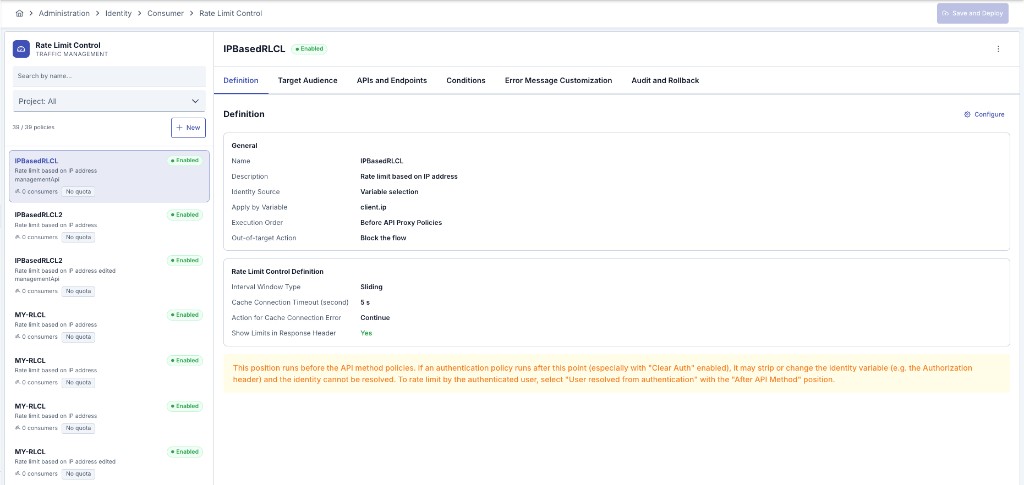
The fields used for rate limit configuration are shown in the table below.
| Field | Description |
|---|---|
| Name | A name can be written to facilitate the use and management of the configuration. You will need this name during configuration management and selection. |
| Description | A description can be written to facilitate the use and management of the configuration. |
| Identity Source (Identity Source) | Determines which identity the rate limit is applied to. When Variable selection is chosen, the identity is taken from the value of a variable you choose (e.g. IP address, user, or API key). When User resolved from authentication is chosen, the identity is taken from the user information resolved by authentication; for this option the relevant API must have an authentication policy running in the last position. |
| Execution Order (Execution Order) | Determines when the rate limit control runs in the request processing flow. One of six positions can be selected: before or after each of the proxy group, API proxy, and API method policies. The default position is before the API proxy policies, so that a control reading the identity from a request header can run before an authentication policy that processes (for example clears) that header. When the identity source is User resolved from authentication, the position is automatically set to after the API method policies and cannot be changed, because the identity is only reliable after authentication has run. If the selected position runs before an authentication policy, a warning is shown in case the identity cannot be resolved. |
| Interval Window Type (Interval Window Type) | Determines the type of time interval to be used in rate limit calculation. It can take FIXED or SLIDING values. When FIXED is selected, a fixed number of requests are accepted within a certain period (e.g., every hour). When SLIDING is selected, the number of requests within the last certain period (e.g., last 1 hour) is taken into account. |
| Cache Connection Timeout (second) (Cache Connection Timeout (second)) | Determines the maximum time to wait when connecting to the cache service in seconds. |
| Action for Cache Connection Error (Action for Cache Connection Error) | Determines the action to be taken when an error occurs during connection to the cache service. When FAIL is selected, the request is rejected in case of connection error, and when CONTINUE is selected, the request continues to be processed. |
| Show Rate Limit Statistics in Response Header (Show Rate Limit Statistics in Response Header) | Determines whether rate limit information will be shown in response headers. When set to TRUE, information such as remaining request count, limit value, and time until limit renewal is added to response headers (RateLimit-Remaining, RateLimit-Limit, RateLimit-Reset, X-RateLimit-Identity, X-RateLimit-Type headers). |
| Apply by Variable (Apply by Variable) | Determines the variable to be used to identify the user or client to which rate limit will be applied. This can be, for example, IP address, user ID, or API key. It is shown only when the identity source is Variable selection. If the selected variable relies on an identity obtained through authentication, a warning is shown indicating that the relevant authentication policy must run before this control. |
| Target Audience (Target Audience) | The list of conditions that define the identities to which the rate limit is applied. Each condition consists of an operator (equals, contains, starts with, ends with, is in the list, etc.) and a value. The conditions are evaluated with OR logic; an identity is included in the target audience if it matches any of the conditions. |
| Target Consumers (Target Consumers) | List of specific identity values to which rate limit will be applied. Rate limit is applied for identity values found in this list. |
| Out-of-target Action (Out-of-target Action) | Determines what happens to requests whose identity is not in the target audience. When Block the flow is selected, these requests are blocked — note that this makes the list a deny-list: every identity outside the target audience is rejected, not merely limited. When Apply general quota is selected, a separate general quota is applied to out-of-target requests. When Do not apply this rule to them is selected, out-of-target requests are neither blocked nor counted by this list. Existing lists keep Block the flow. |
| Quota Mode and General Quota Limits (Quota Mode) | Used only when the out-of-target action is Apply general quota. When Single shared quota for all out-of-target is selected, all out-of-target requests share a single common limit; when Separate quota per out-of-target identity is selected, each out-of-target identity has its own limit. The permitted message count, time amount, and time unit for the general quota are defined in this section. |
| APIs and Endpoints (APIs and Endpoints) | List of APIs and endpoints to which the rate limit policy will be applied. |
| Save and Deploy Button (Save and Deploy) | After completing the settings/changes, press the Save and Deploy button to save and deploy the settings. |
When many records are added to the Target Consumers list, the table is now paginated (you can choose 10, 25, 50, or 100 rows per page) and can be searched and sorted by consumer name. This removes the browser-side performance problems that could previously occur with control lists containing a large number of consumers, which were caused by the excessive request load of resolving each consumer's name individually.
An API client has no username of its own — wherever this policy resolves or matches on an identity (Target Consumers, a Target Audience condition, or an identity resolved from authentication), use the client's client id. It plays exactly the role a consumer's username plays here.
Error Message Customization
When a rate limit error occurs (for example, rate limit exceeded, identity not in the target list, or identity could not be resolved), you can customize the response that is sent to the client.
For each type of rate-limit error, you can define:
- A custom HTTP status code (e.g. 429, 403)
- A custom error code (e.g. RATE_LIMIT_EXCEEDED)
- A custom error message (e.g. "You have exceeded the allowed request rate")
Additionally, you can create a custom message template that becomes the full response body. This template can include variables such as the error code, error message, HTTP status code, request information, date and time, and others. The full list of variables can be copied from the Available Variables panel on the edit screen.
A simple template example:
{
  "errorCode": "#{error.defaultErrorCode}",
  "message": "#{error.defaultMessage}",
  "httpStatusCode": #{error.defaultHttpStatusCode}
}
You can also define a plan-wide global custom message template that is used for all errors that do not have their own specific template.
If an error has its own custom template defined, that template is applied. If not, the plan-wide global template is used. If neither a specific nor a global template is defined, the system default message is applied. This behavior ensures that specific definitions always override general ones, consistent with other Apinizer policies.