MCP Gateway Tool Authorization: Access Rules, Argument Constraints and Risk Policy
What You Build
In this scenario you add three checks to the Order Desk MCP proxy. The proxy is a Passthrough proxy. The checks run on every tools/call.
| Card | Question that it answers |
|---|---|
| Identity Access Rules | Which caller may see and call which tool? |
| Argument constraints | Are the arguments of the call valid? |
| Tool risk policy | Does a person need to approve the call first? |
A call passes the checks in this order. A refusal at one step stops the call. The next steps do not run.
On an Expose Tools proxy, the Required Scopes check of the tool runs between step 1 and step 2. See Expose Tools Proxies.
The reference for each card is in MCP Gateway. This page shows how to use the cards in one scenario.
Prerequisites
Complete the setup of MCP Gateway Browser Sign-In Without Keycloak first. The checks need a caller identity. The examples use this setup:
| Item | Example |
|---|---|
| Proxy | Order Desk MCP, Passthrough, path /order-desk, Standard MCP OAuth profile. |
| Token policy | A JWT policy in Manage From ACL mode. |
| Application | Claude Code, with the public API client claude-code-desktop. |
| Consumers | jane.doe (role Order Viewer) and sam.lee (roles Order Viewer and Order Manager). |
| Roles | Order Viewer (OAuth Scope Name orders.read) and Order Manager (OAuth Scope Name orders.write). |
| Backend MCP server | order-desk, with three tools. |
The tools of the backend server:
| Tool | Annotation | Arguments |
|---|---|---|
get_order_status | readOnlyHint | orderId |
list_open_orders | readOnlyHint | None |
cancel_order | destructiveHint | orderId, reason |
Where the Cards Are
Open the Routing tab of the proxy. The cards are below the list of backend MCP servers. Each card has a Configure button. The button is disabled if you do not have manage permission on the API proxy.
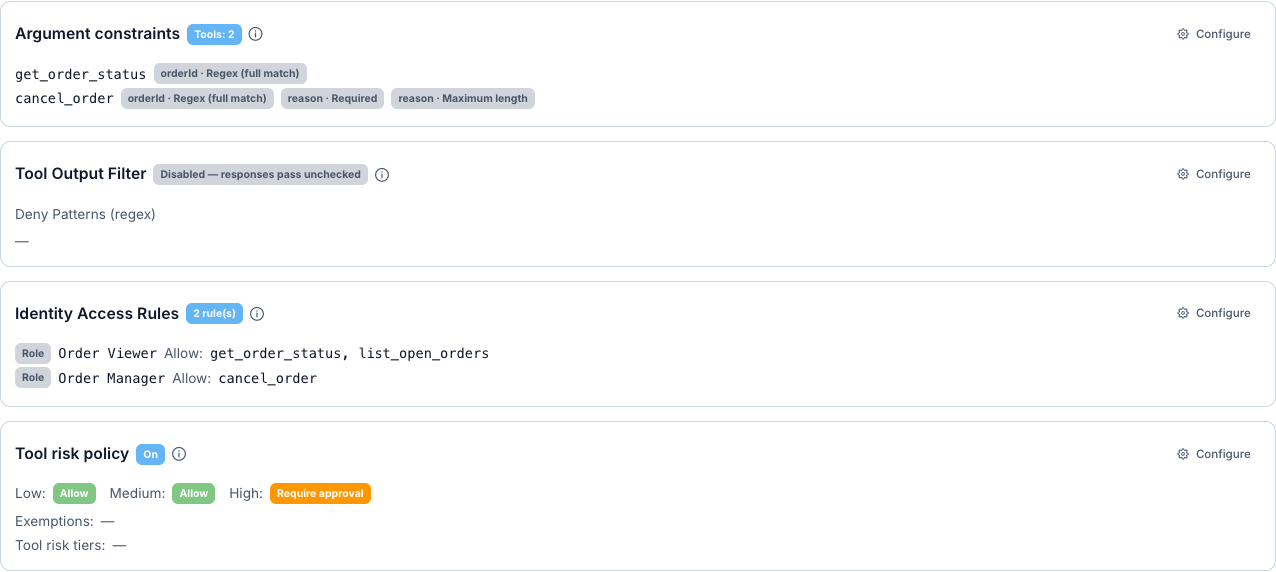
The same cards exist on an Expose Tools proxy. On that proxy, the default risk tier of a tool comes from the HTTP method of the operation: GET is Low, POST is Medium and DELETE is High.
Identity Access Rules
This card sets who may see and call which tool. A caller that a rule does not allow does not see the tool in tools/list and cannot call it.
On the Routing tab, select Configure on the Identity Access Rules card.
Select Add Rule. Set Applies To to Role and Name to Order Viewer. In Allow, add get_order_status and list_open_orders.
Select Add Rule again. Set Applies To to Role and Name to Order Manager. In Allow, add cancel_order.
Select Save. Deploy the proxy.
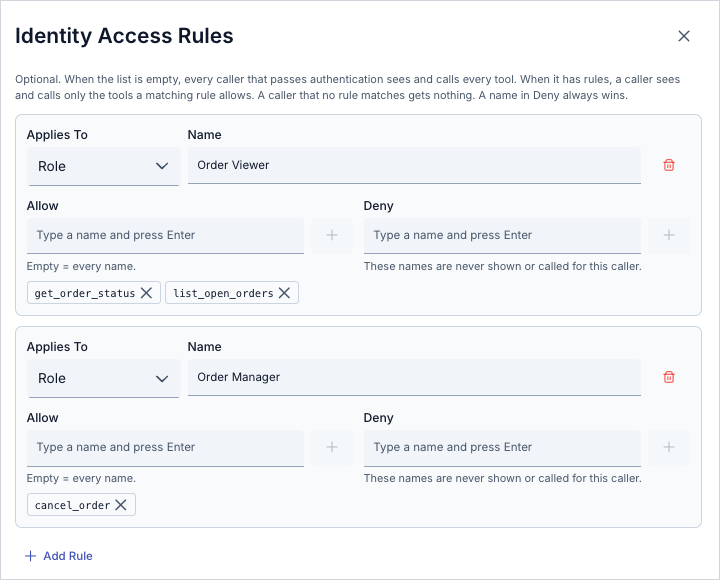
How the rules work:
- A rule applies to a Consumer, a Role or an Organization.
- An empty Allow list means every name.
- A name in Deny always wins.
- When the list has no rules, every authenticated caller sees and calls every tool. When the list has rules, a caller that no rule matches gets nothing.
- The rules of all matching principals combine.
sam.leehas both roles, sosam.leegets the tools of both rules.
See Identity-Based Access Control.
Try it
Send tools/list with the access token of each user. Get the token with the steps of the sign-in tutorial.
curl -s -X POST https://gateway.example.com/apigateway/order-desk \
  -H "Authorization: Bearer <access token of jane.doe>" \
  -H "Content-Type: application/json" \
  -H "Accept: application/json, text/event-stream" \
  -d '{"jsonrpc":"2.0","id":1,"method":"tools/list"}'
| Caller | Tools in the answer |
|---|---|
jane.doe | get_order_status, list_open_orders |
sam.lee | get_order_status, list_open_orders, cancel_order |
Now call cancel_order with the token of jane.doe:
curl -s -X POST https://gateway.example.com/apigateway/order-desk \
  -H "Authorization: Bearer <access token of jane.doe>" \
  -H "Content-Type: application/json" \
  -H "Accept: application/json, text/event-stream" \
  -d '{"jsonrpc":"2.0","id":2,"method":"tools/call","params":{"name":"cancel_order","arguments":{"orderId":"SO-10421","reason":"Customer withdrew the order"}}}'
The answer is an HTTP 200 response with a JSON-RPC error. Depending on the client, the body is JSON or an SSE data: frame:
{"jsonrpc":"2.0","id":2,"error":{"code":-32603,"message":"Tool call rejected: the target API requires policies (e.g. authentication or rate-limit) that the MCP gateway cannot apply on this path."}}
The gateway uses one generic refusal message for this case. It does not tell the caller why the call is refused. You can change the text of the message on the Error Messages screen.
Argument Constraints
This card validates the arguments of a tool call before the gateway sends the call.
Select Configure on the Argument constraints card.
Add the tool get_order_status. Add one rule: Argument path orderId, Rule Regex (full match), Value ^SO-[0-9]{5}$.
Add the tool cancel_order. Add three rules:
| Argument path | Rule | Value |
|---|---|---|
orderId | Regex (full match) | ^SO-[0-9]{5}$ |
reason | Required | Not used |
reason | Maximum length | 200 |
Select Save. Deploy the proxy.
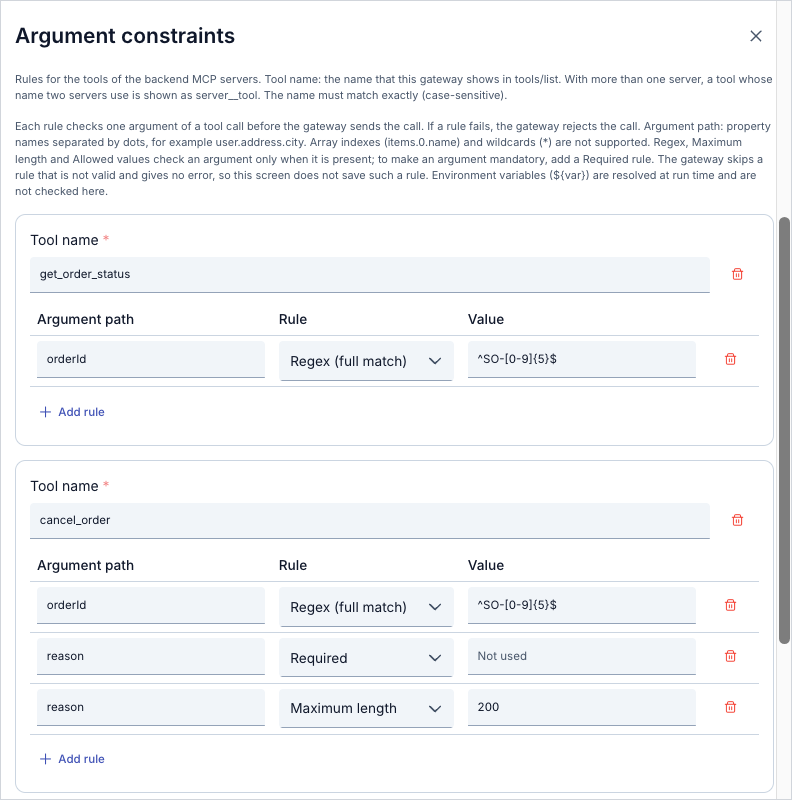
Rules that you must know:
| Rule | Value | The call is rejected when |
|---|---|---|
| Regex (full match) | A regular expression | The argument does not match the whole expression. |
| Maximum length | A whole number | The text of the argument is longer. |
| Allowed values | Values separated by commas | The argument is not one of the values. |
| Required | None | The argument is missing. |
- Regex (full match), Maximum length and Allowed values check an argument only when it is present. Add a Required rule to make the argument mandatory.
- The argument path is a list of property names separated by dots, for example
user.email. Array indexes and wildcards are not supported. - Environment variables (
${var}) are resolved at run time. - The tool name must be the same as the name in
tools/list. The match is case-sensitive. When two servers share a tool name, it shows asserver__tool.
See Argument Constraints.
Try it
Call get_order_status with an orderId that does not match the expression:
curl -s -X POST https://gateway.example.com/apigateway/order-desk \
  -H "Authorization: Bearer <access token of jane.doe>" \
  -H "Content-Type: application/json" \
  -H "Accept: application/json, text/event-stream" \
  -d '{"jsonrpc":"2.0","id":3,"method":"tools/call","params":{"name":"get_order_status","arguments":{"orderId":"10421"}}}'
{"jsonrpc":"2.0","id":3,"error":{"code":-32602,"message":"Bad request. argument constraint violated: path='orderId' rule=REGEX constraint='^SO-[0-9]{5}$'"}}
Call cancel_order as sam.lee without reason:
curl -s -X POST https://gateway.example.com/apigateway/order-desk \
  -H "Authorization: Bearer <access token of sam.lee>" \
  -H "Content-Type: application/json" \
  -H "Accept: application/json, text/event-stream" \
  -d '{"jsonrpc":"2.0","id":4,"method":"tools/call","params":{"name":"cancel_order","arguments":{"orderId":"SO-10421"}}}'
{"jsonrpc":"2.0","id":4,"error":{"code":-32602,"message":"Bad request. argument constraint violated: path='reason' rule=REQUIRED"}}
The message names the rule from your configuration. It never repeats the value that the client sent.
Tool Risk Policy and Pending Tool Approvals
This card holds risky tools until a person approves the call.
Select Configure on the Tool risk policy card.
Turn on Apply the tool risk policy. When the policy is off, every call is allowed. The exemptions and the tool risk tiers stay saved.
Under Action per risk tier, set Low to Allow, Medium to Allow and High to Require approval.
Select Save. Deploy the proxy.
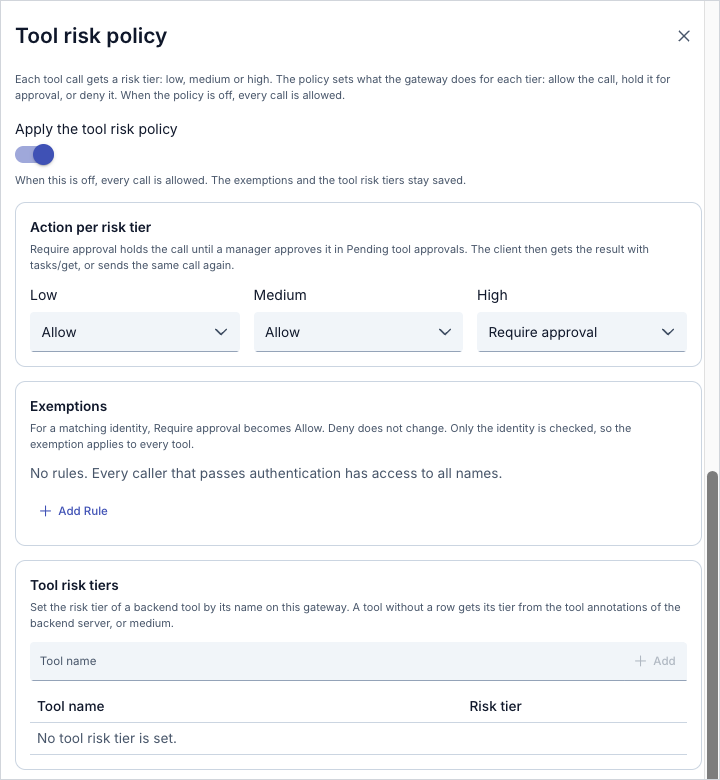
The actions of a tier are Allow, Require approval and Deny.
Tier of a Passthrough tool. The gateway uses the first rule that matches:
- A row in Tool risk tiers for the tool name.
- The annotations of the backend server:
readOnlyHintgives Low anddestructiveHintgives High. - Medium.
In the example, get_order_status and list_open_orders are Low. cancel_order is High, so it needs approval.
Exemptions. For a matching identity (consumer, role or organization), Require approval becomes Allow. Deny does not change. The exemption checks only the identity, so it applies to every tool.
See Tool Risk Policy and Approval for the tiers and the annotation options.
Try it
Call cancel_order as sam.lee with valid arguments:
curl -s -X POST https://gateway.example.com/apigateway/order-desk \
  -H "Authorization: Bearer <access token of sam.lee>" \
  -H "Content-Type: application/json" \
  -H "Accept: application/json, text/event-stream" \
  -d '{"jsonrpc":"2.0","id":6,"method":"tools/call","params":{"name":"cancel_order","arguments":{"orderId":"SO-10421","reason":"Customer withdrew the order"}}}'
The gateway holds the call and returns:
{"jsonrpc":"2.0","id":6,"error":{"code":-32021,"message":"Tool call requires approval. Retry the same call after an administrator approves it.","data":{"approvalId":"…"}}}
If you send the same call again before the decision, the answer holds the same approvalId. The gateway does not create a second request.
Approve the call
On the Routing tab, open Pending tool approvals. Select Refresh if the request does not show.

The list shows the environment, the tool, the risk tier, the caller, the client ID, the operation, the request time and the expiry time.
Select Approve. Read the question and confirm.

The client sends the same call again. The gateway runs it one time and returns the tool result:
Order SO-10421 was cancelled: Customer withdrew the order
The approval is single use. The next identical call creates a new approval request. A client that supports MCP Tasks gets a task instead of the -32021 error, and it can read the result with tasks/get.
See Pending tool approvals for the permission that you need and for the audit log.
Results
| Caller | Call | Card that decides | Answer |
|---|---|---|---|
jane.doe | tools/list | Identity Access Rules | get_order_status, list_open_orders |
sam.lee | tools/list | Identity Access Rules | get_order_status, list_open_orders, cancel_order |
jane.doe | cancel_order | Identity Access Rules | -32603, generic refusal message |
jane.doe | get_order_status with orderId 10421 | Argument constraints | -32602, rule=REGEX |
sam.lee | cancel_order without reason | Argument constraints | -32602, rule=REQUIRED |
sam.lee | cancel_order with valid arguments | Tool risk policy | -32021 with approvalId |
sam.lee | The same call after Approve | Tool risk policy | Tool result |
Limits and Behavior
Check order. The gateway checks Identity Access Rules first, then argument constraints, then the tool risk policy. On an Expose Tools proxy, the Required Scopes check runs after the identity rules. A refusal at one step stops the call. The next steps do not run.
Error answers. The gateway returns each refusal as an HTTP 200 response with a JSON-RPC error. The body is JSON or an SSE data: frame. Read the error.code field, not the HTTP status.
Generic refusal. For a caller that the identity rules do not allow, the gateway uses one generic message on purpose. The message does not reveal why the call is refused. You can change the message text on the Error Messages screen.
Approval.
- An approval is single use. The next identical call needs a new approval.
- A request expires 15 minutes after it is created.
- One caller can have at most 20 open approval requests on one proxy.
- The approval is bound to the environment, the caller, the tool and the arguments.
- The decisions that you make in the Manager are written to the audit log.
Troubleshooting
| Problem | Cause | Fix |
|---|---|---|
A caller sees no tool in tools/list | The list of Identity Access Rules has rules, and no rule matches the caller. | Add a rule for the consumer, the role or the organization of the caller. |
| A tool is missing for a caller that has the right role | A Deny entry of a matching rule lists the tool. A deny entry always wins. | Remove the name from Deny. |
-32603 with the message "Tool call rejected: the target API requires policies…" | The identity rules do not allow the caller to call the tool. | Check the rule of the role of the caller. |
| An argument rule has no effect | The tool name in the rule is not the same as the name in tools/list, or the argument path is wrong. | Copy the name from tools/list. Use dot-separated property names. |
| A missing argument passes the check | Regex (full match), Maximum length and Allowed values check an argument only when it is present. | Add a Required rule. |
| A destructive tool does not need approval | The tool risk policy is off, an exemption matches the caller, or a Tool risk tiers row sets a lower tier. | Check the switch, the Exemptions list and the Tool risk tiers list. |
| The request does not show in Pending tool approvals | The request expired after 15 minutes, or it is in another environment. | Select Refresh. Send the call again to create a new request. |
The call after Approve returns -32021 again | The approval is single use, or the arguments of the call are not the same. | Send the call with the same arguments, right after the approval. |
| The call returns an error about open approval requests | The caller has 20 open approval requests. | Approve or reject the open requests, or wait until they expire. |
Checking the Setup
- When
jane.doesendstools/list, does the answer show onlyget_order_statusandlist_open_orders? - When
sam.leesendstools/list, does the answer show all three tools? - When
jane.doecallscancel_order, does the call return the generic refusal with code-32603? - When
get_order_statusgets anorderIdthat does not start withSO-, does the call return-32602withrule=REGEX? - When
cancel_orderhas noreason, does the call return-32602withrule=REQUIRED? - When
sam.leecallscancel_orderwith valid arguments, does the call return-32021with anapprovalId? - When you send the same call again before the decision, does the answer hold the same
approvalId? - Does the request show in Pending tool approvals with the risk tier High?
- After Approve, does the same call return the tool result?
- When you send the same call a second time after the approval, does the gateway create a new approval request?
- When you turn off Apply the tool risk policy, does
cancel_orderrun without approval?