Calling an API on Behalf of the Signed-In User (Delegated Tokens)
What You Build
A user signs in to an MCP client in the browser. A tool of the MCP Gateway then calls a target API. The target must see the signed-in user, not a shared service identity.
There are two paths. Both use a delegated token. A delegated token names the user as the subject and the agent as the actor.
| A. MCP Gateway, Delegated user mode | B. Your own agent | |
|---|---|---|
| Who exchanges the user token | The gateway, in-process | Your agent, with a request to POST /credential/token (RFC 8693) |
| Who calls the target | The gateway, for the tool | Your agent |
| Agent in Allowed agents | The service client of the MCP proxy | The API client of your agent |
The examples use one scenario in the project Order Management on the gateway https://gateway.example.com. The root context is /apigateway.
| Item | Example |
|---|---|
| Target REST proxy | Order Service API, path /order-service, endpoint GET /orders. Its JWT authentication policy uses Manage From ACL. |
| MCP proxy | Order Service Tools, path /order-tools, mode Expose Tools, profile Standard MCP OAuth. Its JWT policy uses Manage From ACL. The tool list_orders calls GET /orders of Order Service API. |
| Browser client | Application Claude Code, public API client claude-code-desktop, redirect URI http://localhost:33418/callback. |
| Service client | Application Order Tools Gateway, API client order-tools-gateway. You enter this client ID in the Service client field of the MCP proxy. |
| Own agent | Application Order Assistant, confidential API client order-assistant. |
| User | Consumer ella.moore, with an ACL row on Order Service Tools and on Order Service API. |
Prerequisites
- The MCP proxy Order Service Tools, the application Claude Code and the browser login are ready. See MCP Gateway Browser Sign-In Without Keycloak.
- The target proxy Order Service API is deployed. It has a JWT authentication policy with Manage From ACL.
- The consumer
ella.moorecan sign in. The consumer is deployed.
Set Up the Target API
The target decides which agents can act for a user. You change the authentication policy of the target.
Open the JWT authentication policy of Order Service API. An OAuth2 authentication policy has the same settings.
Turn on Accept delegated tokens (token exchange). Without this switch, the target refuses every delegated token.
In Allowed agents, type a client ID and press Enter. Add these client IDs:
| Client ID | Path |
|---|---|
order-tools-gateway | A. The service client of the MCP proxy. |
order-assistant | B. Your own agent. |
An empty list admits no agent.
In Delegation chain depth, select One agent or Up to two agents. In the example, select Up to two agents.
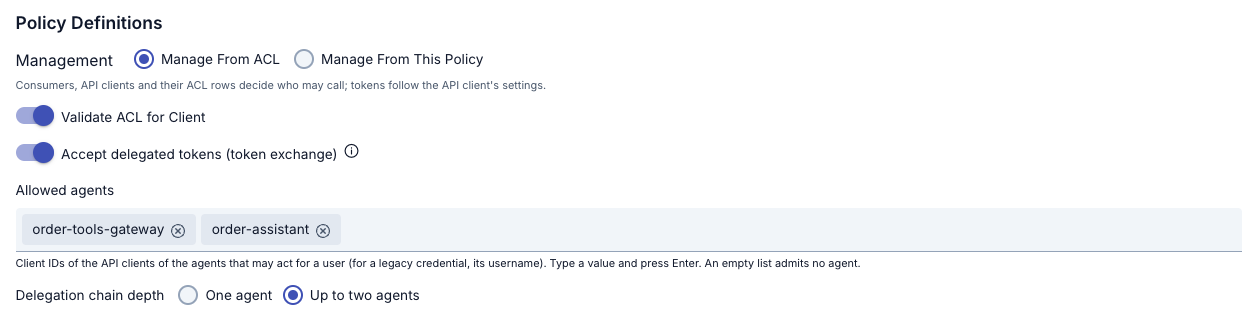
Save the policy. Deploy Order Service API.
The target can be any API proxy. In this scenario it is a REST proxy.
The ACL row of the user
The request to the target runs as the user. Add an ACL row for ella.moore on Order Service API. The user also needs the ACL row on Order Service Tools. See API Proxy ACL.
The service client order-tools-gateway needs no ACL row, neither on the MCP proxy nor on the target.
A. Delegated User Mode of the MCP Gateway
On the Routing tab of Order Service Tools, select Configure in the Routing Mode panel. Select Standard MCP OAuth. In the Service client field, enter order-tools-gateway.
Edit the tool list_orders. Set Downstream identity to Delegated user.
Save the proxy. Deploy it.

If the target does not accept delegated tokens, or does not list the service client, Apinizer refuses the save: "The target API of a Delegated user tool must accept delegated tokens and list the service client as an allowed agent in its JWT or OAuth2 authentication policy." Fix the policy of the target, then save again.
For more information about the modes of a tool, see Calls to the tool target.
Verify with curl
The user signs in with the browser flow of the browser sign-in tutorial. The client claude-code-desktop asks for the resource https://gateway.example.com/apigateway/order-tools. The answer of the token endpoint contains the user token:
{"access_token":"…","refresh_token":"…","token_type":"Bearer","expires_in":900}
The user token is a JWT with typ: at+jwt. Its claims are:
| Claim | Value |
|---|---|
sub | ella.moore |
aud | https://gateway.example.com/apigateway/order-tools |
client_id | claude-code-desktop |
1. Initialize the session:
curl -i -X POST https://gateway.example.com/apigateway/order-tools \
  -H "Authorization: Bearer <user access token>" \
  -H "Content-Type: application/json" \
  -H "Accept: application/json, text/event-stream" \
  -d '{"jsonrpc":"2.0","id":1,"method":"initialize","params":{"protocolVersion":"2025-06-18","capabilities":{},"clientInfo":{"name":"curl","version":"1.0"}}}'
2. List the tools. The answer contains list_orders:
curl -s -X POST https://gateway.example.com/apigateway/order-tools \
  -H "Authorization: Bearer <user access token>" \
  -H "Content-Type: application/json" \
  -H "Accept: application/json, text/event-stream" \
  -d '{"jsonrpc":"2.0","id":2,"method":"tools/list"}'
3. Call the tool:
curl -s -X POST https://gateway.example.com/apigateway/order-tools \
  -H "Authorization: Bearer <user access token>" \
  -H "Content-Type: application/json" \
  -H "Accept: application/json, text/event-stream" \
  -d '{"jsonrpc":"2.0","id":3,"method":"tools/call","params":{"name":"list_orders","arguments":{}}}'
The backend of Order Service API receives an Authorization: Bearer header. The token in this header is a new token. It is not the token of the user. Its decoded claims are:
{
  "sub": "ella.moore",
  "aud": "https://gateway.example.com/apigateway/order-service",
  "act": {"sub": "order-tools-gateway"},
  "client_id": "order-tools-gateway",
  "iss": "order-tools-gateway",
  "scope": "",
  "exp": 0
}
| Claim | Meaning |
|---|---|
sub | The user. The target sees ella.moore. |
act | The agent that acts for the user. |
aud | The target only. The token is not valid for another API. |
exp | The same time as the user token. The delegated token never lives longer than the user token. |
The response has no refresh token.
B. Your Own Agent Exchanges the Token
Your agent gets a delegated token with the token exchange grant. Then the agent calls the target.
Create an application (for example Order Assistant) in the project. Create a confidential API client order-assistant with the client credentials grant type. Create a client secret and activate the client. Deploy the application.
A new application starts with the Client Credentials grant type. If the application already exists, open it, go to the Token Settings tab, select Client Credentials as the grant type, and save. Without this grant type, the token exchange returns unauthorized_client with the message "this client may not use token exchange".
Check that order-assistant is in Allowed agents of Order Service API. You added it in Set Up the Target API.
Use the browser login access token of ella.moore from Order Service Tools. The proxy must use Manage From ACL and the endpoint family /credential.
Send the token exchange request. The agent authenticates with its client ID and its client secret. Send subject_token in the body:
curl -s -X POST https://gateway.example.com/credential/token \
  -u "order-assistant:<client secret>" \
  -d grant_type=urn:ietf:params:oauth:grant-type:token-exchange \
  --data-urlencode "subject_token=<user access token>" \
  -d subject_token_type=urn:ietf:params:oauth:token-type:access_token \
  --data-urlencode "resource=https://gateway.example.com/apigateway/order-service"
The answer contains the delegated token:
{"access_token":"…","issued_token_type":"urn:ietf:params:oauth:token-type:access_token","token_type":"Bearer","expires_in":899}
Call the target with the delegated token. The answer is HTTP 200:
curl -H "Authorization: Bearer <delegated token>" \
  "https://gateway.example.com/apigateway/order-service/orders?status=open"
The delegated token has the same claims as in path A. sub is the user and act is order-assistant.
The token service accepts only some subject tokens. For the full list, see Token Exchange. These subject tokens are refused:
- The browser login token of a proxy in Manage From This Policy mode (
/auth). - An opaque token.
- A revoked token.
- A token of an ordinary (non-MCP) API proxy.
Error Responses
| Response | Cause |
|---|---|
{"error_description":"subject_token is not valid","error":"invalid_grant"} | The token service does not accept the subject token. The token is from an ordinary API proxy, is opaque, is revoked or is expired. The user or the client of the user is disabled. |
{"error_description":"the target does not accept this delegation","error":"invalid_target"} | The target policy does not accept delegated tokens. The agent is not in Allowed agents. The chain is longer than Delegation chain depth allows. |
{"error_description":"URL has sensitive data! You must use 'application/x-www-form-urlencoded' header and form-data!","error":"invalid_request"} | You sent subject_token in the URL query. Send it in the body. |
{"error_description":"this client may not use token exchange","error":"unauthorized_client"} | The API client of the agent cannot use the client credentials grant. |
Roles of the User
The request runs with the current roles of the user. The scope of the delegated token can only narrow these roles. A role without an OAuth Scope Name is not carried.
Checking the Setup
- Does the save of the MCP proxy fail when the target does not accept delegated tokens?
- Does
tools/listshowlist_orders? - Does
tools/callforlist_ordersreturn the orders of the target? - Is the token that the backend receives different from the user token, with
subella.mooreandactorder-tools-gateway? - Is
expof the delegated token equal toexpof the user token? - Does the token exchange of
order-assistantreturn anaccess_token? - Does the call to
/orders?status=openwith the delegated token return HTTP200? - Is a subject token of an ordinary API proxy refused with
invalid_grant? - When you remove
order-assistantfrom Allowed agents, does the token exchange returninvalid_target? - When you remove the ACL row of
ella.mooreon Order Service API, is the call refused?