API Authentication Provider
Identity Provider specifies the user pool to be given to clients. These predefined Identity Providers are used when creating Authentication Policy.
An image containing the Request tab from the settings required for user verification via API is shown below:
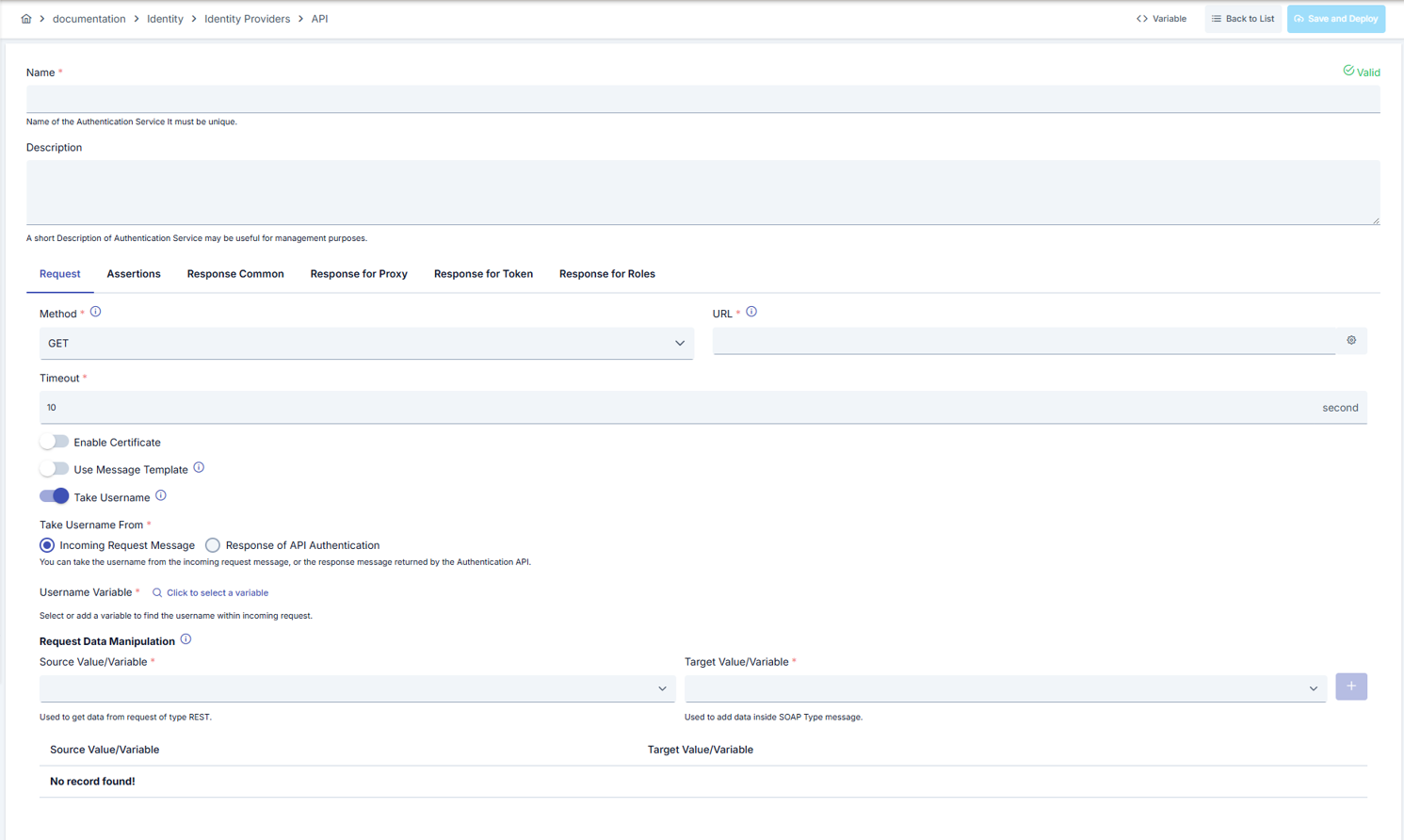
The fields used in Request tab configuration are shown in the table below.
| Field | Description |
|---|---|
| Name | Name information of the API Identity Provider for the created Identity Provider. |
| Description | A description can be written to facilitate management related to the created API Identity Provider. |
| HTTP Method (Method) | The HTTP Method of the API address that will perform Authentication is selected. Default Value: GET. |
| URL (URL) | The address of the API that will perform Authentication is entered. |
| Timeout (Timeout) | If connection to the server is not made within the time given in seconds, it gives an error and the connection is terminated. Default Value: 10 seconds. |
| Use Message Template (Use Message Template) | Activated if a message template will be used for the API. |
| Template Content Type (Template Content Type) | The type of message template content is selected. Default Value: JSON. • XML • JSON |
| Message Template (Message Template) | Message template is entered depending on the selected message template type. |
| Take Username (Take Username) | Activated if username will be taken. |
| Take Username From (Take Username From) | The place where the username will be taken from is selected. Default Value: Incoming Request Message. • Incoming Request Message (Incoming Request Message) • Response of API Authentication (Response of API Authentication) |
| Username Variable (Username Variable) | A variable must be selected to access the username value. |
| Request Data Manipulation (Request Data Manipulation) | You can move parts of the incoming request that you want into the request message sent to the API that will perform authentication. Source Variable specifies which part of the incoming message will be taken, and Target Variable specifies where this information will be placed in the message to be sent to the API. |
| Variable Button (Variable) | You can select dynamic values for fields using the [<> Variable] button at the top of the page. For details, review Dynamic Variables. |
Assertion Tab
An image containing the Assertion tab from the settings required for user verification via API is shown below:

The fields used in Assertion tab configuration are shown in the table below.
| Field | Description |
|---|---|
| Assertion | |
| Assert Result Status Code (Assert Result Status Code) | Selected to use a specific result status code for assertion. |
| Expected Status Code (Expected Status Code) | The status code expected to be returned by the API is entered. |
| Assert Result Body (Assert Result Body) | Selected when a specific body is expected to be returned for assertion. |
| Expected Result Body (Expected Result Body) | The text that the response messages returned by the API are expected to contain is entered. |
| Assert Result XPath (Assert Result XPath) | Selected when a specific field of the incoming Xml message is expected to return a specific value for assertion. |
| XPath Expression (XPath Expression) | Xpath pointing to the part where the expected value is located is entered. |
| Expected Result Body (Expected Result Body) | The expected value is entered. |
| Assert Result JsonPath (Assert Result JsonPath) | Selected when a specific field of the incoming Json message is expected to return a specific value for assertion. |
| JsonPath Expression (JsonPath Expression) | Jsonpath pointing to the part where the expected value is located is entered. |
| Expected Xml Result (Expected Xml Result) | The expected value is entered. |
Common Response Tab
An image containing the Common Response tab from the settings required for user verification via API is shown below:

The fields used in Common response tab configuration are shown in the table below.
| Field | Description |
|---|---|
| Response Common (Response Common) | |
| Use Response Status Code of API in case of Failed Result (Use Response Status Code of API in case of Failed Result) | When a message that the assertion part will consider unsuccessful arrives, it returns the incoming Http status code as a response. |
| Use Response Message of API in case of Failed Result (Use Response Message of API in case of Failed Result) | When a message that the assertion part will consider unsuccessful arrives, it returns the error message as a Token response. |
Response for Proxy Tab
An image containing the Response for Proxy tab from the settings required for user verification via API is shown below:
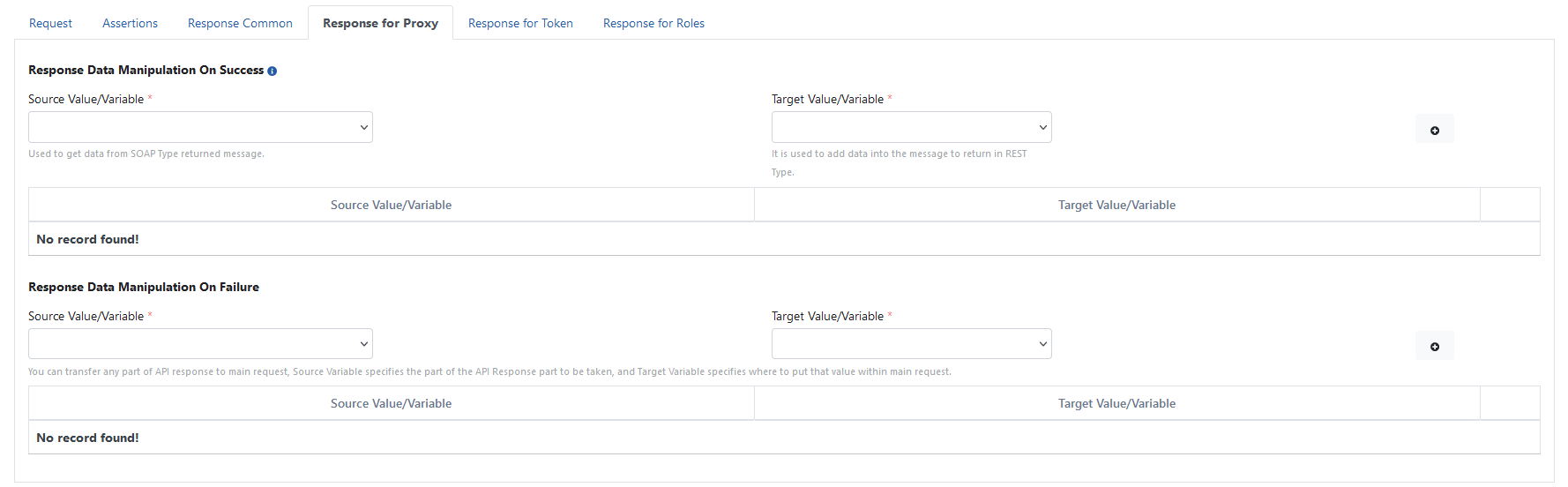
The fields used in Response for proxy tab configuration are shown in the table below.
| Field | Description |
|---|---|
| Response for Proxy (Response for Proxy) | |
| Response Data Manipulation On Success - Source Value/Variable (Response Data Manipulation On Success - Source Value/Variable) | Variable used to express where any value in the message content should be taken from. (You can visit the Variables page for variable usage.) |
| Response Data Manipulation On Success - Target Value/Variable (Response Data Manipulation On Success - Target Value/Variable) | Variable used to express where any value taken from the message content to be returned in the response message should be placed. (You can visit the Variables page for variable usage.) |
| Response Data Manipulation On Failure - Source Value/Variable (Response Data Manipulation On Failure - Source Value/Variable) | Variable used to express where any value in the message content should be taken from. (You can visit the Variables page for variable usage.) |
| Response Data Manipulation On Failure - Target Value/Variable (Response Data Manipulation On Failure - Target Value/Variable) | Variable used to express where any value taken from the message content to be returned in the response message should be placed. (You can visit the Variables page for variable usage.) |
Response for Token Tab
An image containing the Response for Token tab from the settings required for user verification via API is shown below:
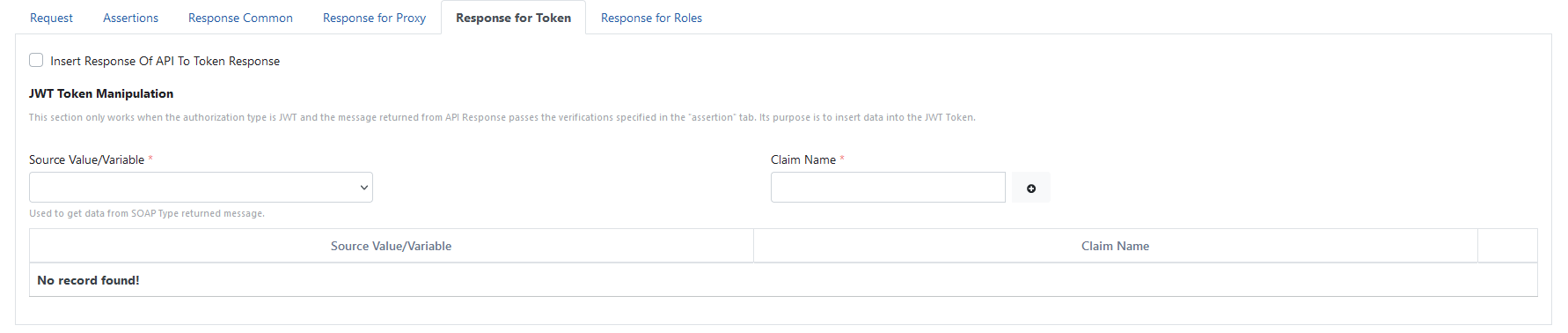
The fields used in Response for token tab configuration are shown in the table below.
| Field | Description |
|---|---|
| Response for Token (Response for Token) | |
| Insert Response Of API To Token Response (Insert Response Of API To Token Response) | If selected, the response returned from the API is returned as a Token response. |
| JWT Token Manipulation - Source Value/Variable (JWT Token Manipulation - Source Value/Variable) | Variable used to express where any value from the message content to be returned in the response message will be taken from. (You can visit the Variables page for variable usage.) |
| JWT Token Manipulation - Claim Name (JWT Token Manipulation - Claim Name) | The part taken from the message content is added to the Jwt Token's content with the name given here. |
Response for Roles Tab
An image containing the Response for Roles tab from the settings required for user verification via API is shown below:

The fields used in Response for roles tab configuration are shown in the table below.
| Field | Description |
|---|---|
| Response for Roles (Response for Roles) | |
| Response Contains Roles (Response Contains Roles) | Activated if it is desired to get the roles of the authenticated user from within the response returned by the API. |
| Response Contains Roles (Response Contains Roles) | Variable used to express which value in the message content contains the roles. (You can visit the Variables page for variable usage.) |
Synchronization
Using the Synchronization tab on the API Authentication Provider edit screen, you can synchronize users from this source into Consumer records on a schedule or via a manual run. The tab's Synchronize Now button becomes available only after the provider has been saved once; it does not appear yet on the create screen.
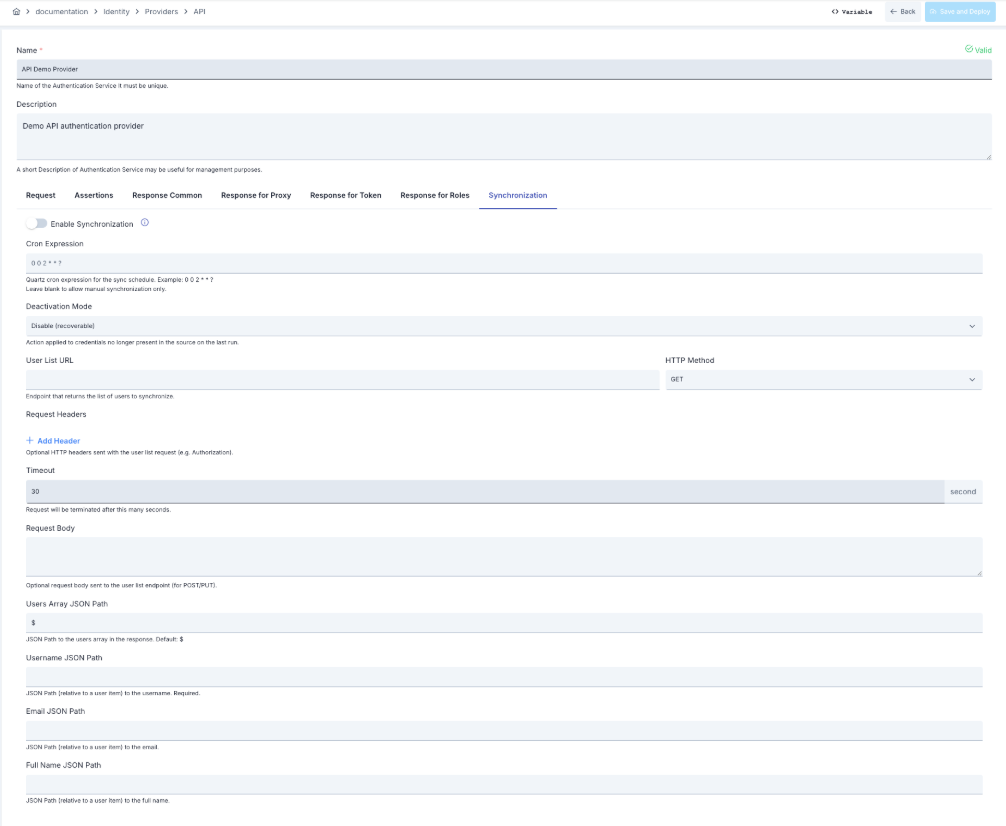
For shared fields (enable, cron, deactivation mode), API-specific fields (user list URL, JSON Path expressions, and so on), and sync status/history, see Provider Synchronization.
User and Organization JSON Path Contract
| Field | Behavior |
|---|---|
| Users Array JSON Path | The user array in the response. Default: $ |
| Username JSON Path | Required. |
| Email JSON Path | Optional. |
| Full Name JSON Path | Optional. |
| Stable Id JSON Path | Optional. Left blank, a renamed user is treated as a new person. |
| Account Status JSON Path | Accepted values: true/false, 1/0, yes/no, active/inactive, enabled/disabled. |
| Organization Path JSON Path | Example: /Head Office/Information Technology. Left blank, existing organization links are kept. |
| Organization Stable Id JSON Path | An organization is tracked even when its path changes. |
| Next Page JSON Path | Left blank, the source is read with a single call. Accepts an absolute or a relative address. A repeated value is treated as a paging loop. |
| Maximum Pages | Default: 1000. A run that hits the limit is reported as incomplete. |
| Organization List URL | Optional separate endpoint, read once before the users, with the same headers and timeout. Left blank, the organization tree is derived from the user rows. |
| Organization Array JSON Path | Required once an Organization List URL is entered. |
| Organization Path Field | Required once an Organization List URL is entered. |
| Organization Name Field | Left blank, the last segment of the path is used. |
| Organization Stable Id Field | Optional. |
| Parent Organization Path Field | When given, it replaces the parent that would otherwise be derived from the path. |
Example response (user array path users, stable id id, next page path next):
{
  "users": [
    { "username": "jane.doe", "email": "jane.doe@acme.com", "fullName": "Jane Doe",
      "id": "u-4821", "enabled": true, "organizationPath": "/Head Office/Information Technology" }
  ],
  "next": "https://idp.example.com/api/users?page=2"
}
Organization list example (organization array path organizations, path field path):
{
  "organizations": [
    { "path": "/Head Office/Information Technology", "name": "Information Technology", "id": "org-12", "parentPath": "/Head Office" }
  ]
}
The JSON key names in the examples above (users, username, fullName, id, next, organizations, parentPath, and so on) are illustrative — the JSON Path expressions you configure describe your own source's actual response shape, which may use different key names.
What Can Go Wrong
| Situation | Result |
|---|---|
| The Organization List URL answers with an error | User synchronization still completes; only the organization list is skipped, and the run records a diagnostic. |
| The Organization List URL returns no usable rows | The run records a warning; the organization tree falls back to what is derived from the user rows. |
| Next Page JSON Path repeats the same value | The run stops as an error, and deactivation is skipped for it. |
Connection Test and Source Preview
The provider's edit screen offers three diagnostic tools. All three work against the request currently entered in the form, and none of them writes anything.
| Action | What it does |
|---|---|
| Test connection (step by step) | Measures the connection in 11 separate steps and shows each one on its own row — see Connection Test Step Matrix. |
| Preview | Reads the first records the user endpoint (and, if configured, the organization list endpoint) would return — see Source Preview. |
| Explain | Walks a single username through the same steps synchronization itself takes, and shows the outcome of each — see Explain User. |
All three send requests, from the Manager, using the request currently entered in the form — they therefore require the "Manage Authentication Services" permission, the same as saving the provider.
Connection Test Step Matrix
Test connection (step by step) opens a Connection Test dialog. Each step is measured separately, so you can see exactly where the connection breaks. If a step fails, every step after it is reported as Not applicable.
| # | Step |
|---|---|
| 1 | Configuration Check |
| 2 | Host Name Resolution |
| 3 | Server Connection |
| 4 | Secure Connection (TLS) |
| 5 | User Request |
| 6 | Response Format (JSON) |
| 7 | User List Path |
| 8 | Field Paths |
| 9 | Second Page |
| 10 | Organization Path |
| 11 | Organization List Request |
The result table shows, for each step, its status (Succeeded, Failed, Not applicable, or Unsupported), duration, an explanation, and — when relevant — the HTTP status, a provider code, a suggestion, and a technical detail.
Source Preview
Preview opens a Source Preview dialog. This preview calls the user endpoint and reads the first records; it creates, updates, and deactivates nothing.
- The number of records read is capped at 200.
- Turning on Dry run reads every page and reports what a synchronization run would change, still without writing anything.
- Results are shown on three tabs: Users, Organizations, Issues.
- The Users tab shows, per row: User Name, Full Name, E-mail, Stable Identity, Account State, Organization Path, and Resolved Organization.
- The Organizations tab shows, per row: Path, Name, Source Code, Source (From list or Derived), and Users.
With Dry run on, a Dry Run Difference box also reports Users read/Organizations read, and how many records would be created, updated, deactivated, unlinked, reactivated, or would skip (a row whose user name is already registered under another project — see API-I11 below). Reactivated counts a consumer that synchronization previously disabled because it disappeared from the source and that has since reappeared — this behavior is the same on every source and never touches a consumer disabled by hand, see Behavior and Safety Notes. If the list was read only in part, the would-deactivate counts are reported as zero rather than the real number, to avoid suggesting a mass deactivation that has not actually been checked.
Preview Issues
The Issues tab lists one row per rule the preview's data raised, with a code, a severity, and a finding; some rows also carry a one-click Apply fix.
| Code | Severity | Finding |
|---|---|---|
| API-I00 | Error | The source could not be read at all. |
| API-I01 | Warning | Row(s) with a blank username/email were skipped. |
| API-I02 | Warning | The same login is used by more than one row; only the first was created. |
| API-I03 | Error | A configured JSON Path matched nothing on any row. |
| API-I04 | Warning | Organization path(s) could not be read. |
| API-I05 | Warning | An organization path is not in the organization list; it was derived from the user row instead. |
| API-I06 | Warning | An account state value was not recognized; the account was taken as active. |
| API-I07 | Warning | The stable identity is blank on some rows. |
| API-I08 | Error | Paging looped or hit the page limit; the list was read only in part. |
| API-I09 | Info | An organization path matches a manually created organization; it was adopted and stays under manual management. |
| API-I10 | Info | No organization path field is configured at all; only users are synchronized. |
| API-I11 | Warning | The user name is already registered in another project, so no consumer is created for that row. Rename the user in the source, or move the existing consumer to this project. |
Explain User
Explain opens an Explain User dialog: enter a username to see step by step why a user is synchronized or not, across 7 steps.
| # | Step |
|---|---|
| 1 | Row Lookup |
| 2 | Raw Values |
| 3 | Organization Path |
| 4 | Organization Resolution |
| 5 | Account State |
| 6 | Stable Identity |
| 7 | Result |
Each step reports Success, Warning, Failed, Not applicable, or Skipped, together with an explanation and, where relevant, the values it read.