LDAP Active Directory
Accessible and manageable by roles that have the "Manage Authentication Services" permission such as "Project Owner".
List
Directories that Apinizer uses to authenticate API calls and to synchronize consumers are listed on this screen. Use the search box to filter by name, and the two filters next to it to narrow the list further.
| Filter | Description |
|---|---|
| Status | All statuses, Enabled, or Disabled. Reflects the provider's Enable Synchronization setting. Hover over the column header for the same explanation. |
| Directory Type | All directory types, Active Directory, OpenLDAP, or Other. Comes from the Directory Type of the provider's connection pool. |
The table shows the following columns.
| Column | Description |
|---|---|
| Name | The provider's name and description. |
| Directory Type | A badge with the Directory Type of the connection pool. Empty when you cannot view the connection, or the pool no longer exists. |
| Server | The server address of the connection. |
| Base DN | The Base DN of the connection. |
| Status | An Enabled or Disabled badge for the provider's synchronization setting. |
| Project | Only in admin (global) scope. The name of the project the provider belongs to. |
Each row has a single ⋮ menu, in this order: View, Edit (if you can manage identity providers), Duplicate (if you can manage global settings), Delete (if you can manage identity providers), Move to Global (if you can manage identity providers, for a provider that is not already global), and Export (if you can export/import identity data).
Click + New at the top of the screen to create a provider, or Import to bring one in from an export package.
View
The view screen opens from a row's name or View button, in the standard page frame: a plain Back bar above a single main card. The card's title row shows the provider's name, an Enabled/Disabled synchronization badge, a Directory Type badge, and its description. If you can manage identity providers, the same title row also has, in order, Edit, Delete, Connection Test, and Directory Preview buttons.
There is no Synchronize… button on this screen. To start a synchronization run for this provider, open the Synchronization screen.
Below the header, a Configuration tab holds the cards described below. An Audit and Rollback tab holds the provider's change history and lets you roll back to an earlier version — see Asset Lifecycle.
Configuration cards
General — the provider's Name, Description, and Directory Type (as a badge).
Connection and bind — read from the connection pool: Server Address, Security (LDAPS or StartTLS), Base DN (from the connection), and Connection Timeout; then the LDAP Authentication Type (Simple or Advanced — see Edit below), the User Configuration Expression when Simple authentication is used, the Bind DN, and the Bind password. The password is always shown as a masked value, or Not set when the connection pool has none — the value itself is never shown on this screen. If you cannot view the provider's connection, the card shows a note instead of these values.
Users and Groups (side by side) — for Simple authentication, both cards show a note that they are not used. For Advanced authentication, each shows its object class definition, read-only: the object class name, the custom filter and base DN attributes, the search scope, an Attribute mapping box, and the attributes to fetch. Users additionally shows the account state attribute and format; Groups additionally shows how membership is determined and the member strategy — see Users and Groups under Edit below for what each field means.
Membership — how a user's group membership is determined (with an explanation next to it), the membership and member attributes, and the member strategy. When membership is determined automatically, the member strategy shows Detected automatically instead of a fixed value, because the format of each member value is then read individually.
Synchronization — the provider's sync profile, read-only:
| Field | Description |
|---|---|
| Enable Synchronization | See Provider Synchronization. |
| Schedule | The cron expression, or Manual only when it is blank. |
| Deactivation Mode | See Provider Synchronization. |
| Scope: users / Scope: groups | How many include/exclude patterns are set for users and for groups/organizations, and which field and pattern type they match — see Edit below. |
| Scope Exit Policy | What happens to a record that still exists in the source but no longer matches the scope: Leave as is, Disable, or Tombstone. |
| Deactivation thresholds | The percentage and record-count guardrails: reconciliation pauses for approval instead of running when the records it would deactivate exceed either one. |
| Without stable identity | Whether reconciliation is prevented from deactivating or deleting records when the source returns no stable external identity (so a renamed user is not mistaken for a removed one). |
Directory Preview
Opens from the Directory Preview button. It reads the directory with the provider's saved configuration and writes nothing. It has tabs for Users, Groups, Membership, and Issues, plus a Full scan (dry run) option that pages through the whole directory and reports what a real synchronization run would create, update, or deactivate. The Issues tab lists configuration problems such as a group object class whose member attribute does not match its object class (code LDAP-I14); some issues carry an Apply suggestion, which you can only write back to the form from the Edit screen.
Synchronization history
At the bottom of the screen, a Synchronization History card lists the last runs of this provider — the same table as the project-wide Synchronization screen, without the Source column, described in Provider Synchronization. Click Refresh to reload it, or click an N issues badge to open the issues drawer for that run. While one of the listed runs is queued or running, the card reloads itself automatically every few seconds, so you do not need to click Refresh to watch it progress. Click Open Synchronization screen to see the provider's full run history and every other source in the project.
Edit
The edit screen has a Configuration tab and, for a saved provider, an Audit and Rollback tab (see Asset Lifecycle). The standard breadcrumb bar at the top holds Back, Variable, Directory Preview, and Save and Deploy. Directory Preview reads the directory with the values currently on the form, including changes you have not saved yet.
Directory Presets
Click [Apply Preset] and pick a directory type to fill the user and group definition fields with matching defaults:
- Active Directory
- OpenLDAP
- 389 Directory Server / FreeIPA
- Active Directory (groups kept as organizational units)
A confirmation dialog states that the chosen preset's values will replace anything you already entered in these fields, and that nothing is saved until you review the values and save the form yourself.
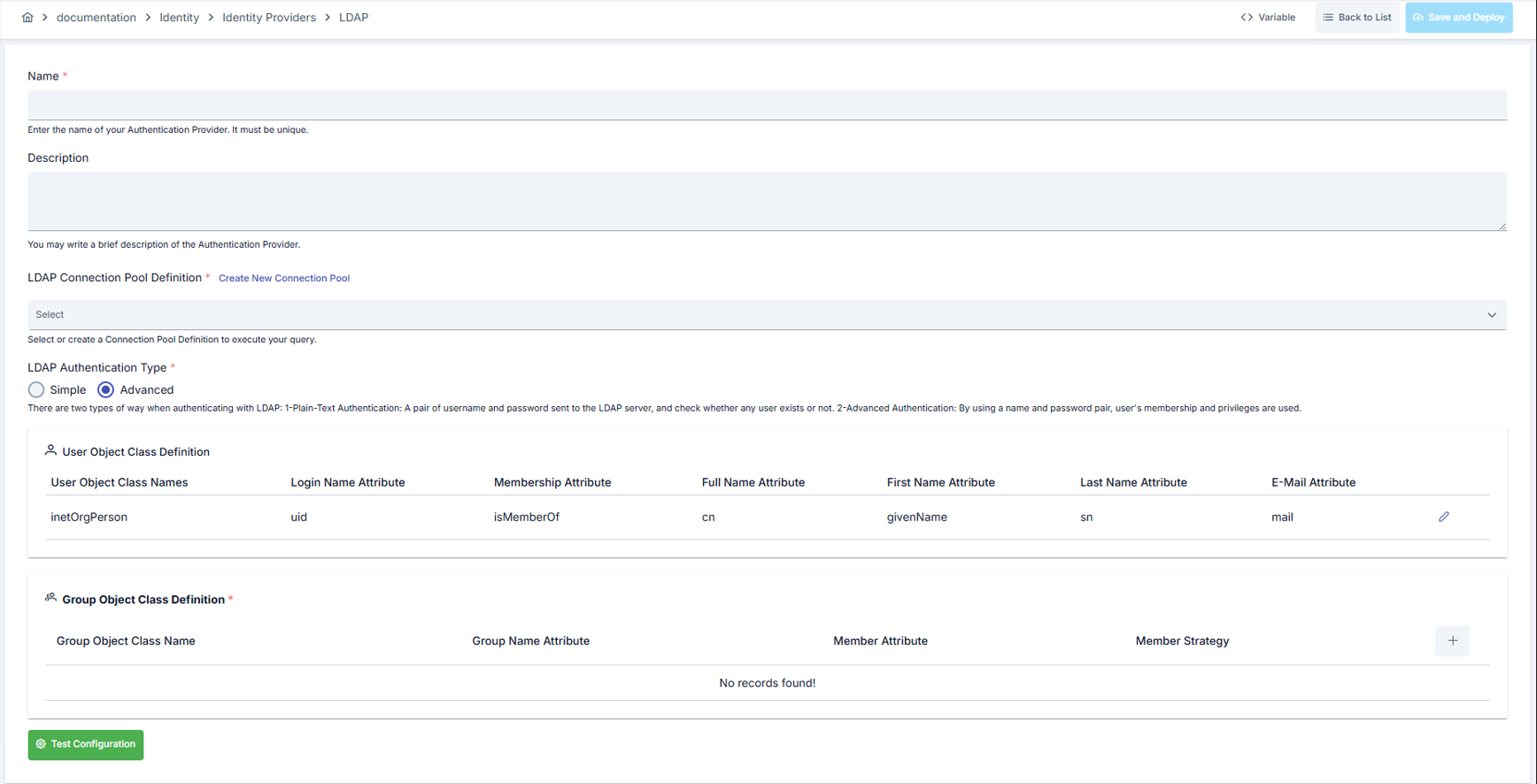
An image containing connection settings for user verification with LDAP is shown below:
General
| Field | Description |
|---|---|
| Name | The provider's name. Must be unique — a badge next to the field shows whether the name you typed is available. |
| Description | An optional description. |
Connection and bind
Select the LDAP Connection Pool Definition, or click Create New Connection Pool to define one without leaving this screen. Once selected, the pool's Server, Base DN, Bind DN, and Bind password (masked, or Not set) appear read-only under it — these values, including the bind account's password, are edited on the connection pool itself, not here.
Two buttons next to the section title test the connection with the values currently on the form, so they also work before the provider is saved:
| Button | Description |
|---|---|
| Test connection | Runs the full step-by-step connection test (the same matrix as the List screen's Connection Test). |
| Test bind | Signs in with only the bind DN and password of the connection pool. |
Choose the LDAP Authentication Type, Simple or Advanced:
- Simple — enter the User Configuration Expression. Test Configuration signs in with a test username and password through this expression; if the expression or the connection pool uses a variable, the test opens an environment picker first.
- Advanced — click Apply Preset to fill the Users and Groups sections below with the defaults of a directory type (Active Directory, OpenLDAP, 389 Directory Server / FreeIPA, or Active Directory with groups kept as organizational units). Applying a preset replaces values already entered in those fields, but nothing is saved until you save the provider. Test Configuration here reads a small sample of users and groups with the values on the form.
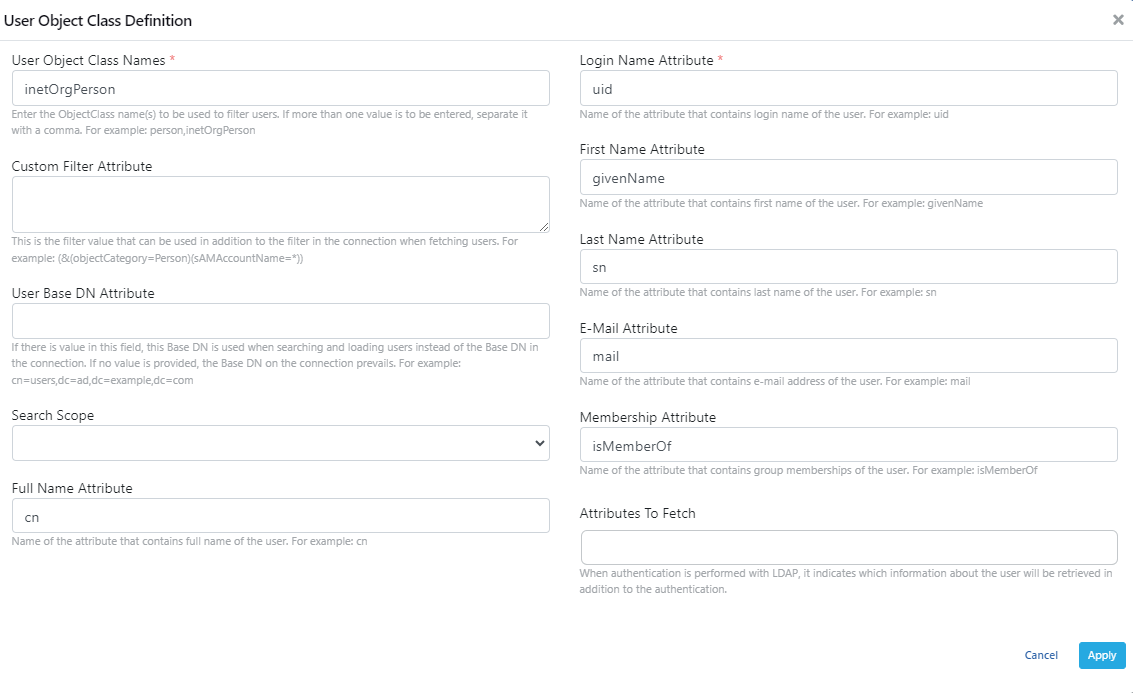
Users
A summary of the current User Object Class Definition is shown read-only, with a Configure button that opens it in a drawer (Advanced authentication only — the summary shows a note instead, for Simple).
| Field | Description |
|---|---|
| User Object Class Names | The class name(s) used to filter users. Separate more than one with a comma. Example: person,inetOrgPerson |
| User Base DN Attribute | Used instead of the connection's Base DN when searching and loading users, if set. Example: cn=users,dc=ad,dc=example,dc=com |
| Custom Filter Attribute | An additional filter used together with the connection's filter when fetching users. Example: (&(objectCategory=Person)(sAMAccountName=*)) |
| Search Scope | The level at which the search runs under the base DN. |
| Attribute mapping — Login Name Attribute | The attribute holding the user's login name. Example: uid |
| Attribute mapping — First Name Attribute | The attribute holding the user's first name. Example: givenName |
| Attribute mapping — Last Name Attribute | The attribute holding the user's last name. Example: sn |
| Attribute mapping — Full Name Attribute | The attribute holding the user's full name. Example: cn |
| Attribute mapping — E-mail Attribute | The attribute holding the user's e-mail address. Example: mail |
| Attribute mapping — Membership Attribute | The attribute holding the user's group memberships. Example: isMemberOf |
| Attributes To Fetch | Extra attributes read for the user in addition to authentication; see below. |
| Account State Attribute | The attribute that tells whether the account is switched off in the directory. Example: userAccountControl on Active Directory, pwdAccountLockedTime on OpenLDAP, nsAccountLock on 389 Directory Server / FreeIPA. Leave it empty to keep the current behavior: the account state is not read, and synchronization never deactivates a consumer because of it. |
| Account State Format | How to read the value of that attribute. Picking the wrong format does not raise an error — it silently reports every locked account as active, so make sure it matches your directory. |
Attributes To Fetch
An account switched off in the directory is switched off in Apinizer too, once synchronization reads it. When the account is switched on again in the directory, synchronization switches it back on automatically. An account you switched off yourself in Apinizer is never touched by synchronization.
When authentication is performed with LDAP, these attributes are read for the user in addition to authentication, if present:
- If the provider is used to generate a JWT, the attributes and their values (excluding null ones) are added to the JWT as claims.
- If the provider is used with plaintext, basic, or digest authorization, the attributes and their values are added to the message context as custom variables, with the key prefixed by
#clientLDAPAttribute#.. For example, anmailattribute becomes the key#clientLDAPAttribute#mail.
A binary attribute is returned as text: Active Directory objectGUID in GUID form, objectSid in S-1-5-21-... form, and any other binary attribute as Base64.
Groups
A summary of the current Group Object Class Definition is shown read-only, with a Configure button that opens it in a drawer (Advanced authentication only).
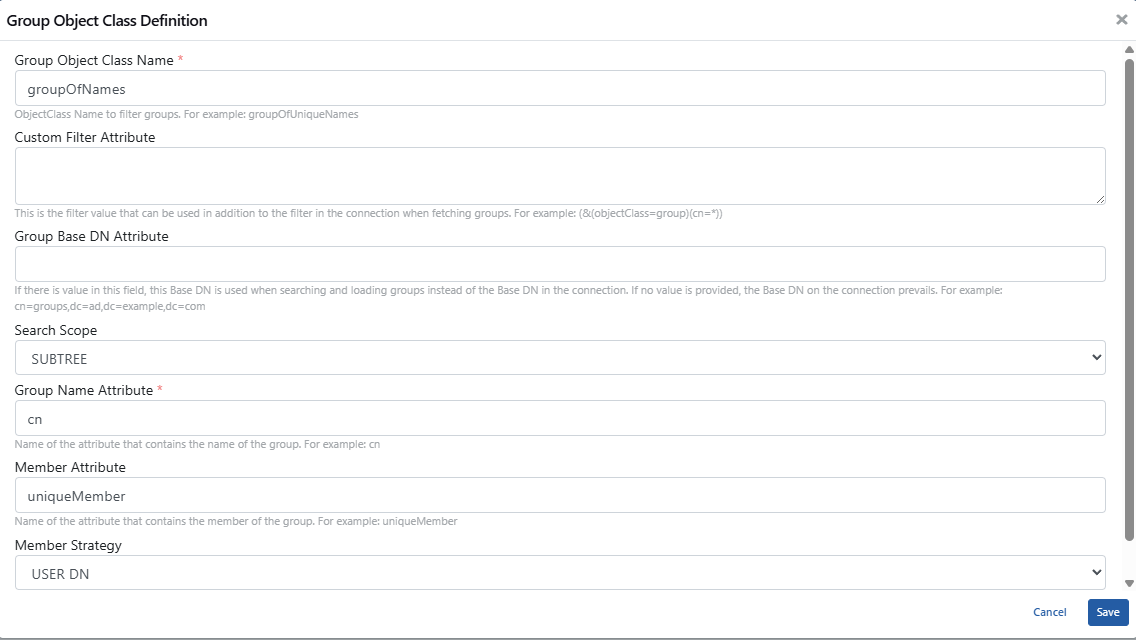
With Advanced authentication, Save and Deploy stays disabled until a Group Object Class Definition is configured.
| Field | Description |
|---|---|
| Group Object Class Name | The class name used to filter groups. Example: groupOfUniqueNames |
| Group Base DN Attribute | Used instead of the connection's Base DN when searching and loading groups, if set. |
| Custom Filter Attribute | An additional filter used together with the connection's filter when fetching groups. |
| Search Scope | The level at which the search runs under the base DN. |
| Attribute mapping — Group Name Attribute | The attribute holding the group's name. |
| Attribute mapping — Member Attribute | The attribute holding the group's members. The value must match the group object class: member for groupOfNames and Active Directory group, uniqueMember for groupOfUniqueNames, memberUid for posixGroup. With a mismatched value, every group is read as empty and no user is linked to an organization — the Directory Preview screen's Issues tab reports this as LDAP-I14, and its Apply button writes the correct value into this field. Active Directory returns the members of a group with more than 1500 members in parts (member;range=); Apinizer reads all parts. |
| How is membership determined? | Selects how a user's group membership is resolved: the current behavior (default, unchanged), automatic detection (recommended), from the user's own membership attribute, from the group's member list, from the organizational unit the user is placed under, or both the OU and every membership list. If you are not sure, leave it as is or choose automatic detection — changing it only affects how memberships are read, not the directory itself. |
| Member Strategy | The strategy used to find a group's members, USER DN or USER LOGIN. Not shown when membership is determined automatically or from the organizational unit tree, since the format of each member value is then detected on its own. |
| Attributes To Fetch | Extra attributes read from each group. Adding the attribute that never changes when a group is renamed or moved (objectGUID on Active Directory, entryUUID on OpenLDAP and 389 Directory Server / FreeIPA) keeps the organization, its limits, and its members attached to the same record after the move. |
Testing the Connection Step by Step
Click [Test connection (step by step)] at the top of the provider screen to measure the connection in 12 separate steps before you save. Each step reports its own result, so you can see exactly where a problem breaks down. The older, single-result Test Configuration flow is still available too.
| # | Step | What it checks |
|---|---|---|
| 1 | Configuration Check | Consistency of the form fields (address format, TLS options, required fields) |
| 2 | Server Connection | Whether the LDAP server can be reached over the network |
| 3 | Secure Connection (TLS) | The LDAPS/StartTLS handshake |
| 4 | Service Account Sign-in | Signing in with the service account configured on the connection |
| 5 | Directory Information | The directory type and tree roots the server reports about itself |
| 6 | Schema Check | Whether the configured object classes and attribute names exist in the directory schema |
| 7 | Base DN Read | Whether the root the searches start from is readable |
| 8 | User Search | Whether the configured user filter returns at least one record |
| 9 | Group Search | Whether the configured group filter returns at least one record |
| 10 | Attribute Permissions | Whether the service account can see all of the requested attributes |
| 11 | Membership Resolution | Whether the sampled users resolve to an organization under the configured membership mode |
| 12 | Paged Search Support | Whether the server can return large result sets page by page |
Each row shows a status badge next to an explanation, a suggestion, and a copyable technical detail. When an attribute is not defined in the directory's schema, or the service account cannot see it, the matching step reports that on its own.
Directory Preview
Click [Directory Preview] to read the directory with the values currently on the form and see what synchronization would produce, without writing anything.
The preview has four tabs:
- Users: username, full name, e-mail, distinguished name, the organization the user would be linked to, the source of that link, and the raw attributes read.
- Groups: name, distinguished name, type (group or organizational unit), member count, and the format of its member values.
- Membership: each user next to the groups or organizational units it resolves to, with a filter to show only users that are not linked.
- Issues: configuration problems found while reading the preview (see below).
Click [Full scan (dry run)] to scan the whole directory with paging and see a report of what synchronization would change — records that would be created, updated, deactivated, or left without an organization — while still writing nothing.
Issues
| Code | Meaning | What to do |
|---|---|---|
| I01 | None of the users read carry the configured membership attribute. | On Active Directory this attribute is usually memberOf. If your directory does not publish group membership on the user entry at all, switch How is membership determined? to a mode that uses group member lists or the organizational unit tree instead. |
| I02 | Group member values are in a different format than the configured strategy expects, so the reverse lookup can never match. | Switch How is membership determined? to Find automatically so the format of each member value is detected on its own. |
| I03 | Some of the groups read are organizational units and carry no member list. | In this layout a user belongs to the organizational unit it is placed under. Set How is membership determined? accordingly. |
| I04 | None of the member values match any of the users read. | The user search root and the groups are probably looking at different parts of the tree, or the user name attribute does not match the format used in the member values. |
| I05 | The group search returned no records for the configured object class. | Check the group object class and the group search root. If your groups are organizational units, use organizationalUnit. |
| I06 | The server does not support paged search results. | Synchronization can only read the first page, so some users will be missing and records will not be reconciled correctly. Enable paged results on the directory server. |
| I07 | The login name attribute is empty on some of the users read. | The user name is taken from this attribute. On Active Directory it is usually sAMAccountName. |
| I08 | The directory returned a referral during the search. | Some records may live on another server and are not read. Consider pointing the connection at a server that holds the whole tree. |
| I09 | On Active Directory the primary group of a user is not listed on the user entry. | This is normal. A user that appears to be missing from a group such as Domain Users is affected by this. |
| I10 | A member value points to another group (nested group). | Nested groups are detected but not resolved yet: members of the inner group are not treated as members of the outer one. |
| I11 | The stable-identity attribute is not in the list of attributes to read. | Without it, a renamed or moved user is treated as a new person: the old record is deactivated and a new one is created, so the organization and limit links are lost. Add objectGUID (Active Directory) or entryUUID (OpenLDAP, 389 Directory Server / FreeIPA). |
| I12 | Configured attributes are not defined in the directory schema. | The server silently ignores an attribute it does not know. Check the spelling and whether the attribute belongs to a different directory product. |
| I13 | Requested attributes came back empty on every user read. | The service account is probably not allowed to see them. Check the access rights of the account used to connect. |
| I14 | None of the groups read has a member in the configured Member Attribute, although the group object class normally keeps its members in a different attribute. Every group looks empty, so no user is linked to an organization. | Set Member Attribute to the value the group object class uses: member for groupOfNames and Active Directory group, uniqueMember for groupOfUniqueNames, memberUid for posixGroup. The [Apply] button writes it for you. |
Where a fix is available, an [Apply] button writes the suggestion to the form; review it and save.
Explain
Explain answers "why is this user's group empty?" for a single account. Enter a user name — and, optionally, a password to also attempt a sign-in — and click [Explain] to see, step by step:
- whether the user was found in the directory, and with which search filter,
- the raw attributes read from the user entry (as far as the service account can see them),
- how each of the three membership sources (user attribute, group member list, organizational unit tree) resolves for this user, with the filter used and the result,
- the final result used, and the organization it produces,
- a simulation of what would happen if this user signed in to the management console (which projects it would be a member of),
- a simulation of what would happen if this user called an API as a consumer (whether a matching consumer exists, its organization, and its active limit assignments),
- the account status, when an Account State Attribute is configured.
Passwords entered for the sign-in attempt are never stored or displayed.
How This Provider Works
A flow strip at the top of the provider screen summarizes the six stages this provider goes through, and clicking a stage jumps to the matching section of the form:
Connect (which server and connection) → Bind (which account authenticates) → Users (where users are searched and which attributes are read) → Groups (which group/OU entries are read) → Membership (how a user is attached to an organization) → Synchronization (schedule, scope, and the last run).
Membership check
This card only has a one-line description and an Explain button; testing a user happens in the dialog that button opens.
- For Advanced authentication, the description is the Explain dialog's own subtitle: it shows step by step how a single user is found in the directory and how the membership is resolved.
- For Simple authentication, which reads no groups, the description points you to Test Configuration in Connection and bind instead.
In the Explain dialog, enter a User name and, optionally, a masked Password (optional). Without a password, the dialog only searches for the user; with one, it also attempts a sign-in — the password is never stored or displayed. Opened for Advanced authentication, the dialog also shows a User details block with the user's Login Name, Full Name, First Name, Last Name, and E-Mail, and a name badge next to each group's distinguished name.
Synchronization
A read-only summary (Enable Synchronization, Schedule, Deactivation Mode, Scope: users, Scope: groups, Scope Exit Policy, thresholds, and the without-stable-identity guard) is shown, with a Configure button that opens it in a drawer:
| Field | Description |
|---|---|
| Enable Synchronization | See Provider Synchronization. |
| Base DN (from the connection) | Read-only. See Provider Synchronization. |
| Cron Expression | See Provider Synchronization. Leave it blank to allow only manual synchronization. |
| Deactivation Mode | See Provider Synchronization. |
Below these, a Synchronization Scope section narrows which users and which groups/organizations this provider synchronizes: for each, choose the matched field (such as Username or Path), the pattern type (Glob or Regular Expression), and the patterns to include or exclude. A record outside the scope is not treated as removed from the source — what happens to it is decided by the Reconciliation Safety Net below it:
| Field | Description |
|---|---|
| Scope Exit Policy | Applied to a record that still exists in the source but no longer matches the scope: Leave as is, Disable, or Tombstone. |
| Deactivation Threshold (%) / Deactivation Threshold (records) | When the records that reconciliation would deactivate exceed either the percentage or the count, reconciliation pauses for approval instead of running. The default is 20%; 0 turns a threshold off. |
| Do not deactivate or delete when the source returns no stable external identity | Without a stable external identity, the only key is the username, so a user renamed in the source looks removed. While this is off, the current behavior is kept and the run only records a warning. |
This scope and safety-net editor is shared by all four provider types (LDAP, Database, API, OIDC).
This drawer, and the Users and Groups drawers above, are edited on a copy: Cancel discards your changes, Apply writes them back into the form (still unsaved). A section's heading gets a Changed badge as soon as you edit it directly, or after you click Apply in its drawer.
This screen has no control to start a synchronization run. Open the Synchronization screen to start one.
Save and Deploy
Click Save and Deploy in the breadcrumb bar to open a confirmation that lists which sections you changed, or says no section changed; either way it reminds you that the provider is deployed to every environment where it is used. Click Back to leave the screen without saving.
There is no separate save-only action, and no separate Cancel button. Saving a provider always deploys it — even when no section changed, in which case the provider is only deployed again.
Synchronization Scope
The Matched Field options for filtering which records are synchronized carry worked examples:
| Matched Field | Example |
|---|---|
| Username | svc-* |
*@example.com | |
| Path (DN / group path) | /Groups/* — the DN is read right to left, written as /Eng/Dev, and dc= components are dropped |
| Name | developers |
A Try a pattern box evaluates a sample value against the current patterns without saving anything and without querying the directory.
Group and organization scope filters are enforced during synchronization: a group excluded by the filter is not created as an organization, and an existing organization that falls out of scope is not deleted or deactivated — it is left untouched. A plain literal pattern (no * or ?) is no longer incorrectly rejected as an unsafe pattern during synchronization.
Synchronization Behaviors
- A consumer that synchronization previously deactivated, and that later reappears in the source, is automatically re-enabled. A consumer you deactivated by hand is never touched by synchronization.
- When a user belongs to more than one in-scope group or OU, only one organization is linked — the deepest one. See How the Organization Link Is Determined for the full winner rule and the exceptions to the every-run rewrite.
- If the source directory carries two entries with the same login name, the second one is skipped and recorded as an issue; the first one is kept.
- If an organization with the same distinguished name already exists as a manually created record, synchronization does not create a duplicate organization — it links users to the existing one and records an issue, leaving the organization under manual management until you hand it over.
- If the synchronization schedule cannot be registered — for example an invalid cron expression — the error is shown immediately when you save, instead of only failing silently on the next scheduled run.
- A run that fails, or in which users could not be attached to an organization, produces an issue you can review from [View issues].
If two different LDAP sources contain the same directory entry (the same DN), synchronization from one source does not update the other source's organization record — each source's organization record belongs to that source alone, so a group present in both directories is kept and reconciled separately per source.
During synchronization Apinizer reads the directory page by page using the LDAP PagedResults control (500 entries per page). If the directory server does not support that control — or does not allow it to be used — only the first page can be read. The run is then reported as Warning and, as a safety measure, no consumer is deactivated or deleted; the records that were read are upserted normally. The same safety measure applies when even a single record read from the directory cannot be converted: the run counts as incomplete and deactivation/deletion is skipped. For a full synchronization, enable paged result support on the directory server or raise its server-side size limit.
Even when the directory server appears to support paged results, the same safety measure applies if paging stalls or repeats — the run is still treated as incomplete and deactivation/deletion is still skipped.
A directory that refuses the search is reported differently. If the configured base DN does not exist, or the bind account may not search under it, the run ends as Failed with a reason naming that base DN — not as a Warning about an incomplete read. Both are settings an administrator can correct, so they are kept distinct from a server that simply refuses paging.
Troubleshooting
Users and groups come in, but the user-to-organization/group link is empty
- Open Explain and enter the affected user name. It shows which of the three membership sources found a match and which did not.
- Open Directory Preview and check the Issues tab — I01, I02, I03, and I04 all describe variants of this problem, each with its own fix.
- Check How is membership determined? in the Group Object Class Definition. On Active Directory, the usual choice is the mode that reads the membership attribute (
memberOf). When groups are organizational units, choose Our groups are OUs; a user belongs to the OU it is in. - Turn on Diagnostic Mode on the connection to log every search made, and read the log while reproducing the problem.
- If the problem needs support, download a Support bundle from the Synchronization screen.
Compatibility
| Directory | Status |
|---|---|
| Active Directory 2012 R2 – 2025, including Samba AD | Tested |
OpenLDAP 2.4 – 2.6 (the memberOf overlay is optional) | Tested |
| 389 Directory Server / FreeIPA | Expected to work with the matching preset |
| Other LDAP-compatible directories | Fill the fields by hand, or apply the closest matching preset above. Then verify with Directory Preview and Test Connection |
Backward Compatibility
Existing providers keep working exactly as before: How is membership determined? stays at Current behaviour (default) for them, and organization assignments do not change. The new membership modes apply only when you choose one yourself. During a rolling upgrade where the API Manager is upgraded before the gateway workers, the workers keep resolving membership the old way until they are redeployed.