Model Catalog and Pricing
What's in the Catalog
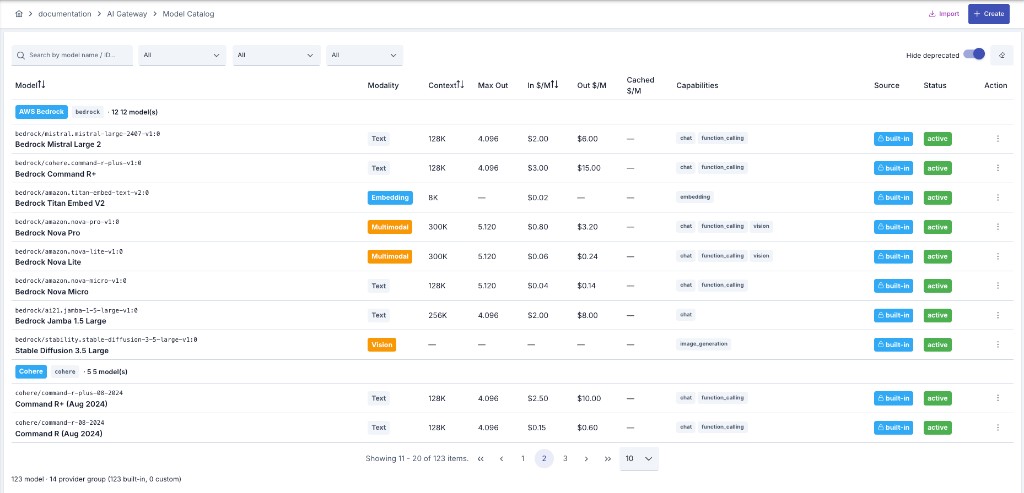
Apinizer AI Gateway ships with a built-in catalog of LLM providers and models, pre-loaded with default pricing — you don't have to manually enter model names or unit prices to start tracking usage and cost. The catalog spans 20+ providers and 180+ models across the major cloud and self-hosted LLM families, and grows as new provider/model combinations are added (most recently the APNZ-6550 catalog refresh, which added nine cloud providers).
The Model Catalog tab follows the same list scoping as the Connections screens: in project mode it lists only the custom models created in the active project; the built-in catalog (and every project's custom models) is browsed under the admin menu. This affects the list only — the provider dropdown on the model form and Clone from Catalog on a provider still see the built-in entries alongside the project's own.
What the Catalog Stores per Model
Provider and model name, so a request for "gpt-4o" or "claude-3-sonnet" resolves to the right connection automatically.
Input, output, and cached-token price per 1M tokens — used to calculate the cost of every request that uses the model.
Which endpoint types a model supports (chat completions, embeddings, audio, image), so requests aren't routed to an incompatible model.
Models you add yourself — for a fine-tuned deployment or a provider not yet in the catalog — with pricing you set.
Model Lifecycle: Deprecated vs. Sunset At
A model record carries two separate lifecycle fields:
- Deprecated — a warning flag. A model flagged this way keeps working; it only means "no longer recommended," and it surfaces as a warning on the Routing tab of any API Proxy that uses the model.
- Sunset At — a hard cutoff date. It's shown on the model's Lifecycle tab alongside General and Capacity & Pricing.
Once the Sunset At date has passed, the gateway stops serving the model: a request naming it is rejected with HTTP 400, and the model no longer appears in the GET /v1/models discovery response. Unlike the deprecated flag, this is enforced, not advisory — set it only to the date the provider actually retires the model.
The date reaches the gateway the same way pricing does: it is copied onto every provider connection that carries the model (see Price Change Propagation below), so a date entered in the catalog also applies to connections that already existed. A model with no Sunset At is never cut off.
Editing a Catalog Entry
Every catalog entry is editable — the ones shipped with Apinizer included. If a provider changes its pricing, or you negotiate a custom rate, update the model's price and new requests immediately use the updated value; historical logs keep their original cost. Pricing can also be managed from AI Cost Settings.
Clicking a row on the Model Catalog tab opens the model's read-only detail page — identity, capacity and pricing, lifecycle, plus a Source card explaining whether the entry is BUILT-IN (ships with Apinizer; your edits override the defaults and survive upgrades) or CUSTOM (created in this workspace; fully editable and removable). The Edit Model button there — or the row menu's Edit action — opens the edit form.
A built-in model is edited from AI Gateway → LLM Providers → Model Catalog, and the edit survives version upgrades — the shipped catalog only seeds models that do not exist yet, so it never writes over a row you already have.
Two fields stay fixed on a built-in row: its provider and its model ID. They are the identity the upgrade uses to recognise the row; if they could be changed, the next catalog refresh would no longer find the model and would add a second copy of it. Everything else — display name, price, context window, maximum output tokens, capabilities, modality, and the deprecated flag — is yours to change. If you need a variant with a different model ID, use Clone and edit the copy.
Editing a built-in row is an installation-wide change (it is shared by every project), so it requires a System Administrator. The APIops REST API is stricter still and rejects any create, update or delete on a builtIn model: that surface is project-scoped, while a built-in row is not. The same split applies to provider definitions.
A System Administrator who opens this screen from the Administration context (no project selected) sees — and can manage — not just built-in rows but every project's custom rows too: the Administration context is deliberately an installation-wide view.
How the Catalog Feeds Cost Tracking
Every request that reaches a provider is metered — input tokens, output tokens, and (when the provider supports it) cached tokens — and priced against the catalog entry for the model that served it. That cost flows into:
- Reports and Analytics — cost breakdowns by person, team, model, and deployment type
- Token Quotas and Rate Limiting — monthly USD budgets are evaluated against the same catalog price
- Routing and Failover — cost-aware routing and per-leg cost caps use catalog pricing to decide where a request should go
Catalog pricing is stored in USD. For an introduction to how tokens are counted and priced, see AI Fundamentals.
Price Change Propagation
Every LLM provider connection keeps its own embedded copy of the models it exposes, and that copy is what the gateway prices live traffic against. When you edit a catalog model's price and save it, those embedded copies are now refreshed automatically. Previously the copy was written once and kept its original price indefinitely, so a catalog price change never reached the connections actually serving requests.
This goes beyond reporting: the embedded price is also what USD budgets and spend limits are enforced against — see Token Quotas and Rate Limiting. A stale price therefore produces both an inaccurate cost report and a quota that cuts off at the wrong point.
Which connections are refreshed depends on who owns the catalog entry:
- A system-defined (built-in) or admin-scoped entry refreshes every matching connection in the installation.
- A project-owned entry refreshes only the connections that belong to that project.
In both cases the connection's provider type must match the catalog entry's provider type.
Pricing is propagated — input, output, and cached-token price per 1M tokens, price per image, price per audio minute, and price per TTS character — together with the model's lifecycle fields: the deprecated flag, its announcement date, and Sunset At. Context window, maximum output tokens, capabilities, and modality are left untouched; they remain per-connection overrides, because an administrator may have narrowed them on purpose.
Because Sunset At travels with pricing, entering a sunset date in the catalog also retires the model on every connection already serving it, on that date. To retire a model on one specific connection ahead of that date — or without touching the catalog at all — disable or remove it on that connection.
If no price actually changed, nothing is saved and no worker deployment is triggered — the same value written at a different scale (2.50 versus 2.5) does not count as a change. Enabled connections are redeployed automatically, so the gateway enforces the new price straight away. A disabled connection still has its stored price refreshed, but it is not deployed and stays disabled; it picks up the current price the next time you enable it.
Importing model definitions does not trigger this synchronization. After an import, save the catalog entry once from the UI so its price reaches the LLM connections that use the model.
Adding a Custom Model
In the Apinizer UI, go to AI Gateway → LLM Providers, then open the Model Catalog tab.
The edit form opens blank. Provider comes first: until you pick a provider, every other field — the model ID included — stays dimmed and locked, because the remaining fields depend on it. Selecting a provider unlocks the form.
Provide the model ID and name, the modality and capabilities, and the capacity and pricing values (USD per 1M tokens; image/audio/TTS unit prices where relevant). The side column shows the entry's Source (a new entry is CUSTOM) and a pricing note.
Click Save and Deploy. The model becomes selectable in any AI Gateway routing to that connection immediately.
Provider Type Catalog
Alongside the model pricing catalog, there is a provider type catalog. These are two different concepts — don't confuse them:
- LLM provider connection (see LLM Providers and Connections) — a configured, running connection instance with credentials.
- LLM provider definition — a template for a provider type: its default endpoint, default API version, default auth scheme, and so on. When you create a new connection, the form pre-fills from this definition; the definition itself carries no secrets.
The catalog is the union of the built-in definitions shipped with Apinizer and any project-specific custom definitions. It has its own UI surface: AI Gateway → LLM Providers → Definitions tab, where every definition can be viewed, and a custom one can also be created, edited, exported, or deleted — see Adding a Custom Provider Definition.
Installation ships built-in provider templates (OpenAI, Anthropic, Azure, and so on) for the connection picker. Custom vendors are configured as LLM provider connections — not through a separate APIops catalog CRUD API. Model catalog entries are managed with LLM Models in APIops.
How a Connection's Defaults Are Resolved
A provider's paths and capability flags (chat completion path, embedding support, and so on) are looked up in this order:
- This provider's own definition — a value set on the definition itself always wins.
- Apinizer's own built-in default for that provider type, when the definition left a value blank.
- A last-resort fallback, when neither of the above says anything.
A product upgrade that refreshes the built-in catalog never touches a custom definition — even one whose code happens to match a built-in provider type — and it does not touch an existing built-in definition either: the refresh only inserts definitions and models that are missing. Anything you configured, on your own definition or on a shipped one, is safe across upgrades; the same holds for a model price you edited in the catalog. It's also why the create form for a custom provider (see Adding a Custom Provider Definition) requires the wire protocol and chat completion path up front: a genuinely custom provider code has no built-in default to fall back to, so leaving those blank would resolve to nothing at request time.