Prometheus Setup and Scraping Configuration for Apinizer Gateway
Prometheus is a monitoring system that pulls metrics from specific targets and stores them as time series data. Scraping is the process by which Prometheus periodically collects metrics from target services. Apinizer Gateway metrics are provided on port 9091, and Prometheus can pull these metrics using two different methods.
Collecting metrics from services defined under static_configs with static IP addresses or DNS names
Automatically discovering pods through Kubernetes service discovery mechanism and collecting metrics
Prometheus Setup and Scraping Configuration
Static (Constant) Scraping Configuration
In the static scraping method, services to be monitored are defined under static_configs with predetermined static IP addresses or DNS names. Prometheus queries these services at regular intervals. This method is useful when service addresses do not change or can be manually defined.
For Apinizer Gateway to publish metrics on port 9091, the METRICS_ENABLED=TRUE parameter must be defined as an environment variable for the relevant container.
...
containers:
  - env:
    - name: METRICS_ENABLED
      value: "true"
...
In Constant Scraping configuration, the service name from which Prometheus will scrape metrics must be specified. Therefore, a service that routes to Apinizer Worker component's 9091 port must be created.
apinizer-prometheus-svc.yaml
apiVersion: v1
kind: Service
metadata:
  name: worker-prometheus-service
  namespace: <WORKER_NAMESPACE>
spec:
  ports:
    - name: metrics
      port: 9091
      protocol: TCP
      targetPort: 9091
  selector:
    app: worker
  type: ClusterIP
For Apinizer Gateway to provide metrics to Prometheus from port 9091, Prometheus scraping configuration must be done via ConfigMap. Constant scraping configuration is performed by defining Prometheus's worker-prometheus-service service in static_configs at the specified address.
apiVersion: v1
kind: Namespace
metadata:
  name: monitoring
---
apiVersion: v1
kind: ConfigMap
metadata:
  name: prometheus-config
  namespace: monitoring
data:
  prometheus.yml: |
    global:
      scrape_interval: 15s
    scrape_configs:
      - job_name: 'my-app-static'
        static_configs:
          - targets: ['worker-prometheus-service.<WORKER_NAMESPACE>.svc.cluster.local:9091']
Dynamic Scraping Configuration
The dynamic scraping method enables Prometheus to automatically discover pods within Kubernetes. With this method, there is no need to make manual scraping configuration for each new pod. Prometheus automatically pulls metrics using specific annotations added to pods. This method provides great advantages in microservice architectures and constantly changing infrastructures.
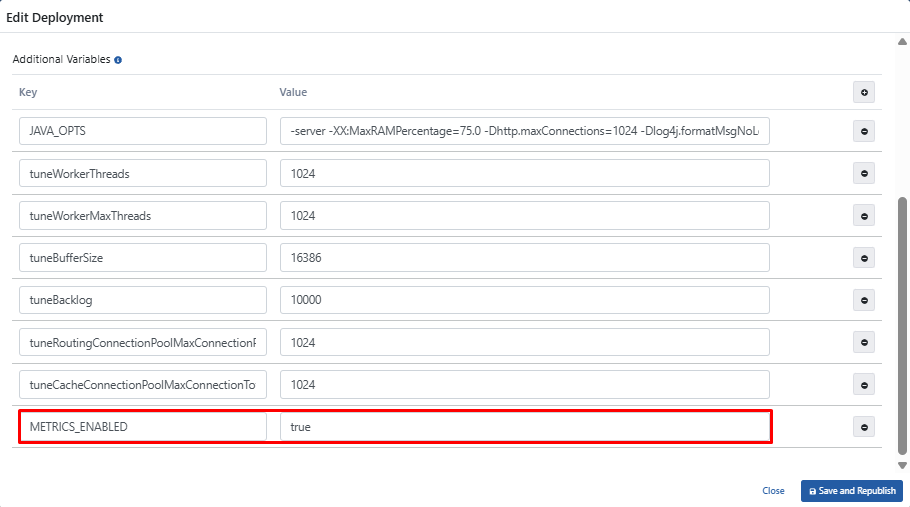
For Gateway metrics to be collected by Prometheus, the METRICS_ENABLED=TRUE variable must be added by selecting Worker edit deployment option in the Deployments & Services section on the Gateway Environments page.
If Kubernetes Management Is Not Done with Apinizer
If Kubernetes management is not done with Apinizer, you need to perform the following steps manually.
For Prometheus to collect metrics from Worker pods, the relevant annotations must be added to the spec.template.metadata.annotations section of the relevant Deployment manifest. Additionally, for Apinizer Gateway to publish metrics on port 9091, the METRICS_ENABLED=TRUE parameter must be defined as an environment variable for the relevant container. This way, the metrics service will be exported on port 9091, and Prometheus will automatically discover and scrape metrics from the Apinizer Gateway pod running on port 9091.
...
template:
  metadata:
    annotations:
      prometheus.io/port: "9091"
      prometheus.io/scrape: "true"
...
...
containers:
  - env:
    - name: METRICS_ENABLED
      value: "true"
...
Prometheus Scraping Configuration
To discover annotations on pods, dynamic scraping must be enabled in Prometheus's ConfigMap configuration using kubernetes_sd_configs.
The following ConfigMap example enables Prometheus to dynamically discover Kubernetes pods. This configuration enables Prometheus to automatically discover Kubernetes pods and collect metrics only from pods with the prometheus.io/scrape: "true" annotation. Thus, metrics can be collected by Prometheus by applying dynamic scraping to Apinizer Gateway without the need for manual target definition.
apiVersion: v1
kind: ConfigMap
metadata:
  name: prometheus-config
  namespace: monitoring
data:
  prometheus.yml: |
    global:
      scrape_interval: 15s
    scrape_configs:
      - job_name: 'kubernetes-pods'
        honor_labels: true
        kubernetes_sd_configs:
          - role: pod
        relabel_configs:
          - source_labels: [__meta_kubernetes_pod_annotation_prometheus_io_scrape]
            action: keep
            regex: true
          - source_labels: [__meta_kubernetes_pod_annotation_prometheus_io_scrape_slow]
            action: drop
            regex: true
          - source_labels: [__meta_kubernetes_pod_annotation_prometheus_io_scheme]
            action: replace
            regex: (https?)
            target_label: __scheme__
          - source_labels: [__meta_kubernetes_pod_annotation_prometheus_io_path]
            action: replace
            target_label: __metrics_path__
            regex: (.+)
          - source_labels: [__meta_kubernetes_pod_annotation_prometheus_io_port, __meta_kubernetes_pod_ip]
            action: replace
            regex: (\\d+);(([A-Fa-f0-9]{1,4}::?){1,7}[A-Fa-f0-9]{1,4})
            replacement: '[$2]:$1'
            target_label: __address__
          - source_labels: [__meta_kubernetes_pod_annotation_prometheus_io_port, __meta_kubernetes_pod_ip]
            action: replace
            regex: (\\d+);((([0-9]+?)(\\.|$)){4})
            replacement: $2:$1
            target_label: __address__
          - action: labelmap
            regex: __meta_kubernetes_pod_annotation_prometheus_io_param_(.+)
            replacement: __param_$1
          - action: labelmap
            regex: __meta_kubernetes_pod_label_(.+)
          - source_labels: [__meta_kubernetes_namespace]
            action: replace
            target_label: namespace
          - source_labels: [__meta_kubernetes_pod_name]
            action: replace
            target_label: pod
          - source_labels: [__meta_kubernetes_pod_phase]
            regex: Pending|Succeeded|Failed|Completed
            action: drop
          - source_labels: [__meta_kubernetes_pod_node_name]
            action: replace
            target_label: node
Prometheus Installation
Persistent Storage Configuration
Since Prometheus metrics will be stored on a node in the Kubernetes cluster, PersistentVolume (PV) and PersistentVolumeClaim (PVC) definitions must be made. This configuration ensures that Prometheus preserves its data in shutdown or restart situations.
apiVersion: v1
kind: PersistentVolume
metadata:
  name: prometheus-pv
  labels:
    type: local
spec:
  capacity:
    storage: 1Gi
  accessModes:
    - ReadWriteOnce
  hostPath:
    path: "/mnt/data/prometheus"
---
apiVersion: v1
kind: PersistentVolumeClaim
metadata:
  name: prometheus-pvc
  namespace: monitoring
spec:
  accessModes:
    - ReadWriteOnce
  resources:
    requests:
      storage: 1Gi
The PersistentVolume (PV) and PersistentVolumeClaim (PVC) configuration above stores Prometheus data on a specific node. However, the hostPath used here is dependent on the local file system of a specific node where Prometheus runs.
Therefore:
- If Prometheus pods are moved to a different node, they will lose their data unless the same hostPath directory exists on the new node.
- To ensure pods always run on the same node, pods must be pinned to specific nodes using nodeAffinity or nodeSelector.
Alternatively, NFS, Ceph, Longhorn, or a cloud-based storage solution can be used to store data independently of nodes.
ServiceAccount and RBAC Configuration
Prometheus must have the necessary permissions to discover pods and collect their metrics. For this, the following ServiceAccount, ClusterRole, and ClusterRoleBinding definitions must be made.
apiVersion: v1
kind: ServiceAccount
metadata:
  name: prometheus
  namespace: monitoring
---
apiVersion: rbac.authorization.k8s.io/v1
kind: ClusterRole
metadata:
  name: prometheus
rules:
  - apiGroups: [""]
    resources:
      - nodes
      - nodes/proxy
      - services
      - endpoints
      - pods
    verbs: ["get", "list", "watch"]
  - apiGroups:
      - extensions
    resources:
      - ingresses
    verbs: ["get", "list", "watch"]
  - nonResourceURLs: ["/metrics"]
    verbs: ["get"]
---
apiVersion: rbac.authorization.k8s.io/v1
kind: ClusterRoleBinding
metadata:
  name: prometheus
roleRef:
  apiGroup: rbac.authorization.k8s.io
  kind: ClusterRole
  name: prometheus
subjects:
  - kind: ServiceAccount
    name: prometheus
    namespace: monitoring
Load the following Prometheus Deployment YAML file into your Kubernetes Cluster by modifying it according to your systems.
apiVersion: apps/v1
kind: Deployment
metadata:
  name: prometheus
  namespace: monitoring
spec:
  replicas: 1
  selector:
    matchLabels:
      app: prometheus
  template:
    metadata:
      labels:
        app: prometheus
    spec:
      serviceAccountName: prometheus
      affinity:
        nodeAffinity:
          requiredDuringSchedulingIgnoredDuringExecution:
            nodeSelectorTerms:
              - matchExpressions:
                  - key: kubernetes.io/hostname
                    operator: In
                    values:
                      - <NODE_HOSTNAME>
      initContainers:
        - name: init-permissions
          image: busybox
          command: ["sh", "-c", "chown -R 65534:65534 /prometheus"]
          volumeMounts:
            - mountPath: /prometheus
              name: prometheus-storage
      containers:
        - name: prometheus
          image: prom/prometheus:v3.3.0
          imagePullPolicy: IfNotPresent
          resources:
            limits:
              memory: 256Mi
              cpu: 256m
          args:
            - "--config.file=/etc/prometheus/prometheus.yml"
            - "--storage.tsdb.path=/prometheus"
            - "--storage.tsdb.retention.time=7d"
          ports:
            - containerPort: 9090
          volumeMounts:
            - name: config-volume
              mountPath: /etc/prometheus
            - name: prometheus-storage
              mountPath: /prometheus
      volumes:
        - name: config-volume
          configMap:
            name: prometheus-config
        - name: prometheus-storage
          persistentVolumeClaim:
            claimName: prometheus-pvc
A Kubernetes Service is created for Prometheus.
apiVersion: v1
kind: Service
metadata:
  name: prometheus-service
  namespace: monitoring
spec:
  type: NodePort
  ports:
    - port: 9090
      targetPort: 9090
      nodePort: 30190
  selector:
    app: prometheus
When Prometheus is deployed on Kubernetes, it creates a Kubernetes service named prometheus-service of type NodePort. This service is necessary for accessing Prometheus from outside Kubernetes. However, you can adapt this to use Ingress or whatever connection method your organization uses instead of this service.