Organization Visibility
What Is It Used For?
- Examining which API products are viewed and subscription status by organization
- Checking active/passive statuses of accounts and organization administrator permissions
- Verifying publication statuses of API products and performing category-based analysis
Who Uses It?
- Portal Administrators: To see API access distribution across organizations
- Support Teams: To diagnose account or API-based issues
- Product Owners: To monitor whether API products reach target organizations
Screen Access and Permissions
- Follow the path Portal Management → API Usage by Organization in the Portal left menu.
- Only authorized roles (Portal Manager, Admin, Portal Business) can view the page.
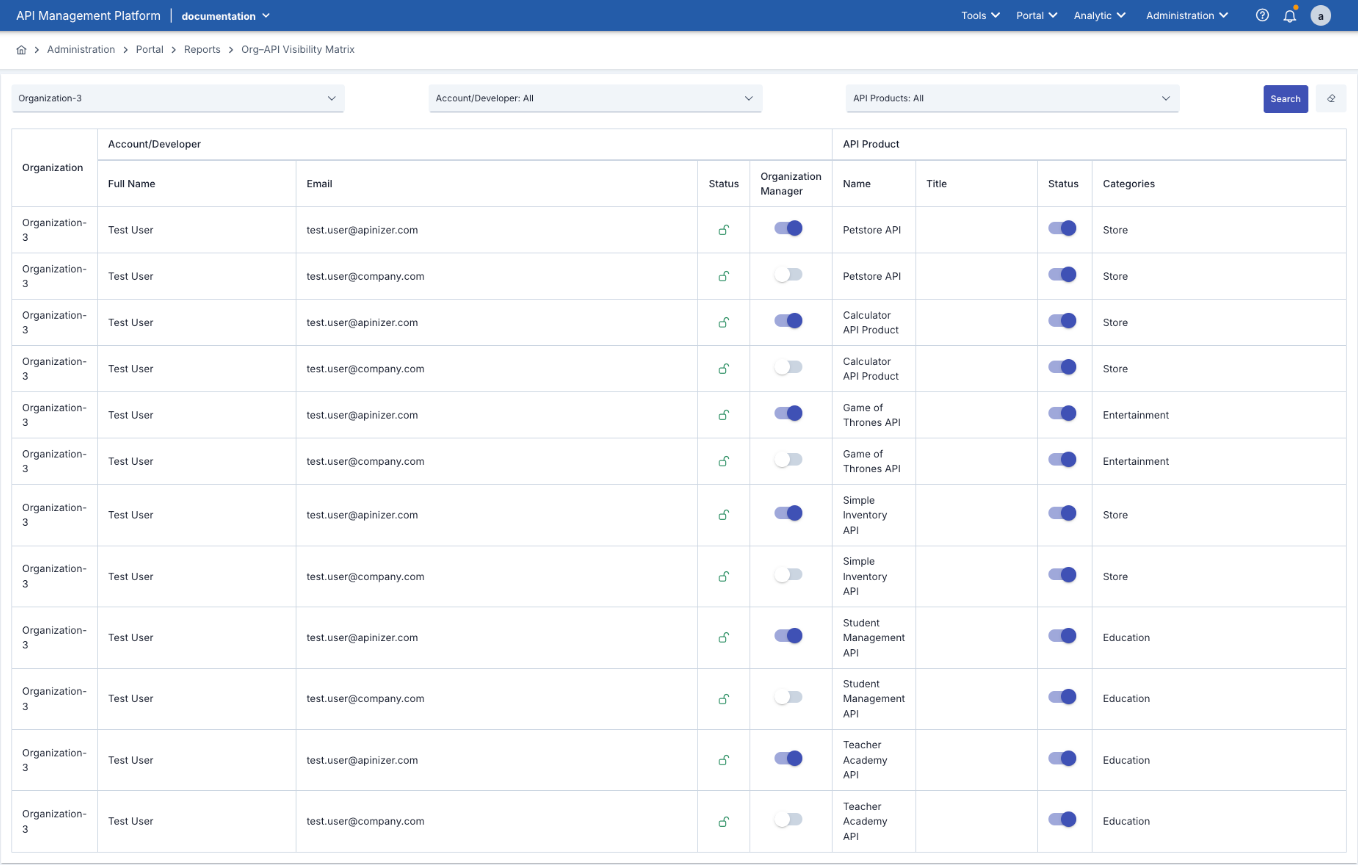
| Field | Description |
|---|---|
| Organization | Organization name. |
| Account Full Name / Email | Portal account name and email. |
| Account Status | Active/Passive Status |
| Organization Manager | Information about whether the account is an organization administrator. |
| API Product Name/ Title | API product identifying information |
| API Product Status | Product publication status |
| Categories | Represents added categories. |
Usage Scenarios:
- Learn which API products a specific organization accesses.
- See whether a complaining account is active, its permissions, and API products it accesses.
- Check whether a newly published API product is visible in target organizations.
- Notice which categories are heavily used in which organizations.