Shared Data Model
Shared Data Model Concept
Shared Data Model enables you to create reusable schema definitions in API Designer's spec first approach. By creating shared schema models that define data types in message content, you can use model inheritance and shared components with JSON Schema references. Created models can be imported and used within the Spec Design Editor.
Shared schema models are created
The same data structure can be used in multiple APIs.
Model inheritance and references
Model relationships with JSON Schema references.
Shared components are used
Common data types are managed centrally.
Usage in Spec Design Editor
Created models can be imported into API Specs.
Shared Data Model Features
Schema Design
Schema design and property management in shared data models:
Data Type Definitions
- Basic data types (string, integer, number, boolean)
- Complex data types (object, array)
- Enum values
- Format definitions
Schema Properties
- Property definitions
- Required fields
- Read-only and write-only behaviors
- Validation rules
Model References
- Model references with $ref
- Model inheritance
- Shared components
- JSON Schema references
Data Model Management
Creation and management of shared data models:
New shared data models are created
- Defining name and description
- Creating schema structure
- Adding example values
Properties are defined within the schema
- Adding and editing properties
- Determining type and format
- Validation rules
Models are used in Spec Design Editor
- Model reference within Spec
- Shared component usage
- Reusability
Creating Shared Data Model
A new Data Model can be created by clicking the New (Create) button in the upper right of the list interface.

The Shared Data Model creation settings are shown in the following image:
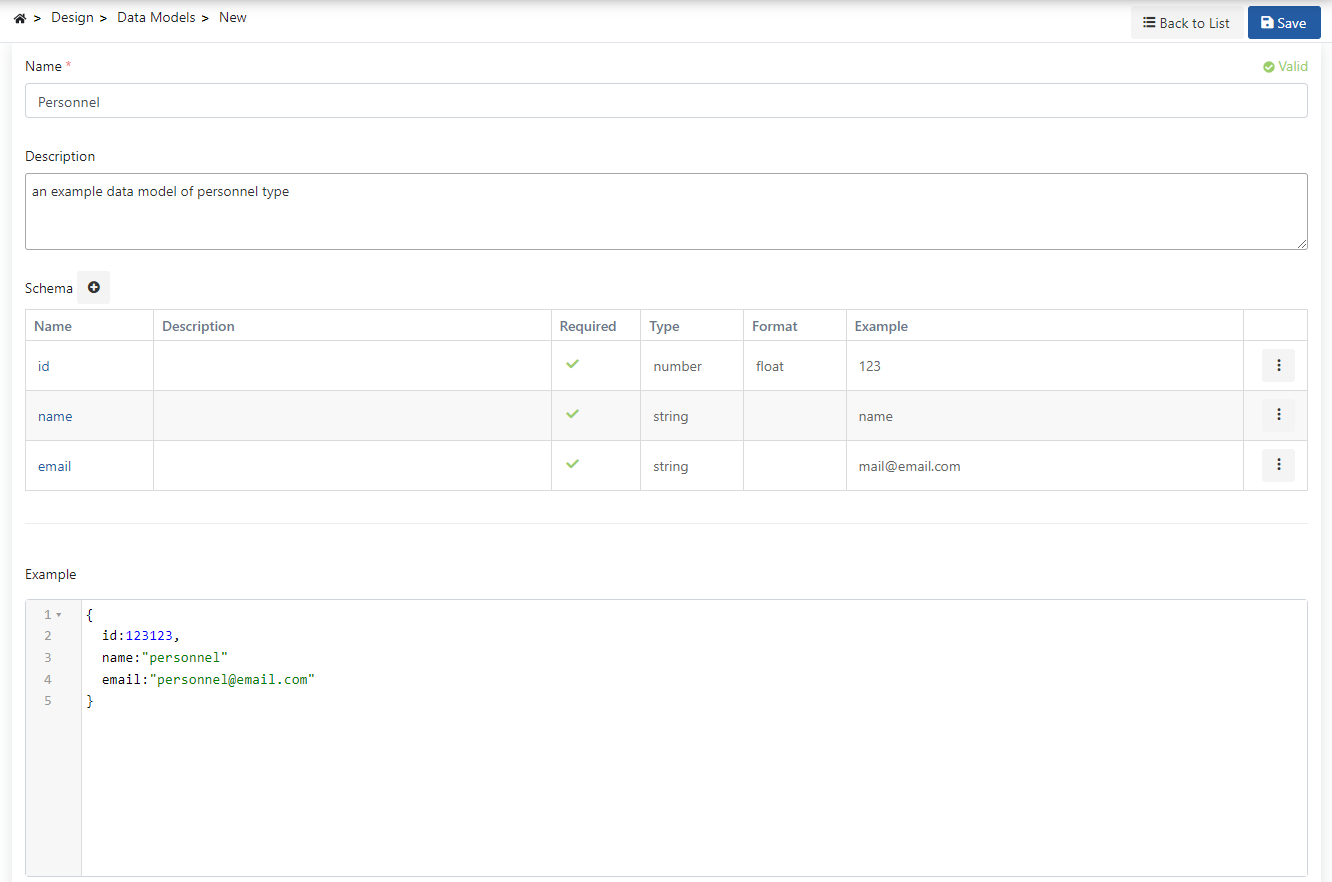
The fields used for shared data model creation configuration are shown in the table below.
| Field | Description |
|---|---|
| Name | The name information of the data model. |
| Description | Description related to the data model. |
| Schema (Schema) | Properties and fields to be included in the data and properties such as type, pattern, min-max are managed. |
| Example (Example) | An example of the data type can be created. |
Adding Schema Property
You can define the structure of your data model by adding properties within the schema.
The Schema Property addition settings are shown in the following image:
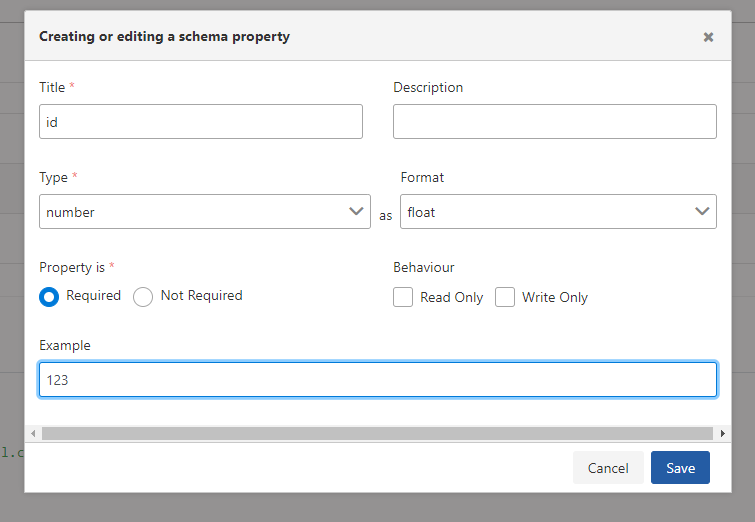
The fields used for Schema Property creation configuration are shown in the table below.
| Field | Description |
|---|---|
| Name | The name information of the schema. |
| Description | Description can be made about the schema. |
| Type | Field where the type of the schema is specified. |
| Format (Format) | A field that is active according to the selected type. There are formats that can be selected for some types: integer - int32: Signed 32-bit integers (commonly used integer type). - int64: Signed 64-bit integers (long type). number - float: Decimal numbers (6 digits). - double: Decimal numbers (14 digits). string - byte: Base64 encoded characters. For example, U3dhZ2dlciByb2Nrcw== - binary: Binary data used to define files - date: Full date representation. For example, 2017-07-21 - date-time: Date-time representation. For example, 2017-07-21T17:32:28Z - password: Used to mask input. |
| $Ref Target | If $ref is selected from the type field, this field becomes active. A reference to another data model can be given. |
| Property is (Property is) | Specifies whether the model's usage is required. |
| Behaviour (Behaviour) | Determines the read-only/write-only information of the schema. |
| Integer Properties (Integer Properties) | If Integer is selected as type, these fields become active: - Minimum: To determine the smallest of the values that can be entered. - Maximum: To determine the largest of the values that can be entered. - MultipleOf: To determine this if the values to be entered are desired to be multiples of a number. |
| String Properties (String Properties) | If String is selected as type, these fields become active: - Pattern (Pattern): Allows you to define a regular expression template for the string value. Only values matching this template will be accepted. - Min Length (Min Length): To determine the minimum length of values that can be entered. - Max Length (Max Length): To determine the maximum length of values that can be entered. |
| Enum Values (Enum Values) | If Enum is selected as type, this field becomes active. Field where possible values of the model are entered. |
| Example (Example) | An example describing the schema can be given. |
Shared Data Model Usage Scenarios
Usage scenarios of shared data models in spec first approach:
- Creating shared data model
- Defining schema properties
- Importing model in Spec Design Editor
- Using in multiple API Specs
- Central update and management
- Creating basic data models
- Establishing relationships with model references
- Model inheritance with $ref
- Using shared components
- Consistent data structures
Relationship Between Shared Data Model and Spec Design Editor
Shared Data Models work integrated with the Spec Design Editor. Workflow:
Shared Data Models
   │
   │ Schema Definitions
   │ Model References
   │
   ▼
Spec Design Editor
   │
   │ Model Import
   │ $ref References
   │
   ▼
API Spec
   │
   │ Shared Components
   │
   ▼
API Proxy
Model is created on Shared Data Models page
Schema properties and structure are defined.
Schema properties and validation rules are determined
Properties, types, and formats are defined.
Model is imported in Spec Design Editor
Model is used with $ref references.
Model can be used in multiple API Specs
Central management and consistency are ensured.
This integration between Shared Data Models and Spec Design Editor enables you to create consistent and centrally managed data structures with reusable schema definitions in spec first approach. Models are created once and can be used in multiple API Specs.
Shared Data Model Advantages
Advantages provided by reusable schema definitions:
- Same schema is used in multiple APIs
- Central schema management
- Consistent data structures
- Model references with $ref
- Model relationships and inheritance
- Shared components
- Schema update from a single place
- Changes reflected to all APIs
- Version control
- Compliance with JSON Schema standards
- OpenAPI/Swagger compatibility
- Tool support