JSON Schema Validation
This document explains the detailed usage of a specific policy. If you are using Apinizer policies for the first time or want to learn the general working principles of policies, we recommend reading the What is Policy? page first.
Overview
What is its Purpose?
- Prevents incorrect data from reaching backend systems by automatically checking whether JSON-based calls coming through API Proxy comply with expected data contract.
- Enables establishing comprehensive yet flexible validation scenarios by targeting specific parts of request through JSONPath (
pathForBody) expression. - Provides adaptable validation flows according to different endpoints, versions, or client types by managing multiple JSON Schema versions under the same policy.
- Centrally controls when validation will be triggered and what messages will be returned to clients through condition engine and error message customization.
Working Principle
- Request Arrival: For each HTTP/HTTPS request arriving at the API Gateway, the source IP address of the request is identified.
- Policy Check: If the JSON Schema Validation policy is active, the system checks in the following order:
- Is a Condition defined? If so, is the condition met?
- Is the policy active (active=true)?
- Is a Variable being used or is Apinizer default?
- JSON Schema Validation: The part of request to be validated is obtained with JSONPath expression defined as
pathForBody; the part is passed through RFC 8259-compliant schema validation according to all defined JSONschemaDefinitionListentries. - Decision Making:
- Match Found: If compatibility is achieved with at least one schema, request continues in flow and target API Proxy response is returned.
- No Match: If compatibility cannot be achieved with any schema, policy terminates flow and client is informed with defined error message/HTTP code.
- Error Handling: Customizable HTTP status code and error message are returned for requests that do not comply with the policy rule.
Features and Capabilities
Basic Features
- JSONPath-Based Data Targeting: Which part of request will be validated is selected with
pathForBodyfield; default$.expression works on entire body. - Multiple JSON Schema Support: Multiple schemas are added through
schemaDefinitionList, each is automatically numbered and can be assigned to different usage scenarios. - Embedded JSON Editor: Schema definitions are edited on syntax-highlighted Apinizer code editor component, increasing accuracy and readability.
- Active/Passive Status Control: Easily change the active or passive status of the policy (active/passive toggle). In passive mode, the policy is not applied but its configuration is preserved.
- Condition-Based Application: Determine when the policy will be applied by creating complex conditions with Query Builder (e.g., only for specific endpoints or header values).
Advanced Features
- JSONPath Test Module:
pathForBodyexpression is run on real data through Test Transformation Data component, instantly validating that correct field is targeted. - Schema Versioning Strategy: Different versions can be tracked and quickly activated when needed thanks to automatic
schemaNogeneration for each new schema record. - Global/Local Policy Flow: Global policies can be converted to local policies, user interaction is provided through
globalPolicyChangedInProxyevents. - Export/Import Feature: Export policy configuration as a ZIP file. Import to different environments (Development, Test, Production). Version control and backup capability.
- Policy Group and Proxy Group Support: Manage multiple policies within Policy Group. Bulk policy assignment to Proxy Groups. Centralized update and deploy operations.
- Deploy and Versioning: Deploy policy changes to live environment. See which API Proxies use it (Policy Usage). Proxy Group and Policy Group usage reports.
Usage Scenarios
| Scenario | Status | Solution (Policy Application) | Expected Behavior / Result |
|---|---|---|---|
| Input Body Validation | User registration request coming to public API in different formats | pathForBody=$.; single record schema is added; required property definitions are made. | Incompatible records return 403, valid records are transmitted to backend. |
| Versioned Schema Management | Same Endpoint accepts both v1 and v2 bodies | Two different schema definitions are added; each contains schema definitions versioned with relevant schemaNo. | Request is accepted if it matches any schema, others are rejected. |
| Partial Validation | Only payload.data field should be checked in large JSON | pathForBody=$.payload.data; relevant schema is written only for this segment. | Only target field is validated, other fields remain free. |
| Optional Field Control | Some fields are optional but their formats must be correct | anyOf is used in schema; conditions are defined through editor. | Format is checked when optional field comes, request is accepted if it doesn't exist. |
| Partner-Based Restriction | Different schema will be applied according to X-Partner value coming in header | Header condition is defined in Query Builder; schema is added for appropriate partner. | Only requests meeting condition enter validation; others are not affected by policy. |
| Test Environment Assurance | Detailed validation specific to development environment is desired | Local copy of global policy is created; pathForBody and schemas are updated according to test requirements. | Strict validation is performed on test API Proxy, production environment is not affected. |
| JSONPath Trial & Approval (optional) | Target of new JSONPath expression is desired to be validated | Test Data Transformation module is opened, path is tested with sample data. | Incorrect expression is shown as warning, correct expression is saved. |
Configuring Policy Parameters
In this step, users can create a new policy or configure existing policy parameters to define access rules. The defined parameters directly affect how the policy works (e.g., which IPs will be allowed, geographical restrictions, conditional activations, etc.). This allows the policy to be customized according to organization-specific requirements while being centrally manageable.
Creating a New JSON Schema Validation Policy
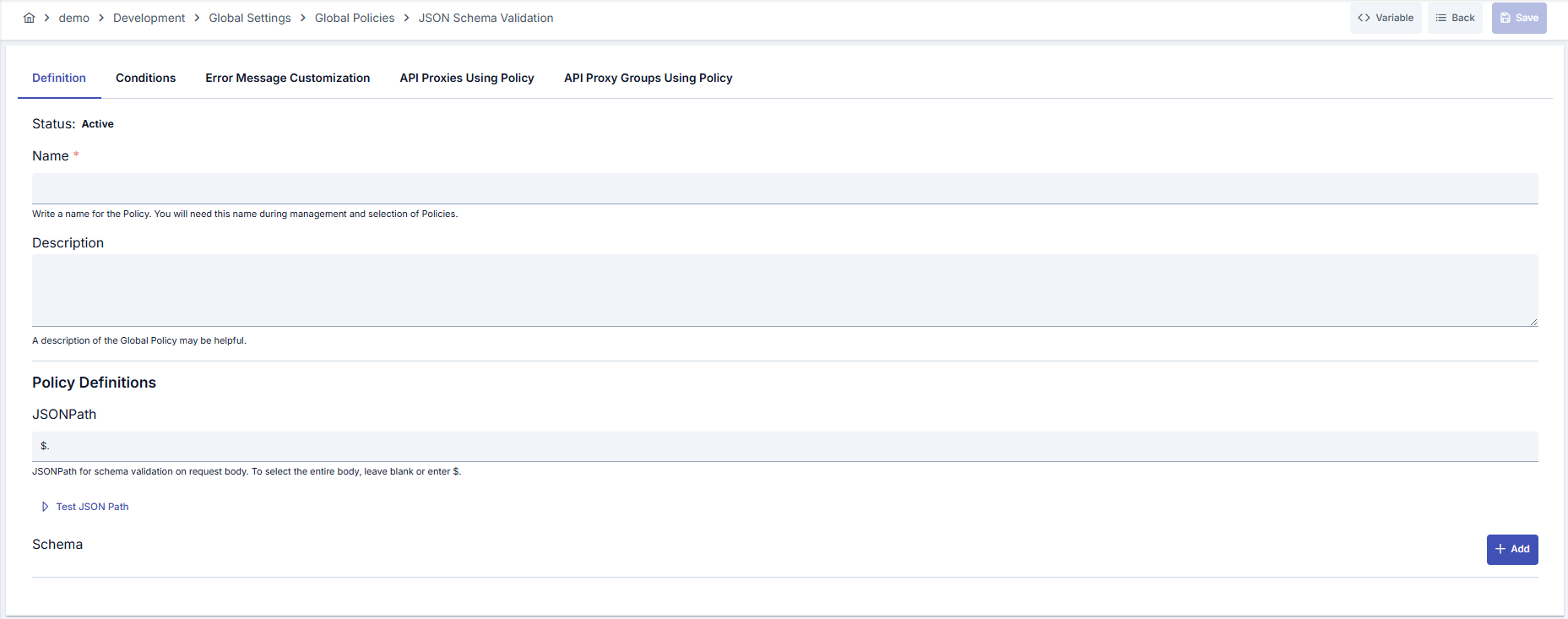
Configuration Steps
| Step | Description / Operation |
|---|---|
| Step 1: Go to Creation Page | - Go to Development → Global Settings → Global Policies → JSON Schema Validation Policy from the left menu. - Click the [+ Create] button at the top right. |
| Step 2: Enter Basic Information | Policy Status: Shows Active/Passive status. New policies are active by default. Name (Required): Example: Production_JSONSchemaValidation- Enter a unique name, does not start with space. - System automatically checks. Green checkmark: available. Red X: existing name. Description: Example: "Validates JSON body in order service" - Max. 1000 characters. - Explain the purpose of the policy. |
| Step 3: Variable Usage | - In the action button area at the top of the page, you can use the [<> Variable] button to select dynamic values. - Using context/global variable expressions, you can manage policy parameters with variable-based values instead of fixed values. - This reduces manual update effort when values change and provides operational convenience. - For detailed information, review Dynamic Variables. |
| Step 4: JSONPath Definition | Enter JSONPath expression in pathForBody field.- Default $. validates entire body.- Use e.g. $.payload.data for partial validation.- Start JSONPath test from same screen if needed. |
| Step 5: JSON Schema Definitions | Add new schema panel with Add button. - Each panel automatically gets JSON n title and schemaNo.- Make valid JSON Schema (Draft 4+) definition in Editor. - Use trash icon to remove schema; numbering is automatically updated. |
| Step 6: Schema Test and Preview | Validate that pathForBody expression selects correct segment on sample data with Test Data Transformation JSONPath button.- Ensure your JSON schema is formatted in Apinizer code editor through Editor. |
| Step 7: Define Condition (Optional) | - Go to Condition tab. - Conditions determine when the policy will be active. Examples: - Environment-based: Header = X-Environment, Operator = Equals, Value = production- API Key-based: Header = X-API-Key, Starts With = PROD-- Endpoint-based: Path = /api/admin/*If no condition is defined, policy is always active |
| Step 8: Customize Error Message (Optional) | - Go to Error Message Customization tab. - Customize the message to be returned when access is denied. Default: { "statusCode": 403, "message": "[Default error message]" }Custom: { "statusCode": 403, "errorCode": "[CUSTOM_ERROR_CODE]", "message": "[Custom message]" } |
| Step 9: Save | - Click the [Save] button at the top right. Checklist: Unique name. Required fields filled. At least one JSON schema defined. Result: - Policy is added to the list. - Can be connected to APIs. - If global policy, automatically applied. |
For descriptions of Conditions and Error Message Customization panels, you can review the Conditions and Error Message Customization sections on the What is Policy? page.
For a complete guide on all layers, priority order and scenario examples of the error message configuration system, see the Error Message Configuration Guide page.
Deleting the Policy
For deletion steps of this policy and operations to be applied when in use, you can refer to the Remove Policy from Flow section on the Policy Management page.
Exporting/Importing the Policy
For export (Export) and import (Import) steps of this policy, you can refer to the Export/Import page.
Connecting the Policy to API
For the process of how this policy will be connected to APIs, you can refer to the Connect Policy to API section on the Policy Management page.
Advanced Features
| Feature | Description and Steps |
|---|---|
| JSON Schema Versioning Management | - Order schema versions using automatically incrementing schemaNo value in each Add operation.- Store old schemas in passive environments, reactivate if needed. - Document versions by numbers before export. |
| Global Policy Localization | - Copy global policy with Localize button on detail screen. - Edit pathForBody or schema contents API-specifically on local policy.- Activate local policy on relevant API Proxy. |
| Conditional Schema Application Architecture | - Create header or endpoint-based conditions in Query Builder. - Match requests meeting condition with different schema sets. - Track which conditions are triggered by examining usage reports. |
Best Practices
Things to Do and Best Practices
| Category | Description / Recommendations |
|---|---|
| Schema Configuration | Bad: Only performing presence check by leaving JSON schema empty. Good: Defining basic required fields and types. Best: Using comprehensive schema enriched with enum, pattern, and format rules. |
| JSONPath Management | Bad: Leaving pathForBody field with incorrect JSONPath.Good: Validating entire body using $..Best: Using JSONPath validated with Test Transformation, targeting minimal data segment. |
| Error Message Communication | Bad: Not informing business users with default message. Good: Customizing general error code and message in Turkish. Best: Making configuration containing error code, tracking number, and user action suggestion. |
| Condition Design | Bad: Running policy on all requests without defining condition. Good: Adding endpoint-based conditions. Best: Performing validation only in necessary flows by creating combined conditions according to environment, client, and payload type. |
| Version Management | Bad: Overwriting new version on old schemas without deleting. Good: Adding new schema and making old one passive. Best: Exporting and tagging schema versions, taking to live after validating in test environment. |
Security Best Practices
| Security Area | Description / Warnings |
|---|---|
| Data Accuracy | Schema should not be limited to type validation only; prevent malicious entries with rules like minimum/maximum, pattern. |
| Error Message Masking | Do not share internal system details in messages returned to clients; do not leak sensitive field names or schema content |
| Global Policy Changes | Review list of all used API Proxies before updating global policy; evaluate possible impact of changes. |
| Import Controls | Get ZIP files from outside only from trusted sources; manually verify name conflicts during import. |
| Audit and Logging | Monitor validation errors in API Gateway logs; integrate error codes with SIEM for anomaly detection. |
Things to Avoid
| Category | Description / Warnings |
|---|---|
| Missing Schema Definition | Why to avoid: Empty or missing schema makes validation mechanism ineffective. Alternative: Add minimum validation rules and expand over time. |
| Unvalidated JSONPath | Why to avoid: Policy may never trigger due to incorrect path expression. Alternative: Validate path with Test Transformation before saving. |
| Uncontrolled Global Change | Why to avoid: Changes made in global policy may affect all APIs causing unexpected interruptions. Alternative: Test on local copy first and take to live after approval. |
| Not Taking Export After Schema Deletion | Why to avoid: No reference remains for rollback, audit traces are lost. Alternative: Export policy before deleting schema. |
Performance Tips
| Criterion | Recommendation / Impact |
|---|---|
| Schema Size | Recommendation: Keep schemas as simple as possible, reduce unnecessary allOf/anyOf combinations.Impact: Faster validation and lower CPU consumption. |
| JSONPath Complexity | Recommendation: Minimize use of wildcard characters in complex path expressions. Impact: JSON selection speeds up, latency decreases. |
| Multiple Schema Check | Recommendation: If multiple schemas are needed, place most frequently used one at list beginning first. Impact: Validation time shortens with early match. |
| Condition Filtering | Recommendation: Optimize Query Builder conditions so policy does not run on unnecessary requests. Impact: Efficient use of Gateway resources. |
| Pre-Prod Tests | Recommendation: Measure results in test environment with same load before going live. Impact: Performance surprises do not occur in live environment. |
Frequently Asked Questions (FAQ)
| Category | Question | Answer |
|---|---|---|
| General | Does this policy validate XML bodies? | No, only JSON contents are validated; you must use separate policy for XML. |
| General | Is it mandatory to change default error message? | No, you can use default message but customization is recommended for user experience. |
| Technical | Which draft version of JSON Schema does it support? | Apinizer editor supports JSON Schema syntax Draft 4 and above; being valid JSON is sufficient. |
| Technical | What happens if pathForBody is left empty? | Default $. is applied and entire request body is included in validation. |
| Usage | Can I use the same policy in multiple API Proxies? | Yes, when defined as global policy, it can be connected to all API Proxies. |
| Usage | Does global version get affected when I convert to local policy? | No, local copy is independent; changes do not reflect to global policy. |