Minimum Message Size (Min. Message Size)
This document explains the detailed usage of a specific policy. If you are using Apinizer policies for the first time or want to learn the general working principles of policies, we recommend reading the What is Policy? page first.
Overview
What is its Purpose?
- Blocks empty or incorrect bodies by ensuring mandatory content is carried in requests coming through API Proxy.
- Stops business rule violations at request entry by ensuring minimum data size guarantee.
- Reduces errors and unnecessary resource consumption that may occur in backend services due to missing payload.
- Helps clients quickly understand minimum requirements with error message customization.
- Activated only in sensitive endpoints or specific client segments thanks to condition-based usage.
Working Principle
- Request Arrival: For each HTTP/HTTPS request arriving at the API Gateway, the source IP address of the request is identified.
- Policy Check: If the Minimum Message Size policy is active, the system checks in the following order:
- Is a Condition defined? If so, is the condition met?
- Is the policy active (active=true)?
- Is a Variable being used or is Apinizer default?
- Payload Verification: Request body is converted to string, measured byte/character length is compared with defined
sizevalue. - Decision Making:
- Match Found: If body length is greater than
sizevalue, request continues in normal flow. - No Match: If body is empty or equal to/below
sizevalue, request is stopped and error message is triggered. Default error is ERR-026 and 403 Forbidden.
- Match Found: If body length is greater than
- Error Handling: Customizable HTTP status code and error message are returned for requests that do not comply with the policy rule.
Features and Capabilities
Basic Features
- Empty Body Blocking: Automatically rejects payloads that do not have request body or are below expected threshold.
- Minimum Byte Threshold Verification: Ensures data integrity by applying lowest data size defined with
sizefield. - gRPC Compatible Operation: Validates HTTP and gRPC messages with same rule thanks to
availableForGrpc()support. - Active/Passive Status Control: Easily change the active or passive status of the policy (active/passive toggle). In passive mode, the policy is not applied but its configuration is preserved.
- Condition-Based Application: Determine when the policy will be applied by creating complex conditions with Query Builder (e.g., only for specific endpoints or header values).
Advanced Features
- Minimum Threshold by Condition: Enables defining different minimum size policies according to path, method, or header information.
- Error Message Versioning: Error messages based on EnumParentErrorType.POLICY_MINMESSAGESIZE are managed in multi-language and format-compatible manner.
- Usage Tracking Integration: API Proxies and groups using policy are monitored centrally with Policy usage tabs.
- Export/Import Feature: Export policy configuration as a ZIP file. Import to different environments (Development, Test, Production). Version control and backup capability.
- Policy Group and Proxy Group Support: Manage multiple policies within Policy Group. Bulk policy assignment to Proxy Groups. Centralized update and deploy operations.
- Deploy and Versioning: Deploy policy changes to live environment. See which API Proxies use it (Policy Usage). Proxy Group and Policy Group usage reports.
Usage Scenarios
| Scenario | Status | Solution (Policy Application) | Expected Behavior / Result |
|---|---|---|---|
| Blocking Empty POST Bodies | Some clients send POST calls without body | Determine size = 1 | POST requests without body are rejected with 403 ERR-026 |
| Required Field Control | Minimum data must exist in JSON user registrations | Define size = 256 | JSON requests below 256 bytes are blocked, missing data is detected |
| gRPC Message Verification | gRPC service gives error when receiving empty payload | Policy active in gRPC, size = 512 | Very small gRPC messages are stopped at gateway |
| Webhook Assurance | External provider occasionally sends empty webhook | Endpoint condition in Query Builder + size = 128 | Minimum 128 byte requirement is applied only on target webhook route |
| Fake Traffic Filtering | Bots are probing system with 0 byte requests | Policy global, size = 64 | Bot traffic receives 403 return, recorded in log |
| File Metadata Control | Metadata body comes empty when file is uploaded | size = 1024 in multipart metadata endpoint | Uploads without required metadata field are rejected |
| PII Consistency (optional) | Empty records without personal data are falling into log | size = 512 in Policy Group | Requests not matching policy are blocked, reporting consistency is ensured |
Configuring Policy Parameters
In this step, users can create a new policy or configure existing policy parameters to define access rules. The defined parameters directly affect how the policy works (e.g., which IPs will be allowed, geographical restrictions, conditional activations, etc.). This allows the policy to be customized according to organization-specific requirements while being centrally manageable.
Creating a New Minimum Message Size Policy
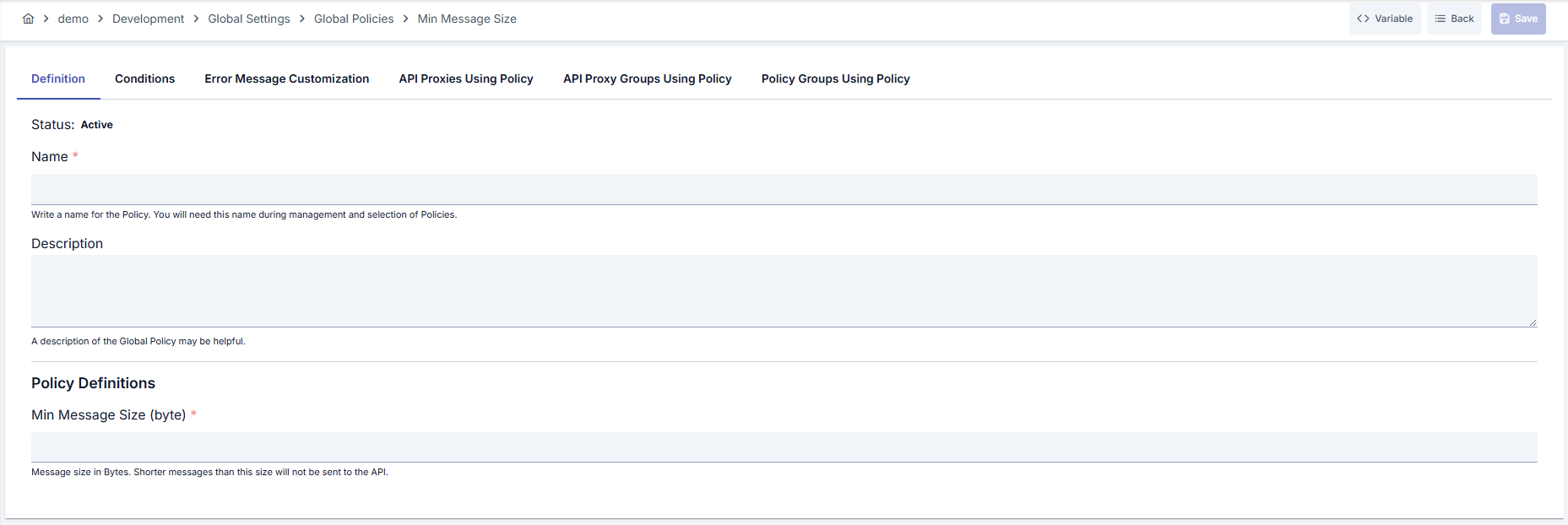
Configuration Steps
| Step | Description / Operation |
|---|---|
| Step 1: Go to Creation Page | - Go to Development → Global Settings → Global Policies → Minimum Message Size from the left menu. - Click the [+ Create] button at the top right. |
| Step 2: Enter Basic Information | Policy Status: Shows Active/Passive status. New policies are active by default. Name (Required): Example: Production_MinPayload- Enter a unique name, does not start with space. - System automatically checks. Green checkmark: available. Red X: existing name. Description: Example: "Block empty JSON POST requests." - Max. 1000 characters. - Explain the purpose of the policy. |
| Step 3: Variable Usage | - In the action button area at the top of the page, you can use the [<> Variable] button to select dynamic values. - Using context/global variable expressions, you can manage policy parameters with variable-based values instead of fixed values. - This reduces manual update effort when values change and provides operational convenience. - For detailed information, review Dynamic Variables. |
| Step 4: Define Minimum Message Length (byte) Value | - Enter mandatory lower limit for payload in Minimum Message Length (byte) field. - Smallest valid value is 1; size value must be > 0.- Remember that request will be blocked when body length is <= size. |
| Step 5: Determine Empty Body Behavior (If Any) | - Determine limit value according to sample requests to ensure expected fields are actually carried. - Very low values may miss empty payload, very high values may cause unnecessary blocking. - Select small threshold for test, threshold close to real production sizes for live. |
| Step 6: Design Endpoint-Based Condition (If Any) | - Limit policy to target endpoints with criteria like path, method, header in Condition tab. - Clone policy and group under Policy Group for different minimum values. - Always keep policy active in routes accepting sensitive data. |
| Step 7: Define Condition (Optional) | - Go to Condition tab. - Conditions determine when the policy will be active. Examples: - Environment-based: Header = X-Environment, Operator = Equals, Value = production- API Key-based: Header = X-API-Key, Starts With = PROD-- Endpoint-based: Path = /api/admin/*If no condition is defined, policy is always active For details, you can refer to: Conditions |
| Step 8: Customize Error Message (Optional) | - Go to Error Message Customization tab. - Customize the message to be returned when access is denied. Default: { "statusCode": 403, "message": "Permissible Min. Size Policy Validation failed! Permissible min. size of request must be ( {0} ) but found ( {1} ) !" }Custom: { "statusCode": 422, "errorCode": "PAYLOAD_TOO_SMALL", "message": "Request body must be minimum 256 bytes." } |
| Step 9: Save | - Click the [Save] button at the top right. Checklist: Unique name. Required fields filled. At least one minimum size requirement defined. Result: - Policy is added to the list. - Can be connected to APIs. - If global policy, automatically applied. |
For descriptions of Conditions and Error Message Customization panels, you can review the Conditions and Error Message Customization sections on the What is Policy? page.
For a complete guide on all layers, priority order and scenario examples of the error message configuration system, see the Error Message Configuration Guide page.
Deleting the Policy
For deletion steps of this policy and operations to be applied when in use, you can refer to the Remove Policy from Flow section on the Policy Management page.
Exporting/Importing the Policy
For export (Export) and import (Import) steps of this policy, you can refer to the Export/Import page.
Connecting the Policy to API
For the process of how this policy will be connected to APIs, you can refer to the Add Policy to Flow section on the Policy Management page.
Advanced Features
| Feature | Description and Steps |
|---|---|
| Dynamic Minimum Value Management | - Create separate policies for different environments (Development, Test, Production). - Perform environment-based distribution with Policy Group. - Update values periodically according to usage statistics. |
| Payload Robustness Verification | - Determine minimum size to cover total length of required fields. - Publish expected/actual size in error message to detect missing fields. - Test policy as local copy in QA process. |
| Global Policy Synchronization | - Check fetchUsedProxies output before making changes in global policy.- Inform relevant teams before changes if multiple APIs are using it. - Synchronize all Proxies by triggering deploy process after update. |
Best Practices
Things to Do and Best Practices
| Category | Description / Recommendations |
|---|---|
| Payload Planning | Bad: Leaving minimum value at 0. Good: Defining threshold according to real average payload size. Best: Adjusting threshold periodically based on log analyses. |
| Condition Design | Bad: Managing all endpoints with single policy. Good: Limiting sensitive endpoints with separate policy. Best: Constructing method/path-based conditions with Query Builder. |
| Environment Separation | Bad: Using same minimum value for Development and Live. Good: Determining tolerant threshold in development, strict threshold in Live. Best: Managing environment-based thresholds with local policies. |
| Error Management | Bad: Sharing default message with client without changing. Good: Customizing message in Turkish/English. Best: Providing error code and min/actual value information in JSON format expected by client. |
| Version Control | Bad: Not taking backup before changes. Good: Creating manual backup with export. Best: Versioning export files and integrating into CI/CD pipeline. |
Security Best Practices
| Security Area | Description / Warnings |
|---|---|
| Bot Traffic Filtering | Block empty or fake requests early with minimum size requirement. |
| Error Message Content | Share only expected and current size in error message; do not reveal system internal details. |
| Log Consistency | Write rejected requests to security log; protect source IP, endpoint, and size information. |
| Condition Security | Avoid wide wildcard usage in condition definitions; create special policy for critical routes. |
| Global Change Audit | Complete impact analysis before updating global policy in use. |
Things to Avoid
| Category | Description / Warnings |
|---|---|
| Wrong Threshold Determination | Why to avoid: Very low values may miss empty payload. Alternative: Measure real request sizes and determine threshold. |
| Unconditional Application | Why to avoid: May lead to unnecessary blocking in all endpoints. Alternative: Select target endpoints with Query Builder. |
| Closing Error Message | Why to avoid: Client does not understand problem, recurring errors occur. Alternative: Provide message explaining minimum/actual size. |
| Making Global Update Without Plan | Why to avoid: May create interruption in multiple APIs simultaneously. Alternative: Validate first with local policy in test environment. |
Performance Tips
| Criterion | Recommendation / Impact |
|---|---|
| Request Size Measurement | Recommendation: Determine size value according to real averages.Impact: Maintains throughput by preventing unnecessary blockings. |
| Logging Level | Recommendation: Keep rejected requests in separate log channel. Impact: Analysis becomes easier, main logs do not bloat. |
| Policy Chain Order | Recommendation: Position minimum size check early in chain. Impact: Unnecessary other policy executions are prevented for small payloads. |
| Condition Pre-Caching | Recommendation: Optimize frequently used conditions in Query Builder. Impact: Condition evaluation time decreases. |
| gRPC Messages | Recommendation: Consider expected serialized size in gRPC calls. Impact: gRPC performance remains stable. |
Frequently Asked Questions (FAQ)
| Category | Question | Answer |
|---|---|---|
| General | Can minimum value be 0? | No. size field must be at least 1; value 0 does not stop empty payloads. |
| General | Can I use policy only in certain endpoints? | Yes, target endpoint, method, or header-based filtering can be done with Query Builder conditions. |
| Technical | Is size measurement byte or character? | Gateway evaluates body as string; character length is assumed in typical scenario, character=byte assumption is valid in UTF-8. |
| Technical | How does it work in gRPC messages? | Length of serialized message is checked because availableForGrpc() is true; request is blocked if below threshold. |
| Usage | What is default error code? | 403 Forbidden and ERR-026 code is returned; can be customized from Error Message tab. |
| Usage | Can I convert global policy to local copy? | Localize button on detail page allows you to duplicate policy as local copy; minimum value can be updated according to needs. |