XML Schema Validation
This document explains the detailed usage of a specific policy. If you are using Apinizer policies for the first time or want to learn the general working principles of policies, we recommend reading the What is Policy? page first.
Overview
What is its Purpose?
- Ensures structural integrity of incoming SOAP or REST-based XML requests, prevents faulty data from reaching backend services.
- Raises integration quality standards by enforcing compatibility requirement with WSDL or XSD schemas at
API Proxylevel. - Provides flexible policy management by performing XML schema validation only in certain endpoint or header combinations with condition-based triggering.
- Supports quick correction of faulty schema by client side thanks to custom error messages.
Working Principle
- Request Arrival: For each HTTP/HTTPS request arriving at the API Gateway, the source IP address of the request is identified.
- Policy Check: If the XML Schema Validation policy is active, the system checks in the following order:
- Is a Condition defined? If so, is the condition met?
- Is the policy active (active=true)?
- Is a Variable used or is Apinizer default used?
- XML Schema Evaluation: If
validateAgainstSpec=true, schema is retrieved from WSDL definitions of relevant API Proxy; otherwise XML parser validation is performed using enteredschemaDefinitionListXSD contents andpathForBodyXPath output. - Decision Making:
- Match Found: If request conforms to schema, process chain continues, routing is done to backend target.
- No Match: If XML structure does not conform to schema, policy stops request and returns customizable error outputs.
- Error Handling: Customizable HTTP status code and error message are returned for requests that do not comply with the policy rule.
Features and Capabilities
Basic Features
- XPath-Based Body Selection: Node to be validated is selected from SOAP Body with
pathForBodyfield; if left empty, entire body is examined. - Multiple XSD Management: Multiple schema segments can be added with
schemaDefinitionList, each ordered withschemaNoand distinguished withsystemId. - Name Conflict Prevention: Policy name passes uniqueness check within project before saving, provides instant feedback to user.
- Active/Passive Status Control: Easily change the active or passive status of the policy (active/passive toggle). In passive state, the policy is not applied but its configuration is preserved.
- Condition-Based Application: Determine when the policy will be applied by creating complex conditions with Query Builder (e.g., only for specific endpoints or header values).
Advanced Features
- WSDL Integration: When
validateAgainstSpecis selected, XML types derived from WSDL are automatically used and external XSD entry is not required. - XPath Test Runner: "Test Data Transformation" component instantly validates whether XPath expression correctly selects target node.
- Schema Versioning Strategies: Gradual transition or rollback can be planned by keeping different
schemaDefinitionListelements in the same policy. - Export/Import Feature: Export policy configuration as a ZIP file. Import to different environments (Development, Test, Production). Version control and backup capability.
- Policy Group and Proxy Group Support: Manage multiple policies within Policy Group. Bulk policy assignment to Proxy Groups. Centralized update and deploy operations.
- Deploy and Versioning: Deploy policy changes to live environment. See which API Proxies use it (Policy Usage). Proxy Group and Policy Group usage reports.
Usage Scenarios
| Scenario | Status | Solution (Policy Application) | Expected Behavior / Result |
|---|---|---|---|
| SOAP Order Validation | Third-party SOAP service sends faulty XML | pathForBody=//*[local-name()='Order'], WSDL validation off, relevant XSD added. | Request not conforming to schema is blocked with 400, service is not interrupted. |
| Integration Testing | Frequently changing XSD versions exist in test environment | Multiple schemaDefinitionList versions kept in one policy. | Old record is preserved while active schema is updated, rollback is possible. |
| Product Catalog Service | Validation required only in /product/* endpoints | Condition: Path=/product/*, custom XSD added. | Validation is active for product APIs without affecting other endpoints. |
| WSDL-Based Banking Integration | Bank-provided WSDL is kept current | validateAgainstSpec=true, policy defined globally. | Validation is updated by redeploying when new WSDL is published. |
| XML Body Trimming | Single field is critical in large SOAP body | pathForBody=//*[local-name()='PaymentRequest'] entered. | Only payment request node is validated, performance increases. |
| Global Policy Sharing | Multiple APIs use same XSD | Policy created globally and shared with Policy Group. | Same validation is applied in all relevant API Proxies. |
| Regional Compliance (optional) | Only EU user data will be checked | Condition: Header=X-Region, Equals=EU. | EU requests are validated according to schema, others are bypassed. |
Configuring Policy Parameters
In this step, users can create a new policy or configure existing policy parameters to define access rules. The defined parameters directly affect how the policy works (e.g., which IPs will be allowed, geographical restrictions, conditional activations, etc.). This allows the policy to be customized according to organization-specific requirements and managed centrally.
Creating a New XML Schema Validation Policy
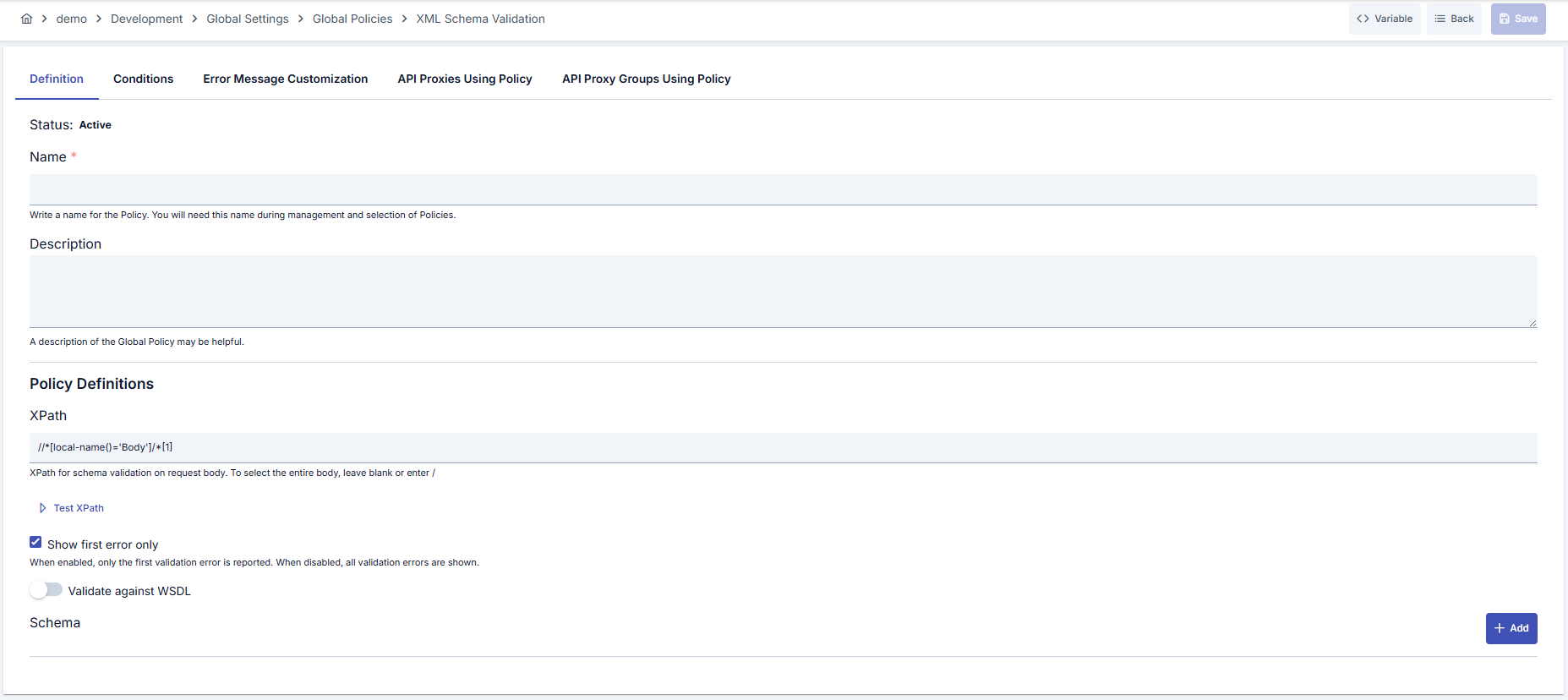
Configuration Steps
| Step | Description / Operation |
|---|---|
| Step 1: Going to Creation Page | - Go to Development → Global Settings → Global Policies → XML Schema Validation from the left menu. - Click the [+ Create] button at the top right. |
| Step 2: Entering Basic Information | Policy Status (Policy Status): Shows Active/Passive status. New policies are active by default. Name (Name) Required: Example: Production_XMLSchema- Enter a unique name, does not start with space. - System automatically checks. Green checkmark: available. Red X: existing name. Description (Description): Example: "Performs XML schema validation in order flow." - Max. 1000 characters. - Explain the purpose of the policy. |
| Step 3: Variable Usage | - In the action button area at the top of the page, you can use the [<> Variable] button to select dynamic values. - Using context/global variable expressions, you can manage policy parameters with variable-based values instead of fixed values. - This reduces manual update effort when values change and provides operational convenience. - For detailed information, review Dynamic Variables. |
| Step 4: XPath Configuration | - Enter XPath expression targeting the XML node to be validated in pathForBody field.- Leave empty or use / for full body validation.- You can use Test Data Transformation button to test XPath accuracy. |
| Step 5: Using WSDL Schema (If applicable) | - Run policy according to connected WSDL schema by checking validateAgainstSpec option.- When checked, manual XSD entry fields are hidden and maintenance burden decreases. |
| Step 6: XSD Schema Definitions (If applicable) | - Add schemaDefinitionList elements with Add button if validateAgainstSpec is off.- Edit XML schema content for each element and specify external references with systemId field if needed.- Ordering is automatically updated with schemaNo field. |
| Step 7: Defining Condition (Optional) | - Go to the Condition tab. - Conditions determine when the policy will be active. Examples: - Environment-based: Header = X-Environment, Operator = Equals, Value = Production- API Key-based: Header = X-API-Key, Starts With = PROD-- Endpoint-based: Path = /api/admin/*If no condition is defined, the policy is always active For details, see: Conditions |
| Step 8: Error Message Customization (Optional) | - Go to the Error Message Customization tab. - Customize the message to be returned when access is denied. Default: { "statusCode": 403, "message": "[Default error message]" }Custom: { "statusCode": 403, "errorCode": "[CUSTOM_ERROR_CODE]", "message": "[Custom message]" } |
| Step 9: Saving | - Click the [Save] button at the top right. Checklist: Unique name. Required fields filled. At least one XSD definition or WSDL selection exists Result: - Policy is added to the list. - Can be connected to APIs. - If global policy, automatically applied. |
For the description of Conditions and Error Message Customization panels, you can review the Conditions and Error Message Customization sections on the What is Policy? page.
For a complete guide on all layers, priority order and scenario examples of the error message configuration system, see the Error Message Configuration Guide page.
Deleting the Policy
For the deletion steps of this policy and the operations to be applied while in use, you can refer to the Removing Policy from Flow section on the Policy Management page.
Exporting/Importing the Policy
For the export and import steps of this policy, you can refer to the Export/Import page.
Connecting the Policy to API
For the process of how this policy will be connected to APIs, you can refer to the Adding Policy to Flow section on the Policy Management page.
Advanced Features
| Feature | Description and Steps |
|---|---|
| WSDL-Based Automatic Schema Update | - validateAgainstSpec is enabled.- WSDL is re-imported before API Proxy deploy. - Policy is deployed to release new schema. |
| Multiple XSD Segment Usage | - Add multiple schemaDefinitionList elements.- Write descriptive systemId for each element.- Perform validation for each schema in test environment. |
| XPath Validation Test | - Load sample XML with test button. - XPath result is displayed. - Policy is saved after appropriate node selection is confirmed. |
Best Practices
Things to Do and Best Practices
| Category | Description / Recommendations |
|---|---|
| XPath Management | Bad: Using complex and ambiguous XPath. Good: Writing XPath for single target node. Best: Documenting XPath versioned and validating with test tool. |
| XSD Versioning | Bad: Deleting old version when XSD is updated. Good: Exporting and storing old version. Best: Version tracking with Policy Export + Git repo combination. |
| WSDL Scenarios | Bad: Forgetting to manually update policy when WSDL changes. Good: Tracking WSDL changes with change log. Best: Setting up WSDL diff detection and automatic policy deploy process in CI/CD pipeline. |
| Error Messages | Bad: Returning general error message to client. Good: Specifying error code. Best: Returning structured JSON with correction suggestions along with XPath and schema name. |
| Condition Definitions | Bad: Allowing policy to run on every request and creating unnecessary load. Good: Adding basic filters. Best: Optimizing environment, endpoint and header combinations with Query Builder. |
Security Best Practices
| Security Area | Description / Warnings |
|---|---|
| Schema Source Security | Ensure XSD files are from trusted sources, use signature or checksum validation. |
| WSDL Validation | Allow only authorized users to make WSDL updates, track changes in audit logs. |
| Policy Permissions | Keep global policy editing permissions limited, review RBAC controls. |
| Error Message Content | Do not share internal system details in error messages, provide only minimum information helpful for correction. |
| Export/Import Process | Store exported ZIP files encrypted, perform content check before import. |
Things to Avoid
| Category | Description / Warnings |
|---|---|
| Publishing Without Schema | Why avoid: Policy becomes meaningless without schema. Alternative: Add at least one XSD definition or activate WSDL option. |
| Excessive XPath Depth | Why avoid: Complex XPath reduces performance and makes maintenance difficult. Alternative: Simplify XML structure and use simpler XPath. |
| Leaving Passive in Development Environment | Why avoid: Errors before production may not be noticed. Alternative: Keep active in development and test as well, add to automation tests. |
| Uncontrolled WSDL Update | Why avoid: New WSDL may reject requests unexpectedly. Alternative: Run regression tests before update and prepare release notes. |
Performance Tips
| Criterion | Recommendation / Impact |
|---|---|
| XPath Complexity | Recommendation: Use shorter and more direct XPath expressions. Impact: Parser time shortens, delay decreases. |
| Schema Size | Recommendation: Remove unnecessary comment lines and spaces. Impact: Memory consumption and loading time decrease. |
| Schema Count | Recommendation: Keep related XSDs modular instead of combining in single file. Impact: Change isolation and cache management become easier. |
| Condition Filtering | Recommendation: Ensure policy runs only on necessary endpoints. Impact: Unnecessary validation cost is eliminated. |
| Test and Monitoring | Recommendation: Monitor policy operation with Apinizer metrics. Impact: Performance issues are detected early and optimized. |
Frequently Asked Questions (FAQ)
| Category | Question | Answer |
|---|---|---|
| General | Does the policy validate only XML contents? | Yes, policy evaluates XML format bodies according to XSD or WSDL schemas. Different policies should be used for JSON or other formats. |
| General | When should validateAgainstSpec be preferred? | This option is recommended in scenarios where API Proxy keeps WSDL file current and you want to reduce manual XSD management. |
| Technical | What happens if XPath is left empty? | Policy tries to validate entire XML body; may have performance impact on large bodies. |
| Technical | What error is returned when schema cannot be loaded? | Schema evaluation error notification is made with 500 Internal Server Error code and details are kept in logs. |
| Usage | Can the policy be shared with multiple API Proxies? | When defined globally, it can be assigned to multiple API Proxies through Policy Group or Proxy Group. |
| Usage | How can I customize error message in different environments? | You can create environment-based templates in Error Message Customization tab, trigger different policies according to environment variables with Condition section. |