Digital Signature
This document explains the detailed usage of a specific policy. If you are using Apinizer policies for the first time or want to learn the general working principles of policies, we recommend reading the What is Policy? page first.
Overview
What is its Purpose?
- Ensures integrity and non-repudiation by adding digital signatures to critical parts of request or response messages.
- Standardizes and makes the signing process auditable through centralized management of secret keys.
- Reduces maintenance costs by creating reusable signature templates in different
API Proxyflows. - Enables dynamic adaptation of the verification side by optionally adding signature algorithm information to the message.
Working Principle
- Request Arrival: For each HTTP/HTTPS request arriving at the API Gateway, the source IP address of the request is identified.
- Policy Check: If the Digital Signature policy is active, the system checks in the following order:
- Is a Condition defined? If so, is the condition met?
- Is the policy active (active=true)?
- Is a Variable being used or is Apinizer default?
- Digital Signature Generation: For each defined signature rule, the text in the source variable is read, signed with the selected private key/certificate and algorithm, and the output is written to the target variable with the selected encoding (Base64/Hex); if the algorithm variable is defined, it is updated simultaneously.
- Decision Making:
- Match Found: If data is found in the source variable, signature is generated and placed in the target variable.
- No Match: If source data is empty, signature is skipped, target variable is updated with empty value and flow continues.
- Error Handling: Customizable HTTP status code and error message are returned for requests that do not comply with the policy rule.
Features and Capabilities
Basic Features
- Multiple Signature Definition: Provides the ability to sign different message fields with different algorithms and keys under a single policy.
- Variable-Based Targeting: Provides flexibility for both request and response by selecting variables for the data to be signed and the field where the signature will be written.
- Certificate/Key Integration: Secret keys or certificates are selected through Apinizer Secret Manager, revocation checks are performed automatically.
- Active/Passive Status Control: Easily change the active or passive status of the policy (active/passive toggle). In passive mode, the policy is not applied but its configuration is preserved.
- Condition-Based Application: Determine when the policy will be applied by creating complex conditions with Query Builder (e.g., only for specific endpoints or header values).
Advanced Features
- Dynamic Algorithm Broadcast: The applied algorithm name can be written into the message using
signatureAlgorithmVarand provides information to consumer systems. - Advanced Variable Management: Existing variables can be selected and updated without editing through the Variable Update Dialog.
- Instant Key/Certificate Creation: New Crypto Key or certificate records can be created from the configuration screen, updating the policy without waiting time.
- Export/Import Feature: Export policy configuration as a ZIP file. Import to different environments (Development, Test, Production). Version control and backup capability.
- Policy Group and Proxy Group Support: Manage multiple policies within Policy Group. Bulk policy assignment to Proxy Groups. Centralized update and deploy operations.
- Deploy and Versioning: Deploy policy changes to live environment. See which API Proxies use it (Policy Usage). Proxy Group and Policy Group usage reports.
Usage Scenarios
| Scenario | Status | Solution (Policy Application) | Expected Behavior / Result |
|---|---|---|---|
| JSON Signing in REST Response | External systems want to verify response body integrity | sourceVar=response.content, signatureVar=response.header.X-Signature, algorithm SHA256withRSA, Base64 output, Crypto Key selected | Signature is calculated before response is sent, added to header, verification side checks the signature |
| Body Signing in SOAP Request | ESB must sign incoming SOAP body | sourceVar=request.soap.body, signatureVar=request.soap.header.Signature, algorithm SHA1withRSA, Hex output, certificate selected | Signature is added to SOAP header, subsystems confirm message has not changed |
| Algorithm Notification in IoT Message | IoT gateway wants to dynamically announce signing algorithm | signatureAlgorithmVar=request.header.X-Sign-Alg is defined, algorithm SHA512withECDSA | Message is enriched with both signature and algorithm name, device works without needing updates |
| Multiple Field Signing | Multiple JSON fields will be signed with separate keys | Two different definitions with different sourceVar and Crypto Key selected | Independent signature is generated for each field, consumer side performs combination verification |
| Inter-Microservice Authorization | Signature required for authentication in inter-service calls | Signature is added to request header, works only for internal calls via Condition | Microservice verifies that incoming request actually comes from expected service |
| Pre-Archival Signature | Immutability guarantee is required before documents are stored | Assigned in bulk via Policy Group, sourceVar is document content, signature is written to metadata field | Every archived document becomes signed, providing provability in audits |
| (optional) Post-Data Masking Signature | To show that masked fields have not changed | Runs after masking policy, signature is applied to the same field | Integrity of masked data is preserved, traceable in chain |
Configuring Policy Parameters
In this step, users can create a new policy or configure existing policy parameters to define access rules. The defined parameters directly affect how the policy works (e.g., which IPs will be allowed, geographical restrictions, conditional activations, etc.). This allows the policy to be customized according to organization-specific requirements while being centrally manageable.
Creating a New Digital Signature Policy
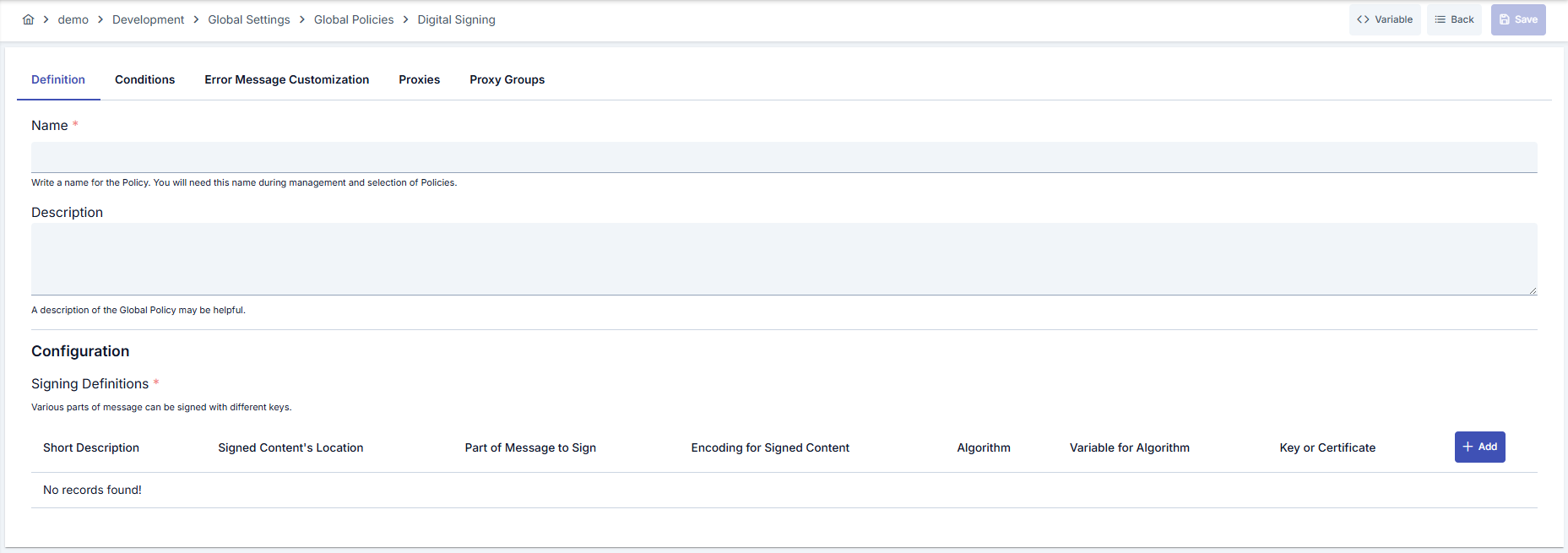
Configuration Steps
| Step | Description / Operation |
|---|---|
| Step 1: Go to Creation Page | - Go to Development → Global Settings → Global Policies → Digital Signature from the left menu. - Click the [+ Create] button at the top right. |
| Step 2: Enter Basic Information | Policy Status: Shows Active/Passive status. New policies are active by default. Name (Required): Example: Production_DigitalSign- Enter a unique name, does not start with space. - System automatically checks. Green checkmark: available. Red X: existing name. Description: Example: "Signs response payload with HSM key." - Max. 1000 characters. - Explain the purpose of the policy. |
| Step 3: Variable Usage | - In the action button area at the top of the page, you can use the [<> Variable] button to select dynamic values. - Using context/global variable expressions, you can manage policy parameters with variable-based values instead of fixed values. - This reduces manual update effort when values change and provides operational convenience. - For detailed information, review Dynamic Variables. |
| Step 4: Create Signature Definitions | Open signature definition with [+ Add] button. - sourceVar (data source to be signed): Select the variable containing the data to be signed. - signatureVar (target where signature will be written): Select the variable where the signature will be written. - signatureAlgorithm: Select the signature algorithm (e.g., SHA256withRSA, SHA512withECDSA). - outputEncodingType: Select the encoding type of signature output (BASE64 or HEXADECIMAL). - signatureAlgorithmVar (optional): Select the variable where algorithm information will be written. |
| Step 5: Key/Certificate Selection | If KEY is selected: - Select private key from Crypto Key list or create new key. If CERTIFICATE is selected: - Select from certificate list. - ⚠️ Revoked certificates are marked in red, should not be used. |
| Step 6: Multiple Definition and Sorting (If Any) | - Add additional definitions for different message sections. - You can assign different algorithms or encodings by editing each definition. - Remove definition with [Delete] if not needed. |
| Step 7: Define Condition (Optional) | - Go to Condition tab. - Conditions determine when the policy will be active. Examples: - Environment-based: Header = X-Environment, Operator = Equals, Value = production- API Key-based: Header = X-API-Key, Starts With = PROD-- Endpoint-based: Path = /api/admin/*If no condition is defined, policy is always active |
| Step 8: Customize Error Message (Optional) | - Go to Error Message Customization tab. - Customize the message to be returned when access is denied. Default: { "statusCode": 500, "message": "Digital Signature policy failed! Error message is: {0}" }Custom: { "statusCode": 500, "errorCode": "ERR-088-CUSTOM", "message": "Signature could not be generated, please check the destination field." } |
| Step 9: Save | - Click the [Save] button at the top right. Checklist: - Unique name - Required fields filled - At least one signature definition exists Result: - Policy is added to the list. - Can be connected to APIs. - If global policy, automatically applied. |
For descriptions of Conditions and Error Message Customization panels, you can review the Conditions and Error Message Customization sections on the What is Policy? page.
For a complete guide on all layers, priority order and scenario examples of the error message configuration system, see the Error Message Configuration Guide page.
Deleting the Policy
For deletion steps of this policy and operations to be applied when in use, you can refer to the Removing Policy from Flow section on the Policy Management page.
Exporting/Importing the Policy
For export (Export) and import (Import) steps of this policy, you can refer to the Export/Import page.
Connecting the Policy to API
For the process of how this policy will be connected to APIs, you can refer to the Connect Policy to API section on the Policy Management page.
Advanced Features
| Feature | Description and Steps |
|---|---|
| Dynamic Algorithm Notification | - Determine the appropriate header/body variable for signatureAlgorithmVar.- Select the variable in the signature definition. - Enable consumer application to read this field and automatically select verification algorithm. |
| Revocation Tracking | - Check revocation status during certificate selection. - Avoid using if revoked certificate is selected. - Redeploy policy with current certificate. |
| Multi-Layer Signature Chain | - Add multiple signature definitions for the same message. - Arrange definition order according to data dependency. - Create chained signatures by directing target variables to different headers or body fields. |
Best Practices
Things to Do and Best Practices
| Category | Description / Recommendations |
|---|---|
| Key Management | Bad: Signing with expired certificate. Good: Updating policy when certificate is renewed. Best: Tracking certificate renewal dates and setting up automatic alarms. |
| Variable Selection | Bad: Using the same variable as both source and target. Good: Defining source and target separately. Best: Making header/body distinction according to consumer expectation and documenting it. |
| Algorithm Usage | Bad: Randomly selecting default algorithm. Good: Determining algorithm suitable for application requirements. Best: Using algorithm list approved by security team. |
| Multiple Definition Management | Bad: Combining all fields in a single definition. Good: Creating definitions specific to different fields. Best: Filling description fields of definitions and referencing in audits. |
| Error Messages | Bad: Closing default error message and leaving it empty. Good: Providing a general error message. Best: Defining customized message and error code that operations teams can understand. |
Security Best Practices
| Security Area | Description / Warnings |
|---|---|
| Key Storage | Manage keys only through Secret Manager; do not export and distribute manually. |
| Certificate Revocation | Revoked certificates are shown with red label, must not be used. |
| Access Control | Give policy editing authority to minimum users, perform IAM audits regularly. |
| Logging | Route signature failures to security logs, analyze unusual retry attempts. |
| Algorithm Security | Use weak algorithms (MD2, MD5) only if backward compatibility is required, otherwise prefer modern options. |
Things to Avoid
| Category | Description / Warnings |
|---|---|
| Empty Source Fields | Why to avoid: Empty content does not generate signature, target variable also remains empty. Alternative: Validate source variable beforehand or filter with Condition. |
| Single Key Dependency | Why to avoid: All APIs stop when key is revoked. Alternative: Prepare second policy with backup key within Policy Group. |
| Untested Changes | Why to avoid: Wrong algorithm or target variable causes error in production environment. Alternative: Test first in Development environment with export/import. |
| Error Message Hiding | Why to avoid: Operations teams cannot identify the problem. Alternative: Define custom error code and descriptive message. |
Performance Tips
| Criterion | Recommendation / Impact |
|---|---|
| Signature Definition Count | Recommendation: Remove unnecessary definitions. Impact: Each definition adds CPU cost. |
| Algorithm Selection | Recommendation: Consider lighter algorithms like ECDSA. Impact: Processing time decreases, throughput increases. |
| Key Size | Recommendation: Use minimum key length suitable for security policies. Impact: Keys longer than necessary increase latency. |
| Condition Usage | Recommendation: Define Condition so policy works only for necessary requests. Impact: Traffic is reduced, CPU load decreases. |
| Order Management | Recommendation: Run policy at the latest possible stage in the flow. Impact: Unnecessary signature generation is not performed if previous policies fail. |
Frequently Asked Questions (FAQ)
| Category | Question | Answer |
|---|---|---|
| General | How many different signature definitions does the policy support? | There is no practical limitation; each definition can be added as a separate row, but consider performance impact. |
| General | How should I choose between Certificate and Crypto Key? | You can use certificate if it contains private key; otherwise select Crypto Key to prefer records in HSM or key vault. |
| Technical | How do I optionally share the signature algorithm? | Select signatureAlgorithmVar in signature definition; policy writes algorithm name to this variable when it runs. |
| Technical | Does the policy work if message body is not JSON? | Yes, data pointed by variable is signed as long as it is plain text; data format is independent of policy. |
| Usage | Do I have to convert global policy to local copy? | No, but you can customize per API by localizing; changes made globally automatically propagate. |
| Usage | Which logs should I examine in error cases? | Look for POLICY_DIGITALSIGN error code and customized message in Policy logs; also check Gateway general logs. |