Maximum Message Size (Max. Message Size)
This document explains the detailed usage of a specific policy. If you are using Apinizer policies for the first time or want to learn the general working principles of policies, we recommend reading the What is Policy? page first.
Overview
What is its Purpose?
- Protects system resources by limiting body size of requests coming through API Proxy.
- Prevents high-volume requests from reducing service performance and unexpected timeout issues.
- Protects backend services by stopping data transfers outside defined trusted limits at early stage.
- Supports quick error debugging on client side with optional error message customization.
Working Principle
- Request Arrival: For each HTTP/HTTPS request arriving at the API Gateway, the source IP address of the request is identified.
- Policy Check: If the Maximum Message Size policy is active, the system checks in the following order:
- Is a Condition defined? If so, is the condition met?
- Is the policy active (active=true)?
- Is a Variable being used or is Apinizer default?
- Message Size Measurement: Length of request body in bytes is read and compared with defined
sizevalue. - Decision Making:
- Match Found: If request size is smaller than defined limit, transmission continues.
- No Match: When size limit
>= size, request is blocked and configured error message is returned.
- Error Handling: Customizable HTTP status code and error message are returned for requests that do not comply with the policy rule. Default 403 ERR-027 code is sent.
Features and Capabilities
Basic Features
- Byte-Based Message Restriction: Stops operation when defined limit is reached by measuring request body length in bytes.
- Instant Blocking Mechanism: Prevents load on backend services by cutting chain as soon as limit overflow is detected.
- gRPC Compatible Validation: Same rule set can be used in both HTTP and gRPC calls thanks to
availableForGrpc()support. - Active/Passive Status Control: Easily change the active or passive status of the policy (active/passive toggle). In passive mode, the policy is not applied but its configuration is preserved.
- Condition-Based Application: Determine when the policy will be applied by creating complex conditions with Query Builder (e.g., only for specific endpoints or header values).
Advanced Features
- Limit Determination by Condition: Different limits can be defined specific to certain endpoints, headers, methods, or user segments with Query Builder.
- Error Message Localization: Provides understandable feedback on client side with custom error codes and messages, compatible with multi-language support.
- Policy Usage Tracking: API Proxies, Proxy Groups, and Policy Groups using it can be monitored from a single screen.
- Export/Import Feature: Export policy configuration as a ZIP file. Import to different environments (Development, Test, Production). Version control and backup capability.
- Policy Group and Proxy Group Support: Manage multiple policies within Policy Group. Bulk policy assignment to Proxy Groups. Centralized update and deploy operations.
- Deploy and Versioning: Deploy policy changes to live environment. See which API Proxies use it (Policy Usage). Proxy Group and Policy Group usage reports.
Usage Scenarios
| Scenario | Status | Solution (Policy Application) | Expected Behavior / Result |
|---|---|---|---|
| Large JSON Request Blocking | Microservice cannot process JSON requests over 1 MB | Define size = 1048576 | Requests 1 MB and above are blocked with 403 ERR-027 return |
| File Upload Restriction | API Proxy only accepts metadata | Pull to size = 65536 value | Multipart bodies over 64 KB are rejected |
| Limit in gRPC Calls | Unexpected large payload coming in gRPC request | Activate policy for gRPC, limit 200 KB | Large gRPC messages are stopped at Gateway |
| Conditional Limit Offline | 200 KB limit needed only for /legacy/* endpoint | Add Path condition in Query Builder, size = 204800 | Legacy routes are limited without affecting other endpoints |
| Test Environment Different Limit | Test API should be 512 KB, Live 256 KB | Local policy size = 524288 in test, global size = 262144 in live | Environment-specific limits are applied without problems |
| DDoS Prevention | Thousands of large requests coming during attack | Activate policy globally, limit 100 KB | Gateway responds with 403 without increasing resource consumption |
| Message Size Warning (optional) | Custom error code desired on limit overflow | Define errorCode=PAYLOAD_LIMIT in Error Message tab | Client logs custom error code and intervenes |
Configuring Policy Parameters
In this step, users can create a new policy or configure existing policy parameters to define access rules. The defined parameters directly affect how the policy works (e.g., which IPs will be allowed, geographical restrictions, conditional activations, etc.). This allows the policy to be customized according to organization-specific requirements while being centrally manageable.
Creating a New Maximum Message Size Policy
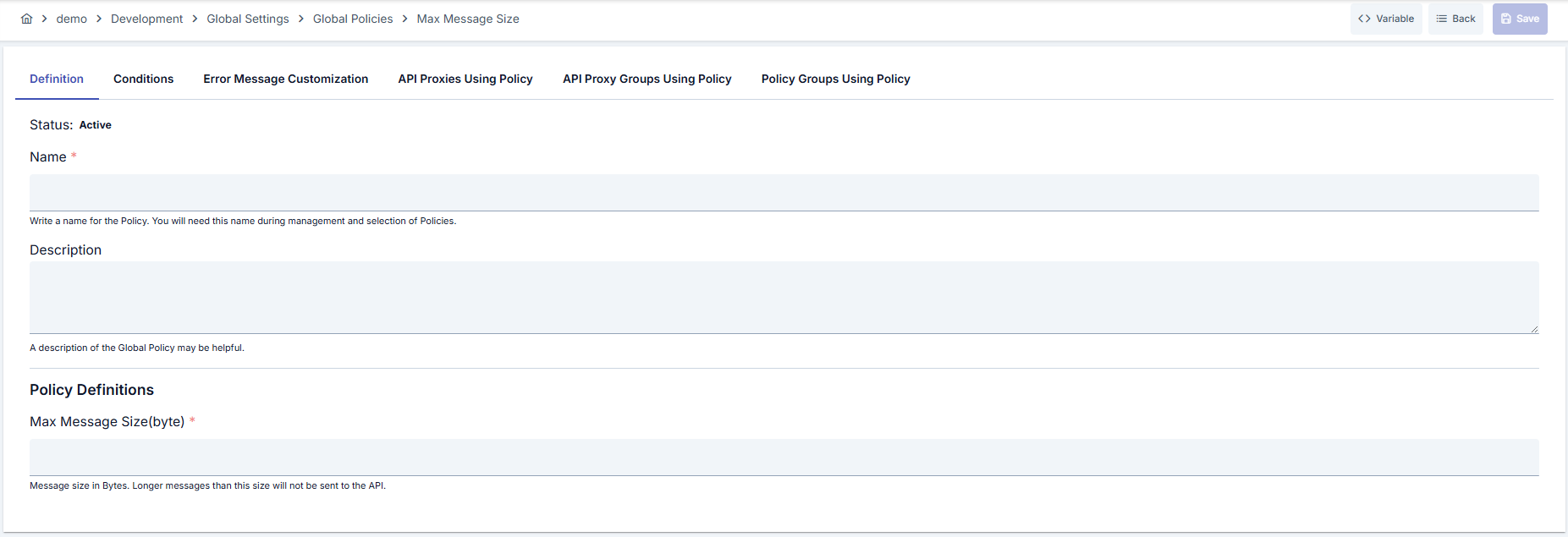
Configuration Steps
| Step | Description / Operation |
|---|---|
| Step 1: Go to Creation Page | - Go to Development → Global Settings → Global Policies → Maximum Message Size from the left menu. - Click the [+ Create] button at the top right. |
| Step 2: Enter Basic Information | Policy Status: Shows Active/Passive status. New policies are active by default. Name (Required): Example: Production_MaxPayload- Enter a unique name, does not start with space. - System automatically checks. Green checkmark: available. Red X: existing name. Description: Example: "512 KB upper limit for JSON POST requests." - Max. 1000 characters. - Explain the purpose of the policy. |
| Step 3: Variable Usage | - In the action button area at the top of the page, you can use the [<> Variable] button to select dynamic values. - Using context/global variable expressions, you can manage policy parameters with variable-based values instead of fixed values. - This reduces manual update effort when values change and provides operational convenience. - For detailed information, review Dynamic Variables. |
| Step 4: Determine Maximum Message Length (byte) Value | - Enter the allowed upper limit of request body in Maximum Message Length (byte) field. - Minimum value is 1; value must be >= 1. - Remember that limit itself is also included (>= size) will be blocked. |
| Step 5: Sharing as Global Policy (Optional) | - You can make policy available for all projects by activating Add to Global key. - You can use it only in relevant API by disabling it during local operation. |
| Step 6: Renaming Policy in Use (Optional) | - System warns for API Proxies in use when making changes on existing global policy. - Copy policy and save locally if new name or ID generation is needed. |
| Step 7: Define Condition (Optional) | - Go to Condition tab. - Conditions determine when the policy will be active. Examples: - Environment-based: Header = X-Environment, Operator = Equals, Value = production- API Key-based: Header = X-API-Key, Starts With = PROD-- Endpoint-based: Path = /api/admin/*If no condition is defined, policy is always active For details, you can refer to: Conditions |
| Step 8: Customize Error Message (Optional) | - Go to Error Message Customization tab. - Customize the message to be returned when access is denied. Default: { "statusCode": 403, "message": "Permissible Max. Size Policy Validation failed! Permissible max. size of request must be ( {0} ) but found ( {1} ) !" }Custom: { "statusCode": 403, "errorCode": "PAYLOAD_LIMIT", "message": "Request body exceeded 256 KB limit." } |
| Step 9: Save | - Click the [Save] button at the top right. Checklist: Unique name. Required fields filled. At least one limit value defined. Result: - Policy is added to the list. - Can be connected to APIs. - If global policy, automatically applied. |
For descriptions of Conditions and Error Message Customization panels, you can review the Conditions and Error Message Customization sections on the What is Policy? page.
For a complete guide on all layers, priority order and scenario examples of the error message configuration system, see the Error Message Configuration Guide page.
Deleting the Policy
For deletion steps of this policy and operations to be applied when in use, you can refer to the Removing Policy from Flow section on the Policy Management page.
Exporting/Importing the Policy
For export (Export) and import (Import) steps of this policy, you can refer to the Export/Import page.
Connecting the Policy to API
For the process of how this policy will be connected to APIs, you can refer to the Add Policy to Flow section on the Policy Management page.
Advanced Features
| Feature | Description and Steps |
|---|---|
| Conditional Limit Differentiation | - Define conditions based on method, path, or header in Query Builder. - Create clone policies containing different size values for each condition.- Reduce DoS risk with lower limits in high-volume endpoints. |
| gRPC Message Verification | - Assign same policy to gRPC services thanks to availableForGrpc().- gRPC message sizes are validated over string length. - Backend gRPC services are protected by early termination at Gateway layer. |
| Global Policy Usage Analysis | - Examine policy usage map with Usage tabs on detail page. - Perform impact analysis before limit changes in heavily used API Proxies. - Return to list after deploy and verify current usage status. |
Best Practices
Things to Do and Best Practices
| Category | Description / Recommendations |
|---|---|
| Payload Planning | Bad: Leaving limit value higher than service capacity. Good: Determining limit according to average payload size. Best: Making periodic limit updates according to real production traces. |
| Environment Management | Bad: Using same limit for Development and Live. Good: Defining higher tolerance in test environment. Best: Applying different limits by defining environment-based local policies. |
| Condition Modeling | Bad: Binding all requests to single policy. Good: Creating separate policy for sensitive endpoints. Best: Separating method/path-based limits with Query Builder. |
| Error Message Management | Bad: Sharing default message with all clients. Good: Customizing message in Turkish and English. Best: Producing error message in format expected by client (JSON/Plain). |
| Version Control | Bad: Not taking export before saving changes. Good: Exporting after each major change. Best: Versioning export files and including in CI/CD process. |
Security Best Practices
| Security Area | Description / Warnings |
|---|---|
| DoS Protection | Prevent large payloads from consuming resources by keeping limits low; consider lowering limits in case of instant attack. |
| Error Information Leakage | Do not share system internal details when giving custom error message; only specify limit and detected size. |
| Log Management | Write limit overflow to security log; protect client IP and endpoint information. |
| Condition Security | Keep wildcard usage to minimum when creating conditions; manage sensitive routes with separate policies. |
| gRPC Channel Protection | Make policy mandatory in gRPC services accepting large messages; narrow attack surface. |
Things to Avoid
| Category | Description / Warnings |
|---|---|
| Excessively Low Limits | Why to avoid: Real user requests may also be blocked. Alternative: Define limit according to average payload measurements. |
| Unconditional Global Limit | Why to avoid: All API Proxies share same limit, flexibility decreases. Alternative: Differentiate with policy groups or local policies. |
| Not Keeping Logs | Why to avoid: Source of limit overflow cannot be detected. Alternative: Add error code and payload size to Gateway logs. |
| Not Validating After Import | Why to avoid: Wrong limit values may remain in Production environment. Alternative: Manually check values and conditions after import. |
Performance Tips
| Criterion | Recommendation / Impact |
|---|---|
| Gateway Memory Usage | Recommendation: Adjust limit value according to service capacity. Impact: Unnecessarily large payloads are blocked without parsing. |
| Throughput | Recommendation: Keep error message light on limit overflow. Impact: Return time over network shortens. |
| Monitoring | Recommendation: Collect limit overflow rate as metric. Impact: Anomalies are noticed early. |
| Condition Evaluation | Recommendation: Optimize Query Builder conditions, do not use unnecessary regex. Impact: Evaluation time per request decreases. |
| Cache Integration | Recommendation: Track clients exceeding limit with short-term Cache. Impact: Provides additional protection layer in repeated violations. |
Frequently Asked Questions (FAQ)
| Category | Question | Answer |
|---|---|---|
| General | What does Maximum Message Size policy restrict? | Limits length of request body in bytes; request is rejected with 403 if limit is exceeded. |
| General | In what format should limit value be entered? | Value is entered in decimal format and in bytes; minimum must be 1. |
| Technical | Is request accepted when limit is equal? | No. Policy blocks request when body length is >= size. |
| Technical | Does it also work in gRPC calls? | Yes, gRPC messages are also validated thanks to availableForGrpc() feature. |
| Usage | How are different limits defined for different endpoints? | Create endpoint-based conditions in Query Builder and assign separate policy for each condition. |
| Usage | How can I change default error message? | You can edit status code, error code, and message fields from Error Message Customization tab. |