Digital Signature Verification
This document explains the detailed usage of a specific policy. If you are using Apinizer policies for the first time or want to learn the general working principles of policies, we recommend reading the What is Policy? page first.
Overview
What is its Purpose?
- Verifies the digital signature to ensure that the content of requests passing through
API Proxyhas not been altered. - Checks the key or certificate used in signature generation to prove that the request actually comes from an authorized client.
- Enables applying separate verification rules for different endpoints or payload types through multiple signature definitions.
- Provides compatibility with different signature formats by dynamically determining the signature verification algorithm.
Working Principle
- Request Arrival: For each HTTP/HTTPS request arriving at the API Gateway, the source IP address of the request is identified.
- Policy Check: If the Digital Signature Verification policy is active, the system checks in the following order:
- Is a Condition defined? If so, is the condition met?
- Is the policy active (active=true)?
- Is a Variable being used or is Apinizer default?
- Digital Signature Verification Check: For each defined verification input, the signature variable in the request is retrieved, the source data is resolved with the selected algorithm (specified or read from variable), and the signature is verified with the selected key/certificate. The input is decoded according to BASE64 or HEX encoding.
- Decision Making:
- Match Found: If the signature is verified for all definitions, the request continues in the processing flow.
- No Match: If any definition fails, the request is stopped and the configured error message is returned.
- Error Handling: Customizable HTTP status code and error message are returned for requests that do not comply with the policy rule.
Features and Capabilities
Basic Features
- Multiple Signature Definition Management: Multiple digital signature verification inputs can be defined for different payload or endpoint combinations; each input works with independent parameters.
- Dynamic Algorithm Selection: The signature algorithm can be determined as a fixed value or automatically retrieved from variables in the request, providing compatibility with different signing strategies.
- Secret Key and Certificate Integration: Crypto Keys or certificates are selected from Secret Manager, providing security compatible with centralized key management.
- Active/Passive Status Control: Easily change the active or passive status of the policy (active/passive toggle). In passive mode, the policy is not applied but its configuration is preserved.
- Condition-Based Application: Determine when the policy will be applied by creating complex conditions with Query Builder (e.g., only for specific endpoints or header values).
Advanced Features
- Variable-Based Signature Resolution: Signature and source data are selected from the global variable store, enabling parametric verification during runtime.
- Algorithm Discovery: FIND mode reads the signature algorithm from the request content, supporting multiple clients with the same policy.
- Revoked Certificate Warning: Revoked certificates are marked in red in the list screen, preventing reuse of invalid certificates.
- Export/Import Feature: Export policy configuration as a ZIP file. Import to different environments (Development, Test, Production). Version control and backup capability.
- Policy Group and Proxy Group Support: Manage multiple policies within Policy Group. Bulk policy assignment to Proxy Groups. Centralized update and deploy operations.
- Deploy and Versioning: Deploy policy changes to live environment. See which API Proxies use it (Policy Usage). Proxy Group and Policy Group usage reports.
Usage Scenarios
| Scenario | Status | Solution (Policy Application) | Expected Behavior / Result |
|---|---|---|---|
| REST JSON Request Signature Verification | Mobile app requests carry JSON body and Base64 signature | sourceVar=body.json, signatureVar=header.X-Signature, inputEncodingType=BASE64, signatureAlgorithm=SHA256withRSA, Crypto Key selected | Request continues only if signature matches, otherwise returns 403 |
| XML Document Signing Check | BPM system sends signed content via SOAP/XML | sourceVar=body.xml, signatureVar=body.signature, inputEncodingType=HEXADECIMAL, signatureAlgorithm=SHA1withDSA, Certificate selected | Policy rejects request if XML document is altered |
| Reading Algorithm from Header | Multiple customers using different algorithms call the same endpoint | sourceOfAlgorithm=FIND, signatureAlgorithmVar=header.X-Signature-Alg, signatureVar=header.X-Signature, sourceVar=body.raw | Signature is verified with algorithm declared in header, error is generated if missing/incorrect |
| Revoked Certificate Audit | Blocking requests signed with revoked certificate | Warning note is added before selecting revoked record in certificate list, current certificate is made mandatory | Requests coming with revoked certificate return 403 Forbidden |
| Multiple Section Signing | Both payload and metadata are signed in the same request | Two separate verification definitions are created; each uses different sourceVar and signatureVar | Request passes if both signatures are verified, blocked if one is incorrect |
| External Key Rotation | Old and new keys will be used simultaneously during key rotation process | Two definitions are added; one with old Crypto Key, other with new Crypto Key | Both keys are accepted during transition, old definition is deleted after rotation |
| Performance Monitoring (optional) | Verification duration needs to be measured under heavy traffic | Policy is active for requests with specific Header values via Condition, duration is tracked with Logging | Verification continues for critical operations, not applied to unnecessary requests |
Configuring Policy Parameters
In this step, users can create a new policy or configure existing policy parameters to define access rules. The defined parameters directly affect how the policy works (e.g., which IPs will be allowed, geographical restrictions, conditional activations, etc.). This allows the policy to be customized according to organization-specific requirements while being centrally manageable.
Creating a New Digital Signature Verification Policy
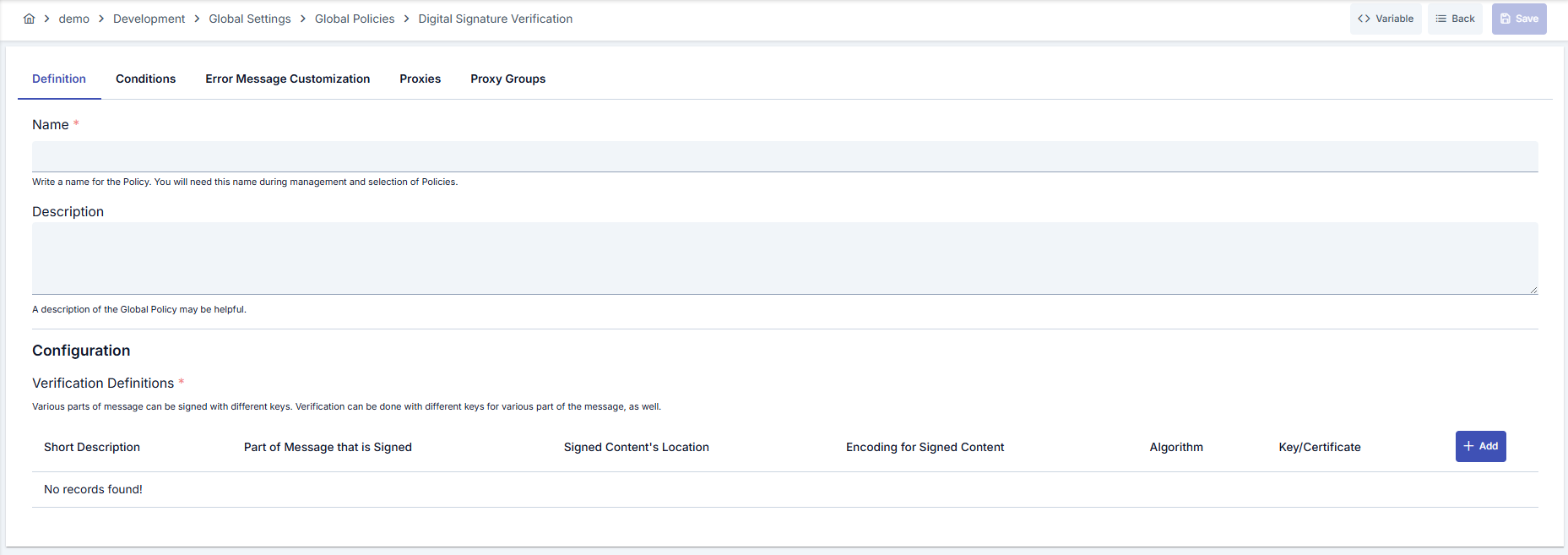
Configuration Steps
| Step | Description / Operation |
|---|---|
| Step 1: Go to Creation Page | - Go to Development → Global Settings → Global Policies → Digital Signature Verification Policy from the left menu. - Click the [+ Create] button at the top right. |
| Step 2: Enter Basic Information | Policy Status: Shows Active/Passive status. New policies are active by default. Name (Required): Example: Production_DigitalSignVerify- Enter a unique name, does not start with space. - System automatically checks. Green checkmark: available. Red X: existing name. Description: Example: "Mobile signed JSON request verification" - Max. 1000 characters. - Explain the purpose of the policy. |
| Step 3: Variable Usage | - In the action button area at the top of the page, you can use the [<> Variable] button to select dynamic values. - Using context/global variable expressions, you can manage policy parameters with variable-based values instead of fixed values. - This reduces manual update effort when values change and provides operational convenience. - For detailed information, review Dynamic Variables. |
| Step 4: Create Digital Signature Definitions | Open modal with [+ Add Verification]. - Signature Var: Select the variable where the signature is located. - Source Var: Select the variable representing the raw data from which the signature was generated. - Input Encoding Type: Specify whether the signature is BASE64 or HEX. - Group the definition by entering a description. |
| Step 5: Algorithm and Key Configuration | Specify the Source of Algorithm field in the modal. - If SPECIFY is selected, select the algorithm from the list. - If FIND is selected, read the algorithm from the variable in the request with Signature Algorithm Var. - In the Key or Certificate section, select Crypto Key or Certificate mode; use new key/certificate creation dialogs if needed. |
| Step 6: Multiple Definition and Priority Management | - Add multiple signature definitions. - Definitions are evaluated in list order. - Edit/delete operations for each definition are done through the same modal. - Recommendation: Use meaningful descriptions for different endpoints |
| Step 7: Define Condition (Optional) | - Go to Condition tab. - Conditions determine when the policy will be active. Examples: - Environment-based: Header = X-Environment, Operator = Equals, Value = production- API Key-based: Header = X-API-Key, Starts With = PROD-- Endpoint-based: Path = /api/admin/*If no condition is defined, policy is always active |
| Step 8: Customize Error Message (Optional) | - Go to Error Message Customization tab. - Customize the message to be returned when access is denied. Default: { "statusCode": 403, "message": "[Default error message]" }Custom: { "statusCode": 403, "errorCode": "[CUSTOM_ERROR_CODE]", "message": "[Custom message]" } |
| Step 9: Save | - Click the [Save] button at the top right. Checklist: - Unique name - Required fields filled - At least one signature definition exists Result: - Policy is added to the list. - Can be connected to APIs. - If global policy, automatically applied. |
For descriptions of Conditions and Error Message Customization panels, you can review the Conditions and Error Message Customization sections on the What is Policy? page.
For a complete guide on all layers, priority order and scenario examples of the error message configuration system, see the Error Message Configuration Guide page.
Deleting the Policy
For deletion steps of this policy and operations to be applied when in use, you can refer to the Removing Policy from Flow section on the Policy Management page.
Exporting/Importing the Policy
For export (Export) and import (Import) steps of this policy, you can refer to the Export/Import page.
Connecting the Policy to API
For the process of how this policy will be connected to APIs, you can refer to the Connect Policy to API section on the Policy Management page.
Advanced Features
| Feature | Description and Steps |
|---|---|
| Runtime Algorithm Selection | - Set Source of Algorithm field to FIND.- Select the variable carrying the algorithm value as Signature Algorithm Var.- Ensure the variable is sent as required in the request and define an error message for missing cases. |
| Key/Certificate Rotation | - Create two separate signature definitions for new and old keys. - Manage the transition process by defining date or header-based rules in the Condition tab. - Simplify the policy list by deleting the old definition after rotation is complete. |
| Multiple Payload Verification | - Select separate sourceVar and signatureVar for each payload section.- Document definitions with meaningful descriptions. - Check the order of definitions and position critical checks at the top. |
Best Practices
Things to Do and Best Practices
| Category | Description / Recommendations |
|---|---|
| Naming Strategy | Bad: policy1Good: DigitalSignVerify_ProdBest: DSV-Prod-CustomerPayload |
| Variable Usage | Bad: Hard-coded header names Good: Using predefined variables Best: Validating dynamic variables with Query Builder conditions |
| Algorithm Management | Bad: Assuming the same algorithm for all clients Good: Defining the main algorithm used with SPECIFY Best: Supporting client-based algorithms with FIND mode |
| Key/Certificate Update | Bad: Manually changing the certificate Good: Defining new certificate and deleting the old one Best: Running two definitions in parallel during rotation process and cleaning up after transition |
| Error Message Management | Bad: Leaving default message as is Good: Specifying error code Best: Adding errorCode and target log reference for traceability |
Security Best Practices
| Security Area | Description / Warnings |
|---|---|
| Key Confidentiality | Share Crypto Key references only with authorized projects; prevent unnecessary access. |
| Certificate Validity | Do not reuse revoked certificates; pay attention to red warnings in the list screen. |
| Error Message Content | Do not share algorithm or key details in error messages to avoid giving information to attackers. |
| Logging and Monitoring | Route failed verification attempts to SIEM systems to detect possible attacks early. |
| Conditional Activation | Define additional Condition criteria for critical endpoints to reduce unnecessary verification load and limit the request surface. |
Things to Avoid
| Category | Description / Warnings |
|---|---|
| Missing Signature Definition | Why to avoid: Policy will not activate without definition. Alternative: Add at least one definition by filling required fields. |
| Wrong Encoding Selection | Why to avoid: Base64/HEX mismatch breaks verification. Alternative: Select encoding according to information received from signature provider. |
| Revoked Certificate Usage | Why to avoid: Creates security risk and verification fails. Alternative: Select valid certificate from Secret Manager. |
| Unconditional Global Effect | Why to avoid: Forces all traffic to unnecessary verification, reducing performance. Alternative: Target only critical endpoints or clients with Condition. |
Performance Tips
| Criterion | Recommendation / Impact |
|---|---|
| Definition Count | Recommendation: Combine similar signature requirements in a single definition. Impact: Number of verifications performed per request decreases. |
| Algorithm Source | Recommendation: Select SPECIFY if you can use a fixed algorithm. Impact: Eliminates additional variable resolution in FIND mode. |
| Condition Usage | Recommendation: Target only endpoints where signed requests will come with conditions. Impact: Reduces unnecessary verification cost. |
| Key Management | Recommendation: Do not repeat the same key in multiple definitions, group common scenarios. Impact: Reduces memory usage and lookup time. |
| Monitoring | Recommendation: Collect failed verification count as a metric. Impact: You detect performance anomalies and attack attempts early. |
Frequently Asked Questions (FAQ)
| Category | Question | Answer |
|---|---|---|
| General | Can I apply different signature rules for different endpoints? | Yes, you can define separate Conditions for each endpoint and add appropriate signature definitions. |
| General | Are registered definitions deleted when the policy is passive? | No, configuration is preserved when switched to passive mode and works with the same settings when reactivated. |
| Technical | What happens if I cannot determine the signature algorithm at runtime? | If FIND is selected but variable is empty, verification fails and customized error message is returned; you can switch to SPECIFY mode. |
| Technical | How do I update the policy when the certificate is renewed? | Add the new certificate to Secret Manager and update the certificate reference in the definition or add a parallel definition for seamless transition. |
| Usage | Can the same policy be used both globally and locally? | You can copy the global policy by localizing it; the local copy is only visible on the selected API. |
| Usage | Can I return a custom HTTP code even if the signature is successful? | Yes, you can define different statusCode or payload by changing the default response in the Error Message Customization tab. |