Decryption
This document explains the detailed usage of a specific policy. If you are using Apinizer policy structure for the first time or want to learn the general working principles of policies, we recommend reading the What is Policy? page first.
Overview
What is its Purpose?
- Enables backend services to remain independent of encryption details by automating decryption of encrypted payload segments on API Proxy (API Proxy Server).
- Provides flexibility in complex integration scenarios by controlling which part of the message will be decrypted and where the result will be written with variables.
- Strengthens centralized key management and facilitates compliance with security standards with Crypto Key Info or certificate objects through Secret Manager.
- Supports dynamic encryption scenarios from different clients by making algorithm name readable from request content.
Working Principle
- Request Arrival: For each HTTP/HTTPS request arriving at the API Gateway, the source IP address of the request is identified.
- Policy Check: If the Decryption policy is active, the system checks in the following order:
- Is a Condition defined? If so, is the condition met?
- Is the policy active (active=true)?
- Is a Variable used or is Apinizer default?
- Decryption Definitions: The policy processes each registered decryption definition in order; reads encrypted content from target variable, collects IV information if necessary, determines algorithm from fixed definition or variable in message, and retrieves relevant key/certificate from Secret Manager.
- Decision Making:
- Match Found: If definition requirements are met, content is decrypted, result is written to determined variable, and flow continues to next Policy stage.
- No Match: Decryption is skipped or customized error message is triggered for content that does not match definition or contains missing parameters.
- Error Handling: Customizable HTTP status code and error message are returned for requests that do not comply with the policy rule.
Features and Capabilities
Basic Features
- Multiple Decryption Definitions: Separate algorithm and key combinations can be defined for different message segments under the same policy.
- Algorithm Flexibility: Supports common decryption algorithms including AES, DES, DESede, and RSA variations.
- Secret Manager Integration: Provides secure key access through Crypto Key Info records or certificates.
- Active/Passive Status Control: Easily change the active or passive status of the policy (active/passive toggle). In passive state, the policy is not applied but its configuration is preserved.
- Condition-Based Application: Determine when the policy will be applied by creating complex conditions with Query Builder (e.g., only for specific endpoints or header values).
Advanced Features
- Dynamic Algorithm Resolution: Adapts to client-based encryption differences by reading algorithm name from variable in request.
- IV Management Automation: Automatically determines IV requirement according to algorithm and validates IV variable/encoding.
- Variable Update Dialogs: Provides quick editing windows for source, target, IV, and algorithm variables.
- Export/Import Feature: Export policy configuration as a ZIP file. Import to different environments (Development, Test, Production). Version control and backup capability.
- Policy Group and Proxy Group Support: Manage multiple policies within Policy Group. Bulk policy assignment to Proxy Groups. Centralized update and deployment operations.
- Deploy and Versioning: Deploy policy changes to live environment. See which API Proxies use it (Policy Usage). Proxy Group and Policy Group usage reports.
Usage Scenarios
| Scenario | Situation | Solution (Policy Application) | Expected Behavior / Result |
|---|---|---|---|
| Payment Response Decryption | Card data encrypted with 3DES returns as Base64 in SOAP response. | Target var is selected as CardData in response body, source var is selected as masking variable; algorithm DESede_CBC_PKCS5Padding, Crypto Key Info reference is defined. | Card data is decrypted and transmitted to backend service with masked field. |
| Request with Dynamic Algorithm | Client sends algorithm name to be used in header. | sourceOfAlgorithm = FIND, cipherAlgorithmVar is set as header variable, key is read from certificate. | Algorithm is read from header, correct key is selected, and content is successfully decrypted. |
| JWT Payload Decryption | Special claim in JWT is encrypted with AES in Hex format. | inputEncodingType = HEXADECIMAL, algorithm AES_CBC_PKCS5Padding, IV existence is checked and IV variable is defined. | Claim is decrypted and transmitted to verification step through API Gateway. |
| Inter-Microservice Secret Sharing | IV information in message between microservices comes in separate field in body. | IV variable is linked to message sub-field, ivEncodingType = BASE64, key is taken from shared key in Crypto Key Info. | Message interface is decrypted with IV + payload, logging is not done with plain text. |
| Revoked Certificate Warning | Certificate used is revoked but policy should still work. | Certificate is selected, revoked list is tracked, user is informed with error message. | Policy continues to work, certificate warning is in logs. |
| Test with Local Policy | Need to use different key for specific API in development environment. | Global policy is Localized and local policy with changed key is linked. | API works only with local policy, other APIs are not affected by global configuration. |
Configuring Policy Parameters
At this step, users can create a new policy or configure existing policy parameters to define access rules.
Creating a New Decryption Policy
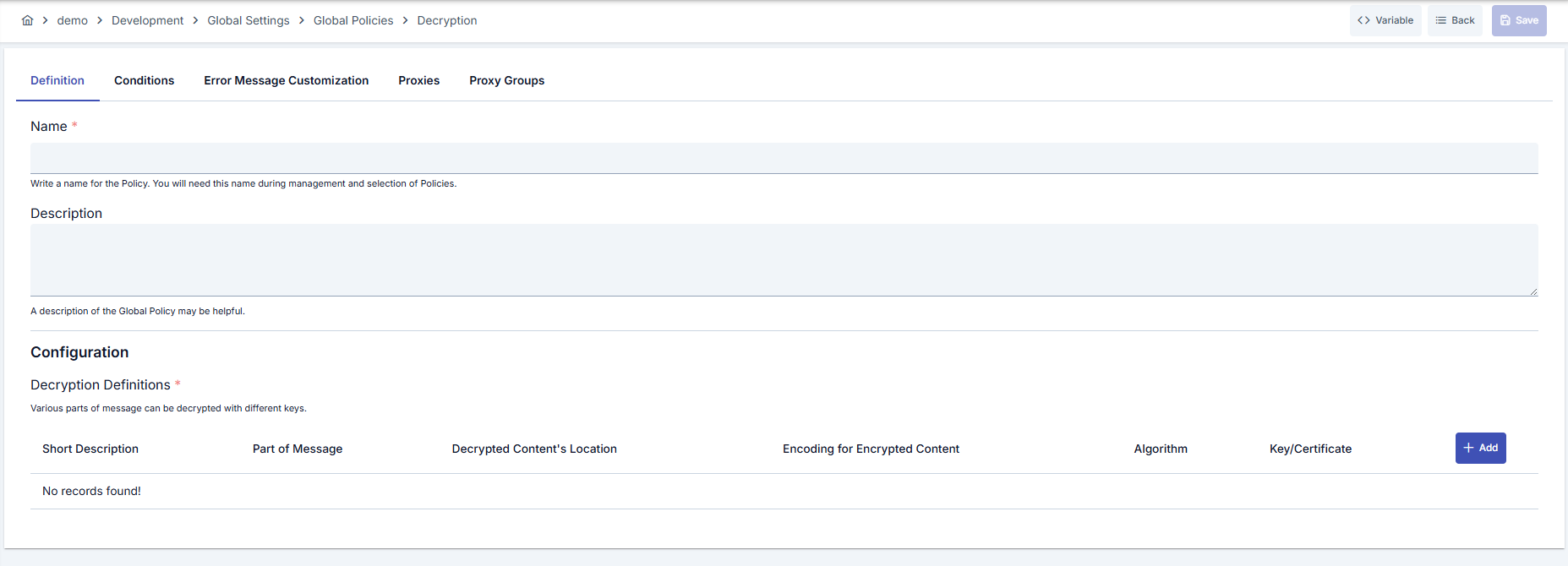
Configuration Steps
| Step | Description / Operation |
|---|---|
| Step 1: Going to Creation Page | - Go to Development → Global Settings → Global Policies → Decryption section from the left menu. - Click the [+ Create] button at the top right. |
| Step 2: Entering Basic Information | Policy Status: Shows Active/Passive status. New policies are active by default. Name (Required): Example: Production_Decryption- Enter a unique name, it cannot start with a space. - System automatically checks. Green checkmark: available. Red cross: existing name. Description: Example: "Card data decryption for payment services" - Max. 1000 characters. - Explain the purpose of the policy. |
| Step 3: Variable Usage | - In the action button area at the top of the page, you can use the [<> Variable] button to select dynamic values. - Using context/global variable expressions, you can manage policy parameters with variable-based values instead of fixed values. - This reduces manual update effort when values change and provides operational convenience. - For detailed information, review Dynamic Variables. |
| Step 4: Managing Decryption Definitions | - Click the [+ Add] button in the Decryption Definitions section to add a new definition. - For each definition, specify short description, message part (source variable), location of decrypted content (target variable). - You can decrypt different message segments separately by adding multiple definitions. |
| Step 5: Determining Algorithm and Key Source | If you select SPECIFY in the Source of Algorithm field, determine the algorithm from the list and select Crypto Key Info or certificate. With FIND selection, you can have the algorithm name read from the cipherAlgorithmVar variable in the message.! Registration cannot be completed without key or certificate selection. |
| Step 6: Making IV and Encoding Settings | If algorithm requires IV, ivExists is automatically checked; select IV variable and ivEncodingType value. Specify encrypted content format with inputEncodingType (BASE64/HEXADECIMAL).! Wrong encoding selection produces data that cannot be decrypted. |
| Step 7: Defining Condition (Optional) | - Go to the Condition tab. - Conditions determine when the policy will be active. Examples: - Environment-based: Header = X-Environment, Operator = Equals, Value = production- API Key-based: Header = X-API-Key, Starts With = PROD-- Endpoint-based: Path = /api/admin/*If no condition is defined, the policy is always active |
| Step 8: Customizing Error Message (Optional) | - Go to the Error Message Customization tab. - Customize the message to be returned when access is denied. Default: { "statusCode": 403, "message": "[Default error message]" }Custom: { "statusCode": 403, "errorCode": "[CUSTOM_ERROR_CODE]", "message": "[Custom message]" } |
| Step 9: Saving | - Click the [Save] button at the top right. Checklist: Unique name. Required fields filled. At least one decryption definition exists Result: - Policy is added to the list. - Can be linked to APIs. - If it's a global policy, it is automatically applied. |
For the description of Conditions and Error Message Customization panels, you can review the Conditions and Error Message Customization sections on the What is Policy? page.
For a complete guide on all layers, priority order and scenario examples of the error message configuration system, see the Error Message Configuration Guide page.
Deleting the Policy
For the deletion steps of this policy and the operations to be applied when it is in use, you can refer to the Removing Policy from Flow section on the Policy Management page.
Exporting/Importing the Policy
For the export and import steps of this policy, you can refer to the Export/Import page.
Linking the Policy to API
For the process of how this policy will be linked to APIs, you can refer to the Linking Policy to API section on the Policy Management page.
Advanced Features
| Feature | Description and Usage Steps |
|---|---|
| Dynamic Algorithm Source Management | - Set sourceOfAlgorithm field as FIND.- Map the variable to be read from request with cipherAlgorithmVar.- Ensure supported algorithm names are agreed with client. |
| Certificate Revocation Tracking | - Check red-marked (revoked) records in certificate selection list. - Inform user in error message if working with revoked certificate. - If needed, create new certificate and update policy. |
| Automating IV Management | - After algorithm selection, if ivExists is automatically checked, determine IV variable.- Select encoding compatible with format in message for ivEncodingType.- Prevent unnecessary workload by clearing ivVar field for algorithms that do not produce IV. |
Best Practices
Things to Do and Best Practices
| Category | Description / Recommendations |
|---|---|
| Algorithm Selection | Bad: Using default algorithm in every definition. Good: Manually selecting the needed algorithm. Best: Providing client-based flexibility by reading algorithm names from message. |
| Key Management | Bad: Storing keys as manual files. Good: Using Crypto Key Info records. Best: Performing key rotation with Secret Manager automation. |
| IV Usage | Bad: Leaving IV field for algorithms that do not require IV. Good: Using fixed IV in algorithms that require IV. Best: Reading IV dynamically from message and mapping with appropriate encoding. |
| Variable Management | Bad: Hardcoding message fields. Good: Selecting existing variables with Variable dialog. Best: Reducing maintenance cost with layered variable naming and descriptions. |
| Error Messages | Bad: Returning default 500 error. Good: Adding meaningful message in decryption failures. Best: Designing messages containing situation-specific error codes and routing information. |
Security Best Practices
| Security Area | Description / Warnings |
|---|---|
| Key Rotation | Plan periodic rotation of keys according to SLA, update policies after rotation. |
| Certificate Validity | Check certificate expiration and revocation status, create emergency action plan for revoked certificates. |
| Access Logs | Collect access logs in centralized SIEM for services accessing decryption results. |
| Condition Management | Define policy conditions according to minimization principle; avoid unnecessarily broad conditions. |
| Error Content | Do not share sensitive key or algorithm details in error messages; use general expressions. |
Things to Avoid
| Category | Description / Warnings |
|---|---|
| Wrong Encoding Selection | Why avoid: Encoding incompatibility leads to decryption failure. Alternative: Verify message format and select correct inputEncodingType. |
| Shared Fixed IV | Why avoid: Creates security vulnerability. Alternative: Take IV from message or generate dynamically for each request. |
| Revoked Certificate Usage | Why avoid: Increases risk of security breach. Alternative: Use active certificates, quickly replace revoked ones. |
| Unconditional Global Impact | Why avoid: Causes unexpected behaviors in all API Proxies. Alternative: Narrow conditions or create local policy. |
Performance Tips
| Criterion | Recommendation / Impact |
|---|---|
| Number of Definitions | Recommendation: Clean unnecessary definitions. Impact: Processing time in decryption loop shortens. |
| Algorithm Selection | Recommendation: Prefer symmetric options instead of unnecessarily heavy algorithms (RSA). Impact: CPU load decreases, latency drops. |
| IV Source | Recommendation: Prevent unnecessary queries instead of reading IV from message. Impact: IO costs decrease. |
| Secret Manager Calls | Recommendation: Group definitions using the same key. Impact: Key retrieval calls decrease. |
| Error Logging | Recommendation: Close debug log level in successful operations. Impact: Log volume and disk usage decrease. |
Frequently Asked Questions (FAQ)
| Category | Question | Answer |
|---|---|---|
| General | Can Decryption Policy be used in a single API? | Can be defined both globally and locally; you can share global policy with multiple API Proxies, customize with local copies. |
| General | How many definitions can I create in the same policy? | There is no limit; you can create a reasonable number of definitions according to your performance requirements. |
| Technical | How should I send algorithm name in request? | If sourceOfAlgorithm = FIND is selected, you should write the algorithm name to the variable you specified (e.g., header or body field). |
| Technical | What format should IV information be in? | IV value should be compatible with the ivEncodingType (BASE64 or HEXADECIMAL) you selected; otherwise decryption errors. |
| Usage | Does policy work if certificate appears revoked? | It works but revoked certificate creates security risk; update with a valid certificate as soon as possible. |
| Usage | Do I have to customize error message? | No, but it is recommended to define customized error code/message for user experience and traceability. |