JSON Transformation
This document explains the detailed usage of a specific policy. If you are using Apinizer policies for the first time or want to learn the general working principles of policies, we recommend reading the What is Policy? page first.
Overview
What is its Purpose?
- Provides compatibility by transforming incoming JSON bodies in integration with API Proxy to the schema expected by target microservice.
- Reduces maintenance costs by making JSON formats produced and sent by multiple clients uniform with the same policy.
- Bridges with legacy Endpoint systems that only accept XML by converting JSON contents to XML output.
- Dynamizes transformation scenarios according to specific tenant, version, or payload content by running according to conditions.
Working Principle
- Request Arrival: For each HTTP/HTTPS request arriving at the API Gateway, the source IP address of the request is identified.
- Policy Check: If the JSON Transformation policy is active, the system checks in the following order:
- Is a Condition defined? If so, is the condition met?
- Is the policy active (active=true)?
- Is a Variable being used or is Apinizer default?
- JSON Transformation Check:
transformationTypefield is examined. If JSON2JSON is selected, JOLT definition is parsed and request body is mapped to new JSON schema. If JSON2XML is selected, JSON content is converted to XML by applying relevant flags. - Decision Making:
- Match Found: Transformed body is written back to request pipeline, current content is sent to target Endpoint, and transformation type is processed to log record.
- No Match: Request is routed by API Proxy with original payload; policy counters are not updated.
- Error Handling: Customizable HTTP status code and error message are returned for requests that do not comply with the policy rule.
Features and Capabilities
Basic Features
- JSON2JSON Transformation Engine: Performs field renaming, hierarchy changes, and data enrichment operations with JOLT specification.
- JSON2XML Configuration: Provides null/empty field management and element packaging options when converting JSON contents to XML for legacy system integration.
- Transformation Test Laboratory: Provides the ability to validate JOLT templates with live data through Test Transformation Data module and examine output differences.
- Active/Passive Status Control: Easily change the active or passive status of the policy (active/passive toggle). In passive mode, the policy is not applied but its configuration is preserved.
- Condition-Based Application: Determine when the policy will be applied by creating complex conditions with Query Builder (e.g., only for specific endpoints or header values).
Advanced Features
- Global Policy Propagation Control: When global policies are updated, lists of API Proxies and Proxy Groups in use are automatically checked and directed to approval process.
- Automatic Name Uniqueness: Provides real-time validation and visual feedback to user so that policy names do not conflict project-wide.
- Policy Flow Integration: Enables reuse scenarios by chaining selected policy with other policies in Policy Flow mode.
- Export/Import Feature: Export policy configuration as a ZIP file. Import to different environments (Development, Test, Production). Version control and backup capability.
- Policy Group and Proxy Group Support: Manage multiple policies within Policy Group. Bulk policy assignment to Proxy Groups. Centralized update and deploy operations.
- Deploy and Versioning: Deploy policy changes to live environment. See which API Proxies use it (Policy Usage). Proxy Group and Policy Group usage reports.
Usage Scenarios
| Scenario | Status | Solution (Policy Application) | Expected Behavior / Result |
|---|---|---|---|
| Microservice Schema Compatibility | Field names of JSON coming to new version API Gateway are different | transformationType=JSON2JSON, field renaming with JOLT | Request body conforms to target schema, backend code is not changed. |
| Transition to Legacy XML Service | Backend only accepts XML | transformationType=JSON2XML, unwrapElement=false, ignoreEmpty=true | JSON payload is converted to XML, SOAP-like Endpoint responds without problems. |
| Multiple Tenant Normalization | Tenant-based extra fields are coming | JSON2JSON, remove unnecessary fields with joltValue | Single JSON structure independent of tenant differences is obtained. |
| Optional Field Cleanup | Empty/null fields break backend validation | JSON2XML, ignoreNull=true, ignoreEmpty=true | Unnecessary empty elements do not occur in XML output, validation passes. |
| Real-Time Data Enrichment | Additional field derivation is needed | JSON2JSON, defaultValue functions in JOLT | Derived field is added to output, calculation is not done on service side. |
| External Service Integration Test | JOLT changes must be tested before going live | JSON2JSON, run sample data with test module | Transformation is validated beforehand, error risk in live decreases. |
| Regional Format Adaptation (optional) | Date format is expected in different regions | JSON2JSON, condition with header=Region check, JOLT format conversion | Region-based JSON outputs are produced consistently. |
Configuring Policy Parameters
In this step, users can create a new policy or configure existing policy parameters to define access rules. The defined parameters directly affect how the policy works (e.g., which IPs will be allowed, geographical restrictions, conditional activations, etc.). This allows the policy to be customized according to organization-specific requirements while being centrally manageable.
Creating a New JSON Transformation Policy
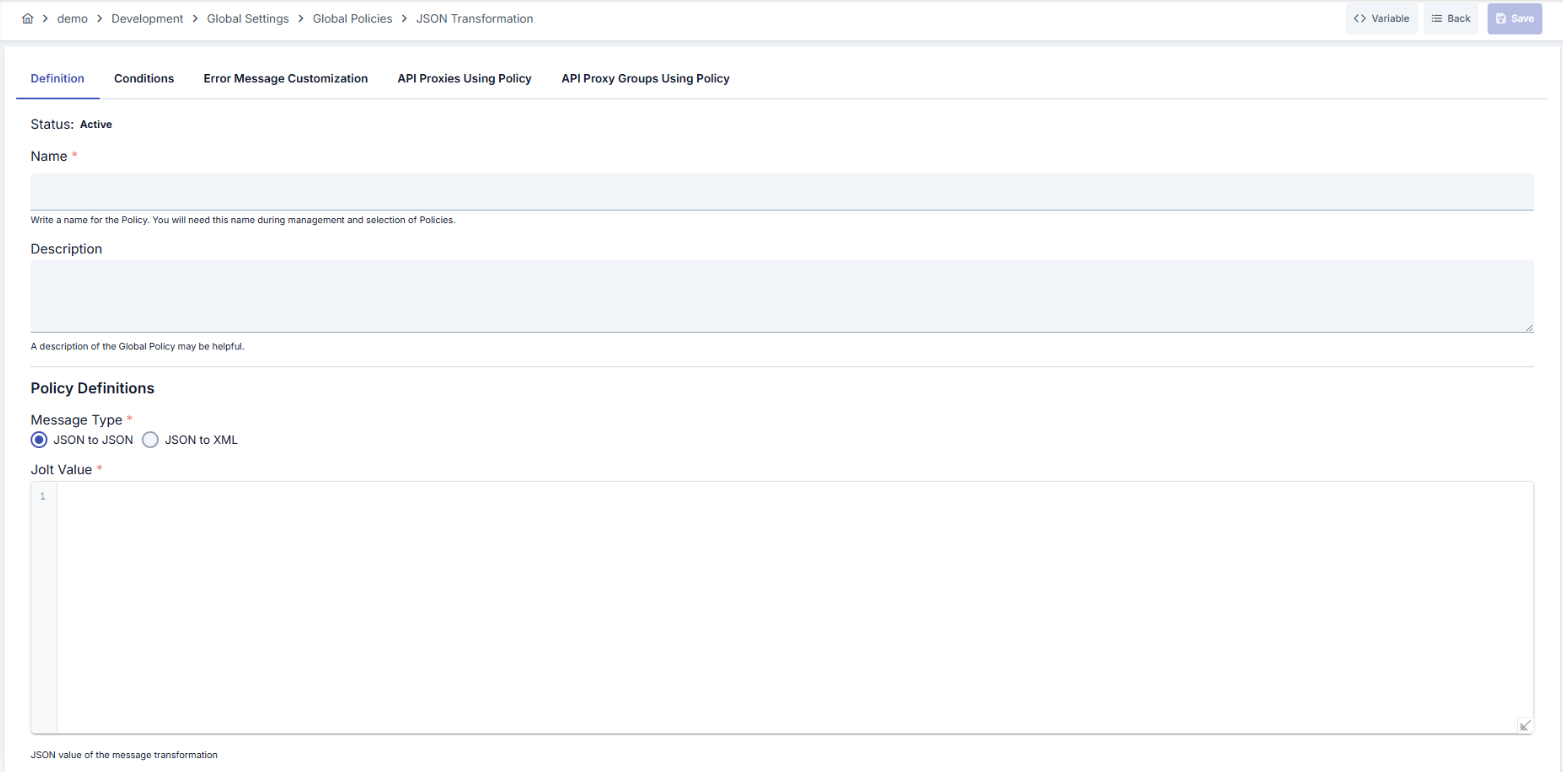
Configuration Steps
| Step | Description / Operation |
|---|---|
| Step 1: Go to Creation Page | - Go to Development → Global Settings → Global Policies → JSON Transformation Policy from the left menu. - Click the [+ Create] button at the top right. |
| Step 2: Enter Basic Information | Policy Status: Shows Active/Passive status. New policies are active by default. Name (Required): Example: Production_JSONTransform- Enter a unique name, does not start with space. - System automatically checks. Green checkmark: available. Red X: existing name. Description: Example: "Normalizes order JSON fields." - Max. 1000 characters. - Explain the purpose of the policy. |
| Step 3: Variable Usage | - In the action button area at the top of the page, you can use the [<> Variable] button to select dynamic values. - Using context/global variable expressions, you can manage policy parameters with variable-based values instead of fixed values. - This reduces manual update effort when values change and provides operational convenience. - For detailed information, review Dynamic Variables. |
| Step 4: Select Transformation Type | Select JSON2JSON or JSON2XML from transformationType field. When JSON2JSON is selected, JOLT editor opens; when JSON2XML is selected, transformation options appear. |
| Step 5: Define JOLT Specification (If Any) | Enter JOLT JSON structure on code editor for JSON2JSON, perform output validation from Test Transformation Data window. Fix syntax errors before template is saved. |
| Step 6: JSON to XML Parameters (If Any) | When JSON2XML is selected, mark ignoreNull, ignoreEmpty, useNullForNil, unwrapElement options. Adjust element packaging or empty field behavior according to legacy Endpoint needs. |
| Step 7: Define Condition (Optional) | - Go to Condition tab. - Conditions determine when the policy will be active. Examples: - Environment-based: Header = X-Environment, Operator = Equals, Value = production- API Key-based: Header = X-API-Key, Starts With = PROD-- Endpoint-based: Path = /api/admin/*If no condition is defined, policy is always active For details, you can refer to: Conditions |
| Step 8: Customize Error Message (Optional) | - Go to Error Message Customization tab. - Customize the message to be returned when access is denied. Default: { "statusCode": 403, "message": "[Default error message]" }Custom: { "statusCode": 403, "errorCode": "[CUSTOM_ERROR_CODE]", "message": "[Custom message]" } |
| Step 9: Save | - Click the [Save] button at the top right. Checklist: Unique name. Required fields filled. At least one transformation configuration exists Result: - Policy is added to the list. - Can be connected to APIs. - If global policy, automatically applied. |
For descriptions of Conditions and Error Message Customization panels, you can review the Conditions and Error Message Customization sections on the What is Policy? page.
For a complete guide on all layers, priority order and scenario examples of the error message configuration system, see the Error Message Configuration Guide page.
Deleting the Policy
For deletion steps of this policy and operations to be applied when in use, you can refer to the Remove Policy from Flow section on the Policy Management page.
Exporting/Importing the Policy
For export (Export) and import (Import) steps of this policy, you can refer to the Export/Import page.
Connecting the Policy to API
For the process of how this policy will be connected to APIs, you can refer to the Connect Policy to API section on the Policy Management page.
Advanced Features
| Feature | Description and Steps |
|---|---|
| JOLT Template Management | - Version new JOLT definitions in JSON editor. - Run sample data in Test Transformation Data screen. - Edit joltValue field and try again when you get error. |
| Global Policy Update Approval | - View list of API Proxies in use before saving. - Temporarily exclude Proxies that will not be affected with removeCurrentProxy if needed.- Connected screens are updated with automatic broadcast after approval. |
| Policy Flow Selection | - Open operation mode with setPolicyFlowMode(true) in Policy Flow mode.- Create chain with other policies through selectEvent.- Save orchestration with INSERT_UPDATE_POLICY event when flow is complete. |
Best Practices
Things to Do and Best Practices
| Category | Description / Recommendations |
|---|---|
| Schema Matching | Bad: Publishing JOLT template without testing on production data. Good: Performing manual check with test dataset. Best: Running automatic JOLT validation in CI pipeline. |
| XML Integration | Bad: Leaving all options as default and not examining XML output. Good: Adjusting ignoreNull/ignoreEmpty parameters according to requirements.Best: Validating results by performing XML validation against XSD schema. |
| Condition Management | Bad: Allowing policy to run on every request. Good: Defining basic conditions based on environment or header in Query Builder. Best: Reducing unnecessary transformations by establishing multi-criteria conditions. |
| Error Messages | Bad: Leaving default error code unchanged. Good: Defining specific message and code for JOLT errors. Best: Providing tracking ID and support direction in error message. |
| Versioning | Bad: Deleting old JOLT definitions. Good: Taking backup with export and storing. Best: Maintaining branch-based JOLT versions in source control. |
Security Best Practices
| Security Area | Description / Warnings |
|---|---|
| Payload Validation | If unexpected fields in incoming data cannot be removed with JOLT, malicious content may reach target service. Keep conditions and schema checks active. |
| Error Message Hygiene | Do not share internal system details in customized error messages; only provide error code and general description. |
| Global Policy Propagation | Review list of used API Proxies when global policies are updated; plan change window for critical services. |
| Audit Log Monitoring | Log transformation policies as mandatory events; detect unexpected transformations early. |
| Authorization | Give policy editing authorities to minimum users; close ROLE_DEPLOY_UNDEPLOY_PROXIES if not needed. |
Things to Avoid
| Category | Description / Warnings |
|---|---|
| Invalid JOLT Deployment | Why to avoid: JOLT with syntax errors causes 500 error in gateway. Alternative: Validate with Test Transformation Data before publishing. |
| Unconditional XML Transformation | Why to avoid: Applying JSON2XML to all requests breaks client expectations. Alternative: Use only in necessary calls by defining header/path condition. |
| Name Conflict | Why to avoid: Policy with same name may be overwritten during import/export. Alternative: Use unique prefix, pay attention to name validation warnings. |
| Global Update Without Approval | Why to avoid: Updating global policy while in use affects all API Proxy traffic. Alternative: Test on local copy first then perform approved deployment. |
Performance Tips
| Criterion | Recommendation / Impact |
|---|---|
| JOLT Complexity | Recommendation: Divide template into small pieces, minimize nested operators. Impact: Transformation time shortens, CPU consumption drops. |
| Condition Pre-Filtering | Recommendation: Use specific header/path filters in Query Builder. Impact: Unnecessary transformation executions are prevented. |
| XML Output Size | Recommendation: Actively use ignoreEmpty and ignoreNull options.Impact: Smaller XML output, network latency decreases. |
| Cache Usage | Recommendation: Store frequently used JOLT templates in joltValue within policy, do not recreate at runtime. Impact: Serialization costs drop. |
| Monitoring | Recommendation: Configure Gateway monitoring panels for policy-specific metrics (success/failed). Impact: Performance issues are detected quickly. |
Frequently Asked Questions (FAQ)
| Category | Question | Answer |
|---|---|---|
| General | At which stage does JSON Transformation Policy run? | Runs in request pipeline within API Gateway, before routing occurs, and current body is transmitted to target Endpoint. |
| General | How many policies can be applied simultaneously? | Multiple policies can be chained through Policy Group; each is executed sequentially to process body. |
| Technical | What happens if JOLT template is incorrect? | System returns HTTP code and message defined in error message tab; request does not reach backend. |
| Technical | Can namespace management be done in JSON2XML transformation? | Current component provides basic JSON→XML transformation; if namespace is needed, preprocessing should be done with JOLT. |
| Usage | How is policy taken to local copy? | Global policy is converted to local copy with Localize button on detail page and used only in selected API. |
| Usage | How can I test changes? | You can load sample JSON in Test Transformation Data component and compare new template's output with live preview. |