API Call
This document describes the detailed usage of a specific policy. If you are using Apinizer policy structure for the first time or want to learn the general working principles of policies, we recommend that you first read the What is Policy? page.
Overview
API Call policy establishes service-to-service communication in microservice architectures by calling other REST APIs through API Gateway. It routes incoming requests to backend systems, processes responses, and integrates them into the API Proxy flow. This enables fetching data from external services, enriching requests, or combining responses from multiple sources.
What is its Purpose?
- Route requests passing through API Gateway to another REST API to enable service-to-service communication in microservice architectures.
- Enrich incoming requests, transform them, and create combined responses by gathering data from multiple backend services (API Orchestration).
- Create a secure and manageable bridge to fetch or send data to external systems (CRM, ERP, payment gateways, etc.).
- Perform data transformation by manipulating headers, parameters, and body on request and response messages.
- Improve performance and reduce load on backend systems by caching results of frequently used API calls using cache mechanisms.
Working Principle
- Request Arrival: For each HTTP/HTTPS request arriving at API Gateway, if REST API Call policy is active, the call process is initiated.
- Policy Check: The system checks in the following order:
- Is a condition defined? If so, is the condition met?
- Is the policy active (active=true)?
- Is a variable used or is Apinizer default used?
- Request Preparation (Before Call): Before sending the request:
- Body is cleared or new content is added
- Headers and parameters are manipulated (add/remove)
- Data Manipulation rules are applied
- Cache check is performed (returns from cache if available)
- API Call: Request is sent to the defined URL with HTTP method:
- Synchronous: Response is awaited and processing continues
- Asynchronous: Process completes without waiting for response
- Response Processing (After Call - Only Synchronous): Incoming response is processed:
- Transformation is performed on body (NOT_CHANGE, REPLACE, CLEAR)
- Headers and parameters are manipulated
- Data Manipulation rules are applied
- Saved to cache (if active)
- Error Handling: Customizable HTTP status code and error message are returned for connection errors, timeouts, or unexpected responses.
Features and Capabilities
Basic Features
- Call Type Selection: Support for Synchronous (wait for response) or Asynchronous (fire-and-forget) mode. Response processing is not performed in async mode.
- HTTP Method Support: Supports all HTTP methods: GET, POST, PUT, DELETE, PATCH, HEAD, OPTIONS, TRACE.
- Timeout Management: Prevents infinite waits and protects system resources by defining maximum wait time in seconds for API calls.
- Active/Passive Status Control: Easily change policy's active or passive status (active/passive toggle). Policy is not applied in passive state but its configuration is preserved.
- Condition-Based Application: Determine when the policy will be applied by creating complex conditions with Query Builder (e.g., only for specific endpoints or header values).
Advanced Features
- Request/Response Manipulation: Comprehensive manipulation of body, headers, and parameters in Before Call and After Call stages. Supports XML, JSON, RAW, URL-Encoded formats.
- Data Manipulation: Data transformation with ADD (add), REPLACE (replace), DELETE (delete) operations between source and target variables. Dynamic data processing using Variable system.
- Secure HTTPS and mTLS: On the request Settings tab you can set timeout and secure connection options (TrustStore, KeyStore, optional PEM certificate, protocols, hostname verifier) for TLS/mTLS to the backend; certificate and KeyStore management aligns with Secret Manager.
- Cache Mechanism: Support for Distributed or Local cache. Variable-based cache key definition, capacity and TTL settings, option to cache null responses.
- Test Helper: Automatically generate URL for API call. Select endpoint from existing API Proxies or Proxy Groups, test based on environment.
- Export/Import Feature: Export policy configuration as ZIP file. Import to different environments (Development, Test, Production). Version control and backup capability.
- Policy Group and Proxy Group Support: Manage multiple policies within Policy Group. Bulk policy assignment to Proxy Groups. Centralized updates and deploy operations.
- Deploy and Versioning: Deploy policy changes to live environment. See which API Proxies use it (Policy Usage). Proxy Group and Policy Group usage reports.
Usage Scenarios
| Scenario | Status | Solution (Policy Application) | Expected Behavior / Result |
|---|---|---|---|
| Microservice Integration | Order API needs to call payment service | POST call is made to payment service with REST API Call policy on requests arriving at order endpoint. Order information is sent in body. | Payment service response is received, if successful order is confirmed. Timeout 30 seconds. |
| Data Enrichment | User profile API comes only with ID but detailed information is needed | GET call is made to CRM system with userId from incoming request body. CRM response is added to existing response with Data Manipulation. | Returns to client with user ID + full profile information (name, surname, email) combined. |
| Authentication Token Management | Backend service expects JWT token instead of API Key | X-API-Key is taken from Request Headers, sent to Authentication API. Returned JWT token is added to Authorization header in Before Call stage. | Backend service is called with valid JWT token. Client continues to use API Key. |
| Performance with Cache | Product catalog API goes to database on every call | Catalog service is called with REST API Call. Cache active, capacity: 1000, TTL: 300 seconds. Cache By: "product.category" variable. Storage: Distributed. | First call goes to backend, result is cached for 5 minutes. Calls for same category return from cache. |
| Async Log Sending | Every API call needs to be logged to external log system | POST is made to log service with Asynchronous REST API Call. Request details are sent in body. Timeout: 5 seconds. | Log service response is not awaited, main request flow continues uninterrupted. Fire-and-forget logic. |
| Third-Party API Gateway | Payment gateway expects special header format | All headers are deleted in Before Call stage (removeAllHeadersBeforeCall: true). New headers are added: X-Merchant-ID, X-Transaction-Type, Authorization (Bearer token). Body is converted from XML to JSON. | Payment gateway receives request in expected format, integration succeeds. |
| Secure Communication with Certificate | Backend service requires mutual TLS (mTLS) | Enable secure connection on the request Settings tab and use Configure to select KeyStore and TrustStore. URL: https://secure-backend/api. Timeout: 60 seconds. | Request is sent with client certificate, backend verifies mutual TLS, secure communication is established. |
Configuring Policy Parameters
In this step, users can create a new policy or configure existing policy parameters to define access rules. Defined parameters directly affect how the policy works (e.g., which IPs will be allowed, geographical restrictions, conditional activations, etc.). This allows the policy to be customized according to organization-specific requirements and managed centrally.
Creating New API Call Policy
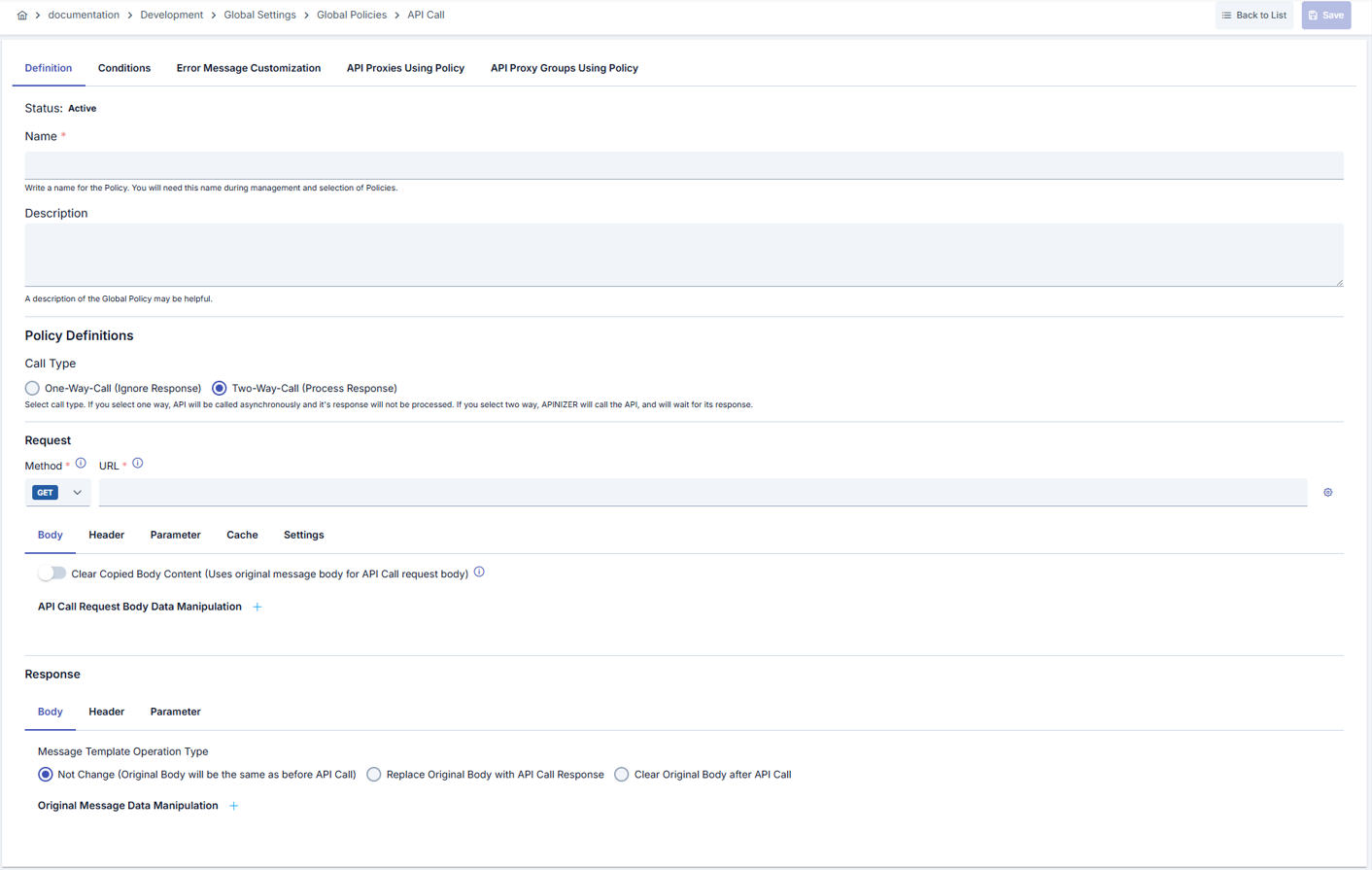
Configuration Steps
| Step | Description / Operation |
|---|---|
| Step 1: Go to Creation Page | - Go to Development → Global Settings → Global Policies → API Call from left menu. - Click [+ Create] button at top right. |
| Step 2: Enter Basic Information | Policy Status (Policy Status): Shows Active/Passive status. New policies are active by default. Name (Name) Required: Example: Payment_Gateway_Call- Enter unique name, does not start with space. - System automatically checks. Green checkmark: available. Red X: existing name. Description (Description): Example: "Makes API call to payment gateway for order confirmation" - Max. 1000 characters. - Explain policy's purpose. |
| Step 3: Configure Call Type and Basic Settings | Call Type (Call Type): - SYNCHRONOUS: Response is awaited, processing continues. Response processing is performed. - ASYNCHRONOUS: Fire-and-forget. Response is not awaited, response processing is not performed. HTTP Method Required: Select from dropdown (GET, POST, PUT, DELETE, PATCH, HEAD, OPTIONS, TRACE) Base URL Required: Example: https://api.payment-gateway.com/v2/charge- You can select URL from existing API Proxies with Test Helper (⚙️ icon). Timeout Required: In seconds. Example: 30 (30 seconds). Min: 1.- If API does not respond, timeout error is returned after this duration. |
| Step 4: Request (Before Call) Configuration | BODY Tab: Clear Body Before Call: Toggle to activate/deactivate - Active: Incoming request body is cleared. - Passive: Incoming body is used as is. Use Message Template (if Clear Body is active): - Content Type: XML, JSON, RAW, URL_ENCODED - Body Content: Enter template in textarea. You can use variables: ${variable.name}- If URL Encoded is selected: Key-Value table appears. Request Data Manipulation: - Click [+ Add] button. - Operation: ADD, REPLACE, DELETE - Source: Value or Variable - Target: Value or Variable (targetName required in ADD) HEADER Tab: Remove All Headers Before Call: Toggle - Active: All headers are deleted. - Passive: Headers are preserved. Deleted Headers (if Remove All is passive): - Add header names to delete in list format: X-Old-HeaderNew Headers: - Name, Description, Value/Variable, Prefix (if Variable is selected: BEARER, BASIC, etc.) - Example: Name: Authorization, Value: Bearer ${token.jwt}, Prefix: BEARERPARAMETER Tab: - Same logic as Header. Used for query parameters. CACHE Tab: Enable Cache: Toggle Apply By (Cache By): Select variable (e.g., user.id, product.category)Capacity Required: Example: 1000 (1000 records)TTL Required: In seconds. Example: 300 (5 minutes)Cache Storage Type: DISTRIBUTED (distributed) or LOCAL (local) Cache Null Responses: Checkbox - Should null responses also be cached? Dynamic TTL: Enable with toggle. When enabled, cache TTL is dynamically calculated from the API call response. See Dynamic TTL section for details. Response Assertion: Enable with toggle. Prevents caching a failed response when the server returns HTTP 200 but reports a business error in the body. See Response Assertion section for details. SETTINGS Tab: Timeout: Required, in seconds. You manage request duration on this tab; keep it consistent with the call timeout in the upper section. Secure connection (mTLS) settings: Turn on enable secure connection under the section title. When on, the summary shows KeyStore status, TrustStore and PEM server certificate if set, selected TLS protocols, and hostname verifier type. Click Configure (gear) for full editing; the button is disabled when secure connection is off. In the Configure dialog: Skip SSL verification disables server certificate validation and hides TrustStore, KeyStore, and certificate panels—use only in trusted test environments. When verification is on, select TrustStore and KeyStore from the pool or create a new KeyStore with +; choose a PEM Certificate from the pool or create a new one. Under Protocol settings, choose supported TLS protocol versions and the hostname verifier. This policy flow uses pool selection and new entries rather than direct file upload; a warning is shown at the bottom of the dialog. Click Save to apply and close. |
| Step 5: Response (After Call) Configuration (Only SYNCHRONOUS) | BODY Tab: After Call Body Operation Type: - NOT_CHANGE_BODY: Incoming response is returned as is. - REPLACE_BODY: Incoming response is completely replaced. - CLEAR_BODY: Incoming response is cleared, new body is created. Use Message Template (if CLEAR_BODY is selected): - Content Type: XML, JSON - Body Content: Enter response template in textarea. Original Message Data Manipulation: - Same logic as Before Call. ADD, REPLACE, DELETE on incoming response. HEADER and PARAMETER Tabs: - Same structure as Request. Header/parameter manipulation for After Call. |
| Step 6: Define Condition (Optional) | - Go to Condition tab. - Conditions determine when the policy will be active. Examples: - Environment-based: Header = X-Environment, Operator = Equals, Value = production- API Key-based: Header = X-API-Key, Starts With = PROD-- Endpoint-based: Path = /api/payment/* |
| Step 7: Customize Error Message (Optional) | - Go to Error Message Customization tab. - Customize message to return when API call fails. Default: { "statusCode": 500, "message": "REST API call failed" }Custom: { "statusCode": 502, "errorCode": "PAYMENT_GATEWAY_ERROR", "message": "Payment service is not responding", "timestamp": "${current.time}" } |
| Step 8: Save | - Click [Save] button at top right. Checklist: Unique name. Required fields filled. At least one IP or group exists Result: - Policy is added to list. - Can be bound to APIs. - If global policy, automatically applied. |
For descriptions of Conditions and Error Message Customization panels, you can review the Conditions and Error Message Customization sections on the What is Policy? page.
For a complete guide on all layers, priority order and scenario examples of the error message configuration system, see the Error Message Configuration Guide page.
Deleting Policy
For deletion steps of this policy and operations to be applied when in use, you can refer to the Removing Policy from Flow section on the Policy Management page.
Exporting/Importing Policy
For export (Export) steps of this policy and available options, you can refer to the Export/Import page.
Binding Policy to API
For the process of how this policy will be bound to APIs, you can refer to the Binding Policy to API section on the Policy Management page.
Advanced Features
| Feature | Description and Steps |
|---|---|
| Variable-Based Dynamic URL | You can create dynamic endpoints using variables in URL. - Define variable: backend.base.url = https://api.backend.com- In URL field: ${backend.base.url}/users/${user.id}/profile- Values are automatically filled at runtime. |
| Chained API Calls (Chain Calls) | You can create data flow by running multiple REST API Call policies sequentially. - Call Authentication API with first policy, get token. - Save token to variable: auth.token- Add ${auth.token} to Authorization header in second policy.- Call Data API with second policy. |
| Conditional Caching | Cache is active only in certain conditions. - Activate cache. - In Condition section: Header = X-Cache-Control, Equals = enable- Client activates cache by sending header when cache is needed. |
Dynamic TTL
Dynamic TTL automatically calculates the cache time-to-live (TTL) from a value in the API response instead of using a fixed value. For example, if your backend service returns an expireAt field in the response, the cache remains valid until that date.
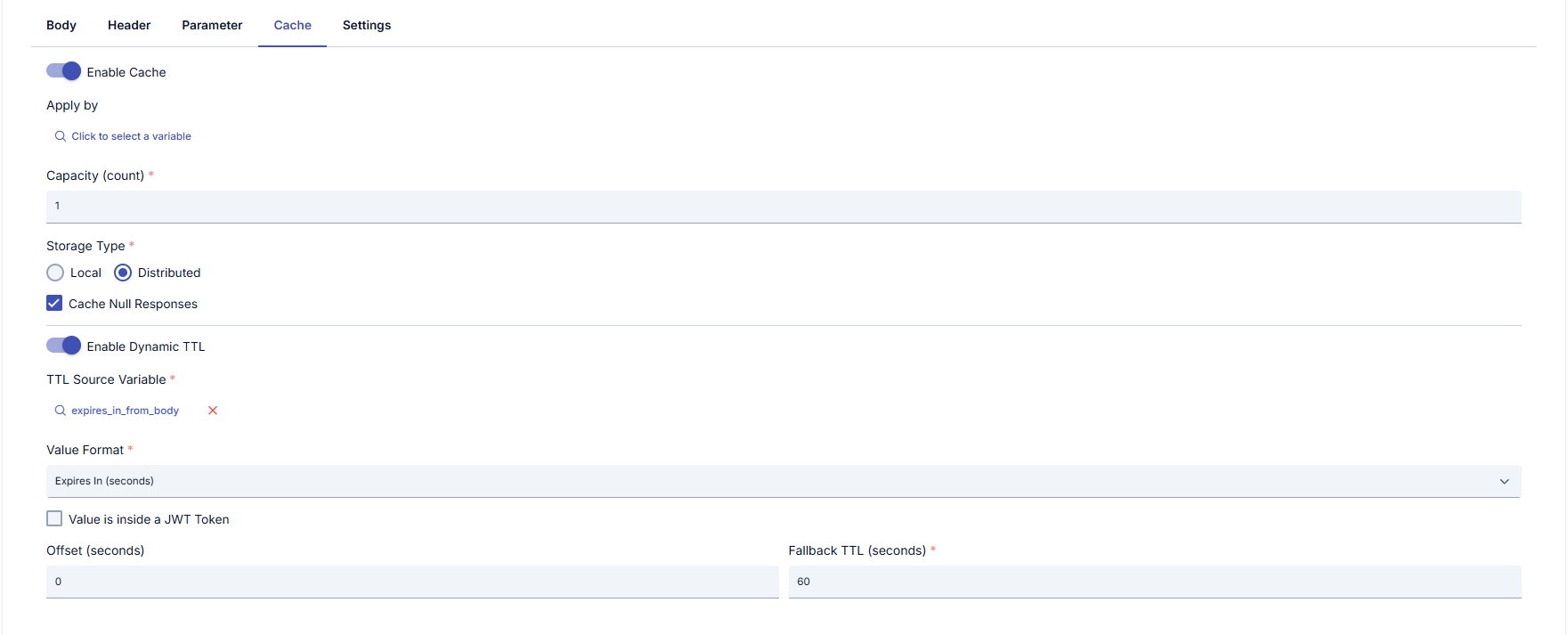
Configuration Fields
| Field | Description |
|---|---|
| Enable Dynamic TTL | Toggle on/off. When enabled, the static TTL field is hidden and dynamic TTL settings appear. |
| TTL Source Variable | The variable from which the TTL value will be read. Can be a response header, response body (JSONPath/XPath), or another context variable. Example: $.expireAt from the response body. |
| Value Format | Specifies the format of the value read from the selected variable. The following formats are supported: |
Supported Value Formats:
| Format | Description | Example Value |
|---|---|---|
| ISO 8601 DateTime | Standard ISO 8601 date format. Accepts UTC, offset, or timezone-less values. | 2026-03-26T15:30:00Z, 2026-03-26T15:30:00+03:00, 2026-03-26T15:30:00, 2026-03-26 |
| Custom DateTime Format | Custom format using Java DateTimeFormatter pattern. An additional pattern field appears when selected. | Pattern: dd.MM.yyyy HH:mm:ss → Value: 26.03.2026 15:30:00 |
| Unix Epoch (seconds) | Unix epoch timestamp in seconds. | 1743004200 |
| Unix Epoch (milliseconds) | Unix epoch timestamp in milliseconds. | 1743004200000 |
| Expires In (seconds) | Relative duration indicating how many seconds the response is valid. | 300 (5 minutes) |
| Expires In (milliseconds) | Relative duration indicating how many milliseconds the response is valid. | 300000 (5 minutes) |
| Duration String | Human-readable duration string. | 1h, 30m, 3600s |
Additional Settings
| Field | Description |
|---|---|
| Value is inside a JWT Token | Checkbox. When selected, the source variable value is first decoded as a JWT token, then the TTL value is read from the specified claim. |
| JWT Claim Name | The claim name to read after JWT decoding. Supports simple claim names (e.g., exp) or JSONPath (e.g., $.data.expireAt). |
| Offset (seconds) | Safety margin in seconds subtracted from the calculated TTL. For example, with a 30-second offset, the cache expires 30 seconds before the actual expire time. Used to compensate for clock drift or network latency. |
| Fallback TTL (seconds) | Fallback TTL value (in seconds) used when dynamic TTL cannot be calculated (parse error, variable not found, etc.). If not defined, the policy's static TTL value is used. |
Example Scenario
Your backend service returns the following response:
{
  "data": { "price": 99.90, "currency": "USD" },
  "expireAt": "2026-03-26T15:30:00Z"
}
Configuration:
- Enable Dynamic TTL: On
- TTL Source Variable: Response body → JSONPath:
$.expireAt - Value Format: ISO 8601 DateTime
- Offset:
30(30-second safety margin) - Fallback TTL:
300(5 minutes if parse fails)
The cache will remain valid until the date in the expireAt field (minus 30-second offset).
If the calculated TTL is zero or negative (the date in the source variable is already in the past), the response is not cached. Some services return "empty date" values such as 0001-01-01T00:00:00 on failed responses; these count as past dates and are excluded from the cache as well.
Response Assertion
Some services return HTTP 200 even on failure and report the error only through a field in the response body:
{ "Token": "", "ReturnCode": 330, "ErrorMessage": "Bad Request" }
Such responses cannot be distinguished by HTTP status code; with cache enabled, the failed response is cached too and the same error is returned for every request until the TTL expires. Response assertion lets you determine success from a value in the body (or a header).
Assertion is disabled by default. Existing configurations keep behaving exactly as before until you enable it.
Configuration Fields
| Field | Description |
|---|---|
| Enable Response Assertion | Master switch. When off, every response is cached (as long as HTTP succeeded). |
| Assertion Variable | The variable the value is read from. Can be a response header, response body (JSONPath/XPath), or another context variable. Example: $.ReturnCode. |
| Comparison | Equals, Not Equals, Contains, Not Contains, Exists (Not Empty), Not Exists (Empty), Matches Regex. |
| Expected Value | The value to compare against. Not required for the Exists/Not Exists operators. Environment variables (${variable}) and context variables (#{variable}) are supported and resolved on every request, so the expected value can differ per environment (dev/test/prod). |
What Happens When the Assertion Fails
The response is not cached; the flow continues normally and the failed response is passed to the caller. The request is not stopped at the gateway.
This prevents a common problem: a transient backend error being written to the cache and returned for every request until the TTL expires.
Example Scenario
For the token service above:
- Enable Response Assertion: On
- Assertion Variable: Response body → JSONPath:
$.ReturnCode - Comparison: Equals
- Expected Value:
0
Successful responses returning ReturnCode 0 are cached; responses returning an error code such as 330 are excluded from the cache and the next request goes to the backend.
The two features complement each other. If your backend does not return a valid expiration date on failed responses, dynamic TTL already prevents caching; but when the success/failure distinction relies on a code in the body, enabling response assertion as well is recommended.
Retry on Failure
When the call to the target service fails with a transient error — a connection timeout, a DNS or TLS failure, or a momentary 502/503/504 from the other side — the request can be sent again automatically instead of failing the whole API request.
Retry is disabled by default. Existing configurations keep behaving exactly as before until you enable it.
Configuration Fields
| Field | Description |
|---|---|
| Retry on failure | Master toggle. When off, the call is attempted once, as before. |
| Retry Count | Number of additional attempts after the first one. The total number of requests is one more than this value. |
| Delay Strategy | No Delay, Fixed Delay or Exponential Backoff. |
| Fixed Delay (ms) | Wait time before each retry. Shown when the strategy is Fixed Delay. |
| Initial Delay (ms) | Wait time before the first retry. Shown when the strategy is Exponential Backoff. |
| Maximum Delay (ms) | Upper bound for the growing wait time, so the delay cannot grow without limit. |
| Backoff Multiplier | Growth factor applied at each step (must be greater than 1). |
| Status Codes To Retry | Which HTTP status codes trigger a retry. When left empty, 502, 503 and 504 are used. |
| Also retry POST/PATCH calls on server errors | Off by default. See the warning below. |
Which Failures Are Retried
The decision is based on how far the request got, not only on the status code:
| Situation | Meaning | Retried? |
|---|---|---|
| Connection was never established (connection refused, connect timeout, DNS failure, TLS handshake failure) | The request was not sent | Yes, for every HTTP method |
| The request was sent but no response arrived (read timeout, connection reset) | The service may have processed the request | Only for idempotent methods |
| The service responded with an error status in the retry list | The service may have processed the request | Only for idempotent methods |
Any other status (for example 400, 401, 404) | Permanent error, retrying will not help | No |
GET, HEAD, OPTIONS, PUT and DELETE are idempotent according to RFC 7231. POST and PATCH are not.
Enable Also retry POST/PATCH calls on server errors only when the target service is safe against duplicate requests. If the service returned an error after processing the request, sending it again can create a duplicate record or a duplicate payment. When the connection could not be established at all, the request was never delivered, so it is retried regardless of this setting.
Interaction with Cache
Retry and the response cache work on separate axes and do not interfere with each other:
- When the response is served from cache, no HTTP call is made at all, so retry never comes into play.
- The cache is looked up once, before the attempts begin — retries do not repeat the cache lookup.
- Only a successful response is written to the cache. If every attempt fails, nothing is cached and the policy fails as it does today.
- With Dynamic TTL, the TTL is calculated from the final, successful response; failed attempts do not affect it.
- Failures reaching the cache service are a different matter and are handled by the cache error action setting, not by retry.
Each attempt can take up to the configured timeout, and the waits are added on top. With a 30-second timeout and 2 retries the call can occupy roughly 90 seconds. Keep this within the API proxy's overall timeout — the policy screen shows the calculated worst case as you change the values.
Visibility in Trace
When tracing is enabled, each attempt is recorded separately. The execution detail shows the total attempt count and, for every attempt, its result, failure class, duration and the delay waited before it — so a long-running request can be explained afterwards.
Compression
By default the policy does not negotiate compression with the target service: no Accept-Encoding header is sent and the response is passed on exactly as it arrives. You can turn negotiation on from the Settings tab with Enable Compression.
When it is enabled, the call tells the target service which compression formats it accepts (gzip, deflate, br, zstd and the other formats available on the platform) and automatically decompresses a compressed response before the rest of the policy runs. On large responses this lowers the amount of data transferred.
When to Enable It
| Situation | Recommendation |
|---|---|
| The target service returns large payloads over a slow or metered link | Enable it — the response travels compressed and is opened automatically. |
| The target service returns a compressed response no matter what the caller accepts | Enable it — otherwise the response is carried on in its compressed form and the following steps cannot read it. |
| The target service returns plain responses | Leave it disabled — this is the default and avoids needless negotiation. |
The Accept-Encoding header is governed by this setting alone. A value you define for that header on the Header tab is not forwarded to the target service.
Compression is disabled by default, so API Call policies configured before this setting existed stop sending Accept-Encoding after the upgrade. If a target service returns a compressed response without checking what the caller accepts, enable this setting on the policies that call it.
Tips and Best Practices
Things to Do and Best Practices
| Category | Description / Recommendations |
|---|---|
| URL Management | Bad: Hard-coding URLs: https://api.prod.com/usersGood: Using environment variable: ${env.api.url}/usersBest: Environment-based management with Variable + Config: ${backend.url} = https://test-api.com in test environment, https://prod-api.com in production |
| Timeout Values | Bad: Very high timeout (120 seconds) - System resources are exhausted Good: Average timeout (30 seconds) - Sufficient in most cases Best: Optimized timeout according to backend service response time. Database queries: 10 seconds, External API: 30 seconds, Payment: 60 seconds |
| Cache Strategy | Bad: Same cache setting for all APIs - Unnecessary cache Good: Endpoint-based cache - Product list: 5 minutes Best: Variable-based cache + Null response control. Cache By: user.tier → Premium user: 1 minute, Free user: 10 minutes. Cache Null Responses: false (empty responses should not be cached) |
| Error Handling | Bad: Default error messages - User doesn't understand Good: Custom error messages - "Backend service is not responding" Best: HTTP status code + custom error code + contextual message: { statusCode: 504, errorCode: "PAYMENT_TIMEOUT", message: "Payment service did not respond within 30 seconds", retryAfter: 60 } |
| Header Manipulation | Bad: Deleting all headers and manually adding - Security risk Good: Adding/deleting only necessary headers Best: Remove All Headers: false. Delete only sensitive headers (Authorization, Cookie). Add headers backend needs. Add correlation-id for trace. |
Security Best Practices
| Security Area | Description / Warnings |
|---|---|
| Certificate Usage | Warning: Connecting to HTTPS backends without certificate creates security vulnerability. Recommendation: Always add certificate to systems requiring mutual TLS (mTLS). Check certificate revocation. Expired certificates give warning. Critical: Do not use self-signed certificate in production environment. |
| Sensitive Data Transmission | Warning: Do not send information like API Key, token, password in body as plain text. Recommendation: Define sensitive data as Variable, store encrypted. Send in header: Authorization: Bearer ${secure.token}Critical: Be careful not to log sensitive data. Mask password fields in Data Manipulation. |
| Asynchronous Call Security | Warning: In async calls, response cannot be checked, errors may be missed. Recommendation: Use Synchronous for critical operations. Use async only for side operations like log, notification. Critical: Operations like payment, order confirmation should not complete without receiving actual response. |
| Input Validation | Warning: Do not send requests to backend without validating incoming requests. Recommendation: Add input validation in Before Call stage. Filter risky characters for XSS, SQL Injection. Perform sanitization with Data Manipulation. Critical: Ensure data is not sent in format other than what backend expects. |
| Rate Limiting | Warning: REST API Call policy does not do rate limiting, backend may be overloaded. Recommendation: Use Rate Limiting policy together with REST API Call. Do not overload backend system. Critical: Rate limiting at API Gateway level is required for DDoS protection. |
Things to Avoid
| Category | Description / Warnings |
|---|---|
| Infinite Timeout | Why to avoid: If timeout value is very high (e.g., 300 seconds), non-responding backends consume system resources. Connection pool may fill up. Alternative: Use reasonable timeout values (between 5-60 seconds). Optimize backend service. Use async call if necessary. |
| Intensive Calls Without Cache | Why to avoid: Calling same data repeatedly tires backend, increases response time, increases cost. Alternative: Activate cache for data that doesn't change frequently (product catalog, settings). Set TTL according to data update frequency. |
| Unnecessary Data Manipulation | Why to avoid: Performing complex data manipulation on every request/response reduces performance. CPU usage increases. Alternative: Prefer changing backend service to send data in desired format. Use data manipulation only when necessary. |
| Frequent Changes in Global Policy | Why to avoid: If global policy is used in multiple APIs, one change affects all APIs. Error risk increases in production. Alternative: Test global policy in test environment. Use local policy for critical APIs. Take backup before changes. |
Performance Tips
| Criterion | Recommendation / Impact |
|---|---|
| Connection Reuse | Recommendation: Apinizer manages backend connections with connection pool. If multiple calls are made to same backend, connection is reused. Impact: New TCP connection is not opened for each call, latency decreases. SSL handshake overhead decreases. |
| Cache Hit Ratio | Recommendation: Do not keep cache capacity too low. Give high capacity to heavily used endpoints. Make correct key selection with Cache By. Impact: If cache hit ratio is 80%+, backend load decreases by 80%. Response time speeds up 10-100x. |
| Async vs Sync Selection | Recommendation: Use async for non-critical, slow, operations that don't require response (log, notification, analytics). Impact: Main request flow is not blocked. End-user response time decreases. Backend timeout risk decreases. |
| Data Manipulation Optimization | Recommendation: Do not perform unnecessary parsing on large JSON/XML files. Manipulate only necessary fields. Access field directly with XPath/JSONPath using variables. Impact: CPU usage decreases by 50-70%. Memory consumption decreases. Throughput increases. |
| Timeout Tuning | Recommendation: Measure backend service average response time. Set timeout as average + 2x standard deviation. Example: Avg: 2s, StdDev: 1s → Timeout: 4s Impact: Unnecessary timeouts don't occur. Non-responding backends fail quickly. Resource leak is prevented. |
Frequently Asked Questions (FAQ)
| Category | Question | Answer |
|---|---|---|
| General | What is the difference between REST API Call policy and API Proxy? | API Proxy: Public endpoint exposed to clients. REST API Call: Makes call to another backend API as policy. REST API Call policy can be used within an API Proxy. Example: Client → API Proxy (/payment) → REST API Call → Backend (/charge) |
| General | Can I use multiple REST API Call policies in the same API Proxy? | Yes. You can use multiple REST API Call policies with different conditions or sequentially. Example: First policy authentication, second policy data fetch. |
| Technical | What is the practical difference between Synchronous and Asynchronous? | Synchronous: Request is sent, response is awaited, response is processed, returned to client. Total time increases but control is complete. Asynchronous: Request is sent, response is not awaited, immediately returned to client. Total time decreases but backend success/error information cannot be obtained. |
| Technical | Is there risk of data corruption or stale data in cache? | Risk is minimal if TTL is set correctly. Cache is cleared when TTL expires. Use Cache Policy for manual cache clear. Keep TTL low for critical data (30-60 seconds). |
| Usage | What is Test Helper, how is it used? | Test Helper makes it easier to create URL for REST API Call. Lists existing API Proxies, automatically fills URL of selected proxy. You can make environment selection. Opens by clicking ⚙️ icon. |
| Usage | What is the difference between ADD and REPLACE in Data Manipulation? | ADD: Adds a new field. Example: Add new field to response JSON: response.user.fullName = ${user.firstName} + ${user.lastName}REPLACE: Changes existing field. Example: Replace value of request.body.price with ${discounted.price}. |
| Error | I'm getting "PolicyRestApiCallConnectionException" error. Solution? | Backend service is not accessible. Check: Is URL correct? Is backend up? Is there network firewall? Is certificate needed? Is timeout too low (increase it)? |
| Error | Cache is not working, goes to backend on every call. Why? | Check: Is cache enabled? Are capacity and TTL defined? Is Cache By variable set correctly? Are requests coming with same cache key? If cache storage type is distributed, is cache server up? |
| Performance | What is the performance overhead of REST API Call policy? | Minimal. Additional latency: 5-20ms if data manipulation exists, less than 2ms if not. If cache is active, there is no backend call on cache hit, latency decreases by 90%. Overhead is almost zero in asynchronous mode. |