XML Transformation
This document explains the detailed usage of a specific policy. If you are using Apinizer policies for the first time or want to learn the general working principles of policies, we recommend reading the What is Policy? page first.
Overview
What is its Purpose?
- Ensures integration compatibility by transforming XML messages on API Proxy to the form expected by target systems.
- Provides opportunity to apply business rules at message layer with XSLT-based XML2XML transformations.
- Serves XML-based services to JSON-consuming clients without intermediary with XML2JSON mode.
- Makes transformation errors traceable by catching them with standardized error messages and status codes.
Working Principle
- Request Arrival: For each HTTP/HTTPS request arriving at the API Gateway, the source IP address of the request is identified.
- Policy Check: If the XML Transformation policy is active, the system checks in the following order:
- Is a Condition defined? If so, is the condition met?
- Is the policy active (active=true)?
- Is a Variable used or is Apinizer default used?
- XML Transformation Rules: If conditions are met, XSLT content or XML→JSON flags are loaded for selected
transformationType, necessary validations are performed. - Decision Making:
- Match Found: XML content is transformed according to selected mode, result body and header values are updated according to new format.
- No Match: Original message is forwarded unchanged through Gateway.
- Error Handling: Customizable HTTP status code and error message are returned for requests that do not comply with the policy rule.
Features and Capabilities
Basic Features
- Dual Transformation Mode: Manages different integration needs under the same policy with XML2XML (XSLT) and XML2JSON options.
- XSLT Editor and Preview: Provides validation opportunity before saving XSLT rules with advanced code editor and test tool.
- JSON Output Optimization: Flexibly manages null, empty and number fields according to target format in XML→JSON transformations.
- Active/Passive Status Control: Easily change the active or passive status of the policy (active/passive toggle). In passive state, the policy is not applied but its configuration is preserved.
- Condition-Based Application: Determine when the policy will be applied by creating complex conditions with Query Builder (e.g., only for specific endpoints or header values).
Advanced Features
- Transformation Test Laboratory: Real-time XSLT trials can be performed on XML inputs with Test Transformation Data component.
- Conflict Prevention Mechanism: Proactively prevents conflicts between global and local policies with name uniqueness check.
- XML→JSON Array Mapping: Transforms certain XPath expressions to JSON arrays with Array Path List parameter.
- Export/Import Feature: Export policy configuration as a ZIP file. Import to different environments (Development, Test, Production). Version control and backup capability.
- Policy Group and Proxy Group Support: Manage multiple policies within Policy Group. Bulk policy assignment to Proxy Groups. Centralized update and deploy operations.
- Deploy and Versioning: Deploy policy changes to live environment. See which API Proxies use it (Policy Usage). Proxy Group and Policy Group usage reports.
Usage Scenarios
| Scenario | Status | Solution (Policy Application) | Expected Behavior / Result |
|---|---|---|---|
| Schema Adaptation with XSLT | Producer XML schema is incompatible with consumer expectation | transformationType=XML2XML, add new XSLT. | XML schema suitable for target system is sent. |
| Bridge from XML to JSON APIs | Legacy SOAP service will be opened to REST clients | transformationType=XML2JSON, activate null/empty filters. | REST client receives JSON response. |
| Filtering XML Fields | Sensitive tags in XML body must be removed | XML2XML, remove relevant nodes in XSLT. | Content is forwarded without sensitive fields. |
| Normalizing XML Number Formats | Numbers in XML must be transmitted as string | XML2JSON, xmlToJsonNumbersAsStrings=true. | All numbers are converted to string type. |
| Converting Nil Values to Null | xsi:nil fields should be null in JSON | XML2JSON, xmlToJsonUseNullForNil=true. | Null values appear in JSON output. |
| Array Configuration | Single nodes must be converted to JSON array | XML2JSON, add XPath to xmlToJsonArrayPathList. | Specified paths become JSON array. |
| Conditional Transformation | Transformation required only in certain endpoints | Define endpoint condition in Query Builder. | Transformation is not applied when condition does not hold. |
Configuring Policy Parameters
In this step, users can create a new policy or configure existing policy parameters to define access rules. The defined parameters directly affect how the policy works (e.g., which IPs will be allowed, geographical restrictions, conditional activations, etc.). This allows the policy to be customized according to organization-specific requirements and managed centrally.
Creating a New XML Transformation Policy
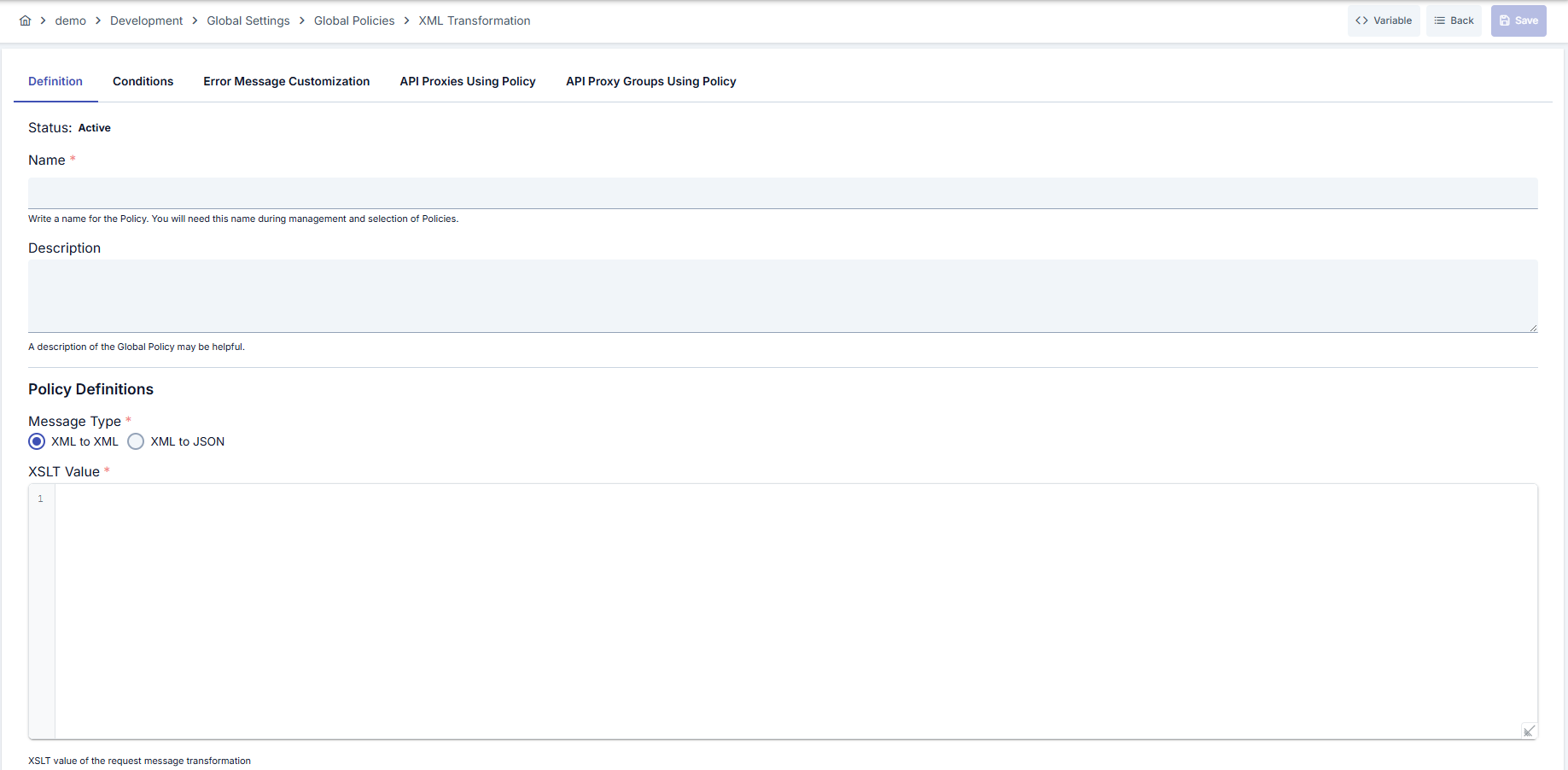
Configuration Steps
| Step | Description / Operation |
|---|---|
| Step 1: Going to Creation Page | - Go to Development → Global Settings → Global Policies → XML Transformation Policy from the left menu. - Click the [+ Create] button at the top right. |
| Step 2: Entering Basic Information | Policy Status (Policy Status): Shows Active/Passive status. New policies are active by default. Name (Name) Required: Example: Production_XMLTransform- Enter a unique name, does not start with space. - System automatically checks. Green checkmark: available. Red X: existing name. Description (Description): Example: "Transforms SAP XML responses to JSON REST format" - Max. 1000 characters. - Explain the purpose of the policy. |
| Step 3: Variable Usage | - In the action button area at the top of the page, you can use the [<> Variable] button to select dynamic values. - Using context/global variable expressions, you can manage policy parameters with variable-based values instead of fixed values. - This reduces manual update effort when values change and provides operational convenience. - For detailed information, review Dynamic Variables. |
| Step 4: Selecting Transformation Type | Select XML2XML or XML2JSON from transformationType field. Selection determines visibility of sub-parameters. When XML2XML is selected, XSLT editor opens, when XML2JSON is selected, JSON options become active. |
| Step 5: Managing XSLT Rules (If applicable) | Enter transformation template in xsltValue editor in XML2XML mode. Code editor provides syntax highlighting. Validate XSLT on sample XML with Test Transformation button. To let the XSLT receive values from outside, see the XSLT Parameter Usage section on this page. |
| Step 6: Configuring XML→JSON Settings (If applicable) | In XML2JSON mode, mark xmlToJsonUnwrapElement, xmlToJsonIgnoreNull, xmlToJsonIgnoreEmpty, xmlToJsonNumbersAsStrings, xmlToJsonUseNullForNil flags as needed. Add XPath expressions that should become JSON arrays to xmlToJsonArrayPathList field. |
| Step 7: Defining Condition (Optional) | - Go to the Condition tab. - Conditions determine when the policy will be active. Examples: - Environment-based: Header = X-Environment, Operator = Equals, Value = production- API Key-based: Header = X-API-Key, Starts With = PROD-- Endpoint-based: Path = /api/admin/*If no condition is defined, the policy is always active For details, see: Conditions |
| Step 8: Error Message Customization (Optional) | - Go to the Error Message Customization tab. - Customize the message to be returned when access is denied. Default: { "statusCode": 403, "message": "[Default error message]" }Custom: { "statusCode": 403, "errorCode": "[CUSTOM_ERROR_CODE]", "message": "[Custom message]" } |
| Step 9: Saving | - Click the [Save] button at the top right. Checklist: Unique name. Required fields filled. At least one XSLT or XML→JSON configuration exists Result: - Policy is added to the list. - Can be connected to APIs. - If global policy, automatically applied. |
For the description of Conditions and Error Message Customization panels, you can review the Conditions and Error Message Customization sections on the What is Policy? page.
For a complete guide on all layers, priority order and scenario examples of the error message configuration system, see the Error Message Configuration Guide page.
XSLT Parameter Usage
In XML2XML transformation, an XSLT template can accept external values through <xsl:param name="..."/> declarations. No separate value field is filled for these; each parameter is automatically matched with a variable defined under the same name. This makes it possible to run the same XSLT template with different values across environments or to feed it with data produced at runtime.
Where the Value Comes From
A parameter name is looked up in the following two sources in order; the first value found is passed to the XSLT:
- Custom variables: Values produced by a policy that ran earlier in the same request pipeline (for example a Script policy) are checked first.
- Environment variables: If not found among custom variables, the environment variables defined in the active environment are checked.
A parameter that is not found in either source is not assigned a value; in that case the default declared in the XSLT template itself (<xsl:param name="..." select="..."/>) applies.
| Value source | Use case | Matching |
|---|---|---|
| Custom variable | A value produced per request by a preceding policy | Parameter name = custom variable name |
| Environment variable | A configuration value that differs per environment | Parameter name = environment variable name |
Example 1 — Environment-variable parameter
When a different region value is needed in development and production, an environment variable is defined under the same name as the XSLT parameter.
XSLT template:
<xsl:param name="backendRegion"/>
<xsl:template match="/">
    <response>
        <region><xsl:value-of select="$backendRegion"/></region>
        ...
    </response>
</xsl:template>
If the backendRegion environment variable is defined as dev-eu in development and prod-eu in production, the same XSLT template receives that environment's value in each. In production the result is <region>prod-eu</region>.
Example 2 — Custom-variable parameter
If a policy that ran earlier in the same request pipeline produced a value under the name requestType, declaring a parameter with the same name in the XSLT makes that value flow into the parameter automatically.
XSLT template:
<xsl:param name="requestType"/>
<xsl:template match="/">
    ...
    <xsl:if test="$requestType = 'premium'">
        ...
    </xsl:if>
</xsl:template>
The value, which can change per request, flows into XSLT and the transformation can branch on it.
- No value is written into a separate field; it is enough to define a custom variable or environment variable under the same name as the XSLT parameter.
- Matching is performed per request; the same name is searched first among custom variables, then among environment variables.
- A parameter not found in any source is left unassigned; the default declared in the XSLT applies.
- Values are passed to the XSLT as text (string).
Deleting the Policy
For the deletion steps of this policy and the operations to be applied while in use, you can refer to the Removing Policy from Flow section on the Policy Management page.
Exporting/Importing the Policy
For the export and import steps of this policy, you can refer to the Export/Import page.
Connecting the Policy to API
For the process of how this policy will be connected to APIs, you can refer to the Connecting Policy to API section on the Policy Management page.
Advanced Features
| Feature | Description and Steps |
|---|---|
| Dynamic XSLT Distribution | - Update XSLT template developed in editor. - Validate with sample XML in test panel before saving. - Distribute to all connected API Proxy endpoints by deploying. |
| JSON Output Shaping | - Mark necessary flags when XML2JSON mode is active. - Define XPaths that will become arrays with xmlToJsonArrayPathList.- Confirm that options are correctly applied in View screen. |
| Global-Local Synchronization | - Create API-based copy by localizing global policy. - Apply package-based changes in local copy. - Use Export/Import to return to global policy when needed. |
Best Practices
Things to Do and Best Practices
| Category | Description / Recommendations |
|---|---|
| XSLT Management | Bad: Copying production XSLT directly. Good: Trying changes on test policy. Best: Storing in version control and distributing with import/export. |
| JSON Configurations | Bad: Leaving all flags as default. Good: Ignoring unnecessary null values. Best: Documenting client needs and regularly reviewing array path list. |
| Condition Design | Bad: Applying to all traffic without defining condition. Good: Making environment-based distinction. Best: Using minimum-scoped condition definitions with endpoint + header combinations. |
| Error Messages | Bad: Not changing default message. Good: Giving understandable message to client. Best: Informing support teams with standardized error codes. |
| Deploy Processes | Bad: Publishing directly to live. Good: Importing and validating in test environment. Best: Creating bulk deploy plan through Policy Groups. |
Security Best Practices
| Security Area | Description / Warnings |
|---|---|
| Content Validation | Faulty XSLT may cause sensitive data leakage. Test before saving. |
| Authorization | Apply role-based authorization for edit and deploy operations, prevent unauthorized changes. |
| Error Message Sanitization | Do not share internal system details in error messages in production, use general descriptions. |
| Export/Import Security | Store ZIP files only in trusted repositories, encrypt before sharing. |
| Version Management | Preserve export archives to return to old versions in XSLT changes, verify integrity. |
Things to Avoid
| Category | Description / Warnings |
|---|---|
| Uncontrolled XSLT | Why avoid: Creates performance and security risks. Alternative: Apply limits and validations in test tool. |
| General Conditions | Why avoid: Transforms all unnecessary traffic, causes delay. Alternative: Define targeted conditions with Query Builder. |
| Undocumented Settings | Why avoid: Effect of JSON flags cannot be tracked. Alternative: Note every change made in policy description. |
| Uncontrolled Export Sharing | Why avoid: Unauthorized persons may copy policy. Alternative: Use encrypted channel and access records before sharing. |
Performance Tips
| Criterion | Recommendation / Impact |
|---|---|
| XSLT Complexity | Recommendation: Make templates modular. Impact: Transformation time decreases. |
| Condition Filters | Recommendation: Limit transformation to only necessary endpoints. Impact: Gateway CPU usage decreases. |
| XML Size | Recommendation: Write streaming-supported XSLT rules for large XMLs. Impact: Memory consumption is balanced. |
| JSON Flags | Recommendation: Close unnecessary flags. Impact: Payload size after transformation remains under control. |
| Array Path Optimization | Recommendation: Keep XPath expressions minimal. Impact: XML→JSON transformation time shortens. |
Frequently Asked Questions (FAQ)
| Category | Question | Answer |
|---|---|---|
| General | Can I quickly switch between XML2XML and XML2JSON modes? | Transformation type can be changed with single click from editor, new mode becomes effective immediately when saved. |
| General | How do I share the policy with multiple API Proxies? | You can configure the policy globally and assign to relevant API Proxies through Policy Group. |
| Technical | What should I do if I get validation error when saving XSLT? | Review error message in editor, repeat error with sample XML in Test Transformation window and save again after fixing. |
| Technical | What happens if numbers are not converted to string in XML2JSON transformation? | By default, numbers remain numeric in JSON; if client expects string, you should open xmlToJsonNumbersAsStrings flag. |
| Usage | How can I limit transformation conditions? | You can create header, path or method-based rules in Condition tab; transformation does not run when condition is not met. |
| Usage | What should I pay attention to when transferring policy export file to another project? | Import without corrupting ZIP format, system warns if name conflict exists; import with new name if necessary. |