Content Filter
This document explains the detailed usage of a specific policy. If you are using Apinizer policies for the first time or want to learn the general working principles of policies, we recommend reading the What is Policy? page first.
Overview
What is its Purpose?
- Prevents malicious expressions from reaching your system by scanning header, parameter, and body contents of incoming requests in
API Proxycalls. - Ensures anonymization or complete removal of sensitive or personal data before being transmitted to backend systems.
- Detects policy-violating content in requests for regulatory compliance and makes them centrally manageable.
- Reduces manual errors by creating a consistent security layer with predefined filter rules.
Working Principle
- Request Arrival: For each HTTP/HTTPS request arriving at the API Gateway, the source IP address of the request is identified.
- Policy Check: If the Content Filter policy is active, the system checks in the following order:
- Is a Condition defined? If so, is the condition met?
- Is the policy active (active=true)?
- Is a Variable being used or is Apinizer default?
- Content Inspection Rules: For each defined filter rule, header, parameter, and body fields are scanned regex-based; for body, target fields can be isolated with optional XPath or JSONPath.
- Decision Making:
- Match Found: If
BLOCKis selected, request is terminated with 403 response; ifDELETEis selected, matching value is removed from header, parameter, or body and flow continues. - No Match: Request is forwarded to the next policy in original format.
- Match Found: If
- Error Handling: Customizable HTTP status code and error message are returned for requests that do not comply with the policy rule.
Features and Capabilities
Basic Features
- Regex-Based Rule Engine: Suspicious content in header, parameter, or body is caught with rule expressions and removed from processed fields or blocked.
- Multiple Application Area Selection: Supports simultaneous application of the same rule on header, query parameter, and body, providing consistent protection.
- Content Path Targeting: In body checks, specific nodes/fields can be selected with XPath or JSONPath, enabling targeted filtering.
- Active/Passive Status Control: Easily change the active or passive status of the policy (active/passive toggle). In passive mode, the policy is not applied but its configuration is preserved.
- Condition-Based Application: Determine when the policy will be applied by creating complex conditions with Query Builder (e.g., only for specific endpoints or header values).
Advanced Features
- Predefined Rule Library: Quickly add validated regex expressions to the policy by selecting from the ready filter rules list.
- Content Transformation Test: Validate and improve XPath/JSONPath expressions with Test Transformation modal on live data.
- Rule-Level Action Selection: Different behaviors can be assigned to different fields by determining
BLOCKorDELETEdecision for each rule. - Export/Import Feature: Export policy configuration as a ZIP file. Import to different environments (Development, Test, Production). Version control and backup capability.
- Policy Group and Proxy Group Support: Manage multiple policies within Policy Group. Bulk policy assignment to Proxy Groups. Centralized update and deploy operations.
- Deploy and Versioning: Deploy policy changes to live environment. See which API Proxies use it (Policy Usage). Proxy Group and Policy Group usage reports.
Usage Scenarios
| Scenario | Status | Solution (Policy Application) | Expected Behavior / Result |
|---|---|---|---|
| SQL Injection Blocking | Patterns like union select can be seen in parameters | ruleValue = (?i)union.+select, paramActive = true, action = BLOCK | When rule matches, request is rejected with 403 and backend is protected |
| Credit Card Masking | Card number is carried in JSON body | JSONPath $..cardNumber, regex \\b\\d{12,19}\\b, action = DELETE | Card number is removed from body, request continues with remaining data |
| Malicious Header Cleanup | Banned IP list exists in X-Forwarded-For header | headerActive = true, regex banned block, action = DELETE | Header is deleted, logged |
| XML Script Blocking | <script> tag is sent in XML request | XPath selects relevant node, regex <script> and below, action = BLOCK | Request is instantly blocked and custom error message is returned |
| DLP - Identity Number | Turkish ID number is shared in request body | JSONPath $..identityNo, regex \\b\\d{11}\\b, action = DELETE | Identity number is removed; cleaned content appears in logs |
| Bot Trace Removal | trackingId parameter should not be carried between systems | Parameter selection, regex .+, action = DELETE | Parameter is completely deleted, backend does not see unnecessary data |
| Geographically Restricted Message | Sensitive fields should be cleaned in requests from certain geography | Condition with country-based rule, body path selection, action = DELETE | Field is removed only in requests meeting the condition |
Configuring Policy Parameters
In this step, users can create a new policy or configure existing policy parameters to define access rules.
Creating a New Content Filter Policy
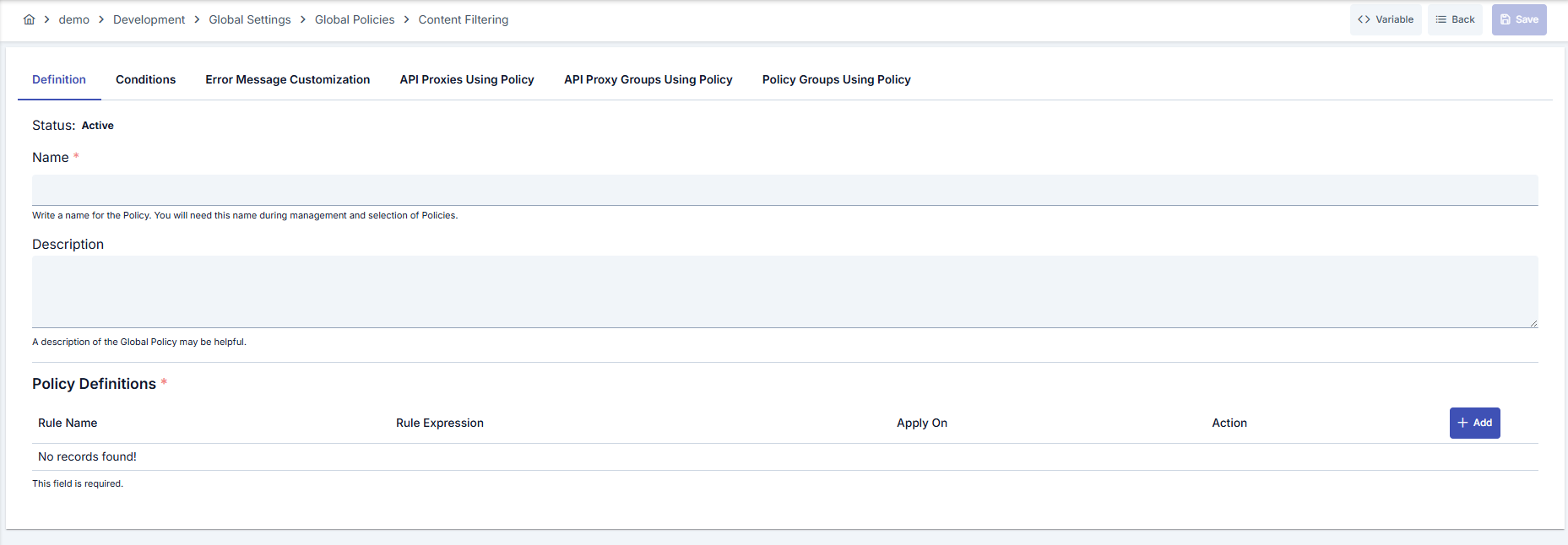
Configuration Steps
| Step | Description / Operation |
|---|---|
| Step 1: Go to Creation Page | - Go to Development → Global Settings → Global Policies → Content Filtering from the left menu. - Click the [+ Create] button at the top right. |
| Step 2: Enter Basic Information | Policy Status: Shows Active/Passive status. New policies are active by default. Name (Required): Example: Production_ContentFilter- Enter a unique name, does not start with space. - System automatically checks. Green checkmark: available. Red X: existing name. Description: Example: "Cleans sensitive data from incoming requests." - Max. 1000 characters. - Explain the purpose of the policy. |
| Step 3: Variable Usage | - In the action button area at the top of the page, you can use the [<> Variable] button to select dynamic values. - Using context/global variable expressions, you can manage policy parameters with variable-based values instead of fixed values. - This reduces manual update effort when values change and provides operational convenience. - For detailed information, review Dynamic Variables. |
| Step 4: Define Filter Rule | - Rule Name: Determine a human-readable rule name. - Rule Expression: Enter regex expression or select from ready list. - Apply On: Mark Header, Parameter, and Body options to determine the rule's scope. |
| Step 5: Determine Body Content Target | - If Body is selected, define the relevant XPath or JSONPath. - Select content type with XML/JSON radio buttons. - Edit the path in Code editor. |
| Step 6: Action and Test Selection | - Terminate request with BLOCK, clean content with DELETE.- Use [Choose] to select ready rule if needed. - Validate XPath/JSONPath expression with [Test Data Transformation]. |
| Step 7: Define Condition (Optional) | - Go to Condition tab. - Conditions determine when the policy will be active. Examples: - Environment-based: Header = X-Environment, Operator = Equals, Value = production- API Key-based: Header = X-API-Key, Starts With = PROD-- Endpoint-based: Path = /api/admin/*If no condition is defined, policy is always active |
| Step 8: Customize Error Message (Optional) | - Go to Error Message Customization tab. - Customize the message to be returned when access is denied. Default: { "statusCode": 403, "message": "[Default error message]" }Custom: { "statusCode": 403, "errorCode": "[CUSTOM_ERROR_CODE]", "message": "[Custom message]" } |
| Step 9: Save | - Click the [Save] button at the top right. Checklist: - Unique name - Required fields filled - At least one filter rule exists Result: - Policy is added to the list. - Can be connected to APIs. - If global policy, automatically applied. |
For descriptions of Conditions and Error Message Customization panels, you can review the Conditions and Error Message Customization sections on the What is Policy? page.
For a complete guide on all layers, priority order and scenario examples of the error message configuration system, see the Error Message Configuration Guide page.
Deleting the Policy
For deletion steps of this policy and operations to be applied when in use, you can refer to the Removing Policy from Flow section on the Policy Management page.
Exporting/Importing the Policy
For export (Export) and import (Import) steps of this policy, you can refer to the Export/Import page.
Connecting the Policy to API
For the process of how this policy will be connected to APIs, you can refer to the Connect Policy to API section on the Policy Management page.
Advanced Features
| Feature | Description and Usage Steps |
|---|---|
| Regex Template Management | - Go to rule list in policy editing screen. - Select ready regex with [Choose] link or enter manually. - Test and confirm before saving. |
| XPath/JSONPath Validation | - Activate Body option and determine content type. - Define path in Code editor. - Validate that expression returns correct value with [Test Data Transformation]. |
| Rule-Based Action Separation | - Determine BLOCK or DELETE option for each rule.- Customize error message for blocked rules from Error Message tab. - Review logs of rules using Delete option. |
Best Practices
Things to Do and Best Practices
| Category | Description / Recommendations |
|---|---|
| Regex Management | Bad: Trying to catch all attacks with a single broad regex. Good: Defining separate regexes according to attack type. Best: Making small additions according to project needs based on ready templates. |
| Content Path Definitions | Bad: Targeting body completely. Good: Determining XPath/JSONPath for critical fields. Best: Using both path and regex to provide maximum protection with minimum scope. |
| Action Selection | Bad: Making every rule BLOCK and cutting requests in false positives.Good: Selecting DELETE for removable fields, BLOCK for risky situations.Best: Planning log monitoring after Delete and switching to block mode when needed. |
| Preview and Test | Bad: Not testing before going to production. Good: Trying with test data in development environment. Best: Validating with Test Transformation tool and pre-prod traffic shadowing. |
| Policy Conditions | Bad: Applying policy to every request. Good: Defining environment or endpoint-based conditions. Best: Determining narrow-scope conditions for risky endpoints, light rules for low-risk areas. |
Security Best Practices
| Security Area | Description / Warnings |
|---|---|
| DLP Protection | Regularly update sensitive data (identity, card, IBAN) regexes and store in Delete mode. |
| Header Integrity | Filter untrusted values in incoming headers in chain proxies, log after delete. |
| Regex Performance | Avoid complex regexes that may lead to ReDoS; use atomic groups if needed. |
| Error Message Content | Do not reveal internal structure in messages returned in Block state; use general but traceable codes. |
| Log Hygiene Maintenance | Do not log deleted content; prefer anonymized masks. |
Things to Avoid
| Category | Description / Warnings |
|---|---|
| Overly General Regex | Why to avoid: Causes false positives and stops legitimate traffic. Alternative: Use specific attack signatures. |
| Not Defining Path | Why to avoid: Increases risk of deleting entire body. Alternative: Target pinpoint field with XPath/JSONPath. |
| Unconditional Global Application | Why to avoid: Creates unnecessary load on low-risk endpoints. Alternative: Define targeted conditions with Query Builder. |
| Deploy Without Testing | Why to avoid: Blockage or data loss occurs in production. Alternative: Validate regex/path combination in test tool. |
Performance Tips
| Criterion | Recommendation / Impact |
|---|---|
| Regex Complexity | Recommendation: Use non-greedy patterns and limited lookaround. Impact: Reduces CPU usage, increases throughput. |
| Rule Count | Recommendation: Group rules according to risk level, clean unnecessary copies. Impact: Evaluation time per request decreases. |
| Body Processing | Recommendation: Select sub-contents with path as much as possible. Impact: Parse cost decreases in large bodies. |
| Condition Usage | Recommendation: Exclude situations where policy does not work with conditions. Impact: Unnecessary regex executions are prevented. |
| Log and Monitoring | Recommendation: Collect deleted fields as numeric metrics, do not log full content. Impact: I/O load decreases, privacy is protected. |
Frequently Asked Questions (FAQ)
| Category | Question | Answer |
|---|---|---|
| General | What types of data does Content Filter Policy audit? | Header, query parameters, and JSON/XML bodies are scanned regex-based. Body can optionally target XPath/JSONPath. |
| General | Does the policy work differently globally and locally? | Behavior is the same; global policy can be applied to all proxies while local policy works only on the specified API Proxy. |
| Technical | Which standard is used as regex expression? | Java regular expression syntax is used; compiled with Pattern.compile() and matched with Matcher.find(). |
| Technical | How is DELETE action applied in body? | If path is defined, relevant node is deleted; if undefined, body is pulled to empty string and request continues. |
| Usage | How is error message customized? | Status code, message, and error code fields can be edited in Error Message tab; blocked rule name can be used as parameter. |
| Usage | Where do ready filter rules come from? | They are pulled from the global rule library managed in Admin → Predefined Filter Rules and listed in selection dialog. |