Script
This document explains the detailed usage of a specific policy. If you are using the Apinizer policy structure for the first time or want to learn about the general working principles of policies, we recommend reading the What is a Policy? page first.
Overview
What is its Purpose?
- Script Policy aims to solve integration requirements without writing code by applying custom business rules and data transformations in the API Proxy request pipeline.
- Script Policy enables centralized management of operations such as masking, enriching incoming data, or adapting error messages in the response pipeline.
- Script Policy makes it possible to create a global/local shared script library for consistent behavior across different environments.
- Script Policy activates only for specific endpoint or header combinations through its condition engine, maintaining performance.
Working Principle
- Request Arrival: For every HTTP/HTTPS request arriving at the API Gateway, the source IP address of the request is detected.
- Policy Check: If Script Policy is active, the system checks in the following order:
- Is a Condition defined? If so, is the condition met?
- Is the policy active (active=true)?
- Is a Variable being used or Apinizer default?
- Script Engine Execution: According to the selected executionType (SYNC/ASYNC) and scriptLanguage (Groovy/Javascript) values, the script runs in the specified pipeline region; request/response body, headers, and parameter maps can be updated.
- Decision Making:
- Match Found: Message components updated as a result of the script are written back to the pipeline; in case of error, the defined statusCode and message are returned.
- No Match: Script is skipped, request/response continues to default flow.
- Error Handling: Customizable HTTP status code and error message are returned for requests that do not comply with policy rules.
Features and Capabilities
Core Features
- ExecutionType Management (Sync/Async): Determines whether the script will run synchronously or in the background; asynchronous mode does not block the endpoint during long-running operations.
- Dual Script Language Support: Allows teams to use the language they are proficient in by choosing between Groovy and Javascript.
- Context Variable Library: Provides ready-made variable maps for From Client, To Backend, From Backend, and To Client flows; readable/writable fields are clearly separated.
- Active/Passive Status Control: Easily switch the policy's active or passive state (active/passive toggle). Policy is not applied when passive, but configuration is retained.
- Condition-Based Application: Create complex conditions with Query Builder to determine when the policy will be applied (e.g., only for specific endpoints or header values).
Advanced Features
- Script Test Laboratory: Click Try it to open the Script Test dialog. Run the script with sample data for the pipeline that you select. The dialog shows what the script changes. The test calls no backend.
- Editor Support: Write scripts faster with the variables band, code completion, editor checks, the compile check, and the side panel.
- Dependency Tracking: See which API Proxy or groups the policy is used in through Used Proxies/Policy Groups sections and perform change impact analysis.
- Dynamic Context Value Selection: Search the Context box to copy or insert date, environment, or proxy metadata values for use within scripts.
- Export/Import Feature: Export policy configuration as a ZIP file. Import to different environments (Development, Test, Production). Version control and backup capability.
- Policy Group and Proxy Group Support: Manage multiple policies within Policy Groups. Assign policies in bulk to Proxy Groups. Centralized update and deploy operations.
- Deploy and Versioning: Deploy policy changes to production environment. View which API Proxies use it (Policy Usage). Proxy Group and Policy Group usage reports.
Usage Scenarios
| Scenario | Situation | Solution (Policy Application) | Expected Behavior / Result |
|---|---|---|---|
| Request Header Injection | External system requests additional header | Header is added via requestHeaderMapToTargetAPI in From Client → To Backend script | Backend call is made with required header |
| Sensitive Field Masking | Response contains ID number | Sensitive field is masked with regex in To Client script | Masked data is returned to client |
| Dynamic Endpoint Routing | Some customers need to be routed to different backend URL | Script sets requestBackendUrlToTargetAPI field conditionally | Request is routed to appropriate target service |
| Conditional Error Return | Access must be blocked for specific API keys | Script sets responseErrorMessageToClient and statusCodeToClient=403 | Client receives 403 and customized message |
| JWT Enrichment | Need to generate context based on JWT claim value | Script reads claim and writes to customVariableMap | Subsequent policies use enriched value |
Configuring Policy Parameters
At this step, users can create a new policy or configure existing policy parameters to define access rules.
Creating New Script Policy
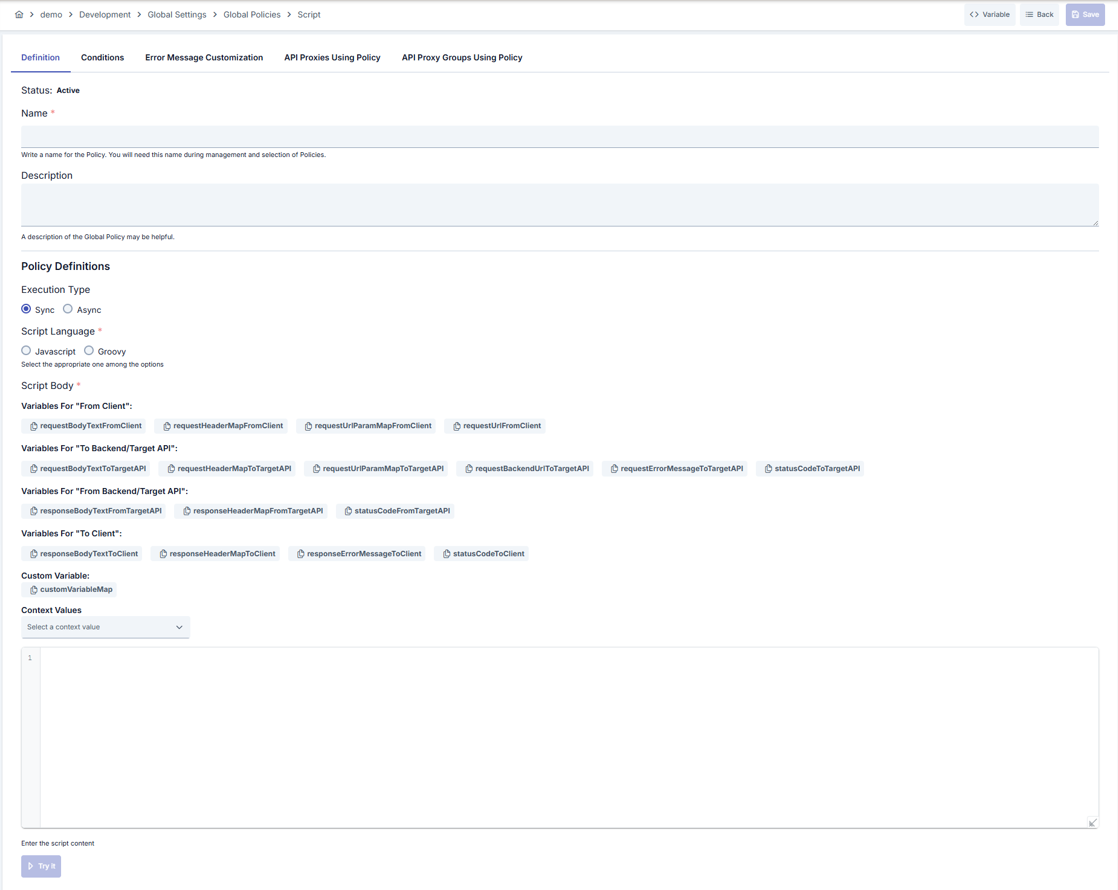
Configuration Steps
Step 1: Navigate to Creation Page
Go to Development → Global Settings → Global Policies → Script Policy from the left menu and click the [+ Create] button in the upper right.
Step 2: Enter Basic Information
Policy Status: Shows Active/Passive status. New policies are active by default.
Name - Required: Enter unique name (example: Production_ScriptPolicy). System checks automatically. Green check: available, Red cross: existing name.
Description: Explain the policy's purpose (Max. 1000 characters). Example: "Adds campaign header in request pipeline."
Step 3: Variable Usage
- In the action button area at the top of the page, click [<> Variable] to select dynamic values. The menu has two items: Global Variable and Context Variable.
- Global Variable opens the Select Environment Variable dialog. Select a variable to copy it. On the Script policy screen, the dialog copies the variable as
environmentVariableMap.get("name"). Paste this expression into the script. - In a Groovy string,
${name}is the string interpolation of Groovy. It reads a script variable. It does not read an environment variable. UseenvironmentVariableMap.get("name")instead. - A script does not resolve
#{...}context variables. The Context Variable item lists#{...}expressions. To read a context value in a script, use the Context box above the editor. For details, see Step 6. - For detailed information, review Dynamic Variables.
Step 4: ExecutionType Selection
Select Sync or Async in Execution Type section:
- When
Syncis selected, script runs synchronously in gateway pipeline Asynctriggers side channel to avoid blocking client during long operations
Step 5: Script Language Configuration
Java classes work in Groovy scripts only. JavaScript scripts on the Worker cannot load Java classes. Java.type is not available and fails with a ReferenceError at runtime. The editor warns you when a JavaScript script uses Java.type. The Classes tab and the class completion are available only for Groovy.
Select Javascript or Groovy under Script Language.
The selection sets the editor language, the code completion, the editor checks, and the engine of Check and Try it. The engines are the same engines that run on the Worker: Groovy 3.0.25 and JavaScript (GraalJS).
Step 6: Script Body and Variable Management
Write or paste your script in the code editor. The editor has a Variables band above the code, a toolbar, a problems bar below the code, and a side panel. Use customVariableMap to pass data to other policies.
Variables band
- The band shows the script variables as chips. It groups the chips in lanes: Client → Gateway (read), Gateway → Backend (write in request), Backend → Gateway (read in response), and Gateway → Client (write in response).
- The Shared row holds the variables that work in every lane:
customVariableMap,environmentVariableMap,credentialMap,cache,stopFlowAsSuccess, andflowResultType. - Click a chip to copy the variable name. The message Copied ! confirms the copy.
- Click ▾ on a chip to open its menu. Insert at cursor adds the name to the code. The ready-made actions, for example Read value, Write value, Check if key exists, Remove key, and Iterate all, add a code line for the variable. Copy name copies the name.
- A blue chip border means you can write the variable. A dashed border means the variable is new on screen. A faded chip means the variable is empty in this flow.
- Use the Context box to find a context value. Type a label or a name in Search context value (copies). Select a value to copy it. Click the button next to the box (Insert at cursor) to insert the value at the cursor.
- Click Search all to open the Variables tab of the side panel. Click Hide to collapse the band. Click Show to expand it.
Toolbar
- The engine tag shows the engine of the selected language: Groovy 3.0.25 or JavaScript (GraalJS).
- Suggest opens the code completion. The shortcuts are
Ctrl+Space,Alt+Space, andCtrl+.. - Check compiles the script on the Worker with the runtime engine. Check executes nothing.
- Try it opens the Script Test dialog. You run the script with sample data. Apinizer saves nothing and calls no backend. For the dialog details, see the Script Test Dialog row in Advanced Features.
- Catalog and classes opens the side panel. Hide panel closes it.
Code completion
Code completion suggests these items:
- Variables, with the most used variables first.
- Context values.
- Members of known types.
- Header names inside quotes, after a get or put call on a header map.
- Environment variable names, after
environmentVariableMap.get(". - Consumer names, after
credentialMap.get(". - Keys that you wrote earlier with
customVariableMap.put. - Groovy classes. When you select a class, the editor adds its import line automatically.
- Catalog snippets.
Problems bar
- The bar under the editor shows No problems. Otherwise, it shows the number of errors (N error(s)) and warnings (N warning(s)).
- Each row shows the position (Line L:C). Click a row to move the cursor to that line.
Editor checks
The editor checks the code while you type. The checks show warnings for these cases:
- An assignment to a read-only variable.
- A variable that is empty or has no effect in this flow.
- A
printlnorconsole.logcall. These calls write to the Worker console, not to the traffic log. - A Groovy
"${name}"expression. A script does not resolve an environment variable this way. The quick fix replaces it withenvironmentVariableMap.get("name"). stopFlowAsSuccessalone. It does not stop the flow. Also setrequestErrorMessageToTargetAPIorresponseErrorMessageToClient.- A literal other than
SUCCESS,BLOCKED, orERRORassigned toflowResultType. - An unknown variable that looks like a known one. The editor offers a fix.
Java.typein a JavaScript script.
Syntax and compile errors
- JavaScript syntax errors appear while you type.
- Groovy compile errors appear after you click Check. Each error shows its line and column.
- The status text next to Check shows the result: Compiled without errors (N ms)., Compile errors found., or Code changed after the last check.
- Check needs a published environment of the project. If the project has no published environment, or the Workers do not support the check, only the editor checks run. The status text then says Compile check needs a published environment. Only editor checks ran. or Compile check is not available now. Only editor checks ran. Save is not blocked in these cases.
Side panel
Click Catalog and classes to open the side panel. The panel has three tabs:
- Variables: Search a variable by name. Click a row to copy the name. Use ⋮ to open the actions of the row.
- Catalog: Ready-made code for the current flow. Click Insert at cursor to add the code. Click Copy to copy it. Import lines go to the top of the script. Some entries work in Groovy only.
- Classes: Search a class by name. Insert a class to add its import line. Click a static member to insert it. This tab is available only for Groovy.
Step 7: Define Condition (Optional)
Switch to Condition tab. Conditions determine when the policy will be active.
Examples:
- Environment-based:
Header = X-Environment, Operator = Equals, Value = production - API Key-based:
Header = X-API-Key, Starts With = PROD- - Endpoint-based:
Path = /api/admin/*
If no condition is defined, policy is always active.
For details see: Conditions
Step 8: Error Message Customization (Optional)
Go to Error Message Customization tab and customize the message to be returned when access is denied.
Default:
{ "statusCode": 403, "message": "[Default error message]" }
Custom:
{ "statusCode": 403, "errorCode": "[CUSTOM_ERROR_CODE]", "message": "[Custom message]" }
Step 9: Save
Click [Save] button in upper right.
Save runs the check. If the script has errors, the Script has errors dialog opens. It warns that the script can fail at runtime. Click Save anyway to save the policy with the errors. Click Go back to return to the editor and fix the errors. The check never blocks Save.
Checklist:
- Unique name
- Required fields filled
- At least one script body line present
Result:
- Policy is added to list
- Can be connected to APIs
- Automatically applied if global policy
For explanation of Conditions and Error Message Customization panels, see Conditions and Error Message Customization sections on the What is a Policy? page.
For a complete guide on all layers, priority order and scenario examples of the error message configuration system, see the Error Message Configuration Guide page.
Flow Variables
Flow variables and properties that you can use within Script Policy are explained in detail in the tables below.
Request Variables (Client → Apinizer)
| Variable Name | Pipeline | Direction | Type | Access | Description | Example Usage |
|---|---|---|---|---|---|---|
| requestHeaderMapFromClient | Request | Client → Apinizer | Map<String, String> | Read | Used to access header values of the original version when the request from client reaches Apinizer. | String value= requestHeaderMapFromClient.get("Content-Type"); |
| requestUrlParamMapFromClient | Request | Client → Apinizer | Map<String, String> | Read | Used to access query parameter values of the original version when the request from client reaches Apinizer. | String value= requestUrlParamMapFromClient.get("param"); |
| requestBodyTextFromClient | Request | Client → Apinizer | String | Read | Used to access body value of the original version when the request from client reaches Apinizer. | String value= requestBodyTextFromClient; |
| requestUrlFromClient | Request | Client → Apinizer | String | Read | Contains the endpoint path the incoming request was matched to (e.g. /pet/findByStatus). For SOAP type API Proxies, the value of this variable is the SOAP method name. | String value= requestUrlFromClient; |
| requestFormUrlEncodedListFromClient | Request | Client → Apinizer | List<BasicNameValuePair> | Read | Used to access "Form-URL-Encoded" parameters of the original version when the request from client reaches Apinizer. | See Form URL-Encoded Usage section for detailed example. |
| requestFormDataListFromClient | Request | Client → Apinizer | List<ApinizerRequestBodyPart> | Read | Used to access "Form-Data" parameters of the original version when the request from client reaches Apinizer. | See Form Data Usage section for detailed example. |
Request Variables (Apinizer → Backend API)
| Variable Name | Pipeline | Direction | Type | Access | Description | Example Usage |
|---|---|---|---|---|---|---|
| requestHeaderMapToTargetAPI | Request | Apinizer → Backend API | Map<String, String> | Read, Write | Used to access header values of the request going from Apinizer to Backend API. Values in this field contain changes made in the request pipeline and may differ from the original request reaching Apinizer. | String value= requestHeaderMapToTargetAPI.get("Content-Type");requestHeaderMapToTargetAPI.put("Content-Type","application/json"); |
| requestUrlParamMapToTargetAPI | Request | Apinizer → Backend API | Map<String, String> | Read, Write | Used to access query parameter values of the request going from Apinizer to Backend API. Values in this field contain changes made in the request pipeline and may differ from the original request reaching Apinizer. | String value= requestUrlParamMapToTargetAPI.get("param");requestHeaderMapToTargetAPI.put("param","value"); |
| requestBodyTextToTargetAPI | Request | Apinizer → Backend API | String | Read, Write | Used to access body value of the request going from Apinizer to Backend API. Value in this field contains changes made in the request pipeline and may differ from the original request reaching Apinizer. | String value= requestBodyTextToTargetAPI;requestBodyTextToTargetAPI= "<body>"; |
| requestFormUrlEncodedListToTargetAPI | Request | Apinizer → Backend API | List<BasicNameValuePair> | Read, Write | Used to access "Form-Url Encoded" parameter values of the request going from Apinizer to Backend API. Values in this field contain changes made in the request pipeline and may differ from the original request reaching Apinizer. | See Form URL-Encoded Usage section for detailed example. |
| requestFormDataListToTargetAPI | Request | Apinizer → Backend API | List<ApinizerRequestBodyPart> | Read, Write | Used to access "Form-Data" parameter values of the request going from Apinizer to Backend API. Values in this field contain changes made in the request pipeline and may differ from the original request reaching Apinizer. | See Form Data Usage section for detailed example. |
| requestErrorMessageToTargetAPI | Request | Apinizer → Backend API | String | Write | If you want to interrupt the flow in the request pipeline and return a message to the client, enter the message to be returned in this variable. If this message has a value after script execution, the flow is interrupted and this value is returned to the client. | requestErrorMessageToTargetAPI= "<body>"; |
| statusCodeToTargetAPI | Request | Apinizer → Backend API | Integer | Write | If you want to interrupt the flow in the request pipeline and return a message to the client, enter the status code to be returned in this variable. Entering this value alone is not sufficient to stop the flow; requestErrorMessageToTargetAPI value must also be filled for the flow to stop. | statusCodeToTargetAPI=500; |
| requestBackendUrlToTargetAPI | Request | Apinizer → Backend API | String | Write | This field can be used if you want to change the context path of the Backend API URL. The default value of this variable is empty, and if a value is set to this variable, the target context path is changed with this value. To make requestBackendUrlToTargetAPI value empty, #EMPTY# value must be entered. When this value is used, the request is routed directly to the routing address without adding any path or query. | See Backend URL Modification section for detailed examples. |
Response Variables (Backend API → Apinizer)
| Variable Name | Pipeline | Direction | Type | Access | Description | Example Usage |
|---|---|---|---|---|---|---|
| responseHeaderMapFromTargetAPI | Response | Backend API → Apinizer | Map<String, String> | Read | Used to access header values of the original version when the result from Backend API reaches Apinizer. | String value= responseHeaderMapFromTargetAPI.get("Content-Type"); |
| responseBodyTextFromTargetAPI | Response | Backend API → Apinizer | String | Read | Used to access body value of the original version when the result from Backend API reaches Apinizer. | String value= responseBodyTextFromTargetAPI; |
| statusCodeFromTargetAPI | Response | Backend API → Apinizer | Integer | Read | Used to access status code value of the original version when the result from Backend API reaches Apinizer. | int value=statusCodeFromTargetAPI; |
Response Variables (Apinizer → Client)
| Variable Name | Pipeline | Direction | Type | Access | Description | Example Usage |
|---|---|---|---|---|---|---|
| responseHeaderMapToClient | Response | Apinizer → Client | Map<String, String> | Read, Write | Used to access header values of the response returning from Apinizer to Client. Values in this field contain changes made in the response pipeline and may differ from the original response returning to Apinizer. | String value= responseHeaderMapToClient.get("Content-Type");responseHeaderMapToClient.put("Content-Type","application/json"); |
| responseBodyTextToClient | Response | Apinizer → Client | String | Read, Write | Used to access body value of the response returning from Apinizer to Client. Value in this field contains changes made in the response pipeline and may differ from the original response returning to Apinizer. | String value= responseBodyTextToClient;responseBodyTextToClient= "<body>"; |
| responseErrorMessageToClient | Response | Apinizer → Client | String | Read, Write | If you want to interrupt the flow in the response pipeline and return a message to the client, enter the message to be returned in this variable. If this message has a value after script execution, the flow is interrupted and this value is returned to the client. | responseErrorMessageToClient= "<body>"; |
| statusCodeToClient | Response | Apinizer → Client | Integer | Read, Write | If you want to interrupt the flow in the response pipeline and return a message to the client, enter the status code to be returned in this variable. Entering this value alone is not sufficient to stop the flow; responseErrorMessageToClient value must also be filled for the flow to stop. | int value=statusCodeToClient;statusCodeToClient=401; |
| stopFlowAsSuccess | Request / Response | Script → Apinizer | boolean | Write | Marks the result as successful when the flow is interrupted and a message is returned to the client. When set to true, the request appears with resultType=SUCCESS in the traffic logs, is not counted in error/blocked analytics, and returns HTTP 200 if no status code was written (the default behavior would return 401). Status code exception: if the backend service returned 4xx/5xx on the response pipeline, that status code is preserved and is not converted to 200 — only the result type becomes SUCCESS. To mask the backend's error code as well, explicitly write the code you want to return to statusCodeToClient; a status code written by the script always takes precedence. This variable does not stop the flow on its own — responseErrorMessageToClient (response pipeline) or requestErrorMessageToTargetAPI (request pipeline) must still be filled for the flow to stop. When it is not set, behavior is unchanged and the result is marked as BLOCKED. | responseErrorMessageToClient= "{\"status\":\"ok\"}";stopFlowAsSuccess= true; |
| flowResultType | Request / Response / Error | Script ↔ Apinizer | String | Read, Write | Sets the result type of the request in the traffic log: SUCCESS, BLOCKED, or ERROR. See Flow Result Type. | flowResultType = "ERROR" |
Flow Result Type
flowResultType sets the result type that the traffic log shows for the request. It works in Groovy and JavaScript, in the request, response, and error lines.
- Values:
SUCCESS,BLOCKED,ERROR. The value is not case-sensitive and Apinizer trims the spaces. Apinizer ignores any other value and gives no error. - Initial value: The choice that a script made earlier in the current request. It is
nullif no script made a choice. You can read and write the variable. - Async scripts: An async script cannot change the result.
If the script stops the flow
If the script also sets requestErrorMessageToTargetAPI or responseErrorMessageToClient, the flow stops with this result type:
SUCCESSuses the "user stopped flow as success" error type. The default HTTP status is 200 (ERR-297).BLOCKEDandERRORuse the "user stopped flow" error type. The default HTTP status is 401 (ERR-057).- If the script sets
statusCodeToClientorstatusCodeToTargetAPI, that status is used.
Only the script that names flowResultType uses it for its own stop. A script that stops the flow without naming it keeps the old rule: stopFlowAsSuccess = true gives SUCCESS, otherwise the result is BLOCKED.
If the flow continues
- The request keeps the choice. When the request finishes successfully, the traffic log result becomes this value.
- If a later policy or the backend fails or blocks the request, that failure result stays.
- A later script can change the value.
nullor an empty value clears it.
The same rule applies to HTTP, gRPC, and WebSocket traffic logs. It also works in Script-2-API endpoints and in Try it. Try it shows the value as Traffic log result.
Example: stop the flow with the ERROR result
requestErrorMessageToTargetAPI = '{"error":"invalid"}'
flowResultType = "ERROR"
Example: continue the flow and mark the call as ERROR in the logs
The client still gets the backend response.
flowResultType = "ERROR"
Detailed Usage Examples
Form URL-Encoded Usage
import org.apache.http.message.BasicNameValuePair

String selectedValue;
for (BasicNameValuePair nameValuePair : requestFormUrlEncodedListFromClient) {
   if("test".equals(nameValuePair.getName())){
       selectedValue=nameValuePair.getValue();
   }
}
Form Data Usage
import com.apinizer.common.global.apinizerrequest.*;

for (ApinizerRequestBodyPart bodyPart : requestFormDataListFromClient) {
    if(bodyPart.getBodyPartType().isText()){
        ApinizerRequestTextBody textBodyPart = ((ApinizerRequestTextBody)bodyPart));
        String text=textBodyPart.getText();
        //do some logic
    }else{//bodyPart.getBodyPartType().isBinary()
        ApinizerRequestBinaryBody binaryBodyPart = ((ApinizerRequestBinaryBody)bodyPart));
        byte[] byteArr=binaryBodyPart.getContent();
        String fileName=binaryBodyPart.getFileName();
        //do some logic
    }
}
Backend URL Modification
Example Scenario:
Current routing address: "https://apinizer.com/api"
Incoming request context path: "/findByStatus?param=value"
In this case, the request goes to: "https://apinizer.com/api/findByStatus?param=value"
When the following code is written:
requestBackendUrlToTargetAPI="/new/path/value?p=v";
The request goes to: "https://apinizer.com/api/new/path/value?p=v"
When the following code is written:
requestBackendUrlToTargetAPI="#EMPTY#"
The request goes to: "https://apinizer.com/api"
Accessing Environment Variables
The ${variable} placeholder syntax is not resolved inside the script body (Groovy interprets it as a GString, JavaScript as a template literal). To access environment variables from within a script, use environmentVariableMap.
String dbHost = environmentVariableMap.get("dbHost");
String apiKey = environmentVariableMap.get("apiKey");

if (environmentVariableMap.containsKey("featureFlag")) {
    // variable is defined, use it
}
Behavior:
- The map is read-only;
put,remove, andclearcalls throwUnsupportedOperationException. - Iteration is supported:
keySet(),values(),entrySet()let you discover all variable names/values in the active environment. - Operates against the active environment; a fresh snapshot is built for each script execution.
- Values marked as Secret are returned in their resolved (plain) form.
- In Try it, values marked as Secret read as
******. See Script Test Dialog. - Keys are case-insensitive:
get("dbHost"),get("DBHOST"),get("dbhost")all return the same value.
// Discovery example — lists the variable NAMES of the active environment (not the values; they may be secret).
// The list appears in the "X-Env-Var-Names" header of the Try It result. Scripts have no log function; println writes to the Worker console.
requestHeaderMapToTargetAPI.put("X-Env-Var-Names", environmentVariableMap.keySet().join(","));
Accessing Credential Information
The existing credential_* variables return only the authenticated consumer of the request. To access another consumer by its username or client ID, use credentialMap.
Example 1 — Basic Auth header (resolved password)
def cred = credentialMap.get("acme-app");
if (cred != null) {
    String token = cred.getUsername() + ":" + cred.getResolvedPassword();
    String header = "Basic " + Base64.getEncoder().encodeToString(token.getBytes());
    requestHeaderMapToTargetAPI.put("Authorization", header);
}
Example 2 — JWT signing (private key)
def cred = credentialMap.get("jwt-signer");
java.security.PrivateKey privateKey = cred?.getPrivateKey();
// sign JWT with privateKey...
Example 3 — Loading a keystore for mTLS
def cred = credentialMap.get("backend-mtls");
java.security.KeyStore ks = cred?.getKeyStore();
// bind ks into SSLContext...
Example 4 — JWK for JWE decryption
def cred = credentialMap.get("jwe-recipient");
def jwk = cred?.getJwkForDecryptionAndEncryption();
// decrypt with jwk...
Example 5 — The authenticated user's consumer
def me = credentialMap.get(request_usernameOrKey);
String myEmail = me?.getEmail();
String myOrg = me?.getOrganizationName();
Example 6 — Reading custom metadata
def cred = credentialMap.get("acme-app");
Map<String, String> meta = cred?.getMetadata();
String tenantId = meta?.get("tenant_id");
String department = meta?.get("department");
Accessible fields (on the object returned by credentialMap.get(...)):
- Basic:
getUsername(),getEmail(),getFullName(),getDescription() - Password:
getResolvedPassword()(decrypted; if the password value contains a${variable}placeholder, it is substituted),getEnvironmentPassword("environment-id")(resolved environment-scoped password) - Identity metadata:
getOrganizationId(),getOrganizationName(),getProjectId(),getProjectName(),getAppId(),getAppName() - Authorization and status:
getRoleNameList(),getEnabled(),isExternal(),getExpireDate(),getGrantType() - Key material:
getSecretKey(),getCertificate(),getPublicKey(),getPrivateKey(),getKeyStore(),getTrustStore(),getJwkForValidationAndSign(),getJwkForDecryptionAndEncryption() - Key identifiers:
getSecretKeyId(),getCertificateId(),getPublicKeyId(),getPrivateKeyId(),getKeyStoreId(),getTrustStoreId() - Custom metadata (the key/value pairs defined on the consumer and on its organization):
getMetadata()(organization + consumer entries merged, consumer overrides on key collision; values are resolved and decrypted),getCredentialMetadata()(consumer level only),getOrganizationMetadata()(organization level only) — each returns a read-onlyMap<String, String>
Null check: credentialMap.get("...") returns null when the consumer cannot be found. Calling a getter on a null reference raises an error — use Groovy's ?. operator or an explicit if (cred != null) check.
Key enumeration is disabled: credentialMap.keySet(), values(), and entrySet() calls raise an error. Only lookup by a known username or client ID is supported.
Security: Granting permission to create script policies effectively grants access to the resolved password and key material of every consumer through this method. Ensure that the user is also authorized to view the relevant consumers.
Try it: In the Script Test dialog, credentialMap returns only the consumers of the project. The consumer password and the other secret fields read as ******.
Important Notes
If Script type is Groovy:
- JsonSlurper for JSON message body,
- XMLSlurper for XML message body
Using these makes message processing much easier.
When the request is blocked with error message variables, the error message returned to the client is whatever is written to this variable's value instead of the Error Message Template.
Message Variables
Message variables and properties that you can use within Script Policy are explained in detail in the tables below.
Request Pipeline Variables
| Flow Variables | Value Location | Data Type | Allowed Operation | Description | Example Usage |
|---|---|---|---|---|---|
| request_remoteAddress | Client → Apinizer | String | Read, Write | Used to access "Remote Address" value in the request from client. | String value= request_remoteAddress;request_remoteAddress= "<new value>"; |
| request_httpMethod | Client → Apinizer | String | Read, Write | Used to access "HTTP Method" value in the request from client. | String value= request_httpMethod;request_httpMethod= "<new value>"; |
| request_contentType | Client → Apinizer | String | Read, Write | Used to access "Content Type" value in the request from client. | String value= request_contentType;request_contentType= "<new value>"; |
| request_pathInfo | Client → Apinizer | String | Read, Write | Used to access "Path Info" value in the request from client. | String value=request_pathInfo ;request_pathInfo= "<new value>"; |
| request_contextPath | Client → Apinizer | String | Read, Write | Used to access "Context Path" value in the request from client. | String value= request_contextPath;request_contextPath= "<new value>"; |
| request_queryString | Client → Apinizer | String | Read, Write | Used to access "Query String" value in the request from client. | String value= request_queryString;request_queryString= "<new value>"; |
| request_remoteUser | Client → Apinizer | String | Read, Write | Used to access "Remote User" value in the request from client. | String value= request_remoteUser;request_remoteUser= "<new value>"; |
| request_usernameOrKey | Client → Apinizer | String | Read, Write | Used to access "Username or API Key" value in the request from client. If the request is authenticated by a security policy on Apinizer, this value is assigned by Apinizer, or a value can be assigned manually with data manipulation policies. | String value= request_usernameOrKey;request_usernameOrKey= "<new value>"; |
| request_requestedSessionId | Client → Apinizer | String | Read, Write | Used to access "Requested Session Id" value in the request from client. | String value= request_requestedSessionId;request_requestedSessionId= "<new value>"; |
| request_requestURI | Client → Apinizer | String | Read, Write | Used to access "Request URI" value in the request from client. | String value= request_requestURI;request_requestURI= "<new value>"; |
| request_characterEncoding | Client → Apinizer | String | Read, Write | Used to access "Character Encoding" value in the request from client. | String value= request_characterEncoding;request_characterEncoding= "<new value>"; |
| request_charset | Client → Apinizer | String | Read, Write | Used to access "Charset" value in the request from client. | String value= request_charset;request_charset= "<new value>"; |
| request_contentLength | Client → Apinizer | String | Read, Write | Used to access "Content Length" value in the request from client. | String value= request_contentLength;request_contentLength= "<new value>"; |
| request_protocol | Client → Apinizer | String | Read, Write | Used to access "Protocol" value in the request from client. | String value= request_protocol;request_protocol= "<new value>"; |
| request_scheme | Client → Apinizer | String | Read, Write | Used to access "Scheme" value in the request from client. | String value= request_scheme;request_scheme= "<new value>"; |
| request_serverName | Client → Apinizer | String | Read, Write | Used to access "Server Name" value in the request from client. | String value= request_serverName;request_serverName= "<new value>"; |
| request_serverPort | Client → Apinizer | String | Read, Write | Used to access "Server Port" value in the request from client. | String value= request_serverPort;request_serverPort= "<new value>"; |
| request_remoteHost | Client → Apinizer | String | Read, Write | Used to access "Remote Host" value in the request from client. | String value= request_remoteHost;request_remoteHost = "<new value>"; |
| request_remotePort | Client → Apinizer | String | Read, Write | Used to access "Remote Port" value in the request from client. | String value= request_remotePort;request_remotePort= "<new value>"; |
| request_localName | Client → Apinizer | String | Read, Write | Used to access "Local Name" value in the request from client. | String value= request_localName;request_localName= "<new value>"; |
| request_localAddr | Client → Apinizer | String | Read, Write | Used to access "Local Address" value in the request from client. | String value= request_localAddr;request_localAddr= "<new value>"; |
| request_localPort | Client → Apinizer | String | Read, Write | Used to access "Local Port" value in the request from client. | String value= request_localPort;request_localPort= "<new value>"; |
| request_xForwardedFor | Client → Apinizer | String | Read, Write | Used to access "X-Forwarded-For" value in the request from client. | String value= request_xForwardedFor;request_xForwardedFor= "<new value>"; |
| request_isSoapToRest | Client → Apinizer | boolean | Read | Information about whether the request goes to an API Proxy with SoapToRest conversion after being interpreted in Apinizer. This variable's value can be "true" or "false". | boolean value= request_isSoapToRest; |
| request_isApiProxy | Client → Apinizer | boolean | Read | Information about whether the request reaches API Proxy after being interpreted in Apinizer. This variable's value can be "true" or "false". | boolean value= request_isApiProxy; |
| request_isApiProxyGroup | Client → Apinizer | boolean | Read | Information about whether the request reaches an API Proxy Group after being interpreted in Apinizer. This variable's value can be "true" or "false". | boolean value= request_isApiProxyGroup; |
| request_data_isXwwwFormUrlEncoded | Client → Apinizer | boolean | Read, Write | Information about whether the request contains application/x-www-form-urlencoded header after being interpreted in Apinizer. This variable's value can be "true" or "false". | boolean value= request_data_isXwwwFormUrlEncoded;request_data_isXwwwFormUrlEncoded= true/false; |
| request_data_isFormData | Client → Apinizer | boolean | Read, Write | Information about whether the request contains "form data" after being interpreted in Apinizer. This variable's value can be "true" or "false". | boolean value= request_data_isFormData;request_data_isFormData= true/false; |
| request_data_isByteArray | Client → Apinizer | boolean | Read, Write | Information about whether the request contains "byte array" data after being interpreted in Apinizer. This variable's value can be "true" or "false". | boolean value= request_data_isByteArray;request_data_isByteArray= true/false; |
| request_data_hasAttachment | Client → Apinizer | boolean | Read, Write | Information about whether the request contains "attachment" data after being interpreted in Apinizer. This variable's value can be "true" or "false". | boolean value= request_data_hasAttachment;request_data_hasAttachment= true/false; |
| request_encoding_gzip | Client → Apinizer | boolean | Read, Write | Information about whether the request data format is "gzip" after being interpreted in Apinizer. This variable's value can be "true" or "false". | boolean value= request_encoding_gzip;request_encoding_gzip= true/false; |
| request_encoding_deflate | Client → Apinizer | boolean | Read, Write | Information about whether the request data format is "deflate" after being interpreted in Apinizer. This variable's value can be "true" or "false". | boolean value= request_encoding_deflate;request_encoding_deflate= true/false; |
| request_encoding_br | Client → Apinizer | boolean | Read, Write | Information about whether the request data format is "br" after being interpreted in Apinizer. This variable's value can be "true" or "false". | boolean value = request_encoding_br;request_encoding_br = true/false; |
| request_encoding_zstd | Client → Apinizer | boolean | Read, Write | Information about whether the request data format is "zstd" after being interpreted in Apinizer. This variable's value can be "true" or "false". | boolean value = request_encoding_zstd;request_encoding_zstd = true/false; |
| request_encoding_identity | Client → Apinizer | boolean | Read, Write | Information about whether the request data format is "identity" after being interpreted in Apinizer. This variable's value can be "true" or "false". | boolean value = request_encoding_identity;request_encoding_identity= true/false; |
| request_encoding_compress | Client → Apinizer | boolean | Read, Write | Information about whether the request data format is "compress" after being interpreted in Apinizer. This variable's value can be "true" or "false". | boolean value = request_encoding_compress;request_encoding_compress= true/false; |
| request_estimatedTokenCount | Client → Apinizer | int | Read | Used to access the estimated token count of the request body (the body sent to the backend, otherwise the body from the client). It is an estimate. It is read-only: writing to this variable has no effect. | int value= request_estimatedTokenCount; |
| request_httpServlet | Client → Apinizer | jakarta.servlet.http.HttpServletRequest | Read | Provides access to the low-level servlet object of the request. Use it only for advanced scenarios that cannot be solved with the standard variables; incorrect use can break the request flow. | def req= request_httpServlet; |
Response Pipeline Variables
| Flow Variables | Value Location | Data Type | Allowed Operation | Description | Example Usage |
|---|---|---|---|---|---|
| response_data_isByteArray | Backend API → Apinizer | boolean | Read, Write | Information about whether the response contains "byte array" data after being interpreted in Apinizer. This variable's value can be "true" or "false". | boolean value= response_data_isByteArray;response_data_isByteArray= true/false; |
| response_encoding_gzip | Backend API → Apinizer | boolean | Read, Write | Information about whether the response data format is "gzip" after being interpreted in Apinizer. This variable's value can be "true" or "false". If the value is false and set to true in the script, the data returned to the client is compressed in gzip format. | boolean value= response_encoding_gzip;response_encoding_gzip= true/false; |
| response_encoding_deflate | Backend API → Apinizer | boolean | Read, Write | Information about whether the response data format is "deflate" after being interpreted in Apinizer. This variable's value can be "true" or "false". If the value is false and set to true in the script, the data returned to the client is compressed in deflate format. | boolean value= response_encoding_deflate;response_encoding_deflate= true/false; |
| response_encoding_br | Backend API → Apinizer | boolean | Read, Write | Information about whether the response data format is "br" after being interpreted in Apinizer. This variable's value can be "true" or "false". If the value is false and set to true in the script, the data returned to the client is compressed in br format. | boolean value= response_encoding_br;response_encoding_br= true/false; |
| response_encoding_compress | Backend API → Apinizer | boolean | Read, Write | Information about whether the response data format is "compress" after being interpreted in Apinizer. This variable's value can be "true" or "false". If the value is false and set to true in the script, the data returned to the client is compressed in compress format. | boolean value= response_encoding_compress;response_encoding_compress= true/false; |
| response_encoding_zstd | Backend API → Apinizer | boolean | Read, Write | Information about whether the response data format is "zstd" after being interpreted in Apinizer. This variable's value can be "true" or "false". If the value is false and set to true in the script, the data returned to the client is compressed in zstd format. | boolean value= response_encoding_zstd;response_encoding_zstd= true/false; |
| response_encoding_identity | Backend API → Apinizer | boolean | Read, Write | Information about whether the response data format is "identity" after being interpreted in Apinizer. This variable's value can be "true" or "false". If the value is false and set to true in the script, the data returned to the client is returned in identity format. | boolean value= response_encoding_identity;response_encoding_identity= true/false; |
| response_charset | Backend API → Apinizer | String | Read, Write | Used to access and change the character set (charset) of the response from Backend API. | String value= response_charset;response_charset= "UTF-8"; |
| response_backendContentEncoding | Backend API → Apinizer | String | Read, Write | Used to access and change the original Content-Encoding header value of the response from Backend API. | String value= response_backendContentEncoding;response_backendContentEncoding= "gzip"; |
| response_statusCode | Backend API → Apinizer | Integer | Read, Write | Contains the status code value of the response from Backend API. | Integer value= response_statusCode;response_statusCode= 400; |
| response_httpServlet | Backend API → Apinizer | jakarta.servlet.http.HttpServletResponse | Read | Provides access to the low-level servlet object of the response. Use it only for advanced scenarios that cannot be solved with the standard variables; incorrect use can break the response flow. | def resp= response_httpServlet; |
Error Pipeline Variables
A Script policy added to the API Proxy's Error Pipeline can access error information through read-only variables, so it can branch based on the type of error that occurred. These variables are populated only in Script policies on the error pipeline; when no error occurred on the request or response pipeline, their values are empty (null).
| Flow Variables | Value Location | Data Type | Allowed Operation | Description | Example Usage |
|---|---|---|---|---|---|
| error_category | Error Pipeline → Script | String | Read | The coarse class of the error and the primary key for branching. Possible values: ROUTING_ERROR (backend routing failure), POLICY_BLOCK (a policy blocked the request), POLICY_ERROR (an error occurred while a policy was running), GATEWAY_ERROR (gateway/internal error). | if (error_category == "ROUTING_ERROR") { ... } |
| error_type | Error Pipeline → Script | String | Read | The detailed type of the error; used when finer branching than error_category is needed. | String value= error_type; |
| error_parent | Error Pipeline → Script | String | Read | The parent group the error belongs to. | String value= error_parent; |
| error_resultType | Error Pipeline → Script | String | Read | The result type: BLOCKED (request was blocked) or ERROR (an error occurred). | String value= error_resultType; |
| error_message | Error Pipeline → Script | String | Read | The error's description/detail message. | String value= error_message; |
| error_code | Error Pipeline → Script | String | Read | The error code. | String value= error_code; |
| error_httpCode | Error Pipeline → Script | Integer | Read | The HTTP status code corresponding to the error. | Integer value= error_httpCode; |
Error pipeline variables are read-only; they are assigned by the system when an error is caught and the Script only reads them. Assigning a value to these variables does not change the system's error response. To change the body, headers, or status code of the error response, use the response pipeline variables (responseBodyTextToClient, responseHeaderMapToClient, statusCodeToClient).
Example — transforming the response based on the error type:
import groovy.json.JsonOutput

if (error_category == "ROUTING_ERROR") {
    // Return a simple, consistent message to the client when the backend is unreachable
    responseBodyTextToClient = JsonOutput.toJson([
        status : "unavailable",
        reason : error_type,
        code   : error_code,
        detail : error_message
    ])
    statusCodeToClient = 503
} else {
    // POLICY_BLOCK / POLICY_ERROR / GATEWAY_ERROR: the response is left untouched and the error is returned as is
}
Behavior of Encoding Variables and Routing Settings
In the script policy, the data format variables (gzip, deflate, br, zstd, compress, identity) on the request or response pipeline can be written. These variables work in combination with the encoding override settings in the routing configuration, and the precedence between them is important.
Execution Order
A request's data flow goes through the following steps:
- Client-side headers are read — The data format header sent by the client is evaluated.
- Routing override settings are applied — Encoding override values defined on the API Proxy or Routing override the client-supplied header.
- Body is decompressed — The compressed request body is decompressed according to the resolved settings.
- Backend-side compression override is applied — The format to be used when forwarding to the backend is determined.
- Request pipeline policies run — The script policy kicks in at this stage. If an encoding variable is written inside the script, it overrides all previous settings.
- Body is forwarded to the backend — Compression is applied based on the final value left by the script.
The response pipeline works the same way; routing settings are applied first to the backend response, and the response pipeline script policy has the final say.
When an encoding variable is written inside the script, the override values defined in the routing settings are silently overridden. If the script policy and routing settings are used together on the same API Proxy, the order of precedence must be planned deliberately.
One Format at a Time
Only one data format should be active at a time for a given request or response. If a format is set to true inside the script, all other format variables must explicitly be set to false. Otherwise, multiple formats may remain active simultaneously and cause unexpected results on the backend or client side.
Recommended usage:
// We want to send the request to the backend in gzip format
request_encoding_gzip = true
request_encoding_deflate = false
request_encoding_br = false
request_encoding_zstd = false
request_encoding_compress = false
request_encoding_identity = false
Header Consistency
When an encoding variable is changed, the Content-Encoding value in the request or response headers must also be set to the same value. A mismatch between the format variable and the header value will cause the client or backend to fail when decompressing the body.
request_encoding_gzip = true
request_headers["Content-Encoding"] = "gzip"
When to Use Script, When to Use Routing Settings
- Routing setting (override): Use when a fixed rule is to be applied for all requests (e.g., every request must go to the backend as gzip). This is the safer, less error-prone option.
- Script: Use when the decision must be made dynamically at runtime (e.g., use a different format based on the client's IP address or a header value). Inside the script, all format variables and the corresponding headers must be managed together.
If both methods are used at the same time, the script has the final say.
Message Variables
| Flow Variables | Value Location | Data Type | Allowed Operation | Description | Example Usage |
|---|---|---|---|---|---|
| message_correlationId | Client → Apinizer | String | Read, Write | When the request from client reaches Apinizer, Apinizer gives the request a unique ID and this ID is also added to the response. This unique ID value can be accessed with this variable. | String value= message_correlationId;message_correlationId= "<new value>"; |
| message_cacheHit | Runtime | boolean | Read, Write | Indicates whether the request was served from the cache. This value is written to the "Cache Hit" field of the traffic logs. It can be changed by assigning true or false in the script, so scenarios that implement their own caching logic in a script can report the request as served from cache. Writing is only effective on the HTTP pipeline. | boolean value= message_cacheHit;message_cacheHit= true; |
| environment_id | Client → Apinizer | String | Read | Environment ID information where API traffic is received and responded. | String value= environment_id; |
| environment_name | Client → Apinizer | String | Read | Environment name information where API traffic is received and responded. | String value= environment_name; |
Environment Variables
| Flow Variables | Value Location | Data Type | Allowed Operation | Description | Example Usage |
|---|---|---|---|---|---|
| apiProxyGroup_id | Client → Apinizer | String | Read | If the request from client is handled by API Proxy Group, used to access API Proxy Group's ID information. | String value= apiProxyGroup_id; |
| apiProxyGroup_name | Client → Apinizer | String | Read | If the request from client is handled by API Proxy Group, used to access API Proxy Group's name information. | String value= apiProxyGroup_name; |
| apiProxy_id | Client → Apinizer | String | Read | If the request from client is handled by API Proxy, used to access API Proxy's ID information. | String value= apiProxy_id; |
| apiProxy_name | Client → Apinizer | String | Read | If the request from client is handled by API Proxy, used to access API Proxy's name information. | String value= apiProxy_name; |
| apiProxy_relativePath | Client → Apinizer | String | Read | If the request from client is handled by API Proxy, used to access the relative path the API Proxy is published under. | String value= apiProxy_relativePath; |
| apiMethod_id | Client → Apinizer | String | Read | If the request from client is handled by API Proxy Method, used to access API Proxy Method's ID information. | String value= apiMethod_id; |
| apiMethod_name | Client → Apinizer | String | Read | If the request from client is handled by API Proxy Method, used to access API Proxy Method's name information. | String value= apiMethod_name; |
| apiMethod_soapAction | Client → Apinizer | String | Read | If the request from client is handled by API Proxy Method, used to access the "Soap Action" value of the API Proxy Method. Valid for SOAP type API Proxies. | String value= apiMethod_soapAction; |
| apiMethod_httpMethod | Client → Apinizer | String | Read | If the request from client is handled by an API Proxy Endpoint, used to access the "Http Method" value of that endpoint. | String value= apiMethod_httpMethod; |
| apiMethod_endpoint | Client → Apinizer | String | Read | If the request from client is handled by an API Proxy Endpoint, used to access the endpoint value. | String value= apiMethod_endpoint; |
| apiMethod_backend_httpMethod | Client → Apinizer | String | Read | If the request from client is handled by an API Proxy Endpoint, used to access the "Http Method" value the endpoint will use on the Backend API. | String value= apiMethod_backend_httpMethod; |
| apiMethod_backend_endpoint | Client → Apinizer | String | Read | If the request from client is handled by an API Proxy Endpoint, used to access the "Endpoint" value the endpoint will use on the Backend API. | String value= apiMethod_backend_endpoint; |
| dateTime_year | Runtime | Integer | Read | Used to access year information at runtime. | Integer value= dateTime_year; |
| dateTime_month | Runtime | Integer | Read | Used to access month information at runtime. | Integer value= dateTime_month; |
| dateTime_dayOfWeek | Runtime | Integer | Read | Used to access the day-of-week information at runtime. Takes values between 1 (Monday) and 7 (Sunday). | Integer value= dateTime_dayOfWeek; |
| dateTime_dayOfMonth | Runtime | Integer | Read | Used to access the day-of-month information at runtime. Takes values between 1 and 31. | Integer value= dateTime_dayOfMonth; |
| dateTime_hour | Runtime | Integer | Read | Used to access hour information at runtime. Takes values between 0 and 23. | Integer value= dateTime_hour; |
| dateTime_minute | Runtime | Integer | Read | Used to access the minute information of the UTC time at runtime. Takes values between 0 and 59. | Integer value= dateTime_minute; |
| dateTime_second | Runtime | Integer | Read | Used to access the second information of the UTC time at runtime. Takes values between 0 and 59. | Integer value= dateTime_second; |
| dateTime_epochMillis | Runtime | Long | Read | Used to access the epoch milliseconds of the UTC time at runtime, i.e. the milliseconds elapsed since 1970-01-01T00:00:00Z. | Long value= dateTime_epochMillis; |
| dateTime_formattedText | Runtime | String | Read | Used to access the UTC date-time at runtime in "yyyy-MM-dd'T'HH:mm:ss.SSS'Z'" format. | String value= dateTime_formattedText; |
| date_formattedText | Runtime | String | Read | Used to access the UTC date at runtime in "yyyy-MM-dd" format. | String value= date_formattedText; |
| time_formattedText | Runtime | String | Read | Used to access the UTC time at runtime in "HH:mm:ss" format. | String value= time_formattedText; |
| environment_certificateMap | Runtime | Map<String, X509Certificate> | Read | Used to access "X509Certificate" values loaded in the environment at runtime. The entity name is used for access. | import java.security.cert.X509Certificate;X509Certificate obj= environment_certificateMap.get("obj-name"); |
| environment_privateKeyMap | Runtime | Map<String, java.security.PrivateKey> | Read | Used to access "Private Key" values loaded in the environment at runtime. | import java.security.PrivateKey;PrivateKey obj= environment_privateKeyMap.get("obj-name"); |
| environment_publicKeyMap | Runtime | Map<String, java.security.PublicKey> | Read | Used to access "Public Key" values loaded in the environment at runtime. | import java.security.PublicKey;PublicKey obj= environment_publicKeyMap.get("obj-name"); |
| environment_secretKeyMap | Runtime | Map<String, javax.crypto.spec.SecretKeySpec> | Read | Used to access "Secret Key" values loaded in the environment at runtime. | import javax.crypto.spec.SecretKeySpec;SecretKeySpec obj= environment_secretKeyMap.get("obj-name"); |
| environment_keyStoreMap | Runtime | Map<String, java.security.KeyStore> | Read | Used to access "Keystore" values loaded in the environment at runtime. | import java.security.KeyStoreKeyStore obj= environment_keyStoreMap.get("obj-name"); |
| environment_jwkMap | Runtime | Map<String, com.apinizer.common.apigw.jwk.Jwk> | Read | Used to access "JWK" values loaded in the environment at runtime. | import com.apinizer.common.apigw.jwk.JwkJwk obj= environment_jwkMap.get("obj-name"); |
| environmentVariableMap | Runtime | Map<String, String> (read-only) | Read | Provides access to environment variables defined in the active environment from the script body. Since ${variable} placeholders are not resolved inside the script body, this method is used instead. Values marked as Secret are returned in their resolved (plain) form. Keys are case-insensitive. Mutation is not supported, but iteration (keySet()/values()/entrySet()) is supported. | String dbHost= environmentVariableMap.get("dbHost");if (environmentVariableMap.containsKey("apiKey")) { ... } |
Credential Variables
| Flow Variables | Value Location | Data Type | Allowed Operation | Description | Example Usage |
|---|---|---|---|---|---|
| credential_username | Runtime | String | Read | Used to access "username" information of the consumer set before the policy. If consumer doesn't exist or is not set, its value is null. | String value= credential_username; |
| credential_email | Runtime | String | Read | Used to access "email" information of the consumer set before the policy. If consumer doesn't exist or is not set, its value is null. | String value= credential_email; |
| credential_fullName | Runtime | String | Read | Used to access "full name" information of the consumer set before the policy. If consumer doesn't exist or is not set, its value is null. | String value= credential_fullName; |
| credential_secretKey | Runtime | javax.crypto.SecretKey | Read | Used to access "Secret Key" information of the consumer set before the policy. If consumer doesn't exist or is not set, its value is null. | javax.crypto.SecretKey value=credential_secretKey; |
| credential_certificate | Runtime | java.security.cert.X509Certificate | Read | Used to access "Certificate" information of the consumer set before the policy. If consumer doesn't exist or is not set, its value is null. | java.security.cert.X509Certificate value=credential_certificate; |
| credential_publicKey | Runtime | java.security.PublicKey | Read | Used to access "Public Key" information of the consumer set before the policy. If consumer doesn't exist or is not set, its value is null. | java.security.PublicKey value=credential_publicKey; |
| credential_privateKey | Runtime | java.security.PrivateKey | Read | Used to access "Private Key" information of the consumer set before the policy. If consumer doesn't exist or is not set, its value is null. | java.security.PrivateKey value=credential_privateKey; |
| credential_keyStore | Runtime | java.security.KeyStore | Read | Used to access "Keystore" information of the consumer set before the policy. If consumer doesn't exist or is not set, its value is null. | java.security.KeyStore value=credential_keyStore; |
| credential_trustStore | Runtime | java.security.KeyStore | Read | Used to access "Truststore" information of the consumer set before the policy. If consumer doesn't exist or is not set, its value is null. | java.security.KeyStore value=credential_trustStore; |
| credential_jwkForValidationAndSign | Runtime | com.apinizer.common.apigw.jwk.Jwk | Read | Used to access the "JWK used for signing and signature validation" of the consumer set before the policy. If consumer doesn't exist or is not set, its value is null. | com.apinizer.common.apigw.jwk.Jwk value=credential_jwkForValidationAndSign; |
| credential_jwkForDecryptionAndEncryption | Runtime | com.apinizer.common.apigw.jwk.Jwk | Read | Used to access the "JWK used for encryption and decryption" of the consumer set before the policy. If consumer doesn't exist or is not set, its value is null. | com.apinizer.common.apigw.jwk.Jwk value=credential_jwkForDecryptionAndEncryption; |
| credentialMap | Runtime | Map (read-only) | Read | Provides access to any consumer in the active environment by username or client ID. While the credential_* variables above return only the authenticated consumer of the request, this method allows reading fields of other consumers as well. The returned object exposes resolved password, username, email, full name, custom key/value metadata, organization metadata, project/application metadata, role names, environment-scoped password, expiration, grant type, and key material (Secret Key, Certificate, Public Key, Private Key, Keystore, Truststore, JWK). Key enumeration is not supported and values cannot be written. | def cred= credentialMap.get("acme-app");String pwd= cred?.getResolvedPassword();java.security.PublicKey pk= cred?.getPublicKey(); |
Custom Variables
There may be a need to temporarily define variables with policies on the Request or Response pipeline and use them in the next policy. In this case, the customVariableMap variable is used.
| Variable Name | Type | Access | Description | Example Usage |
|---|---|---|---|---|
| customVariableMap | Map<String, String> | Read, Write | May need to temporarily define variables with policies in Request or Response pipeline and use them in the next policy. In this case, "customVariableMap" variable is used. For example; You may need to access and change the value of the "testVariable" variable created with business rule policy in the policy before the script policy of an API Proxy in the script policy. In this case, the value assigned to this variable is read by saying customVariableMap.get("testVariable"). Similarly, to create a custom variable in the script policy, it should be used as customVariableMap.put("testVariable","test value"). Thus, in the next policy, the value added in the script policy can be accessed by creating a variable of custom variable type and named "testVariable". | String value = customVariableMap.get("testVariable");customVariableMap.put("testVariable", "test value"); |
Important Restrictions
Pipeline Restrictions:
- Script Policy added to Request pipeline cannot access variables in Response pipeline.
- Script Policy added to Response pipeline can only read variables in Request pipeline.
Cache Access
The cache variable is used to write to, read from and delete entries in the distributed cache from a script policy. It shares the same cache area as the Cache Policy; the storage is distributed, so all gateway (worker) servers see the same data.
| Method | Signature | Returns | Behavior |
|---|---|---|---|
| get | cache.get(String key) | String | null | Returns the cached value. Returns null if there is no entry, the key is blank, or an error occurs. |
| put | cache.put(String key, Object value, long ttlSeconds) | boolean | Stores the value for ttlSeconds seconds. Does nothing and returns false if the key is blank or ttlSeconds is zero or negative. |
| delete | cache.delete(String key) | boolean | Deletes the entry. Returns true if the deletion succeeds. |
import groovy.json.JsonOutput
import groovy.json.JsonSlurper

def key = "profile|" + request_usernameOrKey
def cached = cache.get(key)
if (cached == null) {
    def fresh = JsonOutput.toJson([name: "Acme", tier: "gold"])
    cache.put(key, fresh, 600)   // store for 600 seconds
    cached = fresh
}
def profile = new JsonSlurper().parseText(cached)
- The returned value is always text. Even if you pass an object or a Map to
put,getreturns its text representation. For JSON/XML data you must serialize beforeputand parse afterget. - TTL is mandatory and expressed in seconds. Storing without expiry is not supported.
- There is no separate namespace. Since the same area as the Cache Policy is used, use a distinctive prefix (such as
profile|...) to avoid key collisions. - Cache errors are not surfaced to the script. All errors are swallowed and logged;
cachecalls never throw, they returnnullorfalse.
Deleting the Policy
For steps to delete this policy and operations to be performed when it is in use, see the Removing Policy from Flow section on the Policy Management page.
Exporting/Importing the Policy
For export and import steps of this policy, see the Export/Import page.
Connecting Policy to API
For the process of how to connect this policy to APIs, see the Connecting Policy to API section on the Policy Management page.
Advanced Features
| Feature | Description and Steps |
|---|---|
| Script Test Dialog | - Click Try it on the editor toolbar to open the Script Test dialog. The badge next to the title shows the script language. Apinizer saves nothing and calls no backend. - Top row: Under Where does your script run?, select Request or Response. The badges show the flow: Client → Script → Backend API for Request, Backend API → Script → Client for Response. The dialog selects the pipeline where the variables of your script work. You can change it. - Top row: Select the Environment. The environment is required. Click Run script, or press Ctrl+Enter (Cmd+Enter on macOS). The button stays disabled until you select an environment and write a script. The text under the button tells you what is missing. - Before a run: Run script and Ctrl+Enter first run the editor checks and the compile check. If the script has errors, the Script has errors dialog asks: The script has N error(s). Run it anyway? Click Run anyway to run the script. Click Go back to fix the errors. - 1 Test data: An info message lists the data that the script reads and that is still empty. The message has buttons that add this data. Below the message, the dialog shows a card for each message: From Client, To Backend, From Backend, and To Client. A card holds the headers, the parameters, the request URL path, the body, the error message, and the status code. The badges script reads and script changes mark the fields that the script uses. Click a name next to Add field: to add a field. Click Hide to hide a field that you did not fill in. - Test context: The optional Test context box is below the cards. In Credential (authenticated client), select a consumer. The dialog then fills the credential_* values and credentialMap like an authenticated call. The default is No credential. In HTTP method, select a method to fill request_httpMethod. The default is POST. If you change the test context after a run, the result is stale. Run the script again.- 2 Script: The script editor has code completion, editor checks, the compile check (Check), and the problems list. It is the editor of the policy screen, but it has no Variables band and no side panel. Change the script and run it again. If the script is empty, the dialog shows The script is empty. Write a script to test it. - 2 Script: The Variables panel is below the editor. Click a variable to copy its name. The variables that your script uses are highlighted. The badge of each variable group shows the access in the selected pipeline: Read only, Read and change, or Not available here. - 3 Result: Before the first run, the column shows No result yet and a hint. After a run, the summary shows Success or Failed, the run time in ms, and the number of changes. No changes means that the script changed nothing. - 3 Result: If the script fails, the error block shows The script stopped with an error. and the cause. If empty test data can cause the error, the block lists the names of the empty values. - 3 Result: If the script stops the flow, the result shows The flow stops here. The client gets this error., the status code, and the message. If stopFlowAsSuccess is true, the result shows The flow stops here as SUCCESS. The client gets this message.- 3 Result: The title is Request to the backend API or Response to the client. The header and parameter tables compare the result with the test data. Each row has a badge: added, changed, removed, or no change. Click Show N unchanged to see the rows without a change. If the script changes the body, the new body appears with the changed badge. Click Show the body before the script to see the old body. The result also shows the Customized Backend Resource Url and the Status Code, when they have a value. - 3 Result: The collapsed panel Values given to the script (N) lists the names of the values that the script receives. It groups the names by source: From test inputs, From the environment, From the selected credential, Fixed in Try It, and Runtime service. The panel never shows values. - If you change the data or the script after a run, a note tells you to run the script again. - Try It runs the script on the same engines as the gateway: Groovy and JavaScript (GraalJS). JavaScript scripts cannot load Java classes, and Java.type is not available. Use Groovy for Java classes.- Script changes in the dialog go back to the editor when you close the dialog. For the same dialog in Script-2-API, see Script Test. - Security: Try It masks secret values as ******: the consumer password and the other secret fields of the consumer, and secret environment variables.- Security: Try It gets the key objects (certificates, keys, keystores and JWKs) of the test project and the admin project only. Certificates and public keys have their real values. Private keys, secret keys, keystores and JWKs are present by name only; their value is null. Only the consumers of the project are available. - Permission: The compile check and Try it are open to users who have MANAGE permission on API Creator or on Global Settings in the project. - Security: Cache writes go to a temporary test cache, not to the real cache. Try It never calls the backend. |
| Context Value Library | - The Context box above the editor has a search field: Search context value (copies). - Type a label or a name to filter the values. The values are in groups: Request, Response, Metadata, Date/Time, Error, and Credential. - Select a value to copy it to the clipboard. - Click the Insert at cursor button next to the box to add the value to the code at the cursor. - Use the value directly in the script to get the environment information. |
| WebSocket/gRPC Adaptation | - If proxy type is WebSocket/gRPC, variable lists are automatically narrowed. - Appropriate message flow variables are provided. - Script can manage errors in these protocols. |
Best Practices
Things to Do and Best Practices
| Category | Description / Recommendations |
|---|---|
| Script Configuration | Bad: Writing all logic in a single function. Good: Breaking logic into functions. Best: Keeping common functions in shared modules and keeping script simple. |
| Error Management | Bad: Swallowing errors and waiting for default 500. Good: Setting responseErrorMessageToClient in error cases.Best: Setting both message and statusCodeToClient value according to business scenario. |
| Versioning | Bad: Changing script directly in prod environment. Good: Taking export before changes. Best: Importing new version in test environment and deploying, then moving to live. |
| Condition Usage | Bad: Allowing policy to run on every request. Good: Adding basic path condition. Best: Specifying conditions with header, method, and environment combinations. |
| Performance Monitoring | Bad: Not tracking completion time of async scripts. Good: Monitoring script durations in logs. Best: Profiling and optimizing script if latency increases, using cache if needed. |
Security Best Practices
| Security Area | Description / Warnings |
|---|---|
| Data Masking | Mask personal data in response, perform regex validation in script. |
| Input Validation | Check expected format in parameters taken into script, return error code if incorrect. |
| Exception Management | Catch unexpected errors with try/catch blocks, log them, provide limited information to user. |
| External Calls | If you will make external system calls within script, set timeout and retry limits; prefer async mode. |
| Authorization Logic | Prevent unauthorized access by centralizing header or JWT claim checks in script. |
Things to Avoid
| Category | Description / Warnings |
|---|---|
| Long-Running Operations | Why avoid: Blocks gateway threads in Sync mode. Alternative: Switch to Async mode or delegate to background service. |
| Hard-coded URL | Why avoid: Script breaks when environment changes. Alternative: Use context value or environment variables. |
| Untested Code in Global Script | Why avoid: Affects all API Proxy traffic. Alternative: Test as local script first, then globalize. |
| Leaving Error Message Empty | Why avoid: Client receives ambiguous error. Alternative: Set descriptive message in Error Message Customization section. |
Performance Tips
| Criterion | Recommendation / Impact |
|---|---|
| Script Complexity | Recommendation: Keep loops and parsing operations minimal. Impact: Gateway latency decreases. |
| Data Structures | Recommendation: Use lightweight map instead of ready libraries for large JSON transformations. Impact: Reduces memory usage. |
| Condition Engine | Recommendation: Do not define conditions when not needed; if defined, keep specific. Impact: Policy evaluation time is optimized. |
| Async Usage | Recommendation: Select Async in scripts containing network calls or long IO. Impact: Reduces client wait time, increases throughput. |
| Test and Monitoring | Recommendation: Track duration metric in Script Test module, log situations above limit. Impact: Performance degradations are detected early. |
Frequently Asked Questions (FAQ)
| Category | Question | Answer |
|---|---|---|
| General | When should Script Policy be used? | Should be used when you want to solve data transformation and business logic needs at gateway level that are not covered by rule engine or ready policies. |
| General | How should I decide between Groovy and Javascript? | Make selection according to team expertise, existing libraries, and operations to be performed in script; if you are close to Java ecosystem choose Groovy, if you will work with frontend team you can choose Javascript. Java classes work only in Groovy scripts. |
| Technical | What happens if script does not complete in Async mode? | Default response is returned until async process completes; results are monitored in logs, retry mechanism can be added if needed. |
| Technical | How does Context Value work? | When you select a value in the Context box, the value is copied to the clipboard. Click the button next to the box to insert it at the cursor. You can access runtime data by using the value within script. |
| Technical | Can I use Java classes in a JavaScript script? | No. JavaScript scripts on the Worker cannot load Java classes, and Java.type is not available. Use Groovy for Java classes. |
| Usage | Does script test screen affect real traffic? | No. The test screen works in isolation and runs the script with the sample data that you enter. It does not call the backend and does not write to the real cache. |
| Usage | Can script policy be shared across multiple API Proxies? | When created globally, it can be used in all API Proxies; local copies provide proxy-based customization. |