Business Rule
This document explains the detailed usage of a specific policy. If you are using Apinizer policies for the first time or want to learn the general working principles of policies, we recommend reading the What is Policy? page first.
Overview
What is its Purpose?
- Transform data on request or response according to business rules with action chains to make it consistent.
- Normalize content coming from different data sources to ensure integrity in API Proxy flow.
- Apply business logic only in specific endpoint flows with conditional rule execution.
- Keep sensitive fields that need to be masked or removed under control at policy level.
Working Principle
- Request Arrival: For each HTTP/HTTPS request arriving at the API Gateway, the source IP address of the request is identified.
- Policy Check: If the Business Rule policy is active, the system checks in the following order:
- Is a Condition defined? If so, is the condition met?
- Is the policy active (active=true)?
- Is a Variable being used or is Apinizer default?
- Action Chain Execution: Action list is evaluated sequentially; each action applies operators according to selected data type (numeric/string/temporal), extracts JWT claims if needed, or performs JSON/XML transformation.
- Decision Making:
- Match Found: All actions are applied; request's payload, header, or variables are updated.
- No Match: Policy is skipped; request continues in flow with current state.
- Error Handling: Customizable HTTP status code and error message are returned for requests that do not comply with the policy rule.
Features and Capabilities
Basic Features
- Action Chain Management: Sequential operations are defined on variables in the request with action types like Add, Modify, Delete, Stop.
- Data Type-Based Operator Support: Different operators (e.g., Substring, Add Temporal, Multiply) can be selected for Numeric, String, and Temporal data types.
- Advanced Transformation Capability: JSON↔XML transformations, XSLT/JOLT-based manipulations, and URL encode/decode operations are performed within action scope.
- Active/Passive Status Control: Easily change the active or passive status of the policy (active/passive toggle). In passive mode, the policy is not applied but its configuration is preserved.
- Condition-Based Application: Determine when the policy will be applied by creating complex conditions with Query Builder (e.g., only for specific endpoints or header values).
Advanced Features
- JWT Claim Extraction: JWT contents can be retrieved to variables with Extract JWT Header Claim and Extract JWT Body Claim operators.
- Variable Management Integration: Project variables can be selected as source and target, updated from dialog screen if needed.
- Transformation Profile Settings: Null, empty, and array behaviors in JSON to XML / XML to JSON transformations are managed with fine-tuning.
- Export/Import Feature: Export policy configuration as a ZIP file. Import to different environments (Development, Test, Production). Version control and backup capability.
- Policy Group and Proxy Group Support: Manage multiple policies within Policy Group. Bulk policy assignment to Proxy Groups. Centralized update and deploy operations.
- Deploy and Versioning: Deploy policy changes to live environment. See which API Proxies use it (Policy Usage). Proxy Group and Policy Group usage reports.
Usage Scenarios
| Scenario | Status | Solution (Policy Application) | Expected Behavior / Result |
|---|---|---|---|
| JWT Claim Enrichment | User role needs to be moved to header after authentication. | Action List: Source data type String, operator Extract JWT Body Claim, target variable X-User-Role. | Role value is added to header, backend does not make additional query. |
| Credit Card Masking | Full card number is falling into logs. | Action List: operator Mask, maskFrom=6, maskTo=12. | Card number is masked, sensitive data is protected. |
| Date Normalization | There are endpoints receiving dates in different formats. | Action List: Source data type Temporal, operator Add Temporal (0 days), format=yyyy-MM-dd. | All dates are converted to standard format. |
| XML → JSON Transformation | Legacy service returns XML, microservice expects JSON. | Action List: operator Transform, transformation type XML to JSON, unwrapElement=true. | Response is rewritten in JSON format |
| Value Validation and Stop | Request should not continue with incorrect value. | First action: condition check, second action: action type Stop, custom error message. | Flow stops on rule violation and custom error is returned. |
| Multiple Variable Merging | Data from different headers will be collected and new payload field will be created. | Action List: operator Concat collects source header values, target value source Variable. | New field is created, downstream service does not perform complex operation. |
Configuring Policy Parameters
In this section, you can create a new Business Rule policy or configure existing policy parameters to define access rules.
Creating a New Business Rule Policy
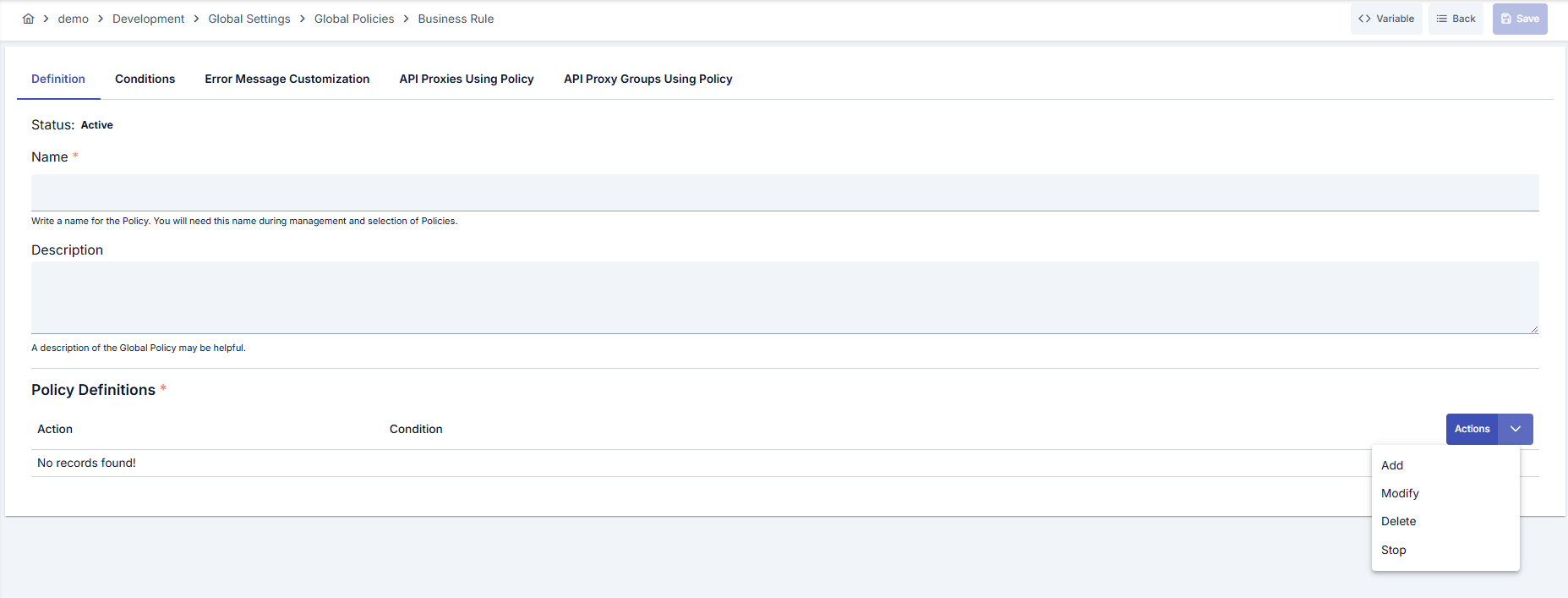
In the Policy Definitions section, use the Actions dropdown to add a new action or choose its type. The following action types are available:
| Action | Description |
|---|---|
| Add | Adds a new variable or value to the request/response. Injection Target (target variable) is required. |
| Modify | Updates the value of an existing variable or field (masking, transformation, JWT claim extraction, etc.). |
| Delete | Removes the specified variable or field from the message. |
| Stop | Stops the flow and returns a custom error message. |
Depending on the selected action type, the Action Definition - Add or Action Definition - Modify modal opens, where you define Injection Target and Conditions.
Configuration Steps
| Step | Description / Operation |
|---|---|
| Step 1: Go to Creation Page | - Go to Development → Global Settings → Global Policies → Business Rule from the left menu. - Click the [+ Create] button at the top right. |
| Step 2: Enter Basic Information | Policy Status: Shows Active/Passive status. New policies are active by default. Name (Required): Example: Production_BusinessRule- Enter a unique name, does not start with space. - System automatically checks: Green checkmark: available Red X: existing name. Description: Example: "Transforms variables in request flow according to business rules in Prod environment." - Max. 1000 characters. - Explain the purpose of the policy. |
| Step 3: Variable Usage | - In the action button area at the top of the page, you can use the [<> Variable] button to select dynamic values. - Using context/global variable expressions, you can manage policy parameters with variable-based values instead of fixed values. - This reduces manual update effort when values change and provides operational convenience. - For detailed information, review Dynamic Variables. |
| Step 4: Define Action Chain | - In Policy Definitions, open the Actions dropdown and select Add, Modify, Delete, or Stop. - In the dialog that opens, set Action Type, Source Data Type (Numeric/String/Temporal), and operator (e.g., Substring, Add Temporal, Extract JWT Body Claim) and fill their parameters. |
| Step 5: Source and Target Selection (If Any) | - Enter Source Variable or literal value for source value. - Use Target Variable or Target Value in target. - Open Variable dialogs to create and bind project variables. Variable type selection and creation flow when adding Business Rule action types have been improved for a clearer user experience. |
| Step 6: Define Condition (Optional) | - Go to Condition tab. - Conditions determine when the policy will be active. Examples: - Environment-based: Header = X-Environment, Operator = Equals, Value = production- API Key-based: Header = X-API-Key, Starts With = PROD-- Endpoint-based: Path = /api/admin/*If no condition is defined, policy is always active For details, you can refer to: Conditions |
| Step 7: Customize Error Message (Optional) | - Go to Error Message Customization tab. - Customize the message to be returned when access is denied or on Stop action. - Use template-based (dynamic) error messages with placeholders such as #{error.defaultErrorCode}, #{request.uri}, #{dateTime.formattedText}, #{message.correlationId} to include request and error details in the message. See What is Policy? – Template-Based Error Messages for details.Default: { "statusCode": 403, "message": "[Default error message]" }Custom (template example — UTC timestamp): Error Code: #{error.defaultErrorCode}, Time: #{dateTime.formattedText}, Request ID: #{message.correlationId}Custom (ISO 8601 offset timestamp): To include a timestamp with timezone offset, use the Date/Time Helper ( dtf) function:Error Code: #{error.defaultErrorCode}, Time: #{dtf.format('+03:00','yyyy-MM-dd\'T\'HH:mm:ssXXX')}, Request ID: #{message.correlationId}See Date/Time Helper ( dtf) for additional timezone and formatting options. |
| Step 8: Save | - Click the [Save] button at the top right. Checklist: - Unique name - Required fields filled - At least one action exists Result: - Policy is added to the list. - Can be connected to APIs. - If global policy, automatically applied. |
For descriptions of Conditions and Error Message Customization panels, you can review the Conditions and Error Message Customization sections on the What is Policy? page.
For a complete guide on all layers, priority order and scenario examples of the error message configuration system, see the Error Message Configuration Guide page.
Deleting the Policy
For deletion steps of this policy and operations to be applied when in use, you can refer to the Removing Policy from Flow section on the Policy Management page.
Exporting/Importing the Policy
For export (Export) and import (Import) steps of this policy, you can refer to the Export/Import page.
Connecting the Policy to API
For the process of how this policy will be connected to APIs, you can refer to the Connect Policy to API section on the Policy Management page.
Advanced Features
| Feature | Description and Usage Steps |
|---|---|
| JWT Claim Extraction Chain | - Select Modify as Action Type. - Set Source Data Type = String, Operator = Extract JWT Body Claim. - Enter desired claim in claimJsonPath field, select target variable and save. |
| XML to JSON Transformation Profile | - Select Transform operator and set transformation content type to XML to JSON. - Mark xmlToJsonIgnoreNull and xmlToJsonIgnoreEmpty options as needed.- Verify that result JSON will be transferred to target variable. |
| Stop Action Traffic Log Result | - The Stop action has the field Traffic log result: SUCCESS, BLOCKED, or ERROR. In API and APIops, the field is stopResultType.- An empty value means BLOCKED. Existing rules do not change, and no migration is needed.- Only the traffic log result changes. The client still gets the Stop message (or the custom message) and its HTTP status. - The Stop row in the action list shows a tag when the value is not Blocked. |
| Conditional Stop Action | - Define desired rule condition in Query Builder. - Add Stop type action to Action List and select custom error message. - Test that Stop action activates when previous actions meet the condition. |
Best Practices
Things to Do and Best Practices
| Category | Description / Recommendations |
|---|---|
| Action Chain Design | Bad: Combining all business rules in a single action. Good: Defining each rule as a separate action. Best: Ordering logically grouped actions and dividing with Stop action if needed. |
| Variable Management | Bad: Working with literal values and not using variables. Good: Reading common values from project variables. Best: Creating versioned variables with variable dialog and standardizing targets. |
| Error Message Structure | Bad: Leaving general error message. Good: Writing a directive message to user. Best: Customizing error message with code, message, and debug-friendly context. |
| Condition Management | Bad: Leaving conditions empty and running policy on every request. Good: Filtering based on endpoint or header. Best: Using Query Builder by combining environment, user segment, and method information. |
| Cross-Environment Transfer | Bad: Directly editing in Production environment. Good: Editing and exporting in test environment. Best: Performing version control with ZIP export-import and deploying changes through pipeline. |
Security Best Practices
| Security Area | Description / Warnings |
|---|---|
| JWT Claim Management | Only retrieve needed fields when extracting claims, mask unauthorized information. |
| Data Masking | Shorten personal data with Mask or Substring, prevent sensitive data from falling into logs. |
| Error Message Control | Do not put internal system details in error messages in production. Write general but directive messages. |
| Global Policy Updates | Review usage list before updating global policy, localize if needed. |
| Variable Authorization | Select only variables accessed by authorized users as target variable, check permissions. |
Things to Avoid
| Category | Description / Warnings |
|---|---|
| Empty Action List | Why to avoid: No operation is performed even if policy is saved, expected workflow is broken. Alternative: Define at least one action and check validation icon. |
| Wrong Data Type Selection | Why to avoid: Operator gives error or unexpected result occurs. Alternative: Analyze source data, correctly select Numeric/String/Temporal type. |
| Uncontrolled Stop Usage | Why to avoid: All requests may be accidentally stopped, service interruption occurs. Alternative: Apply Stop action only after condition filter. |
| Directly Deleting Global Policy | Why to avoid: Multiple APIs may become unprotected. Alternative: First deactivate or replace with local policy then delete. |
Performance Tips
| Criterion | Recommendation / Impact |
|---|---|
| Action Order | Recommendation: Put frequently used and light actions at the beginning. Impact: Flow can be terminated before unnecessary heavy operations. |
| Transformation Operators | Recommendation: Use Transform operations minimally, open separate policy if needed. Impact: CPU load decreases, latency drops. |
| Condition Filters | Recommendation: Write narrow-scope conditions with Query Builder. Impact: Policy works only when needed, throughput increases. |
| Variable Sharing | Recommendation: Take frequently used values to project variables. Impact: Literal operations are not performed repeatedly within action. |
| JWT Operations | Recommendation: Limit JWT claim extraction to only requests that need it. Impact: Unnecessary parsing cost decreases. |
Frequently Asked Questions (FAQ)
| Category | Question | Answer |
|---|---|---|
| General | What types of data does this policy work on? | Works with Numeric, String, and Temporal data types; operator selection is automatically filtered according to data type. |
| General | Should I create global or local? | Global is recommended if multiple API Proxies need the same rule, local if specific to a single API. |
| Technical | What does Stop action do? | Action chain stops at this point, customized error message is returned and flow ends. |
| Technical | How is target value set when extracting JWT claim? | Operator automatically makes target value source Variable; you need to select a project variable. |
| Usage | Why am I getting a warning if Action List is empty? | At least one action is required for policy to work; warning icon indicates this. |
| Usage | How do I control array fields in XML to JSON transformation? | Enter XPaths that should be arrays in xmlToJsonArrayPathList field to get correct type in transformation. |