API Proxy Design
Design Tab Concept
The Design tab provides tools for API design, documentation, and specification with a spec first approach in API Proxy configuration. In this tab, the method/endpoint and data type definitions of the selected API Proxy are managed. The API Specification File of an API Proxy that is deployed and opened for use is created at runtime using these definitions.
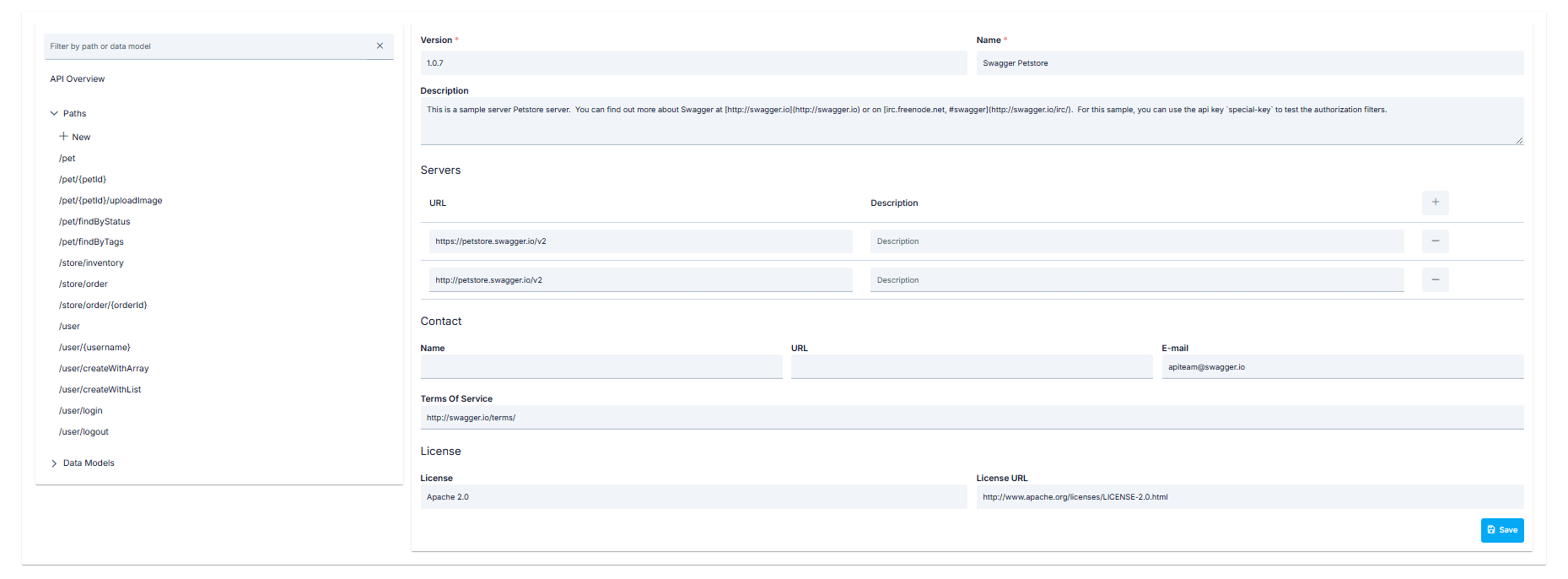
API design with OpenAPI/Swagger specification
API design starts with specification.
OpenAPI/Swagger specification is edited
Creating and editing specification in YAML/JSON format.
Automatic documentation is created from specification
Documentation is generated from OpenAPI spec.
API Specification File is created at runtime
API Specification File is generated using definitions.
The content and usage of the Design tab is the same as the Spec Design Editor interface, except that a few detail data are not requested in the Overview section.
The Design tab can only be used for API Proxies of type Swagger 2.x, OpenAPI/Swagger 3.0.x, and No-Spec API.
Design Tab Features
OpenAPI/Swagger Specification
Creating and editing OpenAPI/Swagger specification in spec first approach:
OpenAPI Editor
- OpenAPI/Swagger editor
- YAML/JSON editing
- Validation
- Syntax checking
Schema Design
- JSON Schema design
- XML Schema design
- Data model design
- Request/Response schemas
Endpoint Design
- Endpoint definition
- HTTP method determination
- Path parameters
- Query parameters
Method and Data Type Definitions
Managing method/endpoint and data type definitions of the API Proxy:
Definitions of API Proxy methods are managed
- HTTP methods (GET, POST, PUT, DELETE, etc.)
- Endpoint paths
- Parameter definitions
Definitions of data types are managed
- Request/Response models
- Schema definitions
- Data structures
API Specification File is created at runtime
- Automatic generation from definitions
- OpenAPI/Swagger format
- Portal integration
Design Tab Usage Scenarios
API Proxy configuration scenarios with spec first approach:
- Creating OpenAPI/Swagger specification in Design tab
- Defining endpoints and schemas
- Validating specification
- Creating API Specification File
- Deploying and opening API Proxy for use
- Editing existing API Proxy's specification
- Updating method and data type definitions
- Validating specification
- Creating updated API Specification File
- Saving changes
Design Tab and Spec Design Editor Relationship
The Design tab uses the same interface and features as the Spec Design Editor. The workflow:
API Proxy Configuration
   │
   │ Design Tab
   │ (Spec First)
   │
   ▼
Spec Design Editor
   │
   │ OpenAPI/Swagger Spec
   │ Method/Endpoint Definitions
   │ Data Type Definitions
   │
   ▼
API Specification File
   │
   │ Runtime Creation
   │
   ▼
API Proxy Deployment
OpenAPI/Swagger specification is created in Design tab
API design starts with specification in spec first approach.
Specification is validated and checked
Compliance check with OpenAPI standards is performed.
Method and endpoint definitions are made
HTTP methods and paths are defined.
API Specification File is created at runtime
API Specification File is automatically generated from definitions.
This integration between the Design tab and Spec Design Editor provides a seamless process from API design to deployment with spec first approach. The specification is created first, then the API Specification File is automatically generated from this specification.
Design Tab Advantages
Advantages provided by spec first approach:
- API design starts with specification
- Standard OpenAPI/Swagger format
- API design without writing code
- Creating API Specification File from definitions
- Automatic documentation generation
- Consistent API structure
- Compliance with OpenAPI/Swagger standards
- Interoperability
- Tool support
- Automatic documentation from specification
- Documentation-specification synchronization
- Portal integration