Endpoint Size Metrics
Since an API Proxy can be loaded into multiple environments, metrics must also be evaluated according to the environment it is loaded into. Therefore, in all analytics screens, metrics are filtered by first selecting environment information.
Metric data cannot be displayed for environments where Elasticsearch integration is not configured. In this case, a warning message is displayed on the screen.
Metrics Page
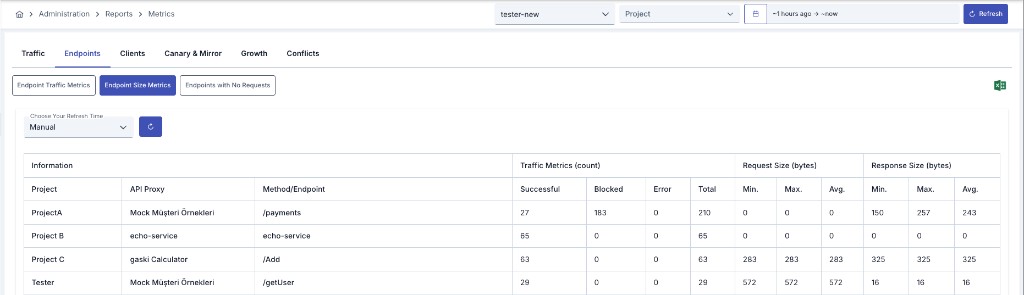
This report is the Message Size tab of the Metrics page (full name: Endpoint Size Metrics). Open it via Administration > Reports > Metrics or Reports > Metrics in the project menu.
Related tabs: Endpoint Traffic, Inactive Endpoints.
Filtering
The filter row at the top of the Metrics page is shared across all tabs and sub-reports:
| Option | Description |
|---|---|
| Environment | Select the environment whose metrics you want to view |
| Project | (Administration only) Filter metrics by selecting multiple projects |
| Date Range | Time range for metric calculation (default: last 1 hour) |
| Refresh | Re-queries the currently displayed sub-report |
| Excel Export | Export on the shared filter row; downloads the list for the active sub-report |
The sub-report row includes Choose Your Refresh Time (default: Manual) and a refresh button.
Table Column Descriptions
Information
| Column | Description |
|---|---|
| Project | Name of the project (only in admin view) |
| API Proxy | Name of the API Proxy |
| Method/Endpoint | HTTP method and endpoint path (e.g., /pet/findByStatus) |
Traffic Metrics (count)
- Successful: Number of requests resulting in successful (2xx) response code
- Blocked: Number of requests blocked due to security policies or rate limiting
- Error: Number of requests resulting in error (4xx, 5xx)
- Total: Total number of requests (Successful + Blocked + Error)
Request Size (bytes)
Body size metrics of requests coming to the endpoint:
| Metric | Description |
|---|---|
| Min. | Minimum request size (smallest request) |
| Max. | Maximum request size (largest request) |
| Avg. | Average request size |
Response Size (bytes)
Body size metrics of responses returning from the endpoint:
| Metric | Description |
|---|---|
| Min. | Minimum response size (smallest response) |
| Max. | Maximum response size (largest response) |
| Avg. | Average response size |