Migrate Unsent Traffic
This screen is used to transfer data accumulated in Apinizer configuration database to the connectors they should go to, if Apinizer configuration database is selected as failover connector.
This operation is started manually and if an error is received in the main connector, the operation is interrupted without data loss. It can be started again later from this screen.
When API Traffic Logs cannot be sent to the connector defined in the environment they are sent to, if the option to use failover connector is active in connector settings, they are sent to the failover connector. After the main connector is fixed, there is a need to transfer data sent to the failover connector to the target in the main connector.
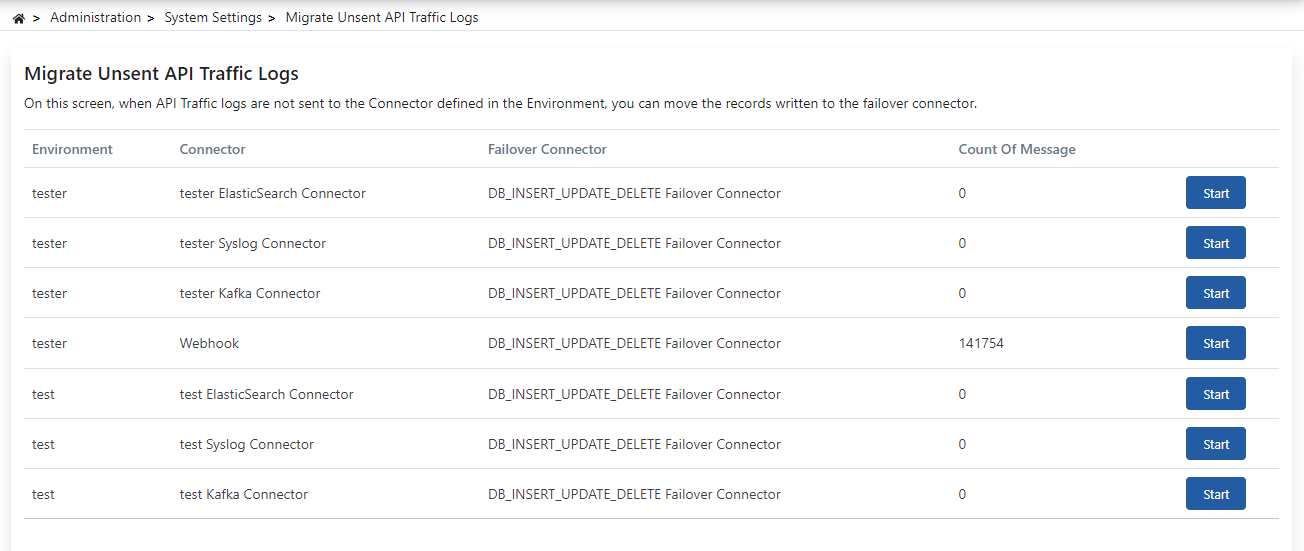
Start is available only for a row that actually has records waiting to be transferred. When there is nothing to move for an environment/connector pair, the row shows Not Exist and Start stays disabled.
When Apinizer configuration database (MongoDB) is used as the failover connector, accumulated logs can be transferred back to the main connectors from this screen. However, if these records are overlooked, MongoDB can grow large enough to crash, and the entire Apinizer platform may go down. Therefore, using the Apinizer configuration database as a failover connector is strongly not recommended.
Alternative: Unsent API traffic logs can be written to a database of your choice. For creating the target tables, see the Apinizer Log Table Creation Commands page.
If a separate MongoDB is used as failover instead of the Apinizer configuration database, accumulated logs can be sent back to Elasticsearch. For detailed information, see the Writing Logs from MongoDB to Elasticsearch with Bash Script page.