Creating API from Script with API Creator
Elements of the incoming message (header, parameter, body) are processed with the selected script language and the result is sent to the client.
Changes cannot be made to the original form of the incoming request message, only reading can be done on this data. The response to be returned to the client is prepared within the script.
Script-2-API List
Select Development → API Creator → Script-2-API in the main menu. The page shows all Script-2-APIs in one card. It has the same layout as the Mock API list.
Type a name in the search box above the table to filter the list. Click the clear button next to the search box to reset the search.
The table has these columns:
| Column | Description |
|---|---|
| Name | The name of the Script-2-API. Its description appears under the name. Click the name to open the editor. |
| Endpoints | The number of endpoints in the Script-2-API. |
| Languages | The script languages of the endpoints, for example JS · GROOVY. |
The ... menu at the end of each row has these actions:
| Action | Description |
|---|---|
| Open editor | Opens the Script-2-API editor. |
| Duplicate | Opens a dialog. Enter a new name to create a copy of the Script-2-API. |
| Export | Opens the Export/Import wizard for this Script-2-API. |
| Delete | Deletes the Script-2-API. See Script-2-API Deletion. |
The breadcrumb bar above the list has two buttons:
| Button | Description |
|---|---|
| Import | Opens the Export/Import wizard with the API Creator type. Use it to import a file that you created with Export. For details, see Export/Import. |
| Create | Opens the Create Script API dialog. See Creating New Script-2-API. |
Creating New Script-2-API
Select Development → API Creator → Script-2-API in the main menu.
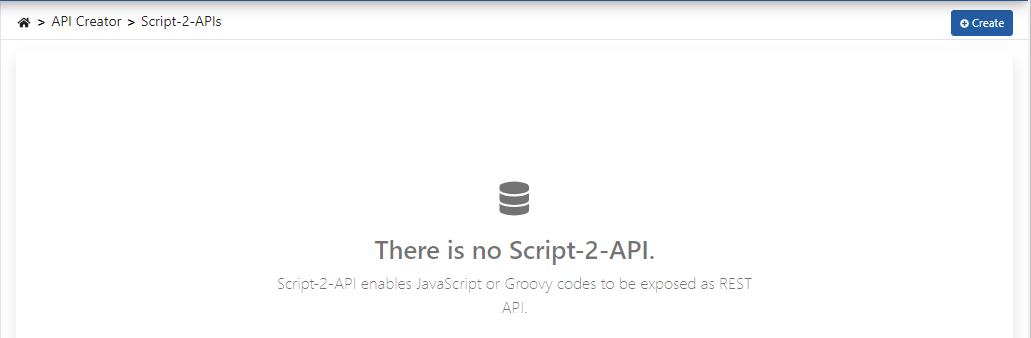
Click the Create button in the breadcrumb bar at the top right of the page. The Create Script API dialog opens.
Enter the name and the description of the API. Define the first endpoint under First endpoint. Click Create. Apinizer saves the Script-2-API with this endpoint and a starter script, then opens the editor.
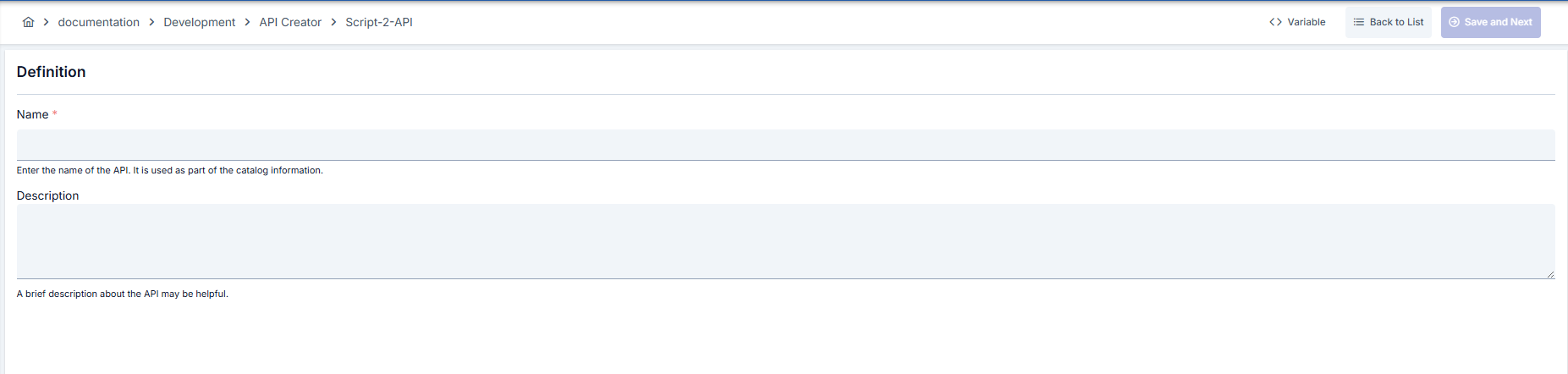
To add another endpoint, click the + button next to API Endpoints in the editor. If the Script-2-API has no endpoint, you can also click Add in the center area.
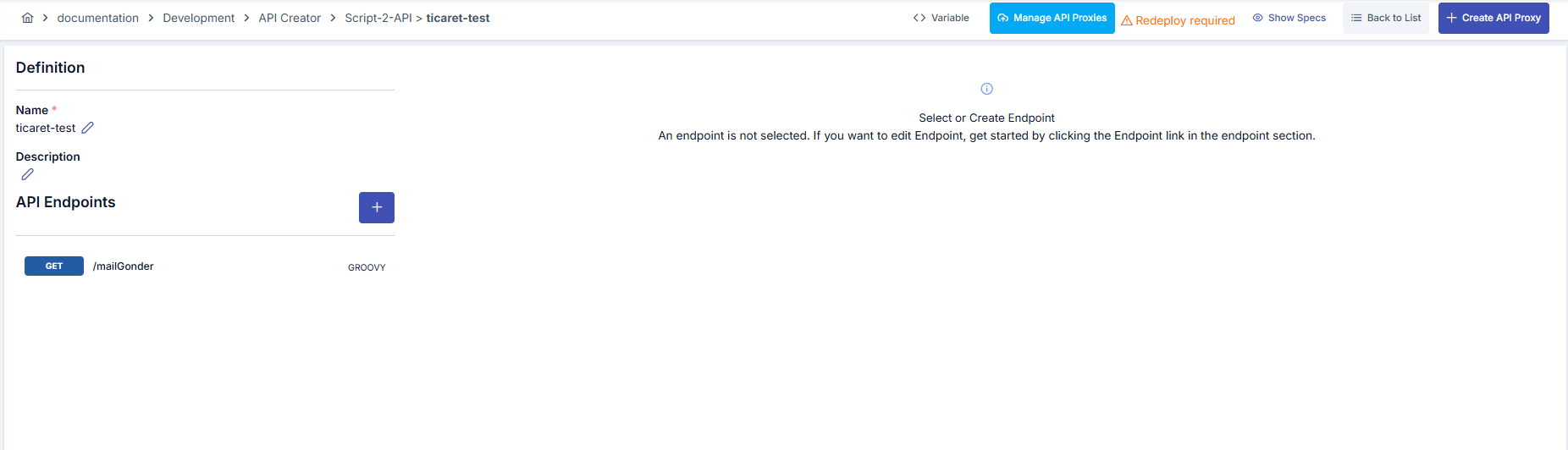
The Create Script API dialog has these fields:
| Field | Description |
|---|---|
| Name | Required. The name of the Script-2-API. Apinizer checks that the name is unique. |
| Description | A short description of the Script-2-API. |
| HTTP Method | The method of the first endpoint. |
| Path | The path of the first endpoint. The path must start with "/". |
| Language | The script language of the first endpoint: JavaScript or Groovy. |
The starter script returns a short JSON message. To change the script, click Configure in the editor.
Script-2-API Editor
The editor opens after you click Create. You can also open it with Open editor on the list. The editor has a left column, a center area, and breadcrumb buttons.
Each panel and dialog that changes data has its own Save button. Save stores your changes at once.
Left Column
- The name and the description of the Script-2-API are at the top. A summary line shows the number of endpoints and API proxies.
- The pencil button opens the Edit name and description dialog. Change the name and the description, then click Save. Apinizer saves the change at once.
- API Endpoints lists the endpoints. The + button adds a new endpoint.
- Each endpoint card shows the method, the path, a language badge (GROOVY or JS), and the description.
- Hold the pointer on a card to see the full path and the description.
- Click a card to select the endpoint. The selected card is highlighted.
Center Area
The top of the center area shows the method, the path, the language, and the description of the selected endpoint. The actions of the endpoint are on the right, in this order:
| Action | Description |
|---|---|
| Try it | Opens the Try it panel for this endpoint. See Try it. If the Script-2-API has no API Proxy, the button is disabled. Hold the pointer on the button to see the reason. |
| Configure | Opens the Configure panel of the endpoint. See Endpoint Creation. |
Only users who can manage API Creator see Configure and the note Read-only · use Configure to edit.
The script of the endpoint is below the header. The code view has line numbers and fills the page. It is read-only. To change the script, click Configure.
Breadcrumb Buttons
The breadcrumb bar has these buttons, from left to right:
| Button | Description |
|---|---|
| Back | Returns to the Script-2-API list. |
| Show Specs (eye icon) | Opens the OpenAPI specification of the Script-2-API in a dialog. Switch between the Open API Yaml tab and the Open API JSON tab. Use Copy to Clipboard or Download to copy or download the specification. |
| Manage API Proxies | Shows the API Proxies created from this Script-2-API and their deployment status. See Deploy/Redeploy. |
| Create API Proxy | Opens the Create API Proxy dialog. See Creating API Proxy from Script-2-API. |
| More actions (⋯) | Opens a menu. Transfer > Export opens the Export/Import wizard for this Script-2-API. History > Audit and Rollback opens the audit and rollback records of the Script-2-API in a side panel; for details, see Asset Lifecycle. Delete followed by the Script-2-API name, in red at the end of the menu, deletes the Script-2-API. |
Endpoint Creation
Click the + button next to API Endpoints to add an endpoint. Click Configure to change the selected endpoint. The Configure panel opens from the right. It edits the definition and the script together.
The title of the panel is New endpoint for a new endpoint. A new endpoint starts with a starter script. For an existing endpoint, the title shows the method and the path.
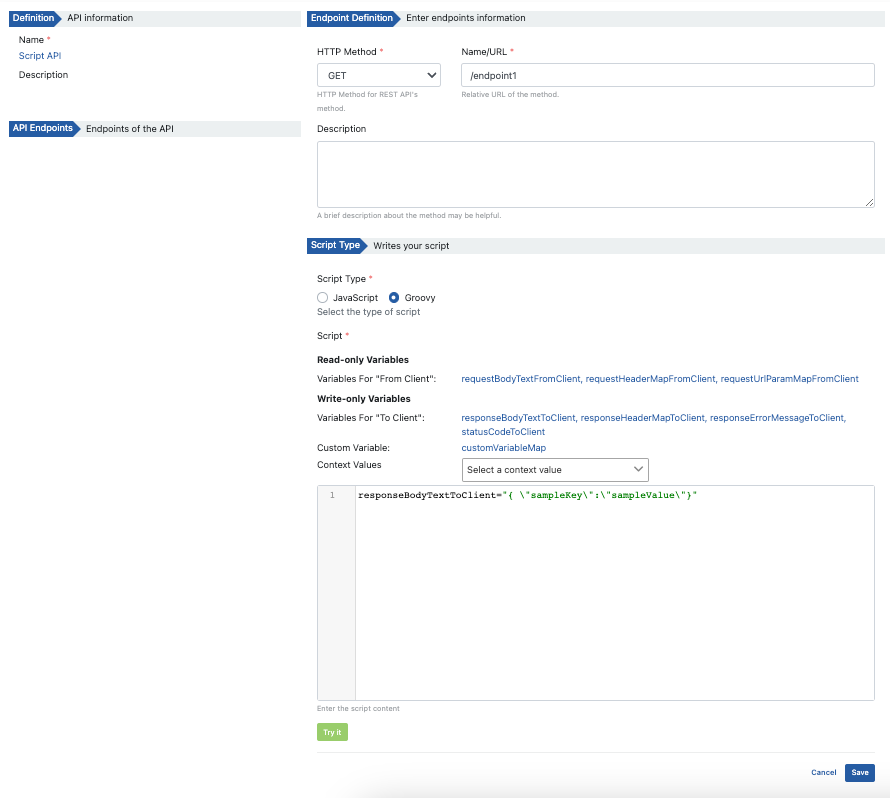
Fields used for endpoint creation configuration are explained below, categorized:
Basic Information
Field: HTTP Method
Required. Select the HTTP method of the endpoint: GET, POST, PUT, HEAD, OPTIONS, DELETE, PATCH, TRACE, or QUERY.
Field: Path
Required. The endpoint access address. The path must start with "/". If it does not, an error message appears. When API Proxy is created, the endpoint is accessed through this address.
Field: Description
Definition information of the API endpoint.
Script Settings
Field: Language
Required. Select the language of the script: JavaScript or Groovy. For a saved endpoint, the Unsaved script changes badge appears next to the field when the script differs from the saved script.
Field: Script
The code editor of the endpoint. The editor has code completion, editor checks, and a compile check. See Script Editor. Press Ctrl+S (Cmd+S on macOS) to save the endpoint.
Field: Snippets row and Variables band above the editor
Click a snippet or a variable chip to insert it at the cursor. See the table below.
Button: Try it (toolbar of the script editor)
Opens the Script Test dialog to run the script with sample data. The button is disabled when the script is empty. See Script Test.
The Snippets row is above the editor. Click a snippet to insert ready-made code at the cursor. The inserted code matches the selected language. The snippets are Read a header, Read a query param, Return JSON, and Return an error.
The Variables band is between the Snippets row and the toolbar. It has two lanes because Script-2-API calls no backend. A click on a chip inserts the variable name at the cursor. The band has these parts:
| Part | Content |
|---|---|
| Client → Gateway (read) | requestHeaderMapFromClient, requestBodyTextFromClient, requestUrlParamMapFromClient, requestFormUrlEncodedListFromClient, requestFormDataListFromClient |
| Gateway → Client (write in response) | responseHeaderMapToClient, responseBodyTextToClient, statusCodeToClient, responseErrorMessageToClient |
| Shared | customVariableMap, environmentVariableMap, credentialMap, cache, stopFlowAsSuccess |
| Context | A box with search. The values are in groups: Request, Response, Metadata, Date/Time, Error, and Credential. Select a context value to insert it at the cursor. |
Each chip also has a ▾ part. Click ▾ to open a menu with ready-made code for the type of the variable and Copy name. For a map, the code actions are Read value, Check if key exists, and Iterate all. A writable map also has Write value and Remove key. A body variable of type String has Read as JSON.
A blue chip border means that you can write the variable. A dashed border means that the variable is new on screen. Click Search all to open the Variables tab of the side panel. Click Hide to collapse the band. Click Show to expand it.
The footer of the panel has these buttons:
- Delete endpoint deletes the endpoint after you confirm. This button is not shown for a new endpoint.
- Cancel closes the panel and discards your changes. If the endpoint is new, Apinizer does not create it.
- Save stores the definition and the script together.
Save and Ctrl+S (Cmd+S on macOS) first check the script. If the script has errors, the Script has errors dialog asks: The script has N error(s). The script can fail at runtime. Save anyway? Click Save anyway to save the endpoint with the errors. Click Go back to return to the panel and fix the errors. The check never blocks Save.
Script Editor
The script editor in the Configure panel is the editor of the Script policy. It has the Variables band above the code, a toolbar, a status text, a problems list under the code, and a side panel. The toolbar and the problems list have these items:
- The engine tag shows the engine of the selected language: Groovy 3.0.25 or JavaScript (GraalJS).
- Suggest opens the code completion. The shortcuts are Ctrl+Space, Alt+Space, and Ctrl+.
- Check compiles the script on the Worker with the runtime engine. Check executes nothing. It needs a published environment of the project. If the project has no published environment, only the editor checks run.
- The status text next to Check shows the result, for example Compiled without errors (N ms). or Compile errors found.
- Try it opens the Script Test dialog. The button is disabled when the script is empty. See Script Test.
- Catalog and classes opens the side panel. Hide panel closes it. The side panel starts closed so that the editor keeps its width.
- The problems list shows No problems, or the number of errors and warnings. Each row shows the position, for example Line 3:5. Click a row to move the cursor to that line.
The editor warns you while you type. For example, it warns about an assignment to a read-only variable, a println or console.log call, and a Groovy "${name}" expression. A script does not resolve an environment variable this way. Use environmentVariableMap.get("name").
Java classes work in Groovy scripts only. JavaScript scripts on the Worker cannot load Java classes, and Java.type is not available.
The side panel has three tabs:
- Variables: Search a variable by name. Click a row to copy the name. Use ⋮ to insert the name or ready-made code.
- Catalog: Ready-made code. Click Insert at cursor to add the code. Click Copy to copy it. On Script-2-API, the Catalog shows only four entries: Read a request header, Read a query parameter, Return a JSON response, and Return an error response. The proxy flow entries of the Script policy are not shown. They use backend variables, and Script-2-API calls no backend.
- Classes: Search a class by name. Insert a class to add its import line. This tab is available only for Groovy.
The Variables band, the toolbar, and the checks work as in the Script policy. One difference: on this screen, a click on a chip and a selection in the Context box insert at the cursor. In the Script policy, they copy. For the full list of completion items, editor checks, and compile check messages, see Script Body and Variable Management on the Script policy page.
Variables
Various keywords are used for access to message header, parameter, and body parts on script for read and write operations to be performed. In the Configure panel, click a chip in the Variables band above the editor to insert the variable name at the cursor. To insert a context value, select it in the Context box of the band.
Client → Apinizer (Request Data)
Variables used to access data coming from client to Apinizer:
Variable: requestHeaderMapFromClient
Data Type: Map<String, String>
Operation: Read
Used to read request headers.
Variable: requestUrlParamMapFromClient
Data Type: Map<String, String>
Operation: Read
Used to read URL parameters.
Variable: requestBodyTextFromClient
Data Type: String
Operation: Read
Used to read request body.
Variable: contextValues
Data Type: String
Operation: Read
Used to access message information.
Variable: customVariableMap
Data Type: Map<String, String>
Operation: Read, Write
Used to read and write custom variables.
Apinizer → Client (Response Data)
Variables used to create data to be sent from Apinizer to client:
Variable: responseHeaderMapToClient
Data Type: Map<String, String>
Operation: Write
Used to create response headers.
Variable: responseBodyTextToClient
Data Type: String
Operation: Write
Used to create response body.
Variable: statusCodeToClient
Data Type: Integer
Operation: Write
Used to set HTTP status code.
Variable: responseErrorMessageToClient
Data Type: String
Operation: Write
Used to return an error message to the client. The Return an error snippet sets this variable together with the status code.
Variable: contextValues
Data Type: String
Operation: Read
Used to access message information.
Variable: customVariableMap
Data Type: Map<String, String>
Operation: Read, Write
Used to read and write custom variables.
The form lists (requestFormUrlEncodedListFromClient and requestFormDataListFromClient) and the shared variables (environmentVariableMap, credentialMap, cache, and stopFlowAsSuccess) work as in the Script policy. For details, see Flow Variables, Accessing Environment Variables, Accessing Credential Information, and Cache Access.
If script type is Groovy:
- JsonSlurper when message body is JSON
- XMLSlurper when message body is XML
Using these makes message processing quite easy.
Script Test
Script Test runs the script that is in the Configure panel with sample data. It runs the script even if you did not save it. It needs no API Proxy. Apinizer saves nothing and calls no backend.
Click Configure on an endpoint, or click the + button to add a new endpoint. Click Try it on the toolbar of the script editor. This is not the Try it button in the header of the endpoint. The Script Test dialog opens. The badge next to the title shows the language of the script.
Under Where does your script run?, Request or Response is selected. The dialog selects the pipeline where the variables of your script work. A script that writes the response to the client runs in Response. You can change the pipeline.
Select the Environment. You cannot run the script without an environment.
Fill in the sample data under 1 Test data. Fill in only the values that your script reads. The other values can stay empty.
Use the Test context box under the cards when your script reads the client or the HTTP method. In Credential (authenticated client), select a consumer. The dialog fills the credential_* values and credentialMap like an authenticated call. The default is No credential. In HTTP method, select a method. The dialog fills request_httpMethod. The default is POST.
Click Run script, or press Ctrl+Enter (Cmd+Enter on macOS). The button stays disabled until you select an environment and write a script. The result appears under 3 Result.
Before the run, the dialog runs the editor checks and the compile check. If the script has errors, the Script has errors dialog asks: The script has N error(s). Run it anyway? Click Run anyway to run the script. Click Go back to fix the errors.
The dialog has three columns:
| Column | Description |
|---|---|
| 1 Test data | An info message lists the data that your script reads and that is still empty. Click a button in the message to add this data. Below the message, sample messages are in cards: From Client, To Backend, From Backend, and To Client. The dialog shows the messages and the fields that your script uses. The fields are Headers, Parameters, Request URL Path, Body, Error Message, and Status Code. The badges script reads and script changes mark the fields that your script uses. To add another field to a card, click the field next to Add field:. Click Hide to hide a field that you did not fill in. The Test context box is at the end of the column. |
| 2 Script | The script in a code editor with code completion, editor checks, the compile check (Check), and the problems list. See Script Editor. Change the script and run it again. Your changes go back to the Configure panel when you close the dialog. If the script is empty, the dialog shows The script is empty. Write a script to test it. The Variables panel is below the editor. Click a variable to copy its name. The variables that your script uses are highlighted. The badge of each variable group shows the access in the selected pipeline: Read only, Read and change, or Not available here. |
| 3 Result | The result of the last run. See the table below. |
The result has these parts:
| Part | Description |
|---|---|
| Outcome | Success or Failed, the run time in milliseconds, and the number of changes. No changes means that the script changed nothing. Before the first run, the column shows No result yet and a hint. |
| Changes | The title is Request to the backend API or Response to the client. The tables compare the result with the To Backend or To Client test data. Each row has a badge: added, changed, removed, or no change. Click Show N unchanged to see the rows without a change. |
| Body | If the script changed the body, the new body appears with the changed badge. Click Show the body before the script to see the old body. |
| Backend URL and status code | If they have a value, the result shows the Customized Backend Resource Url and the Status Code. |
| Error | If the script fails, the result shows The script stopped with an error., a hint, and the cause. If empty test data can cause the error, the result lists the names of the empty values. |
| Flow stop | If the script sets an error message, the result shows The flow stops here. The client gets this error. and the status code. If stopFlowAsSuccess is true, the result shows The flow stops here as SUCCESS. The client gets this message. |
| Values given to the script (N) | A collapsed panel under the result. It lists the names of the values that the script receives. It groups the names by source: From test inputs, From the environment, From the selected credential, Fixed in Try It, and Runtime service. The panel shows only names. It never shows values. |
If you change the data, the test context, or the script after a run, a note tells you to run the script again.
Script Test runs the script on the same engines as the gateway: Groovy and JavaScript (GraalJS). JavaScript scripts cannot load Java classes, and Java.type is not available. Java classes work in Groovy scripts only.
Script Test masks secret values as ******. This applies to the consumer password, the other secret fields of the consumer, and secret environment variables. Script Test gets the key objects (certificates, keys, keystores and JWKs) of the test project and the admin project only. Certificates and public keys have their real values. Private keys, secret keys, keystores and JWKs are present by name only; their value is null. Only the consumers of the project are available. The compile check and Try it are open to users who have MANAGE permission on API Creator or Global Settings. Cache writes go to a temporary test cache, not to the real cache.
Try it
The Try it button in the header of the endpoint opens the Try it panel. It is different from Script Test. The Try it button on the toolbar of the script editor in the Configure panel opens Script Test.
- Script Test runs the script in the Configure panel, saved or not. It needs no API Proxy.
- Try it sends a real request through an API Proxy to the saved script.
Try it uses the same request service as the Test Console. You need the Execute permission for Test Console.
Try it needs an API Proxy that routes to the Script-2-API. If the Script-2-API has no API Proxy, the Try it button is disabled. Create an API Proxy first. See Creating API Proxy from Script-2-API.
The Try it panel is the same panel as in Mock API. For all its parts, see Try it in Mock API.
Select an endpoint in the left column of the editor. Click Try it in the header of the endpoint. The Try it panel opens from the right.
The API Proxy list and the Environment list are on one line. The panel selects the first API Proxy and its first environment. To change them, select another API Proxy. Then select the Environment. The Environment list shows only the environments where the API Proxy is deployed.
The Request part shows the method and the full request URL. Change the request in the Parameters, Headers, and Body tabs.
- Enter a value for each path parameter. A field appears for each parameter in the path.
- Click + Add in the Parameters tab to add a query parameter.
- Click + Header in the Headers tab to add a header. The tab starts with the header
Accept: application/json. - Enter the request body in the Body tab. This tab appears for methods that carry a body, for example POST, PUT, and PATCH. For these methods, the panel also adds the header
Content-Type: application/json.
Click Send at the end of the URL line. The Response part shows the status, the response time, the size, the response body, and the response headers.
The request card also has the Copy cURL and Reset buttons. An API Proxy that is not deployed shows the Not deployed badge. If the panel finds no API Proxy for the Script-2-API, it shows No API Proxy for this API yet and a Create API Proxy button.
Creating API Proxy from Script-2-API
After the API's definitions are completed, it's time to open this API as an API Proxy.
At least one endpoint of the API created with Script-2-API must exist to create an API Proxy from Script-2-API. Until then, the Create API Proxy button is disabled.
To open Script-2-API as an API Proxy for access, click the Create API Proxy button in the breadcrumb bar, as shown in the following visual.
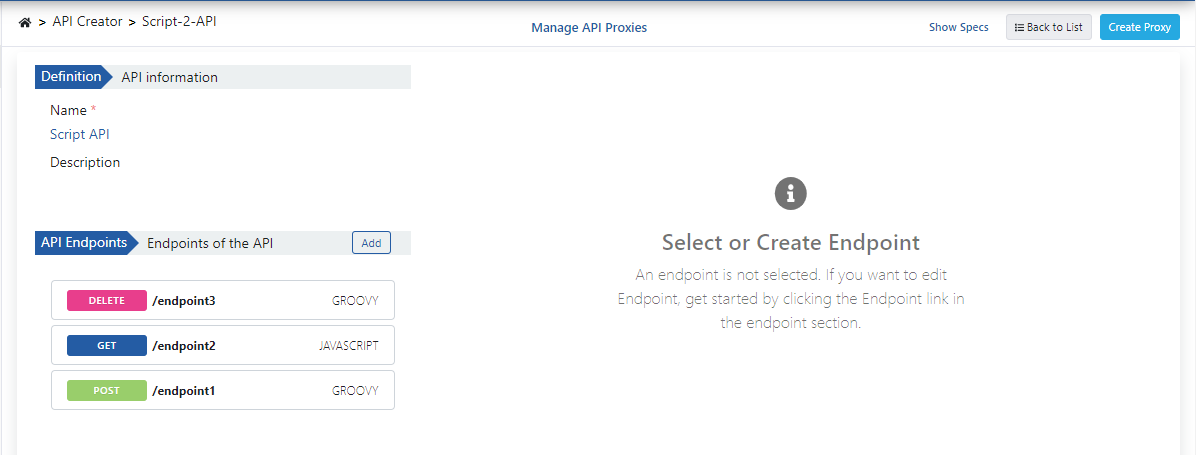
The Create API Proxy dialog opens.
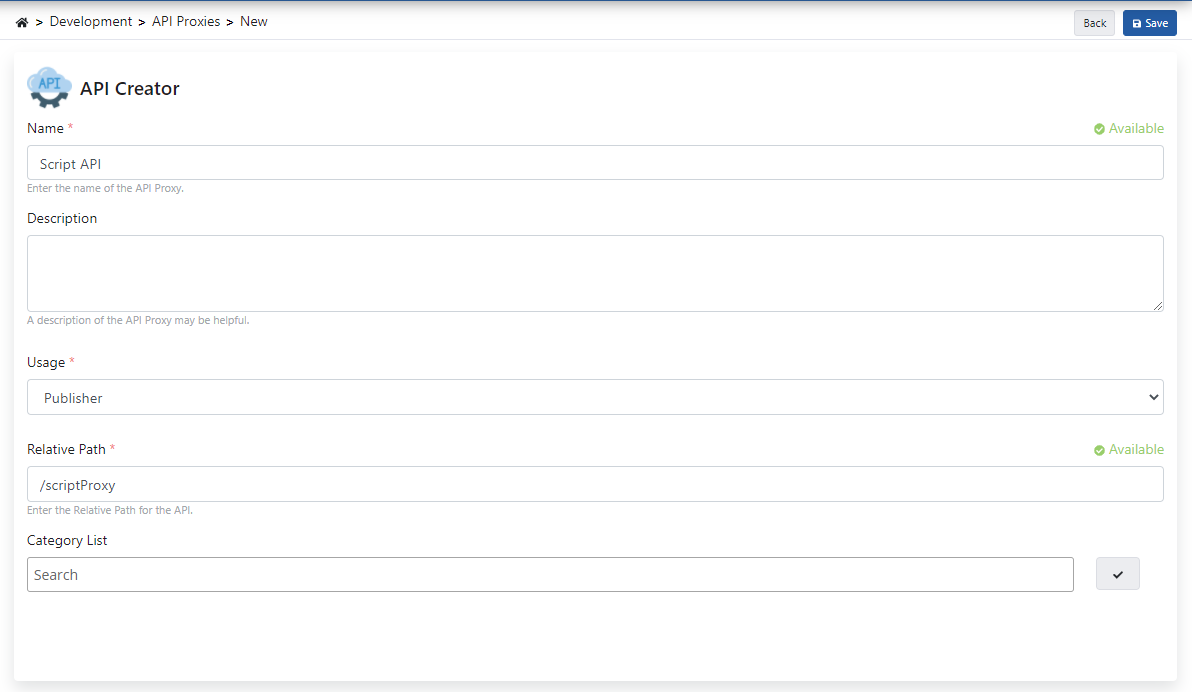
The dialog suggests a name and a relative path from the name of the Script-2-API. Change them if needed. The dialog has these fields:
| Field | Description |
|---|---|
| Proxy name | Required. The name of the API Proxy. Apinizer checks that the name is unique. |
| Relative Paths | The paths that route requests to the API Proxy. Each path must start with "/". If the project uses a relative path prefix, the prefix appears before each path. Click + Add a path to add a path. |
| Methods | Select one or more methods in the list: GET, POST, PUT, DELETE, PATCH, HEAD, OPTIONS, or QUERY. If you select none, Apinizer routes all methods. |
| Hosts | Click + Add a host to add a host. |
| Headers | Click + Add a header to add a header with a name and a value. |
| Category List | Type a category and press Enter to add it. |
| Deploy to | One check box for each environment, with the access URL of the environment. |
| Gateway URL | A preview of the URL that clients use to reach the API Proxy. |
Relative Paths, Methods, Hosts, and Headers form the Client Route section. Define at least one path, method, host, or header. For details, see Client Route Settings.
The first environment is checked by default. Clear the check box if you do not want to deploy now.
Click Create and deploy. Apinizer creates the API Proxy and deploys it to the checked environments. If you check no environment, Apinizer only creates the API Proxy. Click Cancel to close the dialog without creating an API Proxy.
After this step, what can be done is the same as the API Proxy document. You can review the API Proxy Creation page for detailed information.
You can create multiple API Proxies for one Script-2-API.
Deploy/Redeploy
You can deploy an API Proxy when you create it. Check an environment under Deploy to in the Create API Proxy dialog. You can also manage the deployment status of API Proxies created with Script-2-API from the API Proxies page or with the Manage API Proxies button in the editor.
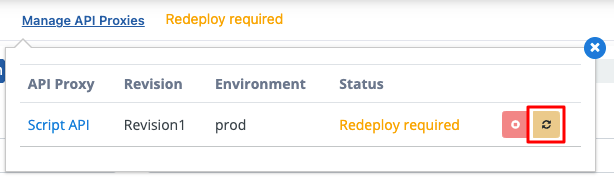
To manage from the Script-2-API page, use the panel opened by the Manage API Proxies button in the breadcrumb bar. In the opened panel, you can perform Deploy, Redeploy, and Undeploy operations for API Proxys created from this API. You can visit our Revision, Deployment, Redeployment, Undeployment pages for more detailed information on this topic.
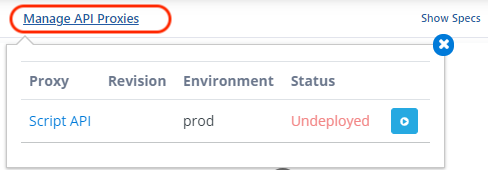
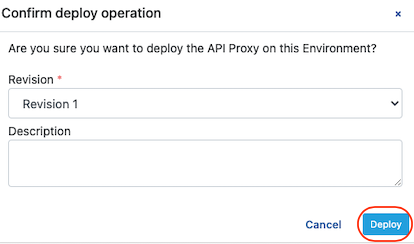
After the above operation, confirmation is required. Information about the deployment operation is created and the (Deploy) Deploy button is clicked.
When you add a new endpoint or save a change in an endpoint, redeploy all API Proxies created from this API. Otherwise the changes do not take effect.
After you save a change, the Redeploy required notice appears next to Manage API Proxies, as in the following image.

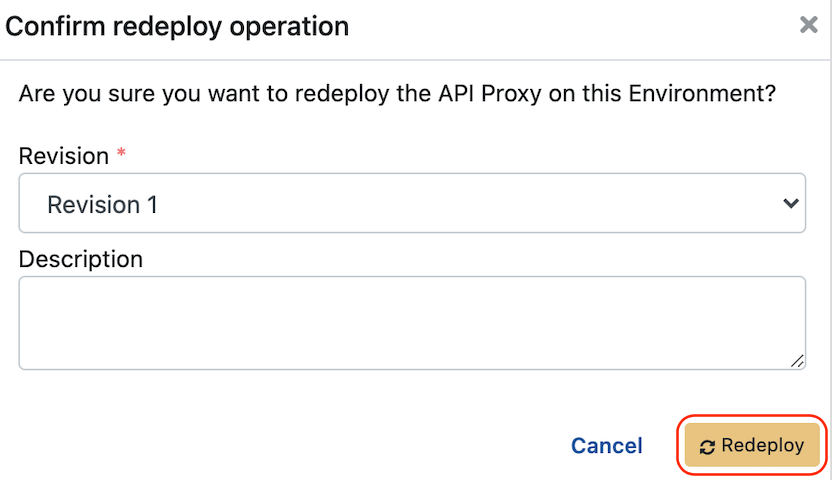
By saying Redeploy, changes are applied to API Proxies.
After the above operation, confirmation is required. Information about the redeployment operation is created and the (Redeploy) Redeploy button is clicked.
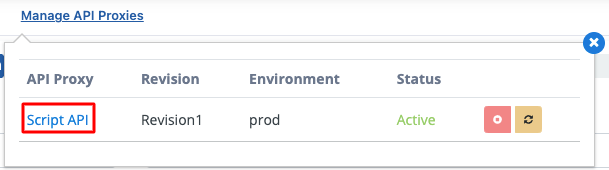
From the Script-2-API page, go to the API Proxy by clicking the API Proxy's name.
Similarly, to go to the Script-2-API page from the API Proxy page, go by clicking the Script-2-API name in the API Proxy as shown below.
Script-2-API Deletion
To delete a Script-2-API, click the ... menu at the end of its row in the Script-2-API list and select Delete. A dialog asks you to confirm. It lists the API Proxies that Apinizer deletes with the Script-2-API. Enter the name of the Script-2-API and click Delete.
When a Script API is deleted, all API Proxies connected to it are first removed (undeploy) and then deleted.
