Client Route Settings
Client Route is the configuration settings that determine how incoming requests to your API Proxies will be routed. For detailed information about the Client Route concept, you can refer to the Client Route page.
Client Route Features
Overview:
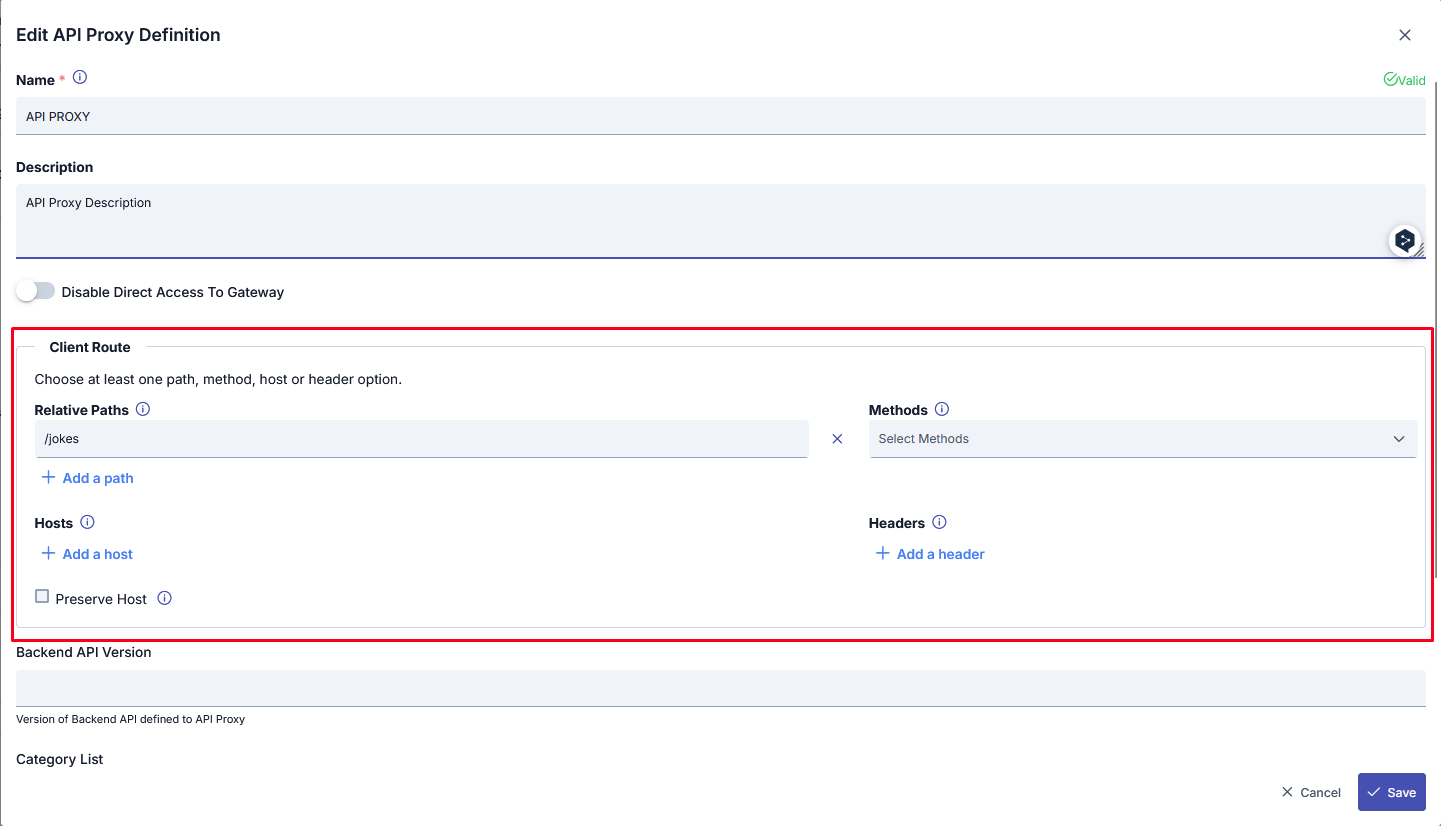
With the Client Route feature, you can use the following routing options:
You can define multiple relative paths for an API Proxy
You can route to different API Proxies based on host information
You can create routing rules based on HTTP header values
You can perform HTTP method-based routing
Before this feature was developed, only a single unique relative path could be defined for each API Proxy. With the new feature, multiple API Proxies with the same relative path can be created, and dynamic routing can be performed between them based on host, header, or method information.
Routing Priority Order
The Gateway evaluates incoming requests according to the following priority order:
Highest priority
Host header check
Header check
Lowest priority
Matching Logic
Hosts (OR Logic)
When multiple hosts are defined, it works with OR logic. That is, matching any one of the defined hosts is sufficient.
Example:
Hosts: hostname_x.com, hostname_y.com
If the Host header value in the request is hostname_x.com or hostname_y.com, the condition is met.
Headers (AND Logic)
When multiple headers are defined, it works with AND logic. That is, all defined headers must match.
Example:
Headers: testmode:true, test:true
Both testmode: true and test: true headers must be present in the request.
Path Matching
- Relative path matching has the highest priority
- More specific (longer) paths are evaluated before more general (shorter) paths
- If an exact match is not found, the closest parent path is used
Method Matching
- Method checking has the lowest priority
- If not specified, all HTTP methods are accepted
Wildcard Hostname Usage
Apinizer supports wildcard (joker character) usage to provide flexibility in host definitions. Wildcard hostnames allow all Host header values that match a certain pattern to satisfy the condition and thus match the related Route.
Wildcard Rules
Wildcard Rules:
- Can contain only one asterisk (*) in the leftmost or rightmost label of the domain
- Asterisk can be used at the beginning or end of the domain
Wildcard Examples
*.example.com
Matching Hosts:
- a.example.com
- x.y.example.com
- api.example.com
- test.subdomain.example.com
example.*
Matching Hosts:
- example.com
- example.org
- example.net
- example.io
Example Scenario
The table below shows 5 different API Proxies and the Client Route configurations defined for them:
| Proxy ID | Relative Path | Methods | Hosts (OR) | Headers (AND) |
|---|---|---|---|---|
| 1 | /jokes | - | - | testmode:true, test:true |
| 2 | /jokes | - | hostname_x.com, hostname_y.com | - |
| 3 | /jokes1/endpoint_x | - | - | - |
| 4 | /jokes1 | - | - | - |
| 5 | /jokes | - | - | - |
Routing Examples
According to this configuration, incoming requests are routed as follows:
Example 1: Basic Routing
Request:
GET https://<ACCESS_URL>/jokes
Result: Routed to Proxy 5 (default proxy since no condition is met)
Path matched but host and header conditions were not met, so Proxy 5 with the simplest configuration is selected.
Example 2: Host-Based Routing
Request:
GET https://<ACCESS_URL>/jokes
Host: hostname_x.com
Result: Routed to Proxy 2 (host condition met)
Proxy 2 is selected because host has higher priority than header.
Example 3: Routing with Missing Header
Request:
GET https://<ACCESS_URL>/jokes
testmode: true
Result: Routed to Proxy 5 (Proxy 1 requires both headers, only one is provided)
Since headers work with AND logic, all headers must match. In case of missing headers, the next suitable proxy is selected.
Example 4: Full Header Match
Request:
GET https://<ACCESS_URL>/jokes
testmode: true
test: true
Result: Routed to Proxy 1 (all header conditions met)
Proxy 1 is selected because all header conditions are met.
Example 5: Path Priority - Basic Path
Request:
GET https://<ACCESS_URL>/jokes1
Result: Routed to Proxy 4 (exact path match)
Proxy 4 is selected because path has the highest priority and it has an exact matching path.
Example 6: Path Priority - Long Path
Request:
GET https://<ACCESS_URL>/jokes1/endpoint_x
Result: Routed to Proxy 3 (more specific path takes priority)
More specific (longer) paths are evaluated before more general (shorter) paths.
Example 7: Path with Sub-Path
Request:
GET https://<ACCESS_URL>/jokes1/endpoint_x/endpoint_y
Result: Routed to Proxy 3 (closest parent path match)
If an exact match is not found, the closest parent path is used.
Example 8: Path Match - Different Sub-Path
Request:
GET https://<ACCESS_URL>/jokes1/endpoint_y
Result: Routed to Proxy 4 (matched /jokes1 as parent path)
There is no exact match for /jokes1/endpoint_y path, so the parent path match /jokes1 is used.
Example 9: Host and Header Combination
Request:
GET https://<ACCESS_URL>/jokes
Host: hostname_x.com
testmode: true
test: true
Result: Routed to Proxy 2 (host has higher priority than header)
Proxy 2 is selected because host has higher priority than header, so when host condition is met, header conditions are ignored.
Example 10: Different Path with Host and Header
Request:
GET https://<ACCESS_URL>/jokes1
Host: hostname_x.com
testmode: true
test: true
Result: Routed to Proxy 4 (path has highest priority, host and headers are ignored)
Proxy 4 is selected because path has the highest priority, so when path match is met, host and header conditions are ignored.
Routing Combination Table
This table shows from the API Proxy perspective how the API Proxy is selected:
| Status | Description |
|---|---|
| None | Not present in the API proxy definition. What the client sends is not checked. |
| Matched | Present in the API proxy definition. What the client sends is checked, and it sent the expected value. |
| Not Matched | Present in the API proxy definition. What the client sends is checked, but it did not send the expected value. |
The table below shows how the API Proxy is selected in different combinations:
| # | HOST | PATH | METHOD | HEADER | RESULT | EXPLANATION |
|---|---|---|---|---|---|---|
| 1 | None | None | None | None | ✓ SELECTED | No criteria defined |
| 2 | None | None | None | Matched | ✓ SELECTED | All defined criteria OK (HEADER) |
| 3 | None | None | None | Not Matched | ✗ REJECTED | Cannot route because HEADER did not match |
| 4 | None | None | Matched | None | ✓ SELECTED | All defined criteria OK (METHOD) |
| 5 | None | None | Matched | Matched | ✓ SELECTED | All defined criteria OK (METHOD, HEADER) |
| 6 | None | None | Matched | Not Matched | ✗ REJECTED | Cannot route because HEADER did not match |
| 7 | None | None | Not Matched | None | ✗ REJECTED | Cannot route because METHOD did not match |
| 8 | None | None | Not Matched | Matched | ✗ REJECTED | Cannot route because METHOD did not match |
| 9 | None | None | Not Matched | Not Matched | ✗ REJECTED | Cannot route because METHOD, HEADER did not match |
| 10 | None | Matched | None | None | ✓ SELECTED | All defined criteria OK (PATH) |
| 11 | None | Matched | None | Matched | ✓ SELECTED | All defined criteria OK (PATH, HEADER) |
| 12 | None | Matched | None | Not Matched | ✗ REJECTED | Cannot route because HEADER did not match |
| 13 | None | Matched | Matched | None | ✓ SELECTED | All defined criteria OK (PATH, METHOD) |
| 14 | None | Matched | Matched | Matched | ✓ SELECTED | All defined criteria OK (PATH, METHOD, HEADER) |
| 15 | None | Matched | Matched | Not Matched | ✗ REJECTED | Cannot route because HEADER did not match |
| 16 | None | Matched | Not Matched | None | ✗ REJECTED | Cannot route because METHOD did not match |
| 17 | None | Matched | Not Matched | Matched | ✗ REJECTED | Cannot route because METHOD did not match |
| 18 | None | Matched | Not Matched | Not Matched | ✗ REJECTED | Cannot route because METHOD, HEADER did not match |
| 19 | None | Not Matched | None | None | ✗ REJECTED | Cannot route because PATH did not match |
| 20 | None | Not Matched | None | Matched | ✗ REJECTED | Cannot route because PATH did not match |
| 21 | None | Not Matched | None | Not Matched | ✗ REJECTED | Cannot route because PATH, HEADER did not match |
| 22 | None | Not Matched | Matched | None | ✗ REJECTED | Cannot route because PATH did not match |
| 23 | None | Not Matched | Matched | Matched | ✗ REJECTED | Cannot route because PATH did not match |
| 24 | None | Not Matched | Matched | Not Matched | ✗ REJECTED | Cannot route because PATH, HEADER did not match |
| 25 | None | Not Matched | Not Matched | None | ✗ REJECTED | Cannot route because PATH, METHOD did not match |
| 26 | None | Not Matched | Not Matched | Matched | ✗ REJECTED | Cannot route because PATH, METHOD did not match |
| 27 | None | Not Matched | Not Matched | Not Matched | ✗ REJECTED | Cannot route because PATH, METHOD, HEADER did not match |
| 28 | Matched | None | None | None | ✓ SELECTED | All defined criteria OK (HOST) |
| 29 | Matched | None | None | Matched | ✓ SELECTED | All defined criteria OK (HOST, HEADER) |
| 30 | Matched | None | None | Not Matched | ✗ REJECTED | Cannot route because HEADER did not match |
| 31 | Matched | None | Matched | None | ✓ SELECTED | All defined criteria OK (HOST, METHOD) |
| 32 | Matched | None | Matched | Matched | ✓ SELECTED | All defined criteria OK (HOST, METHOD, HEADER) |
| 33 | Matched | None | Matched | Not Matched | ✗ REJECTED | Cannot route because HEADER did not match |
| 34 | Matched | None | Not Matched | None | ✗ REJECTED | Cannot route because METHOD did not match |
| 35 | Matched | None | Not Matched | Matched | ✗ REJECTED | Cannot route because METHOD did not match |
| 36 | Matched | None | Not Matched | Not Matched | ✗ REJECTED | Cannot route because METHOD, HEADER did not match |
| 37 | Matched | Matched | None | None | ✓ SELECTED | All defined criteria OK (HOST, PATH) |
| 38 | Matched | Matched | None | Matched | ✓ SELECTED | All defined criteria OK (HOST, PATH, HEADER) |
| 39 | Matched | Matched | None | Not Matched | ✗ REJECTED | Cannot route because HEADER did not match |
| 40 | Matched | Matched | Matched | None | ✓ SELECTED | All defined criteria OK (HOST, PATH, METHOD) |
| 41 | Matched | Matched | Matched | Matched | ✓ SELECTED | All defined criteria OK (HOST, PATH, METHOD, HEADER) |
| 42 | Matched | Matched | Matched | Not Matched | ✗ REJECTED | Cannot route because HEADER did not match |
| 43 | Matched | Matched | Not Matched | None | ✗ REJECTED | Cannot route because METHOD did not match |
| 44 | Matched | Matched | Not Matched | Matched | ✗ REJECTED | Cannot route because METHOD did not match |
| 45 | Matched | Matched | Not Matched | Not Matched | ✗ REJECTED | Cannot route because METHOD, HEADER did not match |
| 46 | Matched | Not Matched | None | None | ✗ REJECTED | Cannot route because PATH did not match |
| 47 | Matched | Not Matched | None | Matched | ✗ REJECTED | Cannot route because PATH did not match |
| 48 | Matched | Not Matched | None | Not Matched | ✗ REJECTED | Cannot route because PATH, HEADER did not match |
| 49 | Matched | Not Matched | Matched | None | ✗ REJECTED | Cannot route because PATH did not match |
| 50 | Matched | Not Matched | Matched | Matched | ✗ REJECTED | Cannot route because PATH did not match |
| 51 | Matched | Not Matched | Matched | Not Matched | ✗ REJECTED | Cannot route because PATH, HEADER did not match |
| 52 | Matched | Not Matched | Not Matched | None | ✗ REJECTED | Cannot route because PATH, METHOD did not match |
| 53 | Matched | Not Matched | Not Matched | Matched | ✗ REJECTED | Cannot route because PATH, METHOD did not match |
| 54 | Matched | Not Matched | Not Matched | Not Matched | ✗ REJECTED | Cannot route because PATH, METHOD, HEADER did not match |
| 55 | Not Matched | None | None | None | ✗ REJECTED | Cannot route because HOST did not match |
| 56 | Not Matched | None | None | Matched | ✗ REJECTED | Cannot route because HOST did not match |
| 57 | Not Matched | None | None | Not Matched | ✗ REJECTED | Cannot route because HOST, HEADER did not match |
| 58 | Not Matched | None | Matched | None | ✗ REJECTED | Cannot route because HOST did not match |
| 59 | Not Matched | None | Matched | Matched | ✗ REJECTED | Cannot route because HOST did not match |
| 60 | Not Matched | None | Matched | Not Matched | ✗ REJECTED | Cannot route because HOST, HEADER did not match |
| 61 | Not Matched | None | Not Matched | None | ✗ REJECTED | Cannot route because HOST, METHOD did not match |
| 62 | Not Matched | None | Not Matched | Matched | ✗ REJECTED | Cannot route because HOST, METHOD did not match |
| 63 | Not Matched | None | Not Matched | Not Matched | ✗ REJECTED | Cannot route because HOST, METHOD, HEADER did not match |
| 64 | Not Matched | Matched | None | None | ✗ REJECTED | Cannot route because HOST did not match |
| 65 | Not Matched | Matched | None | Matched | ✗ REJECTED | Cannot route because HOST did not match |
| 66 | Not Matched | Matched | None | Not Matched | ✗ REJECTED | Cannot route because HOST, HEADER did not match |
| 67 | Not Matched | Matched | Matched | None | ✗ REJECTED | Cannot route because HOST did not match |
| 68 | Not Matched | Matched | Matched | Matched | ✗ REJECTED | Cannot route because HOST did not match |
| 69 | Not Matched | Matched | Matched | Not Matched | ✗ REJECTED | Cannot route because HOST, HEADER did not match |
| 70 | Not Matched | Matched | Not Matched | None | ✗ REJECTED | Cannot route because HOST, METHOD did not match |
| 71 | Not Matched | Matched | Not Matched | Matched | ✗ REJECTED | Cannot route because HOST, METHOD did not match |
| 72 | Not Matched | Matched | Not Matched | Not Matched | ✗ REJECTED | Cannot route because HOST, METHOD, HEADER did not match |
| 73 | Not Matched | Not Matched | None | None | ✗ REJECTED | Cannot route because HOST, PATH did not match |
| 74 | Not Matched | Not Matched | None | Matched | ✗ REJECTED | Cannot route because HOST, PATH did not match |
| 75 | Not Matched | Not Matched | None | Not Matched | ✗ REJECTED | Cannot route because HOST, PATH, HEADER did not match |
| 76 | Not Matched | Not Matched | Matched | None | ✗ REJECTED | Cannot route because HOST, PATH did not match |
| 77 | Not Matched | Not Matched | Matched | Matched | ✗ REJECTED | Cannot route because HOST, PATH did not match |
| 78 | Not Matched | Not Matched | Matched | Not Matched | ✗ REJECTED | Cannot route because HOST, PATH, HEADER did not match |
| 79 | Not Matched | Not Matched | Not Matched | None | ✗ REJECTED | Cannot route because HOST, PATH, METHOD did not match |
| 80 | Not Matched | Not Matched | Not Matched | Matched | ✗ REJECTED | Cannot route because HOST, PATH, METHOD did not match |
| 81 | Not Matched | Not Matched | Not Matched | Not Matched | ✗ REJECTED | Cannot route because HOST, PATH, METHOD, HEADER did not match |
Important Notes
Path Matching
- Relative path matching has the highest priority
- More specific (longer) paths are evaluated before more general (shorter) paths
- If an exact match is not found, the closest parent path is used
Host Matching
- Multiple hosts can be defined
- Hosts work with OR logic
- If the host value in the request matches any of the defined hosts, the condition is met
Header Matching
- Multiple headers can be defined
- Headers work with AND logic
- All headers defined in the request must be present
- In case of missing or incorrect headers, it moves to the next suitable proxy
Method Matching
- Method checking has the lowest priority
- If not specified, all HTTP methods are accepted
The Client Route feature allows you to easily manage complex routing scenarios in your API Gateway. By understanding the priority order and matching logic correctly, you can create flexible and powerful API routing configurations.