This document describes the detailed usage of a specific policy. If you are using Apinizer policy structure for the first time or want to learn the general working principles of policies, we recommend that you first read the What is Policy? page.
Overview
API Based Throttling policy enables limiting requests coming to APIs in short time intervals (seconds, minutes). With this policy:
- You can control the maximum number of requests allowed in a certain time period.
- You can define special rate limits for different targets.
- You can protect your APIs against overload.
- You can apply rate limiting on a user basis or variable basis.
Throttling: Provides short-term (seconds/minutes) rate control, uses only cache, counters reset when system is restarted, ideal for burst protection and DDoS protection.
Quota: Manages long-term (hour/day/month) total usage limits, uses cache + database combination, provides persistent data storage, used for billing and subscription management.
What is its Purpose?
- System Protection and Resource Management: Protects backend systems against overload, prevents resource exhaustion, and ensures fair use of server capacity.
- DDoS and Bot Attack Prevention: Ensures system security against DDoS attacks, bot traffic, and malicious request bombardment.
- Business Model and SLA Support: Provides customized service levels for different user segments (Free, Premium, Enterprise), fulfills service level agreements.
- Cost Control and Performance Optimization: Optimizes cloud service costs, limits unnecessary API calls, early detection of infinite loops and incorrect implementations.
Working Principle
-
Request Arrival: For each HTTP/HTTPS request arriving at the API Gateway, the request's source information (IP, user, API key, etc.) is detected.
-
Policy Check: If the API-based Rate Limiting policy is active, the system checks in the following order:
- Is the policy active (active=true)?
- Is a Condition defined? If so, is the condition met?
- Is a Variable used or in default settings?
-
Throttling Key Creation and Counter Check: A unique throttling key is created for each request (format:
throttling:{policy_id}:{apply_by_value}:{window}). If Apply By parameter exists (IP address, username, API key, etc.), this value is included in the key. Current request counter is queried from cache. If Detail List is defined, it is compared with target value and the limit of the matching rule is used, otherwise default limit is applied. -
Decision Making: If Limit Not Exceeded:
- Counter is incremented by 1 and written to cache synchronously.
- Request is forwarded to backend.
- If rate limit statistics is active, quota information is added to response headers (X-RateLimit-Limit, X-RateLimit-Remaining, X-RateLimit-Reset).
If Limit Exceeded:
- HTTP 429 (Too Many Requests) error is returned, flow is interrupted, goes to error line.
If there is cache access error:
- Action for Cache Connection Error comes into play (Fail: the request is rejected with an error, Continue: the flow continues without rejecting the request).
-
Error Handling: Returns customizable HTTP status code and error message for requests that do not comply with the policy rule.
Data Storage Strategy
API Based Throttling policy uses only cache-based storage for high performance:
Cache - Single Tier:
- All throttling counters are kept only in cache.
- Updated synchronously on every API request.
- Provides minimum delay and maximum performance.
- In distributed systems, all Gateway instances share the same counters.
⚠️ Important: No Database Usage
- Throttling policy does not write to database.
- Data is temporary and automatically deleted when cache's TTL (Time-To-Live) duration expires.
- When system is restarted, throttling counters are reset.
- This design is sufficient for short-term rate control and provides maximum performance.
Features and Capabilities
Basic Features
- Message Count Limit: Determines the maximum number of requests allowed in a certain time period (minimum 1, integer).
- Flexible Time Range Support: Define time periods on second and minute basis. Customizable time intervals with period length multiplier (e.g., 3 seconds, 5 minutes).
- Apply By Variable: Determines which criterion throttling will be applied by (IP address, username, API Key, or any header/parameter/body value you choose). A separate counter is maintained for each variable value.
- Active/Passive Status Control: Easily change the active or passive status of the policy (active/passive toggle). In passive state, the policy is not applied but its configuration waits ready for use.
- Conditional Application: Determine in which situations the policy will be applied with Condition (e.g., only for specific endpoints or header values).
Advanced Features
- Target-Based Different Limits (Detail List): Specify certain limits according to certain rules (user levels, IP ranges, API keys). Flexible target matches with regex support. Separate message count and time interval for each target.
- Interval Window Type Support: SLIDING (Sliding Window) - Window is applied forward from each request time, more precise control is provided. FIXED (Fixed Window) - Counter is reset at certain time intervals, more performant.
- Counting Mode: Determines whether requests rejected because the limit was already exceeded still consume the limit. By default (All requests), every request — accepted or rejected — increases the counter, matching Apinizer's historical behavior. It can instead be set to Accepted only, so that a rejected request never consumes the limit.
- Limit Change Action: Determines what happens to the existing usage counter when the Message Count value is changed while the policy is already in use. By default (Leave unchanged), the counter is kept as it is and the new limit is checked against it from the next request on. It can instead be set to Clamp to previous limit, which caps the counter to the previous limit value, or to Reset — but only when the limit is raised, never when it is lowered.
- Cache Connection and Error Management: Set cache server connection timeout duration (seconds). Determine behavior if cache is inaccessible: Fail (default, the request is rejected) or Continue (the request is not rejected).
- Rate Limit Statistics: Show remaining quota information in response headers (X-RateLimit-Limit, X-RateLimit-Remaining, X-RateLimit-Reset). Enables clients to track their own quotas.
- Distributed Architecture Support: Multiple Gateway instances share the same counters thanks to centralized cache usage. Consistent rate limiting is provided regardless of which gateway the user connects to.
- Export/Import Feature: Export policy configuration as a ZIP file. Import to different environments (Development, Test, Production) or API Proxies.
- Policy Group and Proxy Group Support: Manage multiple policies within Policy Group and centralized update and deploy operations with policy usage in Proxy Group.
- Deploy and Versioning: Versioning with Deployment History feature in API Proxies. See which API Proxies use it with global policy or Policy Group usage.
Usage Scenarios
API Based Throttling policy controls request rates to manage API traffic and protect system resources. The following example scenarios show how this policy can be applied in different usage situations. Each scenario is explained with a configuration example corresponding to a specific need.
| Scenario | Situation | Solution (Policy Application) | Expected Behavior / Result |
|---|---|---|---|
| Simple API Rate Limiting | You want to set a general rate limit for all users | Message Count: 100, Period: 1 Minute, Apply By: Empty, Interval Window Type: SLIDING | Each user can make maximum 100 requests per minute. All requests share the same limit |
| IP-Based Rate Limiting | You want to set separate limit for each IP address | Apply By: {client.ip}, Message Count: 50, Period: 1 Minute | Each IP address can make maximum 50 requests per minute. IPs are counted independently |
| User Level-Based Different Limits | You want to give higher limit to Premium users | Apply By: {user.tier}, Message Count: 100, Detail List: premium=1000/min, enterprise=5000/min, free=100/min | Free: 100 requests/min, Premium: 1000 requests/min, Enterprise: 5000 requests/min |
| Different Limits for Specific Endpoints | You want to apply lower limit to resource-intensive endpoints | Policy 1: Message: 10/min, Condition: {request.path} CONTAINS '/api/heavy'. Policy 2: Message: 100/min, Condition: others | /api/heavy/* endpoints have 10 requests/min limit, other endpoints have 100 requests/min limit |
| API Key-Based Throttling | You want to define separate quota for each API key and enable customers to track their quotas | Apply By: {request.header.X-API-Key}, Message Count: 500, Period: 60 Minutes, Show Rate Limit Statistics: Active | Each API key can make 500 requests per hour. Remaining quota is shown in response headers (X-RateLimit-Remaining) |
| Different Limits for Internal and External Users | You want to give higher limit to requests from internal network | Apply By: {client.ip}, Message: 100/min (default), Detail List: 192.168.=10000/min (regex), 10.=10000/min (regex) | Internal network (192.168., 10.) has 10000 requests/min limit, external users have 100 requests/min limit |
| Daily Quota with Burst Protection | You want to apply both instant burst protection and daily total quota | Throttling Policy: 10 requests/second (SLIDING) Quota Policy: 10000 requests/day (FIXED) | Throttling provides instant rate control (10 requests/sec), Quota controls daily total usage (10K requests/day). Both policies used together provide both short-term and long-term protection |
Configuring Policy Parameters
This section contains the fields and configuration steps used for creating a new API Based Throttling policy. Policy parameters determine by which criterion requests will be limited, how the time window will be calculated, and how the system will behave in limit exceedances.
Creating New API-Based Rate Limiting Policy
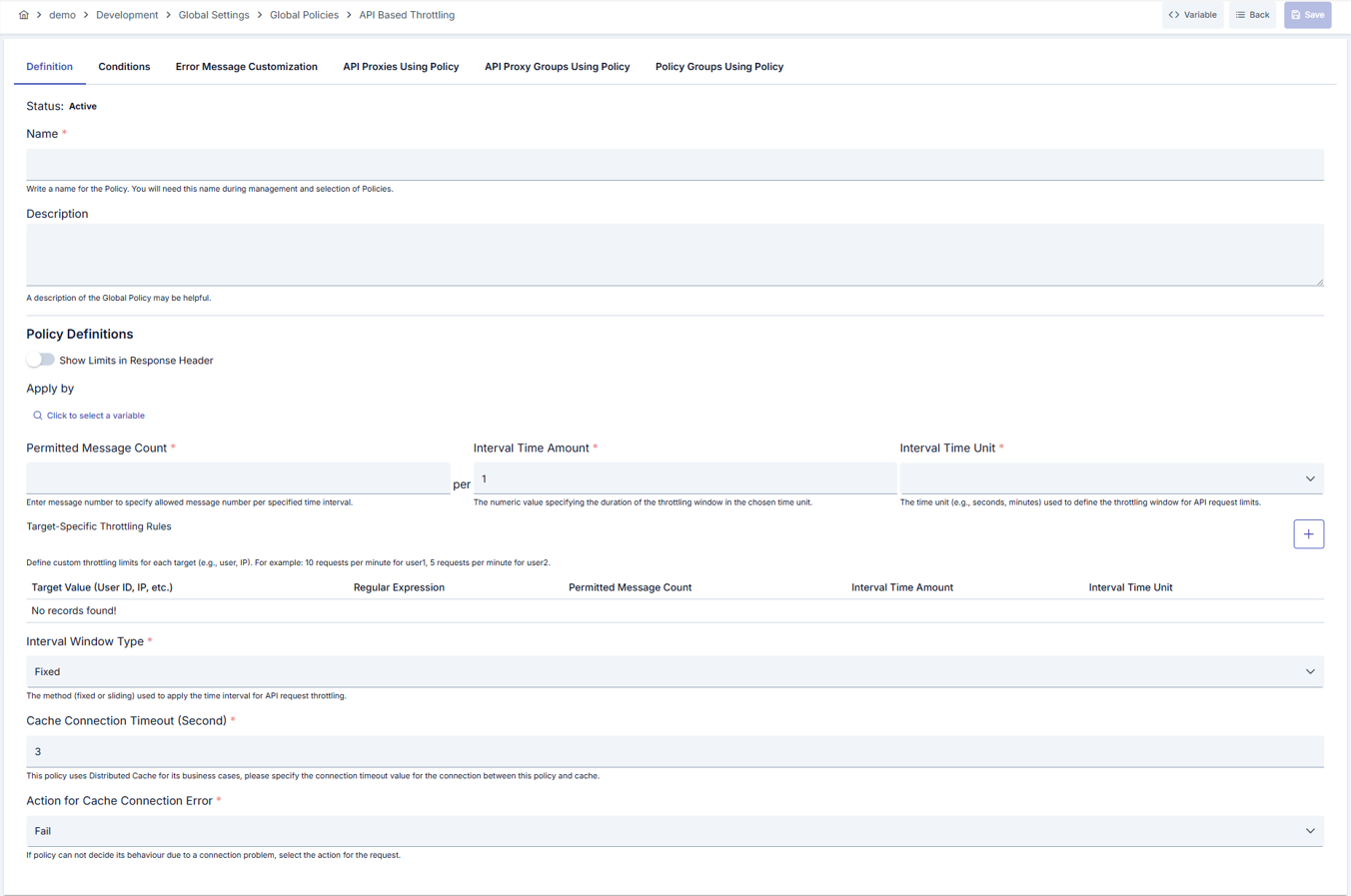
Configuration Steps
| Step | Description / Operation |
|---|---|
| Step 1: Going to Creation Page | - Go to Development → Global Settings → Global Policies → API Based Throttling section from the left menu. - Click the [+ Create] button at the top right. |
| Step 2: Entering Basic Information | Policy Status: Shows Active/Passive status. New policies are active by default. Name (Required): Example: Production_API_Throttling- Enter a unique name, does not start with space. - System automatically checks. Green check: available. Red X: existing name. Description: Example: "100 request limit per minute for production environment" - Max. 1000 characters. - Describe the purpose of the policy. |
| Step 3: Variable Usage | - In the action button area at the top of the page, you can use the [<> Variable] button to select dynamic values. - Using context/global variable expressions, you can manage policy parameters with variable-based values instead of fixed values. - This reduces manual update effort when values change and provides operational convenience. - For detailed information, review Dynamic Variables. |
| Step 4: Configuring Throttling Settings | Show Rate Limit Statistics in Response Header: Default value is closed. - Activate/deactivate with toggle switch. - When active, X-RateLimit-Limit, X-RateLimit-Remaining, X-RateLimit-Reset information is shown in response headers.Application Variable (Apply By): Default value is closed. - Click "Select Variable" button. - Determines which criterion throttling will be applied by. - If variable is not selected, all requests share the same limit. Message Count: Required, Minimum: 1. - Maximum number of requests allowed. - Example: 100 Period Length: Required, Minimum: 1. - Multiplier of time interval. - Example: 1 Time Unit: Required - Second, Minute - Example: Minute ⚠️ Note: Throttling policy is for short-term rate control. Use API Based Quota policy for hour or day-based long-term control. |
| Step 5: Defining Target-Based Rules (Optional) | Target-Based Throttling Rules: - Define special limits for different target values. Add new row by clicking [+] button. Table Columns: - Target Value: Required. Variable value (e.g., "premium", "192.168.1.*", "test_user") - Regex Expression: Whether target value is regex - Toggle (Boolean) - Message Count: Request limit for this target - Number (Min: 1) - Period Length: Time interval multiplier - Number (Min: 1) - Time Unit: Second/Minute/Hour/Day - Dropdown Usage Scenarios: - Higher limit for Premium users: premium → 1000 requests/minute- Specific IP ranges: 192.168.* (regex active) → 500 requests/minute- Test users: test_user → 10000 requests/minuteDeletion: Remove row with trash icon at end of row. |
| Step 6: Configuring Advanced Settings | Interval Window Type: Required - SLIDING (Sliding Window): Window is applied backwards from each request time, more precise control. Example: Request count in last 60 seconds. - FIXED (Fixed Window): Resets at certain time intervals, more performant. Example: Counter resets at beginning of each minute. Cache Connection Timeout: Required, Minimum: 1 second, default: 3 seconds - Connection timeout duration to cache server. - Error management policy comes into play in timeout situation. - Recommended: 1-3 seconds Action for Cache Connection Error: Required, default: Fail - Fail: The request is rejected with an error. - Continue: The request is not rejected and the flow continues. Counting Mode: Required, default: All requests - All requests: Every request, accepted or rejected, increases the usage counter. - Accepted only: Only requests that pass the limit increase the usage counter; rejected requests do not consume it. Limit Change Action: Required, default: Leave unchanged - Clamp to previous limit: When the Message Count value is changed, the usage counter is capped to the previous limit value (not the new one). - Reset: The usage counter is reset to zero, but only when the limit is raised — lowering the limit never resets it. - Leave unchanged: The usage counter is left untouched when the limit changes. Interval Window Calculation (FIXED): For intervals shorter than one minute (e.g., 10 seconds): - Formula: Window Start = Minute Start + (Elapsed Periods × Period Duration)- Example: A request at 14:37:25, in 10-second period → belongs to 14:37:20-14:37:29 window For intervals one minute or longer (e.g., 5 minutes): - Formula: Window Start = Hour Start + (Elapsed Periods × Period Duration)- Example: A request at 14:37, in 5-minute period → belongs to 14:35:00-14:39:59 window Performance Recommendation: FIXED window should be preferred in high-traffic APIs. While SLIDING window does cache reading for each request, FIXED only increments counter and is more performant. |
| Step 7: Defining Condition (Optional) | - Go to Condition tab. - Conditions determine when the policy will be active. Examples: - Environment-based: Header = X-Environment, Operator = Equals, Value = production- API Key-based: Header = X-API-Key, Starts With = PROD-- Endpoint-based: Path = /api/admin/*If no condition is defined, policy is always active |
| Step 8: Error Message Customization (Optional) | - Go to Error Message Customization tab. - Customize the message to be returned when access is denied. Default: { "statusCode": 429, "message": "Too Many Requests" }Custom: { "statusCode": 429, "errorCode": "THROTTLE_LIMIT_EXCEEDED", "message": "Your per-minute request limit has been exceeded. Please try again after 60 seconds." } |
| Step 9: Saving | - Click the [Save] button at the top right. Checklist: Unique name. Required fields filled. At least one message count and time interval defined Result: - Policy is added to the list. - Can be connected to APIs. - If global policy, automatically applied. |
For the description of Conditions and Error Message Customization panels, you can review the Conditions and Error Message Customization sections on the What is Policy? page.
For a complete guide on all layers, priority order and scenario examples of the error message configuration system, see the Error Message Configuration Guide page.
Deleting Policy
For the deletion steps of this policy and operations to be applied while in use, you can refer to the Removing Policy from Flow section on the Policy Management page.
Exporting/Importing Policy
For the export and import steps of this policy, you can refer to the Export/Import page.
Binding Policy to API
For the process of how this policy will be bound to APIs, you can refer to the Binding Policy to API section on the Policy Management page.
Advanced Features
In this section, users gain more flexible, dynamic, and enterprise-level control by using the advanced management capabilities of the API Based Throttling policy. Thanks to advanced features such as variable management, target-specific rule definitions, conditional activation, and customizable error messages, policies can be dynamically adapted and optimized according to different scenarios.
| Feature | Description and Steps |
|---|---|
| Target Matching with Regex | - Add a new row in Detail List table. - Enter regex pattern in Target Value field (e.g., premium_user_.*).- Activate Regex Expression toggle and define custom limit. - This way, multiple targets are matched with a single rule. |
| Multiple Policy Combination | - Assign multiple throttling policies to an API (e.g., burst protection + daily quota). - First policy: 10 requests/second (SLIDING) - burst protection. - Second policy: 10000 requests/day (FIXED) - daily quota. - All policies work in order and complement each other. |
| Dynamic Variable Usage | - Create custom header, JWT claim, or context variable. - Select this variable in Apply By field (e.g., {jwt.user_tier}).- A separate counter is maintained for each variable value, dynamic segmentation is provided. |
Tips and Best Practices
Things to Do and Best Practices
| Category | Description / Recommendations |
|---|---|
| Use Meaningful Names | Bad: policy1, rate-limit, throttle-testGood: Standard_User_Throttle, Premium_Service_Limit, Emergency_Burst_Control |
| Determining Limit Values | Bad: Very low limits (5 requests/minute) - blocks normal users Good: Limits according to real usage statistics (100 requests/minute) Best: Determine optimal limits with A/B testing, evaluate user feedback, and continuously optimize with metrics |
| Window Type Selection | Bad: Using FIXED for every scenario - lack of precise control Good: FIXED if performance critical, SLIDING if precise control needed Best: Adopt balanced approach using SLIDING for critical endpoints, FIXED for high-traffic endpoints |
| Apply By Variable | Bad: Not using variable - all users share same limit Good: IP-based throttling - separate counter for each IP Best: Personalized limits with user ID or API Key, fair resource distribution and abuse prevention |
| Detail List Usage | Bad: Single limit for all users - no flexibility Good: Premium/Free distinction - two levels Best: Multi-tier system (Free/Basic/Premium/Enterprise), dynamic groups with regex, custom limits for special customers |
| Rate Limit Headers | Bad: Not showing headers - users experience limit exceedance unexpectedly Good: Showing header only in external APIs Best: Header active in all throttling, documented how clients will use it, retry-after information provided |
Using Throttling and Quota Policies Together
Throttling and Quota policies complement each other and provide the most effective protection when used together:
Throttling (Short-Term Protection):
- Second/minute-based rate control
- Instantly prevents burst attacks
- Uses only cache, maximum performance
- Affected by system restarts
Quota (Long-Term Protection):
- Hour/day/month-based total usage control
- Billing and subscription management
- Cache + database, persistent data
- Reporting and analytics support
Example Combination:
Throttling on API: 100 requests/minute (burst protection)

Quota on API: 100,000 requests/month (subscription limit)
This way, you are protected against both instant attacks and long-term abuse.
Security Best Practices
| Security Area | Description / Warnings |
|---|---|
| DDoS Protection | Define low limits on second basis for burst protection (e.g., 10 requests/second). Use Quota policy together with Throttling to prevent long-term attacks (e.g., Throttling: 10/sec + Quota: 10000/day). Apply stricter limits for suspicious IPs. Remember that if you only use Throttling, counters will reset when system is restarted. |
| API Key Leakage Protection | Limit damage of leaked keys with API Key-based throttling. Set up monitoring to detect abnormal usage patterns. Apply key rotation strategy. |
| Cache Security | Keep cache server in secure network. Keep the Fail option (the default) for cache errors. |
| Conditional Limiting | Apply stricter limits in production environment. Create separate policies for Test/Dev environments. Loose limits for internal IPs, strict limits for external IPs. |
| Monitoring and Alerting | Continuously monitor 429 error rates. Create alerts on limit exceedances. Set up metrics to detect abnormal traffic increases. |
Things to Avoid
| Category | Description / Warnings |
|---|---|
| Very High Cache Timeout | Why to avoid: Long wait when cache server doesn't respond, request latency increases, user experience worsens Alternative: Use 1-3 second timeout, track cache health with monitoring, set up failover mechanism |
| Using Continue Mode Everywhere | Why to avoid: Throttling is disabled in cache errors, security vulnerability occurs, abuse attacks can succeed Alternative: Use Fail in critical systems, provide cache high availability, prefer Continue only in read-only APIs |
| Target Rules Without Variable | Why to avoid: Detail List doesn't work without Apply By, target matching cannot be done, rules become ineffective Alternative: Definitely define Apply By variable, match variable values with target values |
| Using Very Complex Regex | Why to avoid: Regex is processed for each request, performance decreases, CPU usage increases, latency is added Alternative: Use simple string matching, don't activate regex unless necessary, prefer prefix/suffix check |
Performance Tips
| Criterion | Recommendation / Impact |
|---|---|
| FIXED Window Preference | Recommendation: Use FIXED window in high-traffic APIs, prefer minute-based FIXED instead of second-based SLIDING Impact: Cache reading decreases, transaction cost decreases, throughput increases by 20-40% |
| Cache Key Expiration | Recommendation: Use appropriate TTL values in cache keys for throttling, add period duration + 10 second buffer (e.g., 70 second TTL for 60 second period) Impact: Unnecessary data accumulation is prevented, cache memory usage is optimized, manual deletion of old window data is not needed |
| Detail List Optimization | Recommendation: Limit Detail List to 10-15 rules, keep frequently used rules at top, do not use unnecessary regex Impact: Rule matching speeds up, CPU usage decreases, average latency stays below 5ms |
| Cache Key Strategy | Recommendation: Use short and unique key formats, do not add unnecessary information to key, optimize key expiration durations Impact: Cache memory usage decreases, key lookup speeds up, performance increases |
| Monitoring and Tuning | Recommendation: Collect throttling metrics (hit rate, rejection rate), analyze latency distribution, monitor cache performance Impact: Bottlenecks are detected early, optimal configuration is determined, proactive optimization is done |
Frequently Asked Questions (FAQ)
| Category | Question | Answer |
|---|---|---|
| General | Can multiple throttling policies be added to an API? | Yes, multiple throttling policies can be added. For example, one policy can provide second-based burst protection (10 requests/second), while another can control daily total quota (10000 requests/day). All policies work in order and if any one detects limit exceedance, request is rejected. |
| General | Can Apply By be used without Detail List? | Yes, Apply By variable can be used alone. In this case, the default limit defined in policy is applied for each variable value. Detail List is used when you want to define different limits for specific variable values. |
| Technical | Why is cache server necessary? | A centralized cache server is used to keep throttling counters. Necessary for consistent counting in distributed systems (multiple Gateway instances). Without cache, each Gateway keeps its own counter and limits cannot be applied correctly. |
| Technical | Why are throttling data not written to database? | Throttling provides short-term (seconds/minutes) rate control and requires high performance. Database write operation adds 5-20ms delay for each request, which breaks the purpose of throttling. Cache-only approach works with less than 1ms delay. Data is temporary and resets when system is restarted, which is acceptable for short-term limits. If long-term usage tracking is needed, API Based Quota policy should be used. |
| Technical | What happens to throttling counters when system is restarted? | Since throttling uses only cache, all counters are reset when system is restarted or cache is cleared. This is by design and does not create problems for short-term rate control. Since window durations are already short (seconds/minutes), it does not affect user experience. If persistent counter needs to be kept, Quota policy should be used. |
| Usage | Can I do hour or day-based throttling? | No. Only Second and Minute can be selected as the time unit in the Throttling policy. If you need hour or day-based control, use API Based Quota policy. Quota policy manages long-term limits more reliably with database support and provides persistence needed for billing. |
| Technical | What is the difference between SLIDING and FIXED window? | SLIDING: Opens window backwards from each request moment (last 60 seconds). More precise control but more cache reading. FIXED: Resets at certain time intervals (beginning of each minute). More performant but less sensitive to bursts. |
| Usage | What happens if I don't show rate limit headers? | Policy works normally but clients cannot see their remaining quotas. In this case, users only understand limit exceedance when they get 429 error. If headers are active, clients can proactively adjust their request rates and better user experience is provided. |
| Usage | What happens when user exceeds limit? | HTTP 429 (Too Many Requests) error is returned and request is not processed. The response always carries a Retry-After header (in seconds) — the time remaining until the window closes, at least 1 and capped at a platform-wide ceiling (1 day by default, see note below) — regardless of whether rate limit headers are enabled.If rate limit headers are active, X-RateLimit-Reset information in response also indicates when they can try again. If custom error message is defined, that message is shown. |
| Usage | Can I control what happens to current usage when I change the limit, or whether rejected requests count toward it? | Yes, with two independent settings in Advanced Settings. Limit Change Action controls the usage counter when the Message Count value is edited: by default (Leave unchanged) the counter is kept as it is; it can instead be set to Clamp to previous limit, or to Reset only when the limit is raised. Counting Mode controls whether requests rejected by the policy still consume the limit: by default (All requests) they do, matching historical behavior; setting it to Accepted only means a rejected request never consumes the limit. Example: a client has a limit of 5 and has already made 5 accepted and 5 rejected requests, so usage is 10 under All requests. If the limit is then raised to 8, Clamp to previous limit brings usage down to 5 (the previous limit), so exactly 3 more requests are allowed before the new limit is reached. |
The Retry-After value is capped platform-wide so a client is never told to wait an unreasonably long time — 1 day by default, regardless of how long the throttling window actually is. An operator can change the ceiling with the apinizer.limit.retryAfterClampSeconds JVM system property on the Gateway (Worker); an invalid or non-positive value falls back to the 1-day default. This same ceiling also applies to the Retry-After header of the API Based Quota policy.