Blocked IP List
This document explains the detailed usage of a specific policy. If you are using Apinizer policies for the first time or want to learn the general working principles of policies, we recommend reading the What is Policy? page first.
Overview
What is its Purpose?
- Blocks passage of blacklisted clients through API Proxy by evaluating all incoming clients by source IP address.
- Facilitates centralized blacklist management and provides reusability with corporately defined IP Group records.
- Enables client blocking by country or city using geographical location data.
- Makes it possible to read the client IP address to check from a variable instead of the connection address.
Working Principle
- Request Arrival: For each HTTP/HTTPS request arriving at the API Gateway, the source IP address of the request is identified.
- Policy Check: If the Blocked IP List policy is active, the system checks in the following order:
- Is a Condition defined? If so, is the condition met?
- Is the policy active (active=true)?
- Is the client IP taken from the connection or from a variable?
- Blacklist Evaluation: The client IP is compared with the defined IP list, the connected IP Groups and the selected geographical location entries.
- Decision Making:
- Match Found: Request is rejected, customized error message and determined HTTP code are returned, operation is logged.
- No Match: Request flow is routed to next Policy or target service.
- Error Handling: Customizable HTTP status code and error message are returned for requests that do not comply with the policy rule.
Features and Capabilities
Basic Features
- Blacklist IP Management: Provides ability to add, edit and delete IPv4 addresses,
*wildcards (e.g.,10.3.10.*) and-ranges (e.g.,10.3.10.4-18). The screen does not check the entry format. - IP Group Integration: Includes many IP records in blacklist at once by selecting existing IP Groups and provides group-based updates.
- Geographical Location Filters: Manages large-scale blocking scenarios with country and optional city selection, can create records covering all cities.
- Active/Passive Status Control: Easily change the active or passive status of the policy (active/passive toggle). In passive state, the policy is not applied but its configuration is preserved.
- Condition-Based Application: Determine when the policy will be applied by creating complex conditions with Query Builder (e.g., only for specific endpoints or header values).
Advanced Features
- Variable-Based Client IP: Checks the client IP address that a variable holds instead of the connection address.
- Geolocation-Data Blend: Defines multi-layer blocking strategies in combination of selected countries and cities with IP list.
- Policy Usage Visualization: Facilitates impact analysis by tracking API Proxy and Policy Group information where it is used.
- Export/Import Feature: Export policy configuration as a ZIP file. Import to different environments (Development, Test, Production). Version control and backup capability.
- Policy Group and Proxy Group Support: Manage multiple policies within Policy Group. Bulk policy assignment to Proxy Groups. Centralized update and deploy operations.
- Deploy and Versioning: Deploy policy changes to live environment. See which API Proxies use it (Policy Usage). Proxy Group and Policy Group usage reports.
Usage Scenarios
| Scenario | Status | Solution (Policy Application) | Expected Behavior / Result |
|---|---|---|---|
| Off-Office Access Block | Access to internal systems desired only from corporate network | Add external IP blocks to IP list. | Requests from outside corporate IPs return 403 Forbidden. |
| Suspicious Traffic Source | Heavy attacks detected from certain countries | All cities blocked by selecting relevant country in Geolocation. | All requests from selected country are blocked, logged. |
| Temporary Blacklist | IPs performing attacks will be blocked for short period | Add time-limited record to IP list, note in Description. | Relevant IP access is cut; list can be updated after period ends. |
| Partner API Protection | Unauthorized partner attempts exist | Include set excluding only authorized partner IPs from IP Group. | Partner-outside IP attempts are rejected, partner IPs are not affected. |
| Client IP from Header | A load balancer in front of the gateway forwards the real client IP in a header | Turn off Use Client IP and select the variable that holds this IP. | The address in the variable is checked against the list. |
| Regional Maintenance Process | Temporary access cut from certain cities | Added to list by selecting country+city with Geolocation. | All requests from selected cities are blocked during maintenance period. |
| Multiple API Security (Optional) | Multiple APIs use same blacklist | Create Policy Group and add this policy. | All APIs benefit from current blacklist simultaneously. |
Configuring Policy Parameters
In this section, you can create a new Blocked IP List policy or configure existing policy parameters to define access rules.
Creating a New Blocked IP List Policy
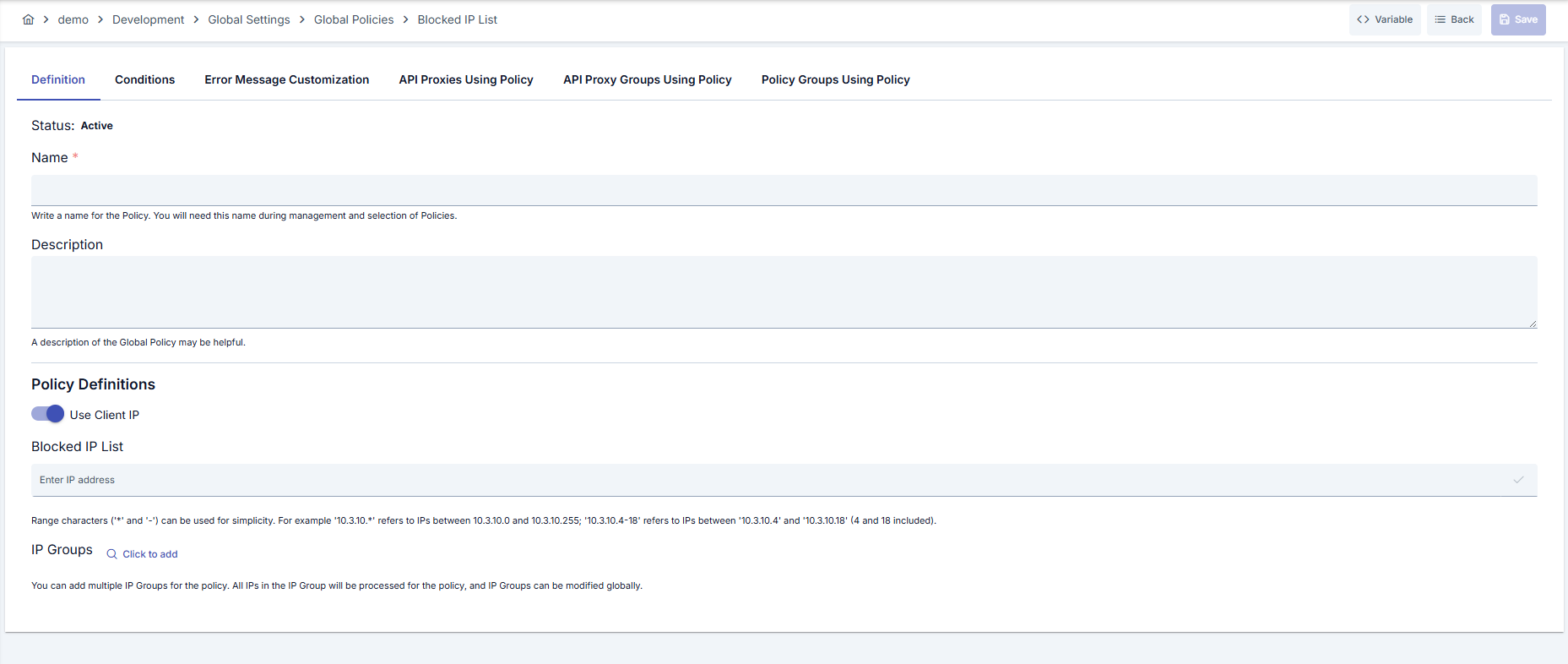
Configuration Steps
| Step | Description / Operation |
|---|---|
| Step 1: Going to Creation Page | - Go to Development → Global Settings → Global Policies → Blocked IP List from the left menu. - Click the [+ Create] button at the top right. |
| Step 2: Entering Basic Information | Policy Status (Policy Status): Shows Active/Passive status. New policies are active by default. Name (Name) Required: Example: Production_IPBlackList- Enter a unique name, does not start with space. - System automatically checks: Green checkmark: available Red X: existing name. Description (Description): Example: "Blocks IPs from global attack sources." - Max. 1000 characters. - Explain the purpose of the policy. |
| Step 3: Variable Usage | - In the action button area at the top of the page, you can use the [<> Variable] button to select dynamic values. - Using context/global variable expressions, you can manage policy parameters with variable-based values instead of fixed values. - This reduces manual update effort when values change and provides operational convenience. - For detailed information, review Dynamic Variables. |
| Step 4: Defining Blacklist Sources | - When Use Client IP is on, the policy checks the client IP address that the gateway determines. - Add entries to the Blocked IP List field in one of the formats in the table below. The screen does not check the format; an entry in any other format never matches. - Select centralized IP Groups with IP Groups button and add to list. |
| Step 5: Client IP from Variable (If applicable) | - Turn off Use Client IP. - Select a variable in the Variable for Client IP field; the policy checks the address that the variable holds against the list. - The variable does not supply the blocked list. |
| Step 6: Adding Geographical Restrictions (If applicable) | - If Geolocation is active, select country/city and click Add button. - If country is selected and city is left empty, all cities are blocked. - You can delete added records individually or in bulk from table. |
| Step 7: Defining Condition (Optional) | Examples: - Environment-based: Header = X-Environment, Operator = Equals, Value = production- API Key-based: Header = X-API-Key, Starts With = PROD-- Endpoint-based: Path = /api/admin/*If no condition is defined, the policy is always active |
| Step 8: Error Message Customization (Optional) | - Go to the Error Message Customization tab. - Customize the message to be returned when access is denied. Default: { "statusCode": 403, "message": "[Default error message]" }Custom: { "statusCode": 403, "errorCode": "[CUSTOM_ERROR_CODE]", "message": "[Custom message]" } |
| Step 9: Saving | - Click the [Save] button at the top right. Checklist: Unique name Required fields filled At least one IP or group exists Result: - Policy is added to the list. - Can be connected to APIs. - If global policy, automatically applied. |
Supported entry formats:
| Format | Example | Matches |
|---|---|---|
| Full IPv4 address | 192.168.1.10 | Only this address |
Wildcard * in an octet | 10.3.10.* | 10.3.10.0 to 10.3.10.255 |
Range a-b in an octet | 10.3.10.4-18 | 10.3.10.4 to 10.3.10.18 (both included) |
CIDR (such as 10.0.0.0/24) and IPv6 are not supported. The screen accepts a CIDR entry, but the entry blocks no address. Use an a-b range or * instead.
If you delete or deactivate an IP Group that the policy uses, the gateway skips the group and its addresses are no longer blocked. Check which policies use a group before you delete or deactivate it. See IP Groups.
For the description of Conditions and Error Message Customization panels, you can review the Conditions and Error Message Customization sections on the What is Policy? page.
For a complete guide on all layers, priority order and scenario examples of the error message configuration system, see the Error Message Configuration Guide page.
Deleting the Policy
For the deletion steps of this policy and the operations to be applied while in use, you can refer to the Removing Policy from Flow section on the Policy Management page.
Exporting/Importing the Policy
For the export and import steps of this policy, you can refer to the Export/Import page.
Connecting the Policy to API
For the process of how this policy will be connected to APIs, you can refer to the Connecting Policy to API section on the Policy Management page.
Advanced Features
| Feature | Description and Usage Steps |
|---|---|
| Client IP from Variable | - Turn off Use Client IP and select the variable that holds the client IP. - Make sure the variable always returns a single IPv4 address. - Verify that policy is deployed in relevant API Proxies after change. |
| Multi-Layer Geolocation Blocking | - Ensure Geolocation settings are active. - Select country and add cities with multi-select if needed. - Regularly review list and clean unnecessary records. |
| Hybrid IP Source Strategy | - Configure both IP list and IP Groups. - Check that policy automatically updates when Group changes. - Define conditions that will trigger only on certain endpoints with Query Builder. |
Best Practices
Things to Do and Best Practices
| Category | Description / Recommendations |
|---|---|
| IP List Maintenance | Bad: Repeating same IP in different formats. Good: Adding clusters collectively with * wildcards or - ranges.Best: Regularly getting reports and removing unnecessary records. |
| IP Group Management | Bad: Adding common IPs individually to each policy. Good: Using shared IP Groups. Best: Mapping IP Group contents with CMDB or IAM processes. |
| Geolocation Usage | Bad: Blocking entire country and leaving critical users outside. Good: Verifying geographical block with periodic reports. Best: Making targeted blocking with city-based records. |
| Variable Management | Bad: Variable returns a value that is not a single IPv4 address. Good: Testing variable at regular intervals. Best: Connecting Variable updates to CI/CD pipeline. |
| Condition Design | Bad: Allowing policy to trigger on every request. Good: Excluding management endpoints. Best: Defining conditions according to environment and user type with Query Builder. |
Security Best Practices
| Security Area | Description / Warnings |
|---|---|
| IP Record Accuracy | The screen does not check entry formats; check each entry by hand. A faulty or unsupported entry (such as CIDR) blocks nothing and lets the attacker pass. |
| Authorization Control | Give policy editing permissions only to trusted roles; changes must be logged to centralized logs. |
| Variable Security | Audit the variable that holds the client IP against unauthorized changes; a request-controlled value (such as a header) can be forged. |
| Geolocation Matches | Wrong blocks may occur if Geolocation provider is not current; verify data currency. |
| Log Monitoring | Automatically add repeating IPs to blacklist by routing error message responses to SIEM. |
Things to Avoid
| Category | Description / Warnings |
|---|---|
| Overly Comprehensive Blacklist | Why avoid: Legitimate users are accidentally blocked. Alternative: Use conditional application and geolocation filters. |
| Forgetting Passive Policy | Why avoid: You may leave policy passive and create security vulnerability. Alternative: Verify active status after deploy. |
| Variable Format Errors | Why avoid: If the variable does not return a valid IPv4 address, the request cannot match the list. Alternative: Perform format validation with automation. |
| Unconditional Global Change | Why avoid: May create service interruption for many APIs. Alternative: Validate in test environment first and deploy gradually. |
Performance Tips
| Criterion | Recommendation / Impact |
|---|---|
| IP List Size | Recommendation: Reduce record count with * wildcards and - ranges.Impact: Decision time shortens, memory usage decreases. |
| Geolocation Queries | Recommendation: Clean unnecessary records in country/city additions. Impact: Comparison count decreases, processing time shortens. |
| Policy Group Usage | Recommendation: Manage through Policy Group when using same policy in multiple APIs. Impact: Deploy operations are done in bulk, operational load decreases. |
| Log Level | Recommendation: Focus error logs only on rejected requests. Impact: Log volume is controlled, analysis processes speed up. |
Frequently Asked Questions
| Category | Question | Answer |
|---|---|---|
| General | What does IP Blacklist Policy block? | Provides security by blocking API Proxy access of clients whose source IP is in the list. |
| General | Is Geolocation data mandatory? | No, country/city records should only be added if additional restriction is needed. |
| Technical | Is CIDR notation supported? | No. An entry such as 10.0.0.0/24 does not match any address, so it blocks nothing. Use 10.0.0.* or 10.0.0.4-18 instead. IPv6 addresses are not supported either. |
| Technical | What should the variable return? | A single IPv4 address, which is checked instead of the connection address. |
| Technical | What happens if I delete or deactivate an IP Group? | The gateway skips the deleted or deactivated group, so its addresses are no longer blocked. Check which policies use a group before you delete or deactivate it. |
| Technical | What happens if same IP is both in list and group? | Policy evaluates IP once; duplicate records do not change behavior. |
| Usage | How do I apply policy only to certain endpoints? | Select relevant endpoint patterns by defining Path condition in Query Builder. |
| Usage | What does Deploy button on detail page do? | Allows you to transfer policy changes to selected API Proxies to live environment. |