Client Ban
This document explains the detailed usage of a specific policy. If you are using Apinizer policies for the first time or want to learn the general working principles of policies, we recommend reading the What is Policy? page first.
Overview
What is its Purpose?
- Temporarily removes clients from resource consumption by detecting increasing abuse or error rates.
- Executes targeted ban policies by associating each request with identity variables (header, query, JWT, etc.).
- Maintains systemic stability in
API Proxyinfrastructure with threshold window and ban duration parameters. - Enforces business rules by taking action on specific error patterns through Assertion Condition configuration.
Working Principle
- Request Arrival: For each HTTP/HTTPS request arriving at the API Gateway, the source IP address of the request is identified.
- Policy Check: If the Client Ban policy is active, the system checks in the following order:
- Is a Condition defined? If so, is the condition met?
- Is the policy active (active=true)?
- Is a Variable being used or is Apinizer default?
- Identity and Threshold Evaluation: Values from selected
clientIdentityVariableListin the request create a key; ifassertionConditionis met, requests/responses within the window are counted according tothresholdCalculationType. - Decision Making:
- Match Found: Blocking is initiated for the key exceeding threshold value for
banTimeInSecondsduration, Retry-After header is returned ifenableRetryAfterHeaderis active. - No Match: Request continues in normal flow, counters are not updated.
- Match Found: Blocking is initiated for the key exceeding threshold value for
- Error Handling: Customizable HTTP status code and error message are returned for requests that do not comply with the policy rule.
Features and Capabilities
Basic Features
- Multiple Identity Detection: Client identity is calculated through composite key by selecting multiple variables, supporting segmentation.
- Adaptable Threshold Management: Fixed or percentage-based (EnumErrorThresholdType) thresholds are defined with
thresholdWindowInSecondsandthresholdCountPerWindowparameters. - Dynamic Ban Durations: Ban duration is determined in seconds with
banTimeInSecondsfield;ignoreWhenKeyIsEmpty(Ignore this policy when client identity evaluation result is empty) option lets requests with an empty client identity pass the policy when it is on; when it is off (the default), such requests are rejected with 401 (ERR-197). - Active/Passive Status Control: Easily change the active or passive status of the policy (active/passive toggle). In passive mode, the policy is not applied but its configuration is preserved.
- Condition-Based Application: Determine when the policy will be applied by creating complex conditions with Query Builder (e.g., only for specific endpoints or header values).
Advanced Features
- Fine Distinction with Assertion Condition: You can trigger bans based on error/response content through Assertion Query Builder. Counters are not updated when conditions are not met, preventing false positives; update conditions with versioning as rules change.
- Retry-After Header Management: When
enableRetryAfterHeaderkey is active, Retry-After is automatically added to error responses. Value matchesbanTimeInSecondsand communicates wait time to clients; standardizes retry strategy in queued systems. - Multiple Threshold Type Scenario: COUNT mode counts consecutive request count while PERCENT mode focuses on error rates. Two different key sets changing with window duration can be managed within the same policy, performance is optimized by switching modes according to your traffic profile.
- Export/Import Feature: Export policy configuration as a ZIP file and import to different environments (Development, Test, Production) for version control and backup.
- Policy Group and Proxy Group Support: Manage multiple policies within Policy Group and assign bulk policies to Proxy Groups to accelerate centralized update and deploy operations.
- Deploy and Versioning: Deploy policy changes to live environment and monitor which API Proxies use it through Policy Usage, evaluate Proxy Group and Policy Group usage reports.
Usage Scenarios
| Scenario | Status | Solution (Policy Application) | Expected Behavior / Result |
|---|---|---|---|
| Mobile Client Excessive Requests | 120 calls coming from the same device in 1 minute. | thresholdWindowInSeconds=60, thresholdCountPerWindow=100, banTimeInSeconds=300. | Device making over 100 requests in 60 seconds receives 403 for 5 minutes. |
| Error-Focused Ban | An endpoint returns 500 and retries repeatedly. | thresholdCalculationType=PERCENT, assertionCondition: statusCode=500, window=120 sec, threshold=50%. | When error rate exceeds 50%, client is blocked for 2 minutes and resources are protected. |
| API Key Sharing | Same API Key is used from multiple IPs. | clientIdentityVariableList: X-API-Key + X-Forwarded-For, window=30 sec, threshold=20. | Key with detected sharing is temporarily suspended. |
| Retry-After Signal | Wait time is not communicated to consumers. | enableRetryAfterHeader=true, banTimeInSeconds=120. | Retry-After=120 is sent in ban responses, client applies backoff. |
| Pass on Empty Identity | Identity header is missing in some requests. | ignoreWhenKeyIsEmpty=true, assertionCondition empty. | Requests without identity are not included in ban calculation, false positives are prevented. |
| Environment-Based Application | You want strict limits only in Production environment. | Condition: Header X-Environment equals production. | Policy restricts only Production environment calls, remains disabled in other environments. |
Configuring Policy Parameters
In this step, users can create a new policy or configure existing policy parameters to define access rules.
Creating a New Client Ban Policy
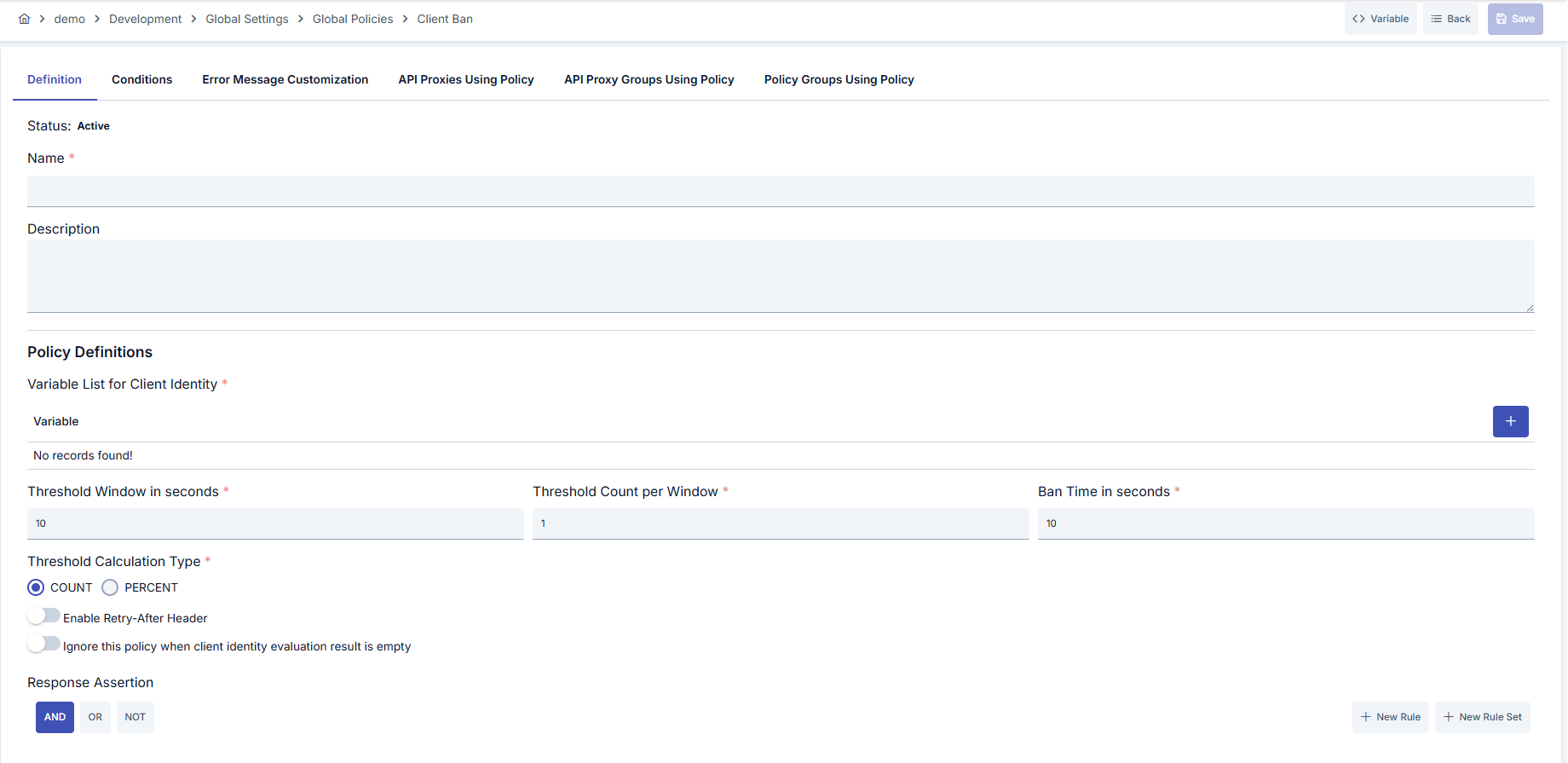
Configuration Steps
| Step | Description / Operation |
|---|---|
| Step 1: Go to Creation Page | - Go to Development → Global Settings → Global Policies → Client Ban from the left menu. - Click the [+ Create] button at the top right. |
| Step 2: Enter Basic Information | Policy Status: Shows Active/Passive status. New policies are active by default. Name (Required): Example: Production_ClientBan- Enter a unique name, does not start with space. - System automatically checks: Green checkmark: available Red X: existing name. Description: Example: "Temporarily bans clients when threshold is exceeded in Prod environment." - Max. 1000 characters. - Explain the purpose of the policy. |
| Step 3: Variable Usage | - In the action button area at the top of the page, you can use the [<> Variable] button to select dynamic values. - Using context/global variable expressions, you can manage policy parameters with variable-based values instead of fixed values. - This reduces manual update effort when values change and provides operational convenience. - For detailed information, review Dynamic Variables. |
| Step 4: Client Identity Parameters | - Select variables defining identity in Client Identity Variables table (header, query, JWT claim, etc.). - Add variables from project with Variable dialog; remove if needed. - Policy cannot be saved if no selection is made. |
| Step 5: Threshold and Ban Timing | - Enter thresholdWindowInSeconds and thresholdCountPerWindow values in seconds and count basis.- Select COUNT or PERCENT mode for thresholdCalculationType.- Determine ban duration with banTimeInSeconds.- Open enableRetryAfterHeader/ignoreWhenKeyIsEmpty toggles as needed. |
| Step 6: Assertion Condition Definition | - Define events to be included in ban calculation in Assertion Query Builder (e.g., statusCode, header, body). - If definition is left empty, all requests are included in window. - Records meeting the condition are kept in counter. |
| Step 7: Define Condition (Optional) | - Go to Condition tab. - Conditions determine when the policy will be active. Examples: - Environment-based: Header = X-Environment, Operator = Equals, Value = production- API Key-based: Header = X-API-Key, Starts With = PROD-- Endpoint-based: Path = /api/admin/*If no condition is defined, policy is always active |
| Step 8: Customize Error Message (Optional) | - Go to Error Message Customization tab. - Customize the message to be returned when access is denied. Default: { "statusCode": 403, "message": "[Default error message]" }Custom: { "statusCode": 403, "errorCode": "[CUSTOM_ERROR_CODE]", "message": "[Custom message]" } |
| Step 9: Save | - Click the [Save] button at the top right. Checklist: - Unique name - Required fields filled - At least one client identity variable exists Result: - Policy is added to the list. - Can be connected to APIs. - If global policy, automatically applied. |
For descriptions of Conditions and Error Message Customization panels, you can review the Conditions and Error Message Customization sections on the What is Policy? page.
For a complete guide on all layers, priority order and scenario examples of the error message configuration system, see the Error Message Configuration Guide page.
Deleting the Policy
For deletion steps of this policy and operations to be applied when in use, you can refer to the Remove Policy from Flow section on the Policy Management page.
Exporting/Importing the Policy
For export (Export) and import (Import) steps of this policy, you can refer to the Export/Import page.
Connecting the Policy to API
For the process of how this policy will be connected to APIs, you can refer to the Connect Policy to API section on the Policy Management page.
Advanced Features
| Feature | Description and Usage Steps |
|---|---|
| Conditional Ban Scenario | - Check error code in API response body with Query Builder. - Update counter through assertionCondition for specific error messages. - Adjust ban duration according to business requirements and save. |
| Multi-Layer Identity Key | - Select user ID, device ID, and IP variables with Variable dialog. - Determine key combination by reviewing order of variables added to list. - Create targeted ban strategy by removing unnecessary variables. |
| Rate-Based Limit Configuration | - Select thresholdCalculationType=PERCENT.- Determine window duration and error percentage (e.g., 120 sec, 40%). - Define Assertion condition according to 5xx/429 status codes and save. |
Best Practices
Things to Do and Best Practices
| Category | Description / Recommendations |
|---|---|
| Identity Strategy | Bad: Using IP address alone. Good: Evaluating IP + API Key combination. Best: Creating unique key with multiple variables like Device ID, User ID, and IP. |
| Threshold Design | Bad: Determining random threshold values. Good: Defining threshold according to average traffic values. Best: Periodically reviewing windows and thresholds using traffic analytics. |
| Retry-After Message | Bad: Not informing client of wait time. Good: Showing fixed error message. Best: Guiding client behavior with Retry-After header and detailed error description. |
| Assertion Condition Usage | Bad: Leaving Assertion empty and counting all requests. Good: Targeting only specific status codes. Best: Counting correct signals with both status and header/body checks. |
| Deploy Process | Bad: Making direct changes in Production environment. Good: Performing manual validation in test environment. Best: Implementing controlled transition with Export/Import and pipeline-based deploy. |
Security Best Practices
| Security Area | Description / Warnings |
|---|---|
| Identity Accuracy | Analyze spoofing risk when selecting unvalidated header values for clientIdentityVariableList. |
| API Key Protection | Set low thresholds and short ban durations for shared keys; enable warning logs. |
| Error Messages | Do not show messages revealing internal architecture to banned clients. Write general but action-suggesting text. |
| Condition Management | Do not skip Production environment condition, otherwise Development traffic may be accidentally banned. |
| Monitor and Alarm | Detect abnormal fluctuations by monitoring ban count; keep threshold settings current. |
Things to Avoid
| Category | Description / Warnings |
|---|---|
| Wrong Identity Variable | Why to avoid: You may apply ban to wrong person. Alternative: Select validated and stable variables. |
| Excessively Long Ban Duration | Why to avoid: Legitimate users are blocked for long periods. Alternative: Apply short duration for first bans, gradual increase on repeat. |
| Thresholds Being Too Low | Why to avoid: Blocks normal traffic and causes service interruption. Alternative: Use reasonable thresholds according to traffic measurements. |
| Retry-After Remaining Closed | Why to avoid: Client does not know how long to wait and retries in spam manner. Alternative: Activate enableRetryAfterHeader to communicate wait time. |
Performance Tips
| Criterion | Recommendation / Impact |
|---|---|
| Identity Key Complexity | Recommendation: Remove unnecessary variables, use minimum but sufficient combination. Impact: Hash calculations speed up, memory usage decreases. |
| Window Duration | Recommendation: Determine realistic traffic intervals instead of very short windows. Impact: Counter updates decrease, performance balances. |
| Threshold Calculation Type | Recommendation: Use COUNT mode in high traffic, PERCENT mode in fluctuating traffic. Impact: False ban probability decreases, resource consumption optimizes. |
| Assertion Condition Complexity | Recommendation: Avoid unnecessary nested conditions. Impact: Query Builder evaluation speeds up. |
| Logging Strategy | Recommendation: Record ban events with summary logs. Impact: Excessive log production is prevented, analytics becomes easier. |
Frequently Asked Questions (FAQ)
| Category | Question | Answer |
|---|---|---|
| General | Is this policy the same as Rate Limiting? | No; Rate Limiting limits requests, Client Ban Policy completely blocks client for a certain duration when threshold is exceeded. |
| General | Should I use global or local? | Use global if multiple APIs share the same rule, prefer local policy if specific to a single API. |
| Technical | How does thresholdCalculationType=PERCENT work? | Ban is triggered when a certain percentage of events evaluated within window meet the condition; counter is filtered with assertionCondition. |
| Technical | What happens to requests with an empty client identity? | An empty identity is never counted toward the ban. With ignoreWhenKeyIsEmpty off (the default), the request is rejected with 401 (ERR-197); with it on, the request passes the policy. |
| Usage | Can I customize Retry-After header? | Header value is automatically taken from banTimeInSeconds; you can use Error Message tab for custom message. |
| Usage | How do I release a client stuck in ban? | You can reduce ban duration, deactivate policy, or update parameters and redeploy. |