How AI Gateway Fits in Apinizer
This is the second part of the Apinizer AI Gateway series. In Part 1 we covered why an AI Gateway matters.
Here the question is more concrete: how is this layer built in Apinizer, and what does each piece do?
- What is an AI Gateway and why does it matter? (Part 1)
- AI Gateway in Apinizer: shared governance, separated runtime, components (this part)
- Hands-on scenario: answering with your own data via RAG
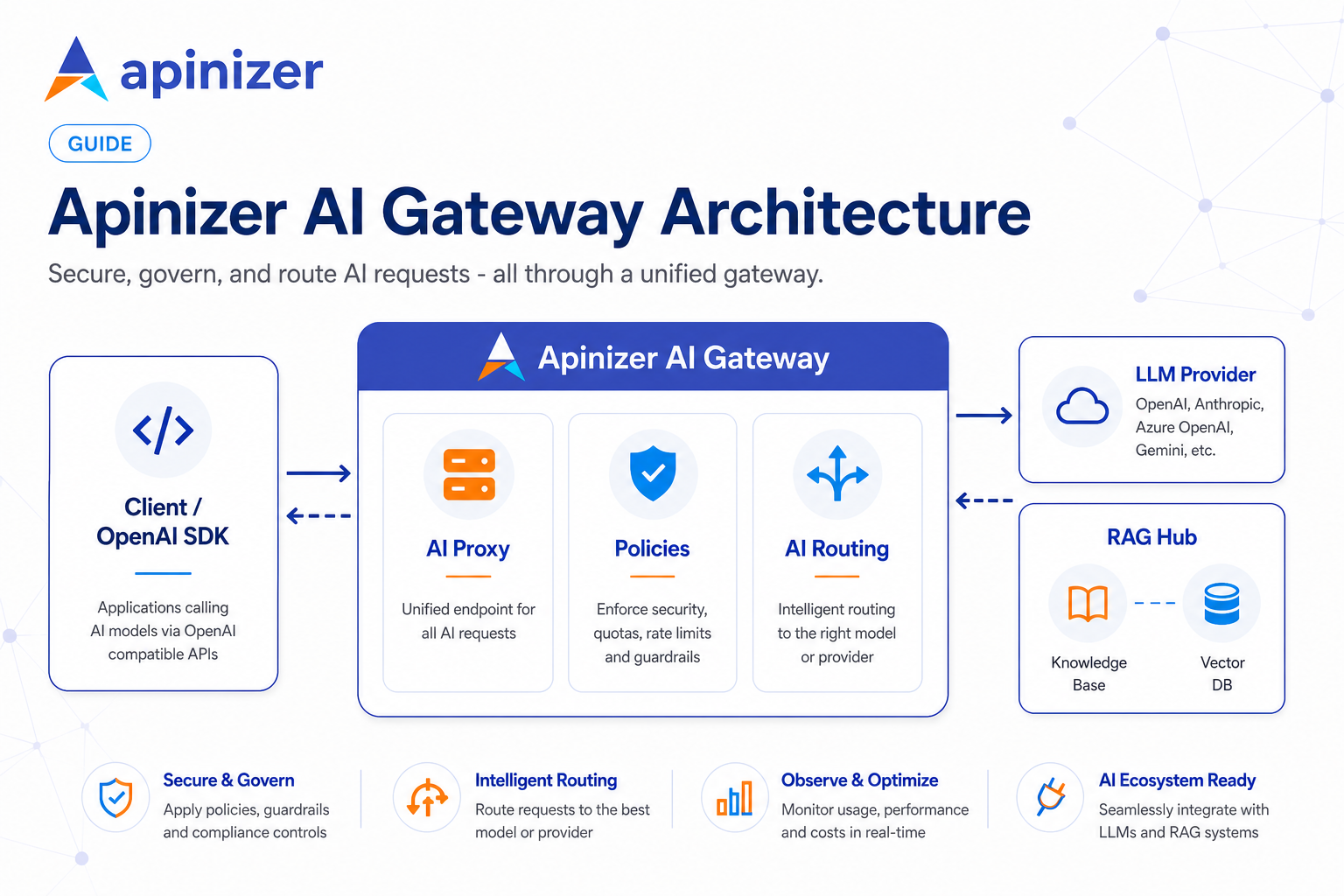
Do not mix up two different needs
Managing LLM traffic involves two distinct requirements:
- Runtime — How does a request reach the model? How is streaming handled? What happens when a provider fails?
- Governance — Who is calling? Where are keys stored? Who owns quotas? What gets logged? How is deployment done?
The first is LLM-specific; the second already exists in the enterprise (or should).
Apinizer's approach:
- LLM-specific work runs on its own path.
- Identity, authorization, policies, logs, and deployment stay inside the existing API management model.
You do not get a second user system, a second key vault, or a second admin world for AI. You can think about models separately; governance does not fragment.
Where it lives in the menu
Under AI Gateway in Apinizer Manager, the pieces are not scattered; the layout is readable:
| Menu | What you do there |
|---|---|
| LLM Gateway | The LLM front door for clients; policies, routing, deploy |
| Models | Connections to OpenAI, Anthropic, Azure, Ollama, and others |
| RAG | Knowledge bases, vector DBs, prompt templates (as tabs) |
| Guardrails | AI-specific protection definitions |
| Analytics | Tokens, cost, traces — who consumed what |
| AI Quota | Budget and quota rules |
Part 3 will walk screen by screen. The point here: LLM traffic is not a separate "mini product"; it is managed inside the same project, same deploy, same authorization model.
Core components in Apinizer
LLM Gateway
The door your client talks to. With the OpenAI SDK, base_url points here.
It shares the same backbone as a classic API Proxy: project, deploy, policy list, logs. The difference is what sits behind it — not a REST service but LLM routing.
In practice it provides:
- Clients always speak OpenAI format; even if the provider is Anthropic, Bedrock, or Ollama, the response is normalized to the same shape.
- Streaming (SSE) is supported; long answers arrive chunk by chunk.
- Classic policies such as auth and rate limits still apply here.
- AI-specific policies (RAG, cache, guardrails, token quotas) attach to the same proxy.
In short, LLM Gateway = "the API Proxy for LLM traffic." On the application side, you often change only base_url and the Apinizer credential.
LLM Provider
The connection record to the model. You define OpenAI, Anthropic, Azure OpenAI, Bedrock, Vertex, Ollama, vLLM, or a custom OpenAI-compatible endpoint.
What lives here:
- Provider type and endpoint
- The real API key (encrypted; never written to logs)
- Deployment type: cloud or on-premises — used for cost and capacity planning
- Allowed models
The most common confusion: the Apinizer credential you give the client vs the real model key on the provider. They are not the same thing. The client hits Apinizer; Apinizer calls the selected provider with its own key.
When testing a provider record, note that the test runs from the selected environment's Worker, not from the Management Console. "OpenAI works from my laptop" is not the same as "it works on the production path."
AI Routing
Inside the LLM Gateway, this is the "this model name → this provider" mapping.
Example: a gpt-4o request can go to an OpenAI provider, deepseek-chat to another provider, and phi3:mini to on-premises Ollama. Client code stays the same; routing changes.
Failover is configured here too: if the primary provider fails, the next one takes over. The client keeps speaking the same OpenAI format.
RAG
In the menu, Vector DB and Knowledge Base are not separate top-level items; they are grouped under RAG with tabs:
- Knowledge Bases — document sets you upload and index (PDF/TXT)
- Vector Databases — where vectors are stored (pgvector, Qdrant, Redis…)
- Prompt Templates — reusable prompt patterns
Conceptually, three pieces connect:
- Vector DB = storage
- Knowledge Base = "which document, in which store, with which embedding"
- RAG Injection policy = "when a question arrives, pull context from the KB and attach it to the request"
Grouping these under RAG in the UI also matches how you set things up: vector connection first, then knowledge base, then attach the policy to the proxy.
One reminder on embeddings: a chat model is not an embedding model. RAG indexing and search need an embedding provider; the chat provider that generates answers is separate.
AI policies
LLM-specific rules attached to the LLM Gateway. The product-side match for the Part 1 flow looks like this:
| Policy | What it does |
|---|---|
| RAG Injection | Adds context from the KB before the request reaches the model |
| Semantic Cache | Answers similar questions without calling the model again |
| Token Rate Limit | Token or budget limits — not "how many requests" |
| Prompt Guard / PII / DLP… | Content and security checks |
Order matters: RAG runs first; guardrails and cache must evaluate the enriched request. Reversing the order risks wrong cache hits or skipped scans.
Guardrails and Analytics (menu side)
Policies run on the proxy; the Guardrails menu is where those rules are defined. Prompt injection, PII masking, off-topic use, and similar controls are managed there.
On Analytics, you answer "who, which model, how many tokens, how much cost." TPS alone is not enough for LLM traffic; you need token- and model-level visibility. With AI Trace you can inspect which stages a request passed through — did RAG run, did it return from cache, did failover happen?
AI Quota keeps budget and quota rules centralized: "this team gets this many tokens per month" or "daily budget on this proxy."
How a request roughly flows in Apinizer
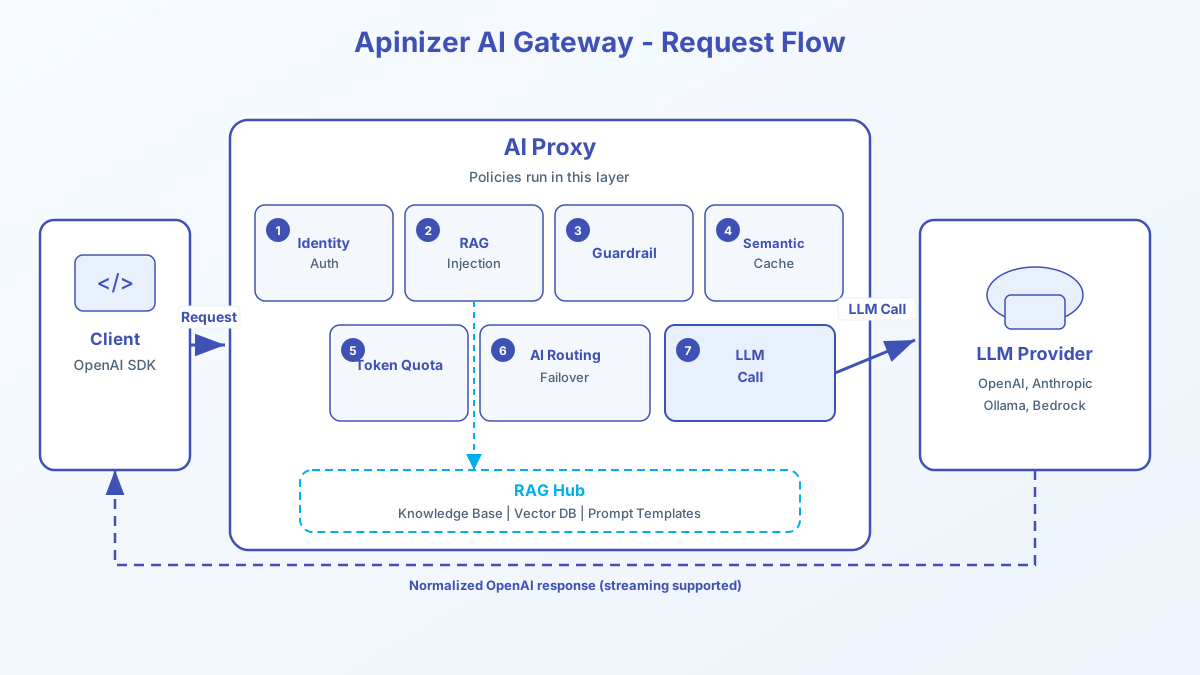
Three practical rules:
- RAG comes before guardrails and cache. Context is added first; security and cache must evaluate that enriched request.
- Chat models and embedding models are different. One generates answers; one turns text into vectors.
- The real model key lives on the Provider; the client key lives in Apinizer. That is the most common setup mistake.
Typical setup order (conceptual)
We are not going screen by screen yet; the rough wiring order is:
- LLM Provider — at least one chat provider (and an embedding provider for RAG)
- RAG — vector DB connection, knowledge base, prompt template if needed
- LLM Gateway — routing, policies
- Deploy — push to the environment
- Test — OpenAI SDK with
base_url+ Apinizer credential
Part 3 will walk through a single scenario end to end.
Why this layout?
Two extremes; both are bad:
- Piling everything into one tool — LLM, routing, security, all in one place; hard to change
- Giving every AI tool its own identity, log, and key world — governance fragments; shadow IT grows
Apinizer aims for the middle: LLM work runs on its own path; enterprise governance stays unified.
So when we say "Apinizer has an AI Gateway," we do not mean a new island product. We mean the existing API platform manages LLM traffic with the same discipline.
What's next
That is the map.
In the next article we will build one scenario: Embedding Provider → RAG (Vector DB + Knowledge Base) → Chat LLM Gateway → RAG Injection → test.
We will go screen by screen there.