Cache
This document describes the detailed usage of a specific policy. If you are using Apinizer policy structure for the first time or want to learn the general working principles of policies, we recommend that you first read the What is Policy? page.
Overview
The Cache policy enables explicit cache read, write, and delete operations within your API Gateway policy chain. Unlike the embedded cache mechanism in the API Call policy, this is a standalone policy that you can insert at any point in your request or response flow to cache expensive computation results or frequently accessed data. It reduces backend load, improves response times, and decreases infrastructure costs by storing intermediate results in a distributed or local cache.
What is its Purpose?
- Reduce backend load and improve response time by caching results of expensive operations.
- Store intermediate computation results or frequently accessed data (user profiles, currency rates, configuration settings).
- Implement dynamic caching strategies where cache operations are triggered conditionally based on request properties.
- Distribute cached data across multiple nodes using distributed cache or maintain local cache within a single gateway instance.
- Handle cache errors gracefully by choosing to continue flow or raise a fault.
Working Principle
The Cache policy performs one of three operations per invocation:
- LOOKUP (Read): Check whether an entry exists in cache by key and update the target variable according to the result. The lookup always continues the policy flow; a cache miss is not an error.
- POPULATE (Write): Extract a variable's current value and store it in cache with a specified key and TTL (time-to-live).
- INVALIDATE (Delete): Delete a cache entry by key. Useful for cache invalidation after data updates.
Each operation:
- Supports variable interpolation in cache keys using
${}(environment variables) and#{}(context variables). - Can hash long keys for case-insensitive or case-sensitive equality.
- Applies a static TTL or dynamically reads TTL from a variable.
- Handles connection errors by continuing the flow or raising a fault based on the error handling setting (CONTINUE or FAULT).
LOOKUP Result States
A lookup ends in one of three states. In every case the target variable is updated predictably:
| State | When it occurs | Target Variable | Flow |
|---|---|---|---|
| Hit | A non-empty value exists for the key | Cached value is written | Continues |
| Empty Value Found | An intentionally stored empty value exists for the key (written with "Cache Null/Empty Values" enabled) | Empty value is written — this still counts as a find | Continues |
| Miss | No entry exists for the key | Custom variable: cleared (any value left by earlier steps is removed). Body / header / parameter: left untouched — the message is never modified on a miss | Continues |
Why is a custom target variable cleared on a miss? The same variable may have been populated earlier in the policy chain. If the lookup returns nothing and the variable is left untouched, that stale value could be mistaken for a cached result. To keep behavior predictable, a custom target variable is always emptied on a miss, so later policies can safely check whether it holds a value.
Why are body, header and parameter targets not cleared? Those targets are part of the message itself. Clearing them on a miss would alter the request or response (for example, wiping the request body, adding a null field at the JSON path, or emptying an XML node) before it reaches the backend. On a miss such targets are therefore left exactly as they were; only a hit writes to them.
Why does an empty value count as a find? When an entry was intentionally stored with an empty value (see the Cache Null/Empty Values option under POPULATE), the lookup treats it as a Hit and writes the empty value to the target variable. This prevents repeated backend calls for queries whose result is known to be empty.
Features and Capabilities
Basic Features
- Three Operations: LOOKUP, POPULATE, INVALIDATE with distinct configuration per operation.
- Cache Key Interpolation: Variable placeholders in cache keys are resolved at runtime. Example:
user:#{request.userId},currency:${ENV_REGION}. - Cache Selection: Choose any cache set created in Cache Management (distributed or local).
- Hash Key Option: Optionally hash the key for case-insensitive lookups or to reduce storage size on long keys.
- TTL Management: Set a static TTL or calculate it dynamically from a variable at runtime.
- Active/Passive Status Control: Toggle policy on/off while preserving configuration.
- Condition-Based Application: Apply policy only when specific conditions are met (e.g., only for certain API endpoints or client types).
Advanced Features
- Dynamic TTL: Read cache entry lifetime from a runtime variable instead of using a fixed value. Supports multiple time formats (ISO 8601, Unix epoch, duration strings, custom patterns).
- Source/Target Variable Binding: On LOOKUP, store cache hit result in any defined variable. On POPULATE, read from any source variable and store in cache.
- Error Handling Strategy: Choose
CONTINUE(ignore cache errors and proceed) orFAULT(raise error and stop). - Connection Timeout: Define maximum wait time for cache service connection.
- Export/Import Feature: Export policy configuration as ZIP file and import to different environments.
- Policy Group and Proxy Group Support: Manage multiple cache policies in Policy Groups and bulk-assign to Proxy Groups.
- Deploy and Versioning: Deploy policy changes to live environment. View Policy Usage (which API Proxies reference it).
Usage Scenarios
| Scenario | Status | Solution (Policy Application) | Expected Behavior / Result |
|---|---|---|---|
| Currency Rate Cache | Exchange rates change slowly but are expensive to fetch | Use POPULATE to cache rates from backend service with 1-hour TTL. Use LOOKUP before backend call to return cached rate on hit. | First backend call stores rate. Subsequent calls (within 1 hour) return cached value. After 1 hour, cache expires and new rate is fetched. |
| User Profile Cache by ID | User detail API is slow and called frequently by different clients | LOOKUP by user ID (cache key: user:#{request.userId}) before calling user service. POPULATE after successful response with 30-minute TTL. | First call for user 123 → backend → cache. Subsequent calls for user 123 → cache hit → response sent immediately. Different user ID → new cache entry. |
| Cache Invalidation on Data Change | Admin updates product catalog and cache must be cleared | After successful update, use INVALIDATE policy to delete cache entry by product ID. | Admin updates product → database changes → cache invalidated → next user request fetches fresh data from backend. |
| Conditional Caching | Cache premium users' data longer than free users | Condition: Header = X-User-Tier, Equals = premium. POPULATE with 1-hour TTL. For free users (condition not met), policy is skipped. | Premium users: data cached 1 hour. Free users: every request goes to backend. Reduces backend load for high-value customers. |
| Hashed Long-Key Cache | Cache key is very long (e.g., full request body JSON) | Enable Hash Key option. Cache key: request:#{request.body} (hashed). TTL: 5 minutes. | Long key is hashed to fixed-size cache key. Same request body → same hashed key → cache hit. Reduces cache key storage. |
| Distributed Cache Across Nodes | Multiple gateway instances need to share cached data | Cache Set: "shared-distributed". Cache Type: Distributed. LOOKUP and POPULATE operations are synced across all nodes. | Gateway Node A caches value → Gateway Node B can retrieve it. Data is consistent across all gateway instances. |
Configuring Policy Parameters
In this step, users can create a new policy or configure existing policy parameters to define cache operations. Defined parameters directly affect how the policy works (e.g., which cache set is used, what triggers cache operations, error handling strategy, etc.). This allows the policy to be customized according to organization-specific requirements and managed centrally.
Creating New Cache Policy
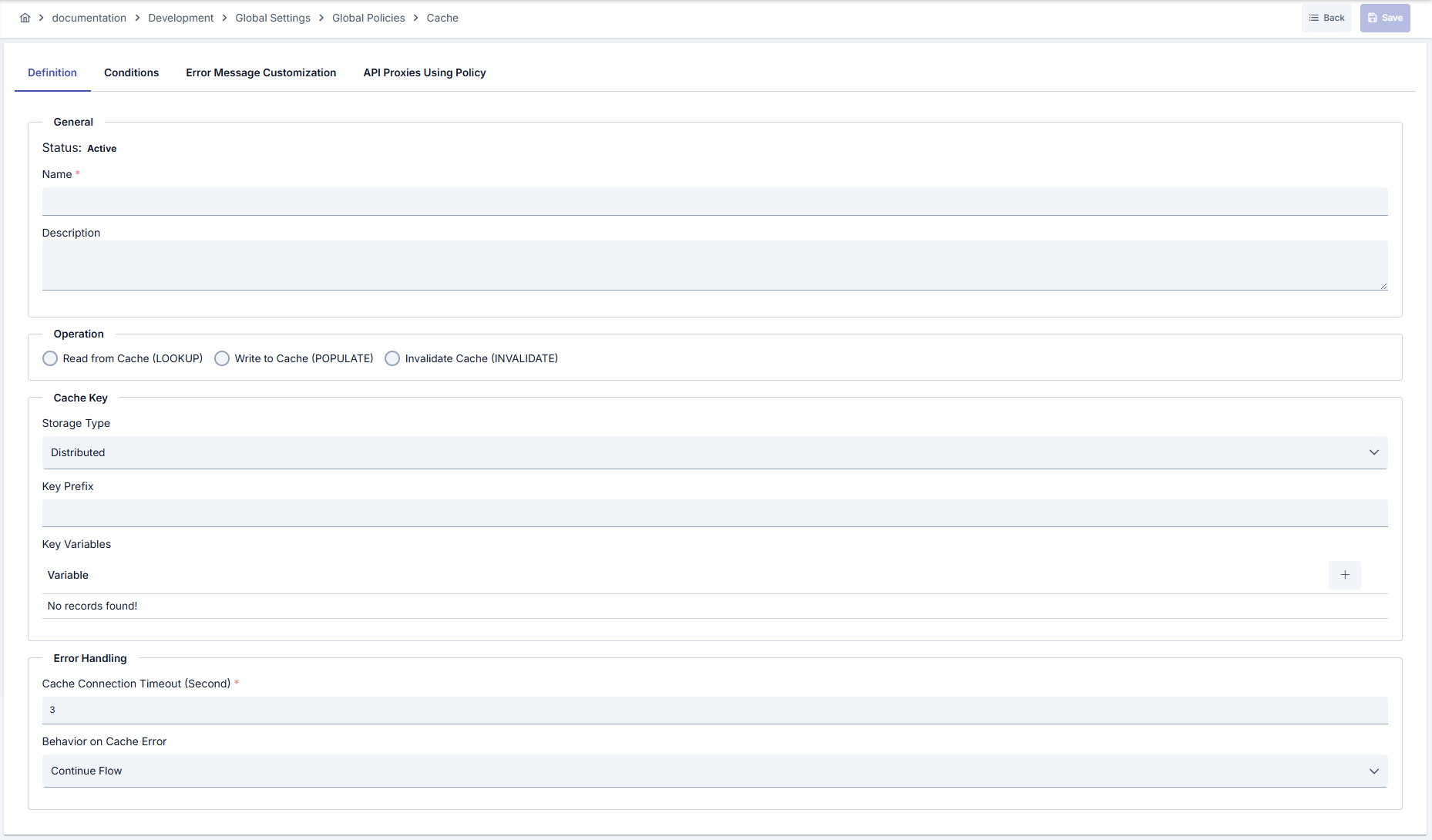
Configuration Steps
| Step | Description / Operation |
|---|---|
| Step 1: Go to Creation Page | - Go to Development → Global Settings → Global Policies → Cache from left menu. - Click [+ Create] button at top right. |
| Step 2: Enter Basic Information | Policy Status (Policy Status): Shows Active/Passive status. New policies are active by default. Name (Name) Required: Example: User_Profile_Lookup_Cache- Enter unique name, does not start with space. - System automatically checks. Green checkmark: available. Red X: existing name. Description (Description): Example: "Caches user profile data by userId to reduce backend calls" - Max. 1000 characters. - Explain policy's purpose. |
| Step 3: Select Operation Type | Operation Required: - LOOKUP: Check cache by key. On hit, write to target variable. On miss, continue. - POPULATE: Write a source variable's value to cache. - INVALIDATE: Delete a cache entry by key. The remaining configuration fields change based on selected operation. |
| Step 4: Configure Cache Set and Key | Cache Set Name Required: - Dropdown list of available cache sets (created in Cache Management). - Example: shared-distributed, local-cache- Select storage type (Distributed or Local) shown next to each name. Cache Key Required: - Plain text or variables. Supports ${} (environment) and #{} (context/request) variables.- Example: user:#{request.userId}, product:#{request.path|/products/([^/]+)/$1}- Evaluated at runtime; each request can produce different cache key. Hash Key (Optional): - Toggle to enable/disable. - When enabled: Cache key is hashed (SHA-256) to fixed-size key. Useful for long keys or case-insensitive equality. - When disabled: Cache key is used as-is. |
| Step 5a: Configure LOOKUP Operation | (If Operation = LOOKUP) Target Variable Required: - Select any variable where the lookup result will be stored. - Example: custom.cachedUserProfile- Hit: variable is populated with the cached value. - Empty value found: variable is populated with the stored empty value (still treated as a find). - Miss: a custom variable is cleared (any value left by earlier steps is removed), so a stale value is not mistaken for a cached result. A body, header or parameter target is left untouched — the message is never modified on a miss. A lookup never stops the flow on its own; a miss is not an error and the next policies always execute. |
| Step 5b: Configure POPULATE Operation | (If Operation = POPULATE) Source Variable Required: - Select variable whose value will be cached. - Example: response.body, custom.userProfileData- Variable's current value is extracted and stored in cache under the specified key. TTL Configuration: - Static TTL: Enter seconds (e.g., 1800 for 30 minutes).- Dynamic TTL: Enable toggle. Select a variable that contains the TTL value at runtime. Specify format (ISO 8601, Unix epoch, duration string, etc.). Cache Null/Empty Values: - Checkbox. Default: unchecked. - If checked: Even when the source value is empty, the entry is still written to cache for the specified TTL (negative caching). On later lookups this stored empty value is returned as a Hit, avoiding repeated backend calls for results known to be empty. - If unchecked: Empty values are not cached. |
| Step 5c: Configure INVALIDATE Operation | (If Operation = INVALIDATE) Cache Key Required: - Same as Step 4. Specify the key to be deleted. - Example: user:#{request.userId}- On policy execution, the cache entry matching this key is deleted (if exists). |
| Step 6: Configure Connection and Error Handling | Cache Connection Timeout Required: In seconds. Example: 10 (10 seconds). Min: 1.- Maximum wait time to connect to cache service. - If cache service does not respond, timeout error is triggered. Error Action Required: - CONTINUE: If cache service is unreachable or error occurs, policy completes normally and flow continues. - FAULT: If cache service is unreachable or error occurs, policy raises a fault and flow stops. Error is returned to client. Recommendation: - CONTINUE: For non-critical caching (performance optimization). - FAULT: For critical cache operations where missing data should fail fast. |
| Step 7: Define Condition (Optional) | - Go to Condition tab. - Conditions determine when the policy will be active. Examples: - Endpoint-based: Path = /api/users/*- Client-based: Header = X-Cache-Enabled, Equals = true- User tier-based: Header = X-User-Tier, Equals = premium |
| Step 8: Customize Error Message (Optional) | - Go to Error Message Customization tab. - Customize message to return when cache operation fails. Default: { "statusCode": 500, "message": "Cache operation failed" }Custom: { "statusCode": 503, "errorCode": "CACHE_UNAVAILABLE", "message": "Cache service is temporarily unavailable", "retryAfter": 60 } |
| Step 9: Save | - Click [Save] button at top right. Checklist: Unique name. Required fields filled. Cache Set exists. Result: - Policy is added to list. - Can be bound to APIs. - If global policy, automatically applied. |
For descriptions of Conditions and Error Message Customization panels, you can review the Conditions and Error Message Customization sections on the What is Policy? page.
For a complete guide on all layers, priority order and scenario examples of the error message configuration system, see the Error Message Configuration Guide page.
Deleting Policy
For deletion steps of this policy and operations to be applied when in use, you can refer to the Removing Policy from Flow section on the Policy Management page.
Exporting/Importing Policy
For export and import steps of this policy, you can refer to the Export/Import page.
Binding Policy to API
For the process of how this policy will be bound to APIs, you can refer to the Binding Policy to API section on the Policy Management page.
Advanced Features
| Feature | Description and Steps |
|---|---|
| Dynamic TTL from Response Variable | You can make cache TTL dynamic by reading it from a response field at runtime. - On POPULATE operation, enable Dynamic TTL toggle. - Select variable: Example $.expireAt from response body (JSONPath) or response.headers[Cache-Control].- Specify format: ISO 8601, Unix epoch (seconds/milliseconds), or duration string (e.g., 5m, 300s).- Cache entry expires based on dynamic value, not fixed TTL. |
| Conditional Cache Invalidation | You can make cache invalidation conditional (e.g., only on successful updates). - Create INVALIDATE policy with Condition: response.statusCode = 200 (or your success code).- Bind to API Proxy response flow after successful update endpoint. - Cache is only cleared when update succeeds; failed updates don't invalidate stale data. |
| Multi-Key Cache Chain | You can cache at multiple levels by using multiple Cache policies with different keys. - First LOOKUP: category:#{request.category} (category-level cache)- If miss, second LOOKUP: global:default (fallback global cache)- POPULATE: Populate both keys with source data. - Hierarchical caching reduces backend calls significantly. |
| Cache Hit/Miss Tracking | You can track cache performance by storing hit/miss status in a variable. - After LOOKUP policy, use Data Manipulation or Script to set a custom variable: cache.status = HIT (if target variable was populated)- Use this variable in later policies for conditional routing or logging. |
Tips and Best Practices
Things to Do and Best Practices
| Category | Description / Recommendations |
|---|---|
| Cache Key Design | Bad: Plain text key: user-profile (all users share same cache)Good: User-specific key: user:#{request.userId}Best: Composite key with multiple dimensions: user:#{request.userId}:v#{request.apiVersion} → Different versions cached separately |
| TTL Strategy | Bad: Very high TTL (24 hours) for data that changes frequently → Stale data served Good: TTL matches data update frequency: Catalog: 1 hour, Rate: 5 minutes, Session: 30 minutes Best: Dynamic TTL from response: Read expiration time from backend response; cache stays fresh without manual TTL tuning |
| Error Handling | Bad: FAULT action for non-critical cache → Entire flow fails if cache is down Good: CONTINUE action for performance caching → Flow continues even if cache unavailable; backend is called instead Best: Conditional error action: FAULT for mandatory data (user authentication), CONTINUE for optimization (product catalog) |
| Cache Invalidation | Bad: Manual invalidation after updates (easy to forget, causes stale data) Good: Automatic invalidation via INVALIDATE policy right after update API Best: Event-driven invalidation: Admin update → INVALIDATE policy triggered → Cache cleared → Next request gets fresh data |
| Distributed vs Local | Bad: Local cache for multi-gateway deployments → Cache misses across nodes Good: Distributed cache for shared data → All gateways access same cache Best: Hybrid: Distributed for user profiles (high hit rate), Local for computed temp data (low reuse) |
Security Best Practices
| Security Area | Description / Warnings |
|---|---|
| Sensitive Data Caching | Warning: Do not cache sensitive data (passwords, tokens, PII) in cache. Recommendation: Cache only non-sensitive, read-only data (product info, rates, config). Mark cache set as restricted if sensitive data is needed. Critical: Implement access control on cache sets. Separate cache stores for different security levels (public cache, private cache). |
| Cache Poisoning | Warning: If cache key is derived from untrusted input (e.g., user query), attackers can poison cache with malicious data. Recommendation: Validate and sanitize cache key inputs. Use whitelisting for key components. Don't cache unvalidated user-submitted data. Critical: Use hash key option for untrusted keys to prevent key-based attack. |
| Cache Timeout on Connection | Warning: Too high cache connection timeout → Slow requests block gateway. Recommendation: Set timeout low (5-10 seconds). Fail fast if cache is unreachable. Critical: Monitor cache service availability. Set up alerts if cache is down. Use FAULT action only for critical caches. |
| Data Consistency | Warning: Cached data may become stale between TTL expiration and backend update. Recommendation: Use short TTL for critical data. Implement cache invalidation on backend updates. Monitor cache hit rates and stale data incidents. Critical: For financial or billing data, implement version-based cache keys or event-driven invalidation. |
Things to Avoid
| Category | Description / Warnings |
|---|---|
| Caching All Requests | Why to avoid: Not all data benefits from caching. Caching dynamic data (user balance, stock price) leads to stale data issues. Alternative: Cache only stable, slow-changing data (settings, catalogs, translations). Use conditional policies to cache only when beneficial. |
| Unbounded TTL | Why to avoid: Setting very high TTL (days/weeks) for data that changes frequently causes stale data to be served for extended periods. Alternative: Match TTL to data update frequency. Use dynamic TTL to read expiration from backend. Implement event-driven invalidation for critical data. |
| Ignoring Cache Errors | Why to avoid: Always using CONTINUE action can mask cache infrastructure failures. Slow cache service may cause performance regression. Alternative: Use FAULT for critical cache. Monitor cache service health. Set up alerts for cache errors. Implement circuit breaker pattern. |
| Unbounded Cache Capacity | Why to avoid: Without capacity limits, cache can grow unbounded and consume all memory. Alternative: Set appropriate cache capacity during setup. Monitor cache utilization. Implement eviction policies (LRU, TTL-based). Clean old entries regularly. |
| No Cache Invalidation Strategy | Why to avoid: Without invalidation, cache serves stale data indefinitely or until TTL expires. Alternative: Implement cache invalidation in response flow of update APIs. Use time-based (TTL) + event-based (INVALIDATE) invalidation together. Document invalidation points. |
Performance Tips
| Criterion | Recommendation / Impact |
|---|---|
| Cache Hit Ratio | Recommendation: Design cache keys carefully to maximize hits. Avoid overly specific keys that create many cache entries for similar data. Impact: If cache hit ratio is 80%+, backend load decreases by 80%. Response time improves by 10-100x depending on backend latency. |
| Key Hashing | Recommendation: Use hash key option for long cache keys (>256 bytes) to reduce memory footprint. Impact: Fixed-size hashed keys (SHA-256 = 64 bytes) reduce cache memory. Slight CPU cost for hashing is worth the memory savings at scale. |
| Dynamic TTL | Recommendation: Read expiration time from response instead of using fixed TTL. Reduces manual tuning and stale data. Impact: Cache stays fresh longer when backend provides accurate expiration. Reduces the need for manual invalidation. |
| Distributed Cache | Recommendation: Use distributed cache for data accessed by multiple gateway instances. Impact: Cache hits across all nodes. Significant backend load reduction in multi-gateway deployments. Network latency for distributed cache is minimal. |
| CONTINUE vs FAULT Action | Recommendation: Use CONTINUE for performance optimization (cache miss = backend call). Use FAULT only for mandatory caching (missing cache = fail). Impact: CONTINUE avoids cascading failures; service gracefully degrades. FAULT fails fast on critical cache unavailability. Choose based on use case. |
Frequently Asked Questions (FAQ)
| Category | Question | Answer |
|---|---|---|
| General | What is the difference between Cache policy and API Call policy's embedded cache? | API Call embedded cache: Built into API Call policy. Request → cache lookup → backend call (if miss) → cache populate → response. Works only within API Call context. Cache policy: Standalone policy. Can be placed anywhere in pre-flow, request, response, or post-flow. Offers three explicit operations: LOOKUP, POPULATE, INVALIDATE. More flexible for complex caching scenarios. |
| General | Can I use multiple Cache policies in the same API Proxy? | Yes. You can use multiple Cache policies with different keys, operations, or conditions. Example: First policy lookups user cache, second policy populates product cache. Useful for hierarchical or multi-level caching. |
| Technical | What happens on hit, empty value, or miss in LOOKUP? | Hit: the target variable is populated with the cached value. Empty value found (stored with Cache Null/Empty Values): the target variable receives the empty value — still treated as a find. Miss: a custom target variable is cleared so a stale value from an earlier step isn't mistaken for a result; a body, header or parameter target is left untouched (the message is never modified on a miss). In all cases the lookup continues the flow; a miss is not an error. |
| Technical | Can I cache empty/null values? | By default, empty values are not cached. Enable the "Cache Null/Empty Values" toggle on POPULATE if you want to store them. A value stored this way is returned as a Hit on later lookups (the target variable receives the empty value), so backend calls are avoided when the result is known to be empty (negative caching). |
| Technical | How does cache key interpolation work? | Cache key supports ${} for environment variables and #{} for context/request variables. Example: user:#{request.userId}:${ENV_REGION}. Variables are resolved at runtime. Different variable values produce different cache keys. |
| Technical | What time formats does dynamic TTL support? | ISO 8601 (2026-05-15T10:30:00Z), Unix epoch in seconds (1715779800), Unix epoch in milliseconds (1715779800000), relative durations (300s, 5m, 1h), custom patterns (dd.MM.yyyy HH:mm:ss), and JWT claim names (exp). |
| Usage | What should I do if cache service is down? | If Error Action = CONTINUE: Policy completes normally, flow continues, backend is called as fallback. If Error Action = FAULT: Policy raises error, flow stops, client receives error. Choose CONTINUE for resilience, FAULT for critical caching. |
| Usage | How do I invalidate cache after a successful update? | Create INVALIDATE policy with the same cache key. Bind it to the API Proxy response flow after update endpoint. Add condition: response.statusCode = 200 to invalidate only on success. |
| Usage | Can I cache data from multiple backends? | Yes. Use multiple POPULATE policies, each caching data from a different source. Cache keys should differ to avoid conflicts. Example: api1:#{request.id} for API1, api2:#{request.id} for API2. |
| Performance | What is the performance overhead of Cache policy? | Minimal. Cache lookup: 1-5ms (local), 5-20ms (distributed). POPULATE/INVALIDATE: 2-10ms. Network round trip to distributed cache is the main cost; local cache has near-zero latency. Overall gateway overhead is negligible if cache is available. |
| Performance | How do I know if cache is working (hit ratio)? | Enable detailed tracing on the API Proxy. Each LOOKUP operation in trace shows whether it was a hit or miss. Monitor API Traffic logs to calculate hit ratio = hits / (hits + misses). Aim for 70%+ hit ratio for effective caching. |