Log Policy
This document explains the detailed usage of a specific policy. If you are using the Apinizer policy framework for the first time or want to learn about the general working principles of policies, we recommend reading the What is a Policy? page first.
Overview
Purpose
- The Log policy captures a snapshot of the current message state at any point in the message processing pipeline and sends it to the configured connectors.
- Unlike standard traffic logging, it can be placed at intermediate points in the pipeline (for example, before and after a transformation policy) to observe message changes.
- It works with HTTP, WebSocket, and gRPC protocols.
- It can send data to multiple connectors simultaneously.
How It Works
- Policy Trigger: Runs when the log policy's turn comes in the message processing pipeline.
- Snapshot Creation: The current message state is captured per protocol (headers, parameters, body information).
- Send to Connectors: The snapshot is sent to each defined connector individually.
- Privacy Application: If privacy settings are enabled, sensitive data is processed before delivery (mask, delete, hash, encrypt).
Use Cases
- Monitor message state at specific pipeline stages (before/after policy comparison)
- Collect detailed logs for debugging and troubleshooting
- Meet audit and compliance requirements
- Send real-time data to external systems (SIEM, log analysis platforms)
Supported Targets
| Target | Protocol |
|---|---|
| Elasticsearch | REST/HTTP |
| Database (Oracle, MySQL/MariaDB, PostgreSQL, SQL Server, MongoDB) | JDBC / MongoDB Driver |
| Graylog | GELF |
| Webhook | HTTP POST |
| Syslog | Syslog Protocol |
| Kafka | Kafka Producer |
| RabbitMQ | AMQP |
Protocol Support
| Protocol | Header | Parameter | Body |
|---|---|---|---|
| HTTP | ✓ | ✓ | ✓ |
| WebSocket | ✓ | — | ✓ |
| gRPC | — | — | ✓ |
In the WebSocket and gRPC protocols, header and parameter information may be limited due to the nature of the protocol.
Configuration Fields
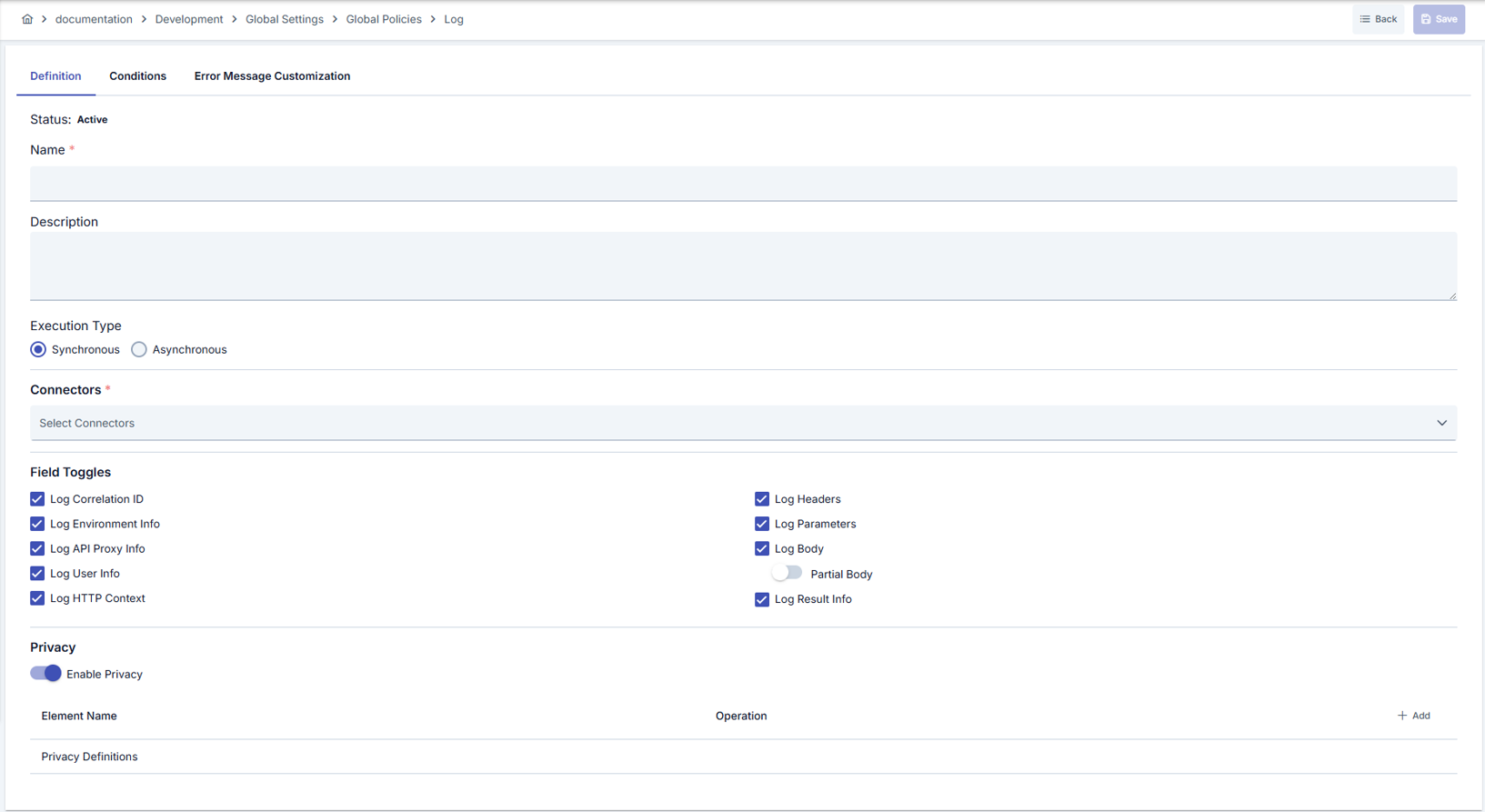
General Settings
| Field | Description |
|---|---|
| Name | Identifier name of the policy |
| Description | Description explaining the purpose of the policy |
| Active | Whether the policy is active or passive |
| Execution Mode | Synchronous or Asynchronous execution mode (detailed below) |
| Condition | Condition that determines when the policy runs (optional) |
Connector Selection
You can select the connectors the policy will send logs to. Connectors are selected through their connection definition and work environment-independent — the same connection definition may correspond to different connector instances across environments.

Definitions marked as global policies can be used in multiple environments; the connector corresponding to the same connection definition must be configured in each environment.
Logged Fields
You can choose which of the following field groups are included in the log record:
| Field Group | Description |
|---|---|
| From-Client Request Headers | Request header information from the client to the API Proxy |
| From-Client Request Parameters | Request parameters from the client to the API Proxy |
| From-Client Request Body | Request body from the client to the API Proxy |
| To-Backend Request Headers | Request header information from the API Proxy to the Backend API |
| To-Backend Request Parameters | Request parameters from the API Proxy to the Backend API |
| To-Backend Request Body | Request body from the API Proxy to the Backend API |
| From-Backend Response Headers | Response header information from the Backend API |
| From-Backend Response Body | Response body from the Backend API |
| To-Client Response Headers | Response header information sent to the client |
| To-Client Response Body | Response body sent to the client |
| Metadata | Request metadata such as IP address, HTTP method, URI, port |
| Metrics | Performance metrics such as duration, size, cache state |
Body Logging Mode
| Mode | Description |
|---|---|
| Full | The body data is logged in full |
| Partial | The body data is logged up to the specified maximum size. Data is truncated when the size is exceeded |
Execution Modes
| Mode | Delivery | Error Behavior | Pipeline Effect |
|---|---|---|---|
| Synchronous (default) | Sequential, waits until completion | Error is raised | Pipeline is interrupted |
| Asynchronous | In the background, does not wait | Error is logged and swallowed | Pipeline continues |
In synchronous mode, a connector error interrupts the pipeline and returns an error to the client. If uninterrupted operation is required in production, prefer the asynchronous mode.
In asynchronous mode, when a connector error occurs, the error information is written to the application logs, but the client request is not affected.
Data Structure
The Log policy uses a lightweight data structure that is different from standard API traffic logs. The following table lists the fields sent and their Elasticsearch/database equivalents.
| Field Name | Short Name (ES/JSON) | Type | Description |
|---|---|---|---|
| Timestamp | @timestamp | Date | Log record creation time |
| Correlation ID | aci | String | Apinizer request tracking ID |
| Environment ID | ei | String | Gateway environment identifier |
| API Proxy ID | api | String | API Proxy identifier |
| API Proxy Name | apn | String | API Proxy name |
| API Proxy Method ID | apmi | String | API Proxy method identifier |
| API Proxy Method Name | apmn | String | API Proxy method name |
| User/Key | uok | String | Authenticated username or API key |
| HTTP Status Code | sc | Number | HTTP response status code |
| Result Type | rt | String | Operation result (SUCCESS, ERROR, etc.) |
| Error Type | et | String | Error type (if any) |
| Request Headers | fcrh | List | Request headers as key-value pairs |
| Request Parameters | fcrp | List | Query parameters as key-value pairs |
| Request Body | fcrb | String | Request body content |
| Pipeline Position | cr | String | Pipeline region where the log policy is placed |
| Attachment Scope | cl | String | Hierarchy level where the log policy is attached |
Example JSON Output
{
  "@timestamp": "2026-03-31T12:30:45.123Z",
  "aci": "550e8400-e29b-41d4-a716-446655440000",
  "ei": "env-production-001",
  "api": "proxy-payment-api",
  "apn": "Payment API",
  "apmi": "method-create-payment",
  "apmn": "POST /payments",
  "uok": "merchant-api-key-123",
  "sc": 200,
  "rt": "SUCCESS",
  "fcrh": [
    { "k": "Content-Type", "v": "application/json" },
    { "k": "Authorization", "v": "Bearer eyJhbGciOi..." },
    { "k": "X-Request-ID", "v": "req-abc-123" }
  ],
  "fcrp": [
    { "k": "currency", "v": "TRY" },
    { "k": "lang", "v": "tr" }
  ],
  "fcrb": "{\"amount\": 150.00, \"merchantId\": \"M-001\"}",
  "cr": "FROM_CLIENT",
  "cl": "API_PROXY_METHOD"
}
Each entry in the header and parameter fields consists of k (key) and v (value) pairs. This structure is indexed as nested type in Elasticsearch.
Pipeline Position (cr) Values
| Value | Description |
|---|---|
FROM_CLIENT | First pipeline stage where the incoming client request is processed |
TO_BACKEND | Last pipeline stage before the request is forwarded to the backend |
FROM_BACKEND | First pipeline stage where the backend response is processed |
TO_CLIENT | Last pipeline stage before the response is sent to the client |
Attachment Scope (cl) Values
| Value | Description |
|---|---|
API_PROXY_GROUP | Policy is attached to a proxy group; applies to all proxies in the group |
API_PROXY | Policy is attached directly to an API Proxy |
API_PROXY_METHOD | Policy is attached to a specific API Proxy method |
Elasticsearch Integration
A separate index template must be created for log policy data in Elasticsearch. This template is different from the standard API traffic log template and contains only the fields sent by the log policy.
The Elasticsearch index template and ILM policy for log policy data are not automatically created from the Apinizer UI. For ILM policy, index template, and data stream setup commands, see Apinizer Log Table Creation Commands — Log Policy.
Connector Configuration
Enter apinizer-log-policy-capture in the Elasticsearch connector's Index Name field. This name must match the index_patterns in the template.
If you want to use a different index name, update the index_patterns field in the template accordingly. For example, for project-based separation you can use apinizer-log-policy-capture-projectname.
Database Integration
The Database connector writes each log policy capture as a single row into the log_PolicyCapture table on the target relational database. Supported database types are Oracle, MySQL/MariaDB, PostgreSQL, and SQL Server. For MongoDB, the collection is created automatically on first write — no manual setup is required.
For relational databases, the log_PolicyCapture table is not created automatically — you must create it manually before enabling the connector. See Apinizer Log Table Creation Commands for the CREATE TABLE statement, recommended indexes, and partitioning guidance for each supported database type.
The correlation_id column links request and response rows of the same call. When the log policy is placed at multiple pipeline stages (for example, FROM_CLIENT and TO_CLIENT), records can be joined on correlation_id to trace a transaction end to end. The index on this column is therefore strongly recommended.
For high-traffic APIs, configure the log policy in Asynchronous mode so database write latency does not block the request pipeline.
Privacy Settings

You can configure privacy settings at the policy level so that sensitive data is processed before being written to the log record.
| Operation | Description |
|---|---|
| Mask | Partially hides the sensitive data (e.g. ****1234) |
| Delete | Completely removes the sensitive data |
| Hash | Converts the sensitive data to a one-way hash value |
| Encrypt | Encrypts the sensitive data |
Privacy settings are applied at two levels: first the policy-level settings, then the connector-level settings. If both levels are enabled, each is applied in sequence.
Masking is applied before data is sent to connectors. Connector-level privacy settings are applied separately and independently. This feature can be used to meet data protection requirements such as GDPR.
Usage Scenarios
| Scenario | Description | Recommended Mode |
|---|---|---|
| Before/after transformation comparison | Add a log policy before and after a transformation policy to observe message changes | Asynchronous |
| Debugging | Add a temporary log point to the pipeline to inspect the input and output of a specific policy | Synchronous |
| Audit trail | Keep a full record of each request on sensitive APIs | Asynchronous |
| Multi-target logging | Send the same message to Elasticsearch and Kafka simultaneously | Asynchronous |
| Conditional logging | Log only requests matching a specific header value or path | Asynchronous |
Related Pages
Deleting the Policy
For the steps to delete this policy and the actions to be taken when it is in use, see the What is a Policy? page.
Exporting/Importing the Policy
For the export steps and available options for this policy, see the What is a Policy? page.
Attaching the Policy to an API
For the process of attaching this policy to APIs, see the Adding Policy to Flow section on the Policy Management page.