API Catalog
What Is It For?
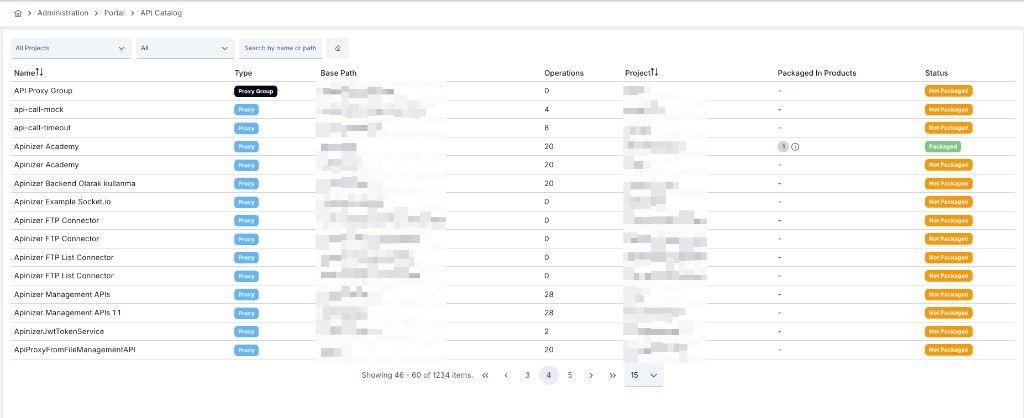
- Shows packaging status of APIs that will be or are published on the portal in one list
- Makes proxies not yet added to any API Product visible
- Distinguishes assets outside portal project scope to reduce publishing the wrong scope
- Lets you run an inventory and packaging check before the product storefront goes live
Who Uses It?
- Portal administrators: To verify packaging completeness before publish
- API / product owners: To see which products their proxies belong to
- Platform teams: To clean up forgotten or out-of-scope APIs
Access and Permissions
- In the admin panel follow Portal → API Catalog
- The list is fed from projects in the active portal’s scoped-projects set
Info
This screen is an in-Manager packaging inventory. It is not the public product catalog (APIs / products storefront) on the Developer Portal. You do not create or edit products here; you spot gaps and complete them on API Product.
Filtering
| Filter | Description |
|---|---|
| All Projects | Narrow by project; clearable |
| Packaging Status | All · Packaged · Not Packaged |
| Search | Search by name or path |
| Clear | Clears filters |
Paging: 10 / 15 / 25 / 50
How to Read the List
Each row is an API Proxy or Proxy Group asset.
| Column | Description |
|---|---|
| Name | Asset name (sortable) |
| Type | Proxy or Proxy Group |
| Base Path | Base path |
| Operations | Operation count |
| Project | Owning project (sortable) |
| Packaged In Products | Linked API Products (badge + popover) |
| Status | Packaging / scope status |
Status badges
| Badge | Meaning |
|---|---|
| Packaged | Linked to at least one API Product |
| Not Packaged | Not yet added to any product |
| Out of Scope | Outside the active portal’s project scope |
Usage Scenarios
- Before a portal launch, add critical Not Packaged proxies into products
- Check Packaged In Products to see if a proxy is accidentally in multiple products
- Review Out of Scope rows and clean the portal scoped-projects list