Portal Membership and Invitation
What Is It For?
- Organizes API consumers inside an organization as a team on the portal
- Provides controlled onboarding via invitations and join requests
- Separates who can manage members, who can run app/credential work, and who can see secrets
- Prevents removing the last Owner so organization management is never orphaned
Who Uses It?
- Organization Owners: To invite members, assign roles, manage invitations, and approve join requests
- Developer members: To run application, subscription, and credential work
- Viewer members: For read-only monitoring
Access
- Developer Portal user menu → Organization (page: Organization / Organization Members)
- Accept invitation:
/organization/accept-invitation?token=… - For Manager-side organization operations (suspend, merge, revoke) → Portal Organizations
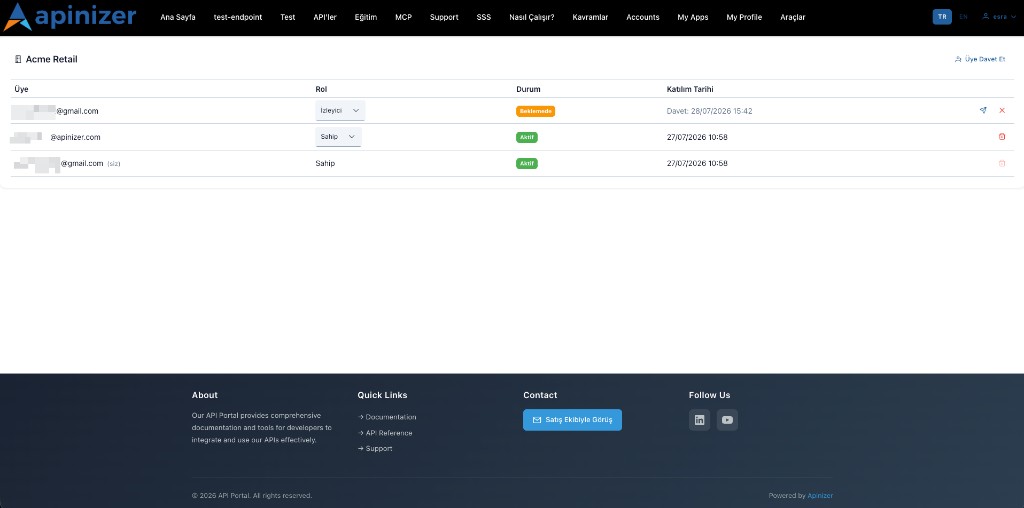
Roles and Permissions
| Role | Member management | App / subscription / credential write | Client secret |
|---|---|---|---|
| Owner | Yes (invite, role, remove, join request) | Yes | Visible |
| Developer | No | Yes | Visible |
| Viewer | No | No (read-only) | Not visible |
Rules:
- The last active Owner cannot be demoted or removed
- You cannot change your own role on your row
- Owner only: Invite / Resend / Cancel / Remove / Join Requests
Member statuses: Pending (Invited date) · Active (Joined Date)
Invite a Member
An Owner opens Invite Member.
E-mail (required) and Role (often default Viewer) → Send Invitation. The member appears as Pending.
The recipient opens accept-invitation?token=…. If the recipient is already logged in, the invitation is accepted immediately. Otherwise the screen shows two buttons instead of jumping straight to either one. When no account exists yet for the invited e-mail: Create account (primary) and I already have an account (secondary). When an account already exists but no session is open: Log in (primary) and Create account (secondary). The e-mail field on the registration form is pre-filled from the invitation and cannot be changed. Completing registration, or logging in, accepts the invitation right after.
For pending invites use Resend invitation or Cancel invitation. Removing an active member also clears that member's association with this organization on their account — see Removing a Member below.
Registering from an invitation link works even when Allow account registration is turned off on Portal Settings — a valid invitation is an explicit, one-time permission to create an account that does not depend on that setting. A visitor who reaches the registration page without an invitation is still redirected to the portal home page while that setting is off.
Removing a Member
When an Owner removes a member, that member's account no longer shows this organization: its name disappears from the account together with the member list, rather than the name staying visible while the member list goes empty. The account itself is not deleted — the person can still log in, and their profile information is unchanged. If the removed member belongs to another organization as well, that other organization is unaffected and becomes the one shown on their account. Re-adding the same person as a member restores the organization name and membership list immediately.
Accounts removed from an organization before this behavior existed could still show that organization's name on their account, even though they held no membership in it any more. Upgrading to this version repairs those accounts automatically: an account with no active membership in the organization it points to is cleared, or moved to another organization it is still an active member of. An account whose invitation is only pending, or that is still an active member, is left exactly as it is.
Join Requests
Users who self-signup / request to join from a verified email domain land in the Owner’s Join Requests queue. The Owner Approves (picking a role; UI default is often Developer) or Rejects.
Common errors: duplicate invitation, last-owner constraint, only owners manage members, invitation email mismatch, already a member.
Usage Scenarios
- An Owner invites Developers for a new integrator firm and gives Viewers monitoring-only access
- A self-signup from the company domain is approved via Join Request into the right role
- An Owner removes a former employee so secret and write access stop