Inactive Subscribers
What Is It For?
- Lists subscriptions registered to an API product that have not sent a request beyond the selected threshold
- Distinguishes never used subscriptions (onboarding never completed) from silenced ones (used before, then stopped)
- Helps you catch organizations/accounts stuck in onboarding or churning early
Who Uses It?
- Portal Administrators: To identify subscriptions that never completed onboarding and follow up
- Support / Customer Success Teams: To proactively reach out to silenced organizations and accounts
- Business Development Teams: To catch churn-risk accounts at an early stage
Screen Access and Permissions
- In the Admin panel's left menu, follow Portal → Reports → Inactive Subscribers.
- Only authorized roles (Portal Manager, Admin, Portal Business) can view this report.
Tip
For subscription lifecycle and approval see API Product; for live usage see Traffic & Usage.
Info
Request counts here attribute traffic to an application whose identity is a typed API Client (client ID matching the traffic row's username/key), not only to one still carrying a legacy username/password credential — an app that has switched to a typed client no longer drops out of these numbers.
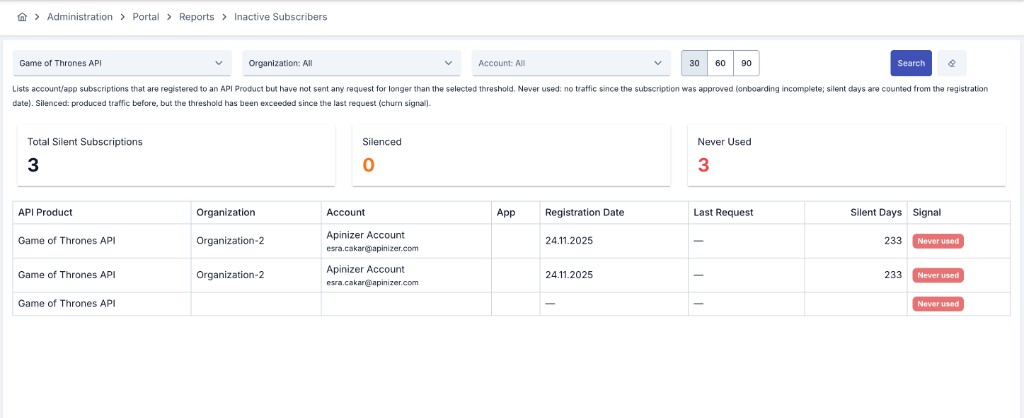
Filtering
| Filter | Description |
|---|---|
| API Product | Narrow the report to one or more API products. If left empty, all products are included. |
| Organization | Narrow the report to one or more organizations. If left empty, all organizations are included. |
| Account | Narrow the report to a specific portal account. |
| Threshold (days) | Choose a silence threshold of 30, 60, or 90 days (default: 30 days). |
How to Read This Report
The summary cards at the top show:
| KPI Card | Description |
|---|---|
| Total Silent Subscriptions | Total number of subscriptions exceeding the selected threshold. |
| Silenced | Number of subscriptions that produced traffic before but have exceeded the threshold since their last request. |
| Never Used | Number of subscriptions that have produced no traffic since being approved. |
Table columns:
| Column | Description |
|---|---|
| API Product / Organization / Account / App | The API product, organization, account and app the subscription belongs to. |
| Registration Date | The date the subscription was approved. |
| Last Request | The date of the subscription's last request; left empty when no request was ever sent. |
| Silent Days | For never-used subscriptions, days since the registration date; for silenced subscriptions, days since the last request. |
| Signal | Whether the subscription is Silenced or Never used. |
Usage Scenarios:
- List never-used subscriptions to identify accounts that need onboarding support.
- Regularly review silenced subscriptions to trigger proactive outreach from the customer success team.
- Adjust the threshold (30/60/90 days) to balance early warning against a firmer churn signal.