Application Promote
What Is It For?
- Ties applications to a path where they are validated on Test before Prod
- Separates TEST and PROD credentials so production keys are not created too early
- Gives approvers context via technical contact, expected traffic, egress IPs, and required documents
- Manages the lifecycle of promoted apps safely with suspend and deletion requests
- Manages product access through the app with a subscription wizard and plan approval
Who Uses It?
- Developers (Owner/Developer): To create apps, subscribe, and request Prod promotion
- Portal / platform administrators: To configure Prod Promotion, document templates, and approvals
- Security / operations: To verify documents and network requirements before Prod access
Access
- Developer Portal: My Apps → application detail (Credentials & Subscriptions, Usage)
- Manager setting: Portal → Settings → Portal → Prod Promotion
- Related environment URLs: under Features / API Environments, Production API base URL and Sandbox API base URL (address shown to consumers; does not change gateway routing)
Why Promote Exists
Apps created on the portal start as Test only, authenticating test traffic with the application's own typed API Client — created automatically together with the app, see Credentials & Subscriptions below. Production keys are read from a separate prod management connection only after an approved promote, so test keys are not used for production traffic.
Application promotion state
| State | Meaning |
|---|---|
| Test only | Test only; no PROD credentials yet |
| Awaiting prod approval | Promote requested; waiting for approval |
| Prod active | Approved; PROD credentials available |
Manager — Prod Promotion Configuration
| Field | Purpose |
|---|---|
Enable Prod Promotion (enablePromotion) | Shows/hides Prod Promotion configuration fields (connection, documents) in Manager |
| Production instance connection | Separate Apinizer production instance |
| Prod management API URL | Where approved apps/credentials are read from |
| Prod management API key | Stored encrypted; never shown again after save (leave blank = do not change) |
| Requested documents | Name, hint, allowed types, Required/Optional document list |
If no documents are defined, approval alone may be enough (with an info note). Reading PROD credentials requires the prod management URL + key connection.
enablePromotion is mapped to the portal as promotionEnabled. The current Developer Portal UI does not hide the Promote button based on this flag, and submitPromote on the backend does not check it either. The flow follows the app promotion state (Test only → Awaiting prod approval → Prod active). When the toggle is off, Manager hides the connection/document form fields.
My Apps — Application Detail
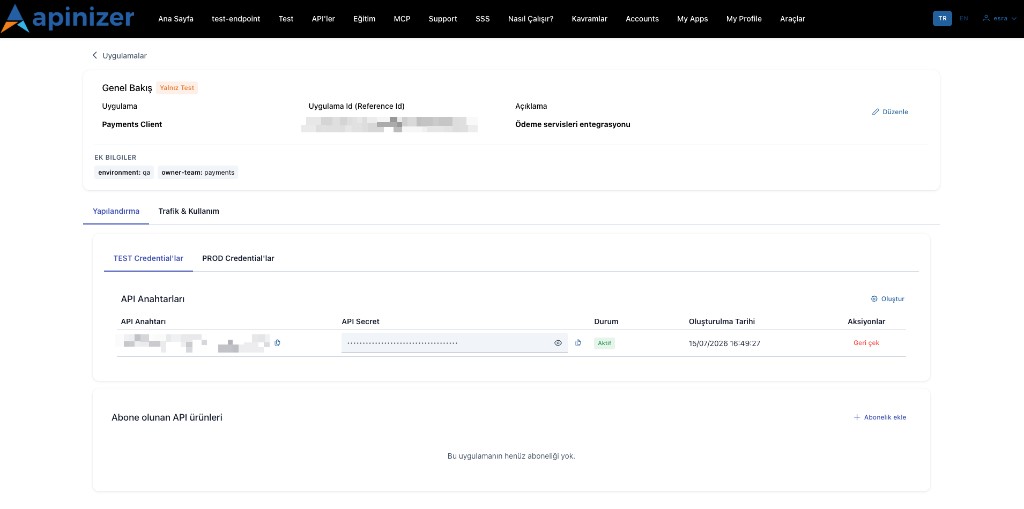
A fixed header sits above the two tabs: application name, a state badge (Test only / Awaiting prod approval / Prod active, or Prod request rejected), an Active/Suspended badge, description, App Id (copy), and Edit.
Below the header, two collapsed panels hold what used to be the Overview tab: Metadata (key/value pairs, secret values masked) and Request history (the promote submit/reject/resubmit/approve timeline, shown once a promote request exists).
Credentials & Subscriptions tab
The Credentials card has a TEST | PROD environment picker (buttons).
- TEST: an application can have more than one API client. Each client is an accordion row — label, status (Draft / Active / Suspended / Revoked), and its active-secret count. Expanding a client shows its Client ID — generated automatically, printed in full as plain text with a copy button next to it — Suspend / Resume, and that client's Client secrets table: Label · Secret · Status (Active / Grace period / Revoked / Pending activation) · Created · Expires · Actions
- The Secret cell is masked. Show reveals the value on demand; Hide only re-masks it; the copy icon copies the value. Every reveal is written to the server audit trail and there is an hourly reveal limit per account — an error message appears when it is exceeded, so wait and try again. A revealed secret is never stored in the browser; it is forgotten when the page closes
- New secret (formerly Rotate) adds a new secret to the same client. The dialog asks for an optional Label and an Expires choice — Never, In 30 days, In 90 days or In 1 year (90 days by default). The previous secret keeps working through its grace period. The new secret is shown once in the creation dialog and can be shown again later with Show
- Revoke immediately invalidates one secret, after confirmation; the client's other secrets are unaffected. A revoked row is dimmed, with no Show or copy
- New API Client adds another client to the application. The dialog asks for a Label only; the Client ID is generated automatically and appears in the client's accordion row, where it can be copied
- Show, New secret, Revoke, and New API Client are available to members with write access to the application; Viewer members do not see them
- PROD: the client and secret list is read-only — PROD keys are issued by the platform team and there is no Show. While the application is Test only, a Promote to Prod call-to-action appears instead; while a promote request is pending, the review notice appears; once Prod active, the live PROD credentials and the PROD API address are shown
Subscriptions, in the same tab below the Credentials card: Add subscription, Change plan, Unregister (unsubscribe), and a daily quota bar per subscription.
The second tab, Usage, is covered in Usage (application) below.
Secret visibility
| Data | Owner / Developer (write access) | Viewer |
|---|---|---|
| Client ID | Visible + copy | Visible + copy |
| Client secret | Masked; Show on demand + copy | No secret access |
| App / credential metadata secret | Masked | — |
| Prod management API key (Manager) | Saved; never shown again | — |
Create Application and Subscription
New application is limited by Portal Settings maxAppCount (default 3).
Name*, description, OAuth2 Redirect URI (https://; may be empty for client-credentials)
One or more products + plan selection
Summary; confirming creates the app together with its first typed API Client, named after the app — the client's one-time secret is shown right here, in this same step. Use Promote to Prod on the detail for production.
Neither this wizard nor the quick New Application dialog on the app list mints a legacy UUID API Key (username/password) anymore — both paths now create the app with a typed API Client from the start. That first client is issued by the manager in the same request that creates the application: the application is created together with its client, or not at all — if the client cannot be generated, the application is not saved either and the error is shown (The application could not be created: its first API Client could not be generated). This restores the pre-typed-client guarantee that a portal application is never without a key. A new application therefore never has a legacy credential to begin with, and — like every application, whatever its migration state — its API Clients tab shows no separate Legacy API Keys block at all; see the note above.
Add subscription: Product & Plan → Confirm → Subscribe. For manually approved plans, the subscription activates after admin approval (Approval Requests). Card actions: Change plan, Unregister.
Subscription card statuses: Active (APPROVED) · Waiting for approval · Rejected · Disabled · Unsubscribed.
Promote to Prod Wizard
Stages: Test → Info & Documents → Approval → Prod active
Required context fields:
- Prod technical contact (email)*
- Expected traffic* (
< 1,000/1,000–10,000/> 10,000req/day) - Static egress IPs*
- Documents (required/optional list from Manager)
Review: test verified + terms & rate limits accepted → Send for approval → Awaiting prod approval → after approval Prod active → credentials appear under the PROD environment of the Credentials & Subscriptions tab.
Production access approved through this wizard is now provisioned as a typed API Client, not a legacy username/password credential. The approval result tells you to rotate the client's secret to obtain it — see The Client Secret Is Shown Once — from PROD Credentials on this page or from the client's detail in API Manager.
Application Lifecycle
| Status | Meaning |
|---|---|
| ACTIVE | Normal use |
| SUSPENDED | Credentials disabled; subscriptions/analytics kept → Resume |
| PENDING_DELETION | Waiting for deletion approval; keys revoked, traffic stops |
| ARCHIVED | Archived |
Promoted apps (PENDING / PROD) cannot be hard-deleted → Suspend or Request deletion. Hard-delete applies only to Test only apps.
Usage (application)
The Usage tab on the app detail shows KPIs, quota, charts, and API Traffic in application scope; for a Prod active application it also shows the production usage summary. For platform-wide view see Traffic & Usage.
Usage Scenarios
- A partner integration is finished on Test, then Prod approval is requested with a document pack
- After a security incident, a Prod-active app is Suspended
- Expected traffic gives approvers context before moving to a quota-bearing Prod plan
- Viewer members monitor the app but do not see client secrets