Support Tickets
What Is It For?
- Lets developers open support requests from the portal about APIs, access, quotas, performance, and subscriptions
- Lets the support team manage tickets from the Manager inbox with priority, SLA, assignment, and internal notes
- Fits your process via Built-in support or Jira integration
- Allows users in the same organization to follow tickets together (organization-wide visibility)
- Standardizes operations with ticket-number prefix, categories, and first-response SLA
Who Uses It?
- Portal / support teams: To reply, assign, prioritize, and close tickets
- Portal administrators: To enable the support module and configure provider, SLA, and categories
- Developers / organization members: To open tickets, converse, and close their own tickets
Access and Permissions
- Manager inbox: Portal → Support Tickets
- Developer Portal: Top menu → Support (visible when the support module is on; signed-in users)
- Configuration: Portal → Settings → Portal → Support
- If the support module is off, the portal Support menu is hidden and tickets cannot be opened
Support Model: Built-in and Jira
The provider decides where the portal Support menu goes. There are two flows:
| Provider | Portal Support menu | Ticket in Apinizer? | Manager |
|---|---|---|---|
| Apinizer Built-in Support | /support-ticket | Yes — native list/create | Full management: assignee, status, priority, customer reply, internal note |
| Jira Integration | /jira-issue (classic Jira form) | No — issue is created directly in Jira | Support Tickets inbox is for Built-in records; the Jira form does not write Apinizer tickets |
Jira requires Features → Jira Integration. Connection fields are on Jira Integration. The Support tab also has project key / issue type / status mapping (Support Ticket API path); when the navbar routes to /jira-issue, JiraConfig Project Key / Issue Type apply in practice.
For the Jira menu redirect, “every ticket is stored in Apinizer” is false. With Built-in, tickets live in Apinizer; with the Jira form, tracking is in Jira.
Support Tab Configuration
| Field | Purpose |
|---|---|
| Enable support module | Turns the portal Support menu and ticket create on/off |
| Ticket Management Backend | Built-in or Jira |
| Default SLA (first response) | First-response target: 1 / 4 / 8 / 24 / 48 hours (default 8) |
| Organization-wide visibility | Lets users in the same org see tickets (default on). Feeds portal Organization Tickets |
| Ticket categories | Categories on the new-ticket form (e.g. API / Integration, Access / Authorization, Performance / Limit, Subscription / Billing, Other) |
| Ticket No prefix | Ticket number prefix (e.g. APX). Changing rewrites existing numbers; requires a dedicated confirm step |
| Auto assignment | A preference stored in Manager Support settings. Ticket create does not set an assignee; assignment is done manually from the Manager inbox |
| Support project key / Issue type / Status mapping | Jira provider only |
Auto assignment is saved and the UI text says new tickets are assigned automatically, but the current ticket-create flow does not read autoAssign. New tickets open as Unassigned.
The Built-in settings panel appears when Built-in is selected; the Jira panel when Jira is selected.
Ticket Lifecycle
| Status | Meaning |
|---|---|
| Open | Waiting for a response or reopened by a customer reply |
| Waiting for Reply | Waiting on the customer (set manually by the agent) |
| Answered | Support has replied to the customer |
| Resolved | Closed |
Priority: Low · Medium (default on create) · High · Critical (recommended for production outages only)
Typical flow:
- The user opens a ticket on the portal.
- Support sees it in Manager; assigns and replies as needed.
- Reply to Customer moves the ticket to Answered and records first response (SLA stops).
- A customer reply returns status to Open; a reply on Resolved also reopens.
- Internal Note does not change status; the customer never sees it.
- The ticket is Resolved (agent or owner Close as resolved).
Manager — Support Tickets
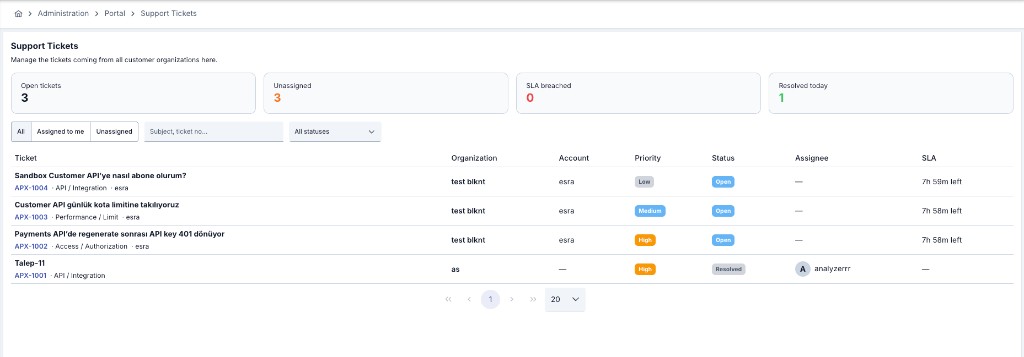
The inbox is scoped to the active portal. If the module is off, the screen warns you to enable Support in settings.
Summary cards
| Card | Meaning |
|---|---|
| Open tickets | Not Resolved |
| Unassigned | Unresolved and unassigned |
| SLA breached | Past SLA with no first response |
| Resolved today | Resolved today |
Filtering
| Filter | Description |
|---|---|
| All / Assigned to me / Unassigned | Workload scope |
| Status | All statuses or a single status |
| Search | Subject or ticket number |
List and detail
The list shows ticket (subject + code · category · account), organization, account, priority, status, assignee, and SLA. The SLA cell clears after first response or when Resolved; otherwise it shows time left or breach.
Detail includes the conversation and a Management panel:
- Editable: Assignee (including Unassigned), Status, Priority
- Read-only: Organization, Ticket owner, Related API (+ endpoint), Created, SLA
- With Jira: Jira issue and Open in Jira
Reply types:
- Reply to Customer → Send Reply
- Internal Note → Add Note (INTERNAL NOTE badge; Customer cannot see)
Developer Portal — Built-in Flow
When the provider is Built-in:
On Support Tickets, use My Tickets or (if visibility is on and data returns) Organization Tickets. Open-count and status/priority filters are available.
New Ticket / New Support Ticket: Subject, Category, Priority, Related API / Subscription (or not tied to a specific API), optional Endpoint, Description, Attachments (max 10 MB). Subject and Description are required → Submit Ticket.
Follow the conversation and reply with Send. Agent messages show a SUPPORT badge; internal notes and assignee are not returned to consumers. A reply on Resolved reopens the ticket. The owner can Close as resolved.
Under organization scope: org admins can manage all tickets; members can comment and may only close their own.
Usage Scenarios
- A Critical ticket is opened for a production outage; it is taken from Unassigned and the first reply stops SLA.
- Two developers in the same org follow each other’s tickets via Organization Tickets.
- If support already runs in Jira, the Jira provider routes portal users there while Apinizer may still keep a record.