Log
This document describes the detailed usage of a specific policy. If you are using the Apinizer policy structure for the first time or want to learn the general operating principles of policies, we recommend reading the What is Policy? page first.
Overview
Purpose
- The Log Policy captures a snapshot of the current message state at any point in the message processing pipeline and sends it to designated connectors.
- Unlike standard traffic logging, it enables logging at intermediate points in the pipeline (e.g., before and after a transformation policy) to track message changes.
- Works across HTTP, WebSocket, and gRPC protocols.
- Can send to multiple connectors simultaneously.
How It Works
- Policy Trigger: The policy executes when its turn comes in the message processing pipeline.
- Snapshot Creation: The current message state is captured in a protocol-specific manner (headers, parameters, body).
- Connector Delivery: The snapshot is sent to each defined connector individually.
- Privacy Application: If privacy settings are enabled, sensitive data is processed before delivery (masking, deletion, hashing, encryption).
Features and Capabilities
Core Features
- Sync/Async Execution: In synchronous mode, the pipeline waits until delivery is complete; in asynchronous mode, the pipeline continues while delivery happens in the background.
- Multi-Protocol Support: Works across HTTP, WebSocket, and gRPC protocols.
- Multi-Connector Delivery: The same snapshot can be sent to multiple connectors.
- Field-Level Control: Headers, parameters, body, metadata, and metrics can each be independently enabled or disabled.
- Body Size Limiting: Body data can be logged fully or partially. In partial mode, a maximum size can be specified.
- Policy-Level Privacy: Masking, deletion, hashing, or encryption can be applied to sensitive data.
- Condition-Based Execution: Define conditions to ensure the policy only runs in specific situations.
Protocol Support
| Protocol | Header | Parameter | Body |
|---|---|---|---|
| HTTP | ✓ | ✓ | ✓ |
| WebSocket | ✓ | — | ✓ |
| gRPC | — | — | ✓ |
Header and parameter information may be limited in WebSocket and gRPC protocols due to their protocol structure.
Configuration Fields
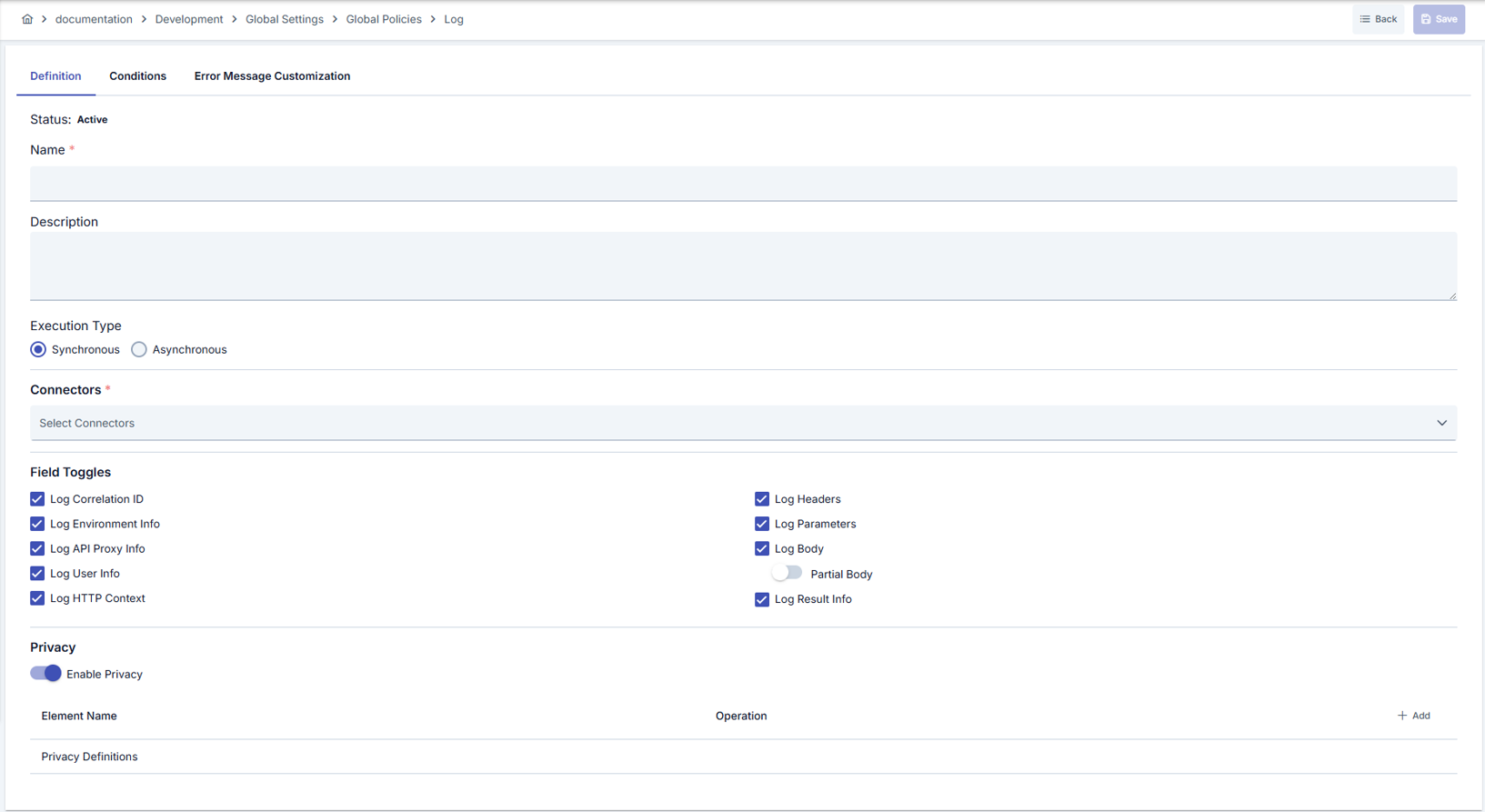
General Settings
| Field | Description |
|---|---|
| Name | Descriptive name of the policy |
| Description | Description explaining the purpose of the policy |
| Active | Active/inactive status of the policy |
| Execution Mode | Synchronous or Asynchronous execution mode (detailed below) |
| Condition | Condition determining when the policy executes (optional) |
Connector Selection
You can select the connectors to which the policy will send logs. Connectors are selected through connection definitions and work independently of environments — the same connection definition may correspond to different connector instances in different environments.

A log policy defined as a global policy works across all environments. In each environment, the connector corresponding to the relevant connection definition is automatically matched.
Logged Fields
You can determine which of the following field groups are included in the log record:
| Field Group | Description |
|---|---|
| Request Headers from Client | Request header information from client to API Proxy |
| Request Parameters from Client | Request parameters from client to API Proxy |
| Request Body from Client | Request body from client to API Proxy |
| Request Headers to Target | Request header information sent from API Proxy to Backend API |
| Request Parameters to Target | Request parameters sent from API Proxy to Backend API |
| Request Body to Target | Request body sent from API Proxy to Backend API |
| Response Headers from Target | Response header information from Backend API |
| Response Body from Target | Response body from Backend API |
| Response Headers to Client | Response header information sent to client |
| Response Body to Client | Response body sent to client |
| Metadata | Request metadata such as IP address, HTTP method, URI, port |
| Metrics | Performance metrics such as duration, size, cache status |
Body Logging Mode
| Mode | Description |
|---|---|
| Full | Body data is logged completely |
| Partial | Body data is logged up to the specified maximum size. Data is truncated when the size is exceeded |
Privacy Settings

You can configure privacy settings at the policy level to process sensitive data before it is written to the log record.
| Operation | Description |
|---|---|
| Mask | Partially hides sensitive data (e.g., ****1234) |
| Delete | Completely removes sensitive data |
| Hash | Converts sensitive data to a one-way hash value |
| Encrypt | Encrypts sensitive data |
Privacy settings are applied at two levels: first the policy-level settings, then the connector-level settings. If both levels are enabled, both are applied in sequence.
Sync and Async Execution
| Mode | Delivery | Error Behavior | Pipeline Impact |
|---|---|---|---|
| Synchronous (default) | Sequential, waits for completion | Error is thrown | Pipeline breaks |
| Asynchronous | Background, non-blocking | Error is logged, suppressed | Pipeline continues |
In synchronous mode, a connector error breaks the pipeline and returns an error to the client. If uninterrupted operation is required in production, prefer asynchronous mode.
In asynchronous mode, when a connector error occurs, the error information is written to application logs, but the client request is not affected.
Use Cases
| Scenario | Description | Recommended Mode |
|---|---|---|
| Pre/post transformation comparison | Add log policies before and after a transformation policy to track message changes | Async |
| Debugging | Add a temporary log point to the pipeline to inspect a specific policy's input and output | Sync |
| Audit trail | Maintain a complete record of every request to sensitive APIs | Async |
| Multi-target logging | Send the same message to Elasticsearch and Kafka simultaneously | Async |
| Conditional logging | Log only requests matching a specific header value or path | Async |